
css style

13 years 7 months ago - 13 years 7 months ago #90539
by luppe
Hi
My add to card button in the style pictureblue is not showing the top layer image
If I check with fire bug it give me this css line 559 in the pictureblue css
background: url("../images/style_pictureblue/add_to_cart.png") no-repeat scroll right top transparent;
If I just remove 1 letter off the transparent it is solved the problem
now if I go search in the pictureblue css I can find the line but there is a part missing no-repeat scroll right top transparent;
where can I find the line?
thanks
My add to card button in the style pictureblue is not showing the top layer image
If I check with fire bug it give me this css line 559 in the pictureblue css
background: url("../images/style_pictureblue/add_to_cart.png") no-repeat scroll right top transparent;
If I just remove 1 letter off the transparent it is solved the problem
now if I go search in the pictureblue css I can find the line but there is a part missing no-repeat scroll right top transparent;
where can I find the line?
thanks
Last edit: 13 years 7 months ago by luppe.
Please Log in or Create an account to join the conversation.

Less
More
- Posts: 12953
- Thank you received: 1778
13 years 7 months ago #90589
by Mohamed Thelji
Replied by Mohamed Thelji on topic css style
Hi,
I don't really understand you problem so can you :
1. Explain it to me with some screenshots
2. Give me a link to your web site
3. Read the CSS documentation, think that it would helpful to read it.
Hope this will help you.
I don't really understand you problem so can you :
1. Explain it to me with some screenshots
2. Give me a link to your web site
3. Read the CSS documentation, think that it would helpful to read it.
Hope this will help you.
Please Log in or Create an account to join the conversation.
13 years 7 months ago - 13 years 7 months ago #90660
by luppe
Hi Mohamed thanks for your answer
hope you can understand it better now
its the
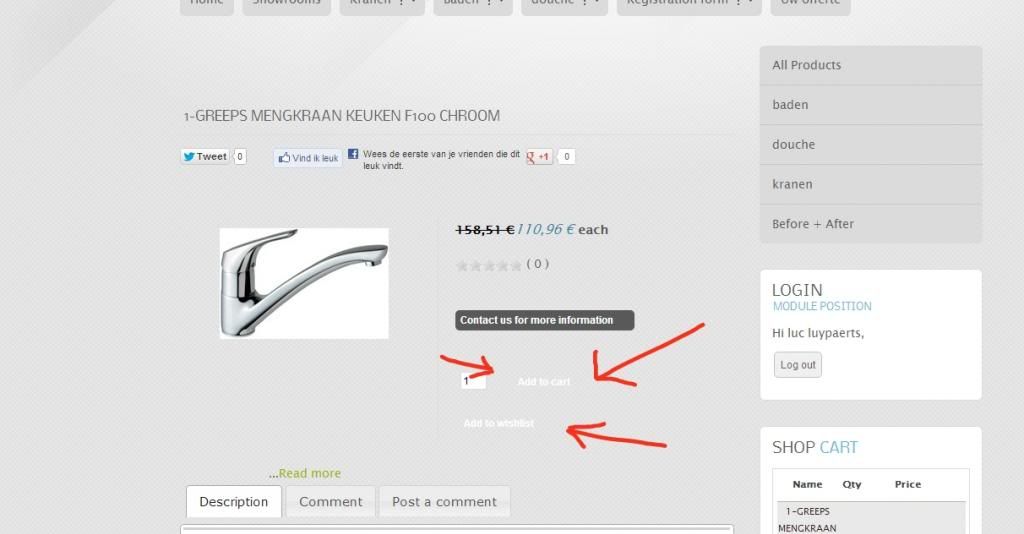
thanks for your time
hope you can understand it better now
its the
- add to card
- add to wishlist
- + - button
www.sanitair-installatie.be/index.php/co...00-chroom?Itemid=200
thanks for your time
Last edit: 13 years 7 months ago by luppe.
Please Log in or Create an account to join the conversation.
Less
More
- Posts: 12953
- Thank you received: 1778
13 years 7 months ago #90697
by Mohamed Thelji
Replied by Mohamed Thelji on topic css style
I think that you'll just have to remove this CSS property of your front-end CSS :
Code:
.hikashop_product_stock .button {
background: url("../images/style_pictureblue/add_to_cart.png") no-repeat scroll right top;
}
The following user(s) said Thank You: luppe
Please Log in or Create an account to join the conversation.
13 years 7 months ago #90796
by luppe
thanks Mohamed
But there still a lot off issues with the css from the styles
I think there is somewhere a conflict with the theme css
maybe its better to get some help to sort this out
its gone take me a long time and a lots off questions here
I don't now that much off programming
But there still a lot off issues with the css from the styles
I think there is somewhere a conflict with the theme css
maybe its better to get some help to sort this out
its gone take me a long time and a lots off questions here
I don't now that much off programming
Please Log in or Create an account to join the conversation.
13 years 7 months ago #90797
by luppe
Ok I find my last minute inspiration
I put the images separately in the image map
So I have to leave them all in the theme map and then they show correct
hope my stupid mistake can help someone else :blush:
thanks for your time
I put the images separately in the image map
So I have to leave them all in the theme map and then they show correct
hope my stupid mistake can help someone else :blush:
thanks for your time
Please Log in or Create an account to join the conversation.
Time to create page: 0.214 seconds