

- Posts: 10
- Thank you received: 0
Landing page + Email content
13 years 4 months ago - 13 years 4 months ago #104906
by agrimsey
Landing page + Email content was created by agrimsey
Hi,
Thankyou for a fantastic product.
I have a few queries.
1.)how do I edit a 'landing page' after an action, for example:
If an order is processed and payment made, the user is directed to this page:
/index.php?option=com_hikashop&view=category&layout=listing&Itemid=72&lang=en. How can I change this to just be say, index.php?
2.)When a user registers and confirms registration they are taken to this page:
Username:
Name:
Email Address:
Password:
Confirm Password:
Back-end Language:
Front-end Language:
User Editor:
Help Site:
Time zone
I would rather they return to basket / checkout if items are present in basket, if not then index.php / catagory page?
3.) How can I change the content on an email sent to user. for example order creation confirmation. I can see the design layout in Hikashop/System/Email, but where can I edit the actual content?
4.)I have odd symbols in a number of database fields - Greece, please see attached. Although I am using Greece as an example here, it looks quite common.
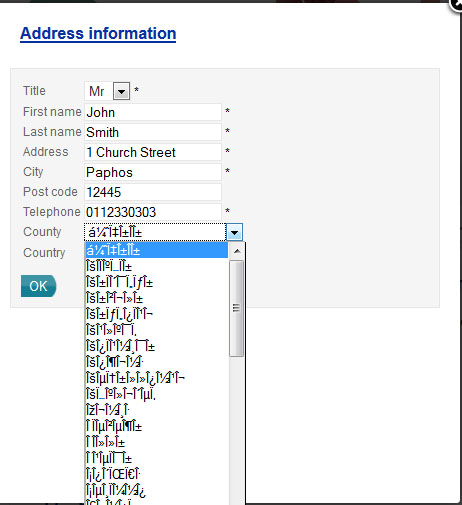
5.)Joomla question so sorry to ask on here.. When creating a menu for the footer, in the past I have been able to select 'Horizontal' in the display type in module. I do not have this option. Any ideas?
Many thanks
A
Thankyou for a fantastic product.
I have a few queries.
1.)how do I edit a 'landing page' after an action, for example:
If an order is processed and payment made, the user is directed to this page:
/index.php?option=com_hikashop&view=category&layout=listing&Itemid=72&lang=en. How can I change this to just be say, index.php?
2.)When a user registers and confirms registration they are taken to this page:
Username:
Name:
Email Address:
Password:
Confirm Password:
Back-end Language:
Front-end Language:
User Editor:
Help Site:
Time zone
I would rather they return to basket / checkout if items are present in basket, if not then index.php / catagory page?
3.) How can I change the content on an email sent to user. for example order creation confirmation. I can see the design layout in Hikashop/System/Email, but where can I edit the actual content?
4.)I have odd symbols in a number of database fields - Greece, please see attached. Although I am using Greece as an example here, it looks quite common.
5.)Joomla question so sorry to ask on here.. When creating a menu for the footer, in the past I have been able to select 'Horizontal' in the display type in module. I do not have this option. Any ideas?
Many thanks
A
Last edit: 13 years 4 months ago by agrimsey.
Please Log in or Create an account to join the conversation.

13 years 4 months ago #104955
by nicolas
Replied by nicolas on topic Landing page + Email content
Hi,
1. For that page you can enter the URL you want in the "return URL" option of your payment plugin.
2. I suppose that you're talking about the registration which happens via joomla. If you want to change that, you will have to change that in joomla.
groups.google.com/forum/?fromgroups#!top...-general/k58m8lWioSI
forum.joomla.org/viewtopic.php?p=923896
3. If you want to change the text of the emails, you can use translation overrides:
www.hikashop.com/en/download/languages.html#modify
4. That sounds like a problem of encoding format setting on your server. Please make sure that the default encoding of your server is set to UTF8 and you should not have that problem anymore.
5. I'm not sure about what you're talking about. Can you do a screenshot ?
1. For that page you can enter the URL you want in the "return URL" option of your payment plugin.
2. I suppose that you're talking about the registration which happens via joomla. If you want to change that, you will have to change that in joomla.
groups.google.com/forum/?fromgroups#!top...-general/k58m8lWioSI
forum.joomla.org/viewtopic.php?p=923896
3. If you want to change the text of the emails, you can use translation overrides:
www.hikashop.com/en/download/languages.html#modify
4. That sounds like a problem of encoding format setting on your server. Please make sure that the default encoding of your server is set to UTF8 and you should not have that problem anymore.
5. I'm not sure about what you're talking about. Can you do a screenshot ?
The following user(s) said Thank You: agrimsey
Please Log in or Create an account to join the conversation.
13 years 4 months ago - 13 years 4 months ago #105048
by agrimsey
Replied by agrimsey on topic Landing page + Email content
[strike]1. For that page you can enter the URL you want in the "return URL" option of your payment plugin.
Excellent, thank you.
2. I suppose that you're talking about the registration which happens via joomla. If you want to change that, you will have to change that in joomla.
groups.google.com/forum/?fromgroups#!top...-general/k58m8lWioSI
forum.joomla.org/viewtopic.php?p=923896
Ok, I will look into that.
3. If you want to change the text of the emails, you can use translation overrides:
www.hikashop.com/en/download/languages.html#modify
Again, thank you,
[/strike]
4. That sounds like a problem of encoding format setting on your server. Please make sure that the default encoding of your server is set to UTF8 and you should not have that problem anymore.
I have checked on PHPmyAdmin and char set is UTF_General_ci - I am assuming this is correct?
[strike]5. I'm not sure about what you're talking about. Can you do a screenshot ?
Don't worry, managed to fix this.
[/strike]
I am trying to edit the user control panel - I would like to add remove items from this but cannot find where this is? As default you have:
Edit your account information Manage your addresses View your orders Show the carts Show the wishlists Access to the affiliate program
Where do I find this in the back end?
Thanks
A
Excellent, thank you.
2. I suppose that you're talking about the registration which happens via joomla. If you want to change that, you will have to change that in joomla.
groups.google.com/forum/?fromgroups#!top...-general/k58m8lWioSI
forum.joomla.org/viewtopic.php?p=923896
Ok, I will look into that.
3. If you want to change the text of the emails, you can use translation overrides:
www.hikashop.com/en/download/languages.html#modify
Again, thank you,
[/strike]
4. That sounds like a problem of encoding format setting on your server. Please make sure that the default encoding of your server is set to UTF8 and you should not have that problem anymore.
I have checked on PHPmyAdmin and char set is UTF_General_ci - I am assuming this is correct?
[strike]5. I'm not sure about what you're talking about. Can you do a screenshot ?
Don't worry, managed to fix this.
[/strike]
I am trying to edit the user control panel - I would like to add remove items from this but cannot find where this is? As default you have:
Edit your account information Manage your addresses View your orders Show the carts Show the wishlists Access to the affiliate program
Where do I find this in the back end?
Thanks
A
Last edit: 13 years 4 months ago by agrimsey.
Please Log in or Create an account to join the conversation.
13 years 4 months ago #105081
by nicolas
Replied by nicolas on topic Landing page + Email content
4. I'm talking about you web server (Apache or Nginx or IIS) settings, not PHPMyAdmin or MySQL.
6. You can edit the file "cpanel" of the view "user" via the menu Display->Views and modify the $this->buttons array for that.
6. You can edit the file "cpanel" of the view "user" via the menu Display->Views and modify the $this->buttons array for that.
Please Log in or Create an account to join the conversation.
13 years 4 months ago #105182
by agrimsey
Replied by agrimsey on topic Landing page + Email content
4. I'm talking about you web server (Apache or Nginx or IIS) settings, not PHPMyAdmin or MySQL.
I included the following line in my .htaccess file : 'AddDefaultCharset UTF-8' - But this made no difference? Any ideas?
6. You can edit the file "cpanel" of the view "user" via the menu Display->Views and modify the $this->buttons array for that.
Sorry, I don't see where in this file I would add / remove specific items? I have a vague understanding of arrays, so I would have thought to remove a specific item I would delete the item from the source not by editing the array?
As an example if I wanted to remove the last item 'Access to the affiliate program', what would I need to change?
Many thanks,
A
I included the following line in my .htaccess file : 'AddDefaultCharset UTF-8' - But this made no difference? Any ideas?
6. You can edit the file "cpanel" of the view "user" via the menu Display->Views and modify the $this->buttons array for that.
Code:
foreach($this->buttons as $oneButton){
$url = hikashop_level($oneButton['level']) ? 'onclick="document.location.href=\''.$oneButton['link'].'\';"' : ''; ?>
<div <?php echo $url; ?> class="icon hikashop_cpanel_icon_div">
<a href="<?php echo hikashop_level($oneButton['level']) ? $oneButton['link'] : '#'; ?>">
<table class="hikashop_cpanel_icon_table">
<tr>
<td class="hikashop_cpanel_icon_image">
<span class="hikashop_cpanel_icon_image_span icon-48-<?php echo $oneButton['image']; ?>" title="<?php echo $oneButton['text']; ?>"> </span>
<span class="hikashop_cpanel_button_text"><?php echo $oneButton['text']; ?></span>
</td>
<td>
<div class="hikashop_cpanel_button_description">
<?php echo $oneButton['description']; ?>
</div>
</td>
</tr>
</table>
</a>
</div>
<?php } ?>
</div>
</div>
<div class="clear_both"></div>
Sorry, I don't see where in this file I would add / remove specific items? I have a vague understanding of arrays, so I would have thought to remove a specific item I would delete the item from the source not by editing the array?
As an example if I wanted to remove the last item 'Access to the affiliate program', what would I need to change?
Many thanks,
A
Please Log in or Create an account to join the conversation.
13 years 4 months ago #105188
by nicolas
Replied by nicolas on topic Landing page + Email content
4. It could potentially aslo come from the component.php file of your template or something else.
Can you give a link to the shop so that we can see that popup to look at the html ?
6. For the affiliate program, it you don't want to use it, simply unpublish the affiliate plugin.
To remove the last element of an array you can use the array_pop function of PHP.
So you would add at the beginning of the file the code:
<?php array_pop($this->buttons); ?>
Can you give a link to the shop so that we can see that popup to look at the html ?
6. For the affiliate program, it you don't want to use it, simply unpublish the affiliate plugin.
To remove the last element of an array you can use the array_pop function of PHP.
So you would add at the beginning of the file the code:
<?php array_pop($this->buttons); ?>
Please Log in or Create an account to join the conversation.
13 years 4 months ago #105812
by nicolas
Replied by nicolas on topic Landing page + Email content
Hi,
Ok, I checked your website and server responses and everything is in UTF8.
So the issue is actually that your zones encoding is screwed up.
I don't know what you did with them but the text of the zones in the database is apparently wrong.
The best will be to empty the tables "hikashop_zone" and "hikashop_zone_link" via your phpmyadmin and install HikaShop again so that it puts back all the default zone data which should then have the proper encoding.
Ok, I checked your website and server responses and everything is in UTF8.
So the issue is actually that your zones encoding is screwed up.
I don't know what you did with them but the text of the zones in the database is apparently wrong.
The best will be to empty the tables "hikashop_zone" and "hikashop_zone_link" via your phpmyadmin and install HikaShop again so that it puts back all the default zone data which should then have the proper encoding.
Please Log in or Create an account to join the conversation.
13 years 3 months ago - 13 years 3 months ago #106545
by agrimsey
Replied by agrimsey on topic Landing page + Email content
Not sure, probably when I have copy and pasted from notepad / saved as no UTF8.
How do I go about reinstalling hika without losing all settings and database values? -EDIT I have just downloaded the latest release of Hikashop - 2.1.3 and have done the below, dropping the tables and then recreating with sql (slightly edited to include my prefix. Unfortunately when I install I get a 500 error. /EDIT
Can I not just run something like:
DROP Hikashop_zone
DROP Hiksahop_zone_link
Then run an insert on demo data of the two tables?
I have just checked the sql file I have with demo data and it includes the odd symbols in that, checked the compressed file also and this too has the odd characters....? So as it stands I don't have a backup sql file with non-corrupted data?
Thanks,
How do I go about reinstalling hika without losing all settings and database values? -EDIT I have just downloaded the latest release of Hikashop - 2.1.3 and have done the below, dropping the tables and then recreating with sql (slightly edited to include my prefix. Unfortunately when I install I get a 500 error. /EDIT
Can I not just run something like:
DROP Hikashop_zone
DROP Hiksahop_zone_link
Code:
CREATE TABLE IF NOT EXISTS `#__hikashop_zone` (
`zone_id` int(10) unsigned NOT NULL AUTO_INCREMENT,
`zone_namekey` varchar(255) NOT NULL,
`zone_name` varchar(255) NOT NULL,
`zone_name_english` varchar(255) NOT NULL,
`zone_code_2` varchar(255) NOT NULL,
`zone_code_3` varchar(255) NOT NULL,
`zone_type` varchar(255) NOT NULL DEFAULT 'country',
`zone_published` tinyint(4) NOT NULL DEFAULT '0',
`zone_currency_id` int(10) unsigned DEFAULT '0',
PRIMARY KEY (`zone_id`),
UNIQUE KEY `zone_namekey` (`zone_namekey`),
KEY `zone_code_3` (`zone_code_3`)
) ENGINE=MyISAM /*!40100 DEFAULT CHARACTER SET utf8 COLLATE utf8_general_ci*/;
CREATE TABLE IF NOT EXISTS `#__hikashop_zone_link` (
`zone_parent_namekey` varchar(255) NOT NULL,
`zone_child_namekey` varchar(255) NOT NULL,
PRIMARY KEY (`zone_parent_namekey`(150),`zone_child_namekey`(150))
) ENGINE=MyISAM /*!40100 DEFAULT CHARACTER SET utf8 COLLATE utf8_general_ci*/;
Then run an insert on demo data of the two tables?
I have just checked the sql file I have with demo data and it includes the odd symbols in that, checked the compressed file also and this too has the odd characters....? So as it stands I don't have a backup sql file with non-corrupted data?
Thanks,
Last edit: 13 years 3 months ago by agrimsey.
Please Log in or Create an account to join the conversation.
13 years 3 months ago #106546
by agrimsey
Sorry going back to the 'My Account' section. I am wanting to edit one of the menu options 'Account Details'. But I cannot see where this is. I have checked views for all permeatations relating to 'Account' and 'Details', but can find no reference to it. I have also used firebug to see if there is a hint in the code...
This is the seciton I want to edit initially:
Thanks again
Replied by agrimsey on topic Landing page + Email content
nicolas wrote: 4. It could potentially aslo come from the component.php file of your template or something else.
Can you give a link to the shop so that we can see that popup to look at the html ?
6. For the affiliate program, it you don't want to use it, simply unpublish the affiliate plugin.
To remove the last element of an array you can use the array_pop function of PHP.
So you would add at the beginning of the file the code:
<?php array_pop($this->buttons); ?>
Sorry going back to the 'My Account' section. I am wanting to edit one of the menu options 'Account Details'. But I cannot see where this is. I have checked views for all permeatations relating to 'Account' and 'Details', but can find no reference to it. I have also used firebug to see if there is a hint in the code...
This is the seciton I want to edit initially:
Code:
<form class="form-validate" autocomplete="off" name="userform" method="post" action="index.php">
Thanks again
Please Log in or Create an account to join the conversation.
13 years 3 months ago #106550
by nicolas
Replied by nicolas on topic Landing page + Email content
The my account page is displayed by Joomla. If you want to modify it you will have to modify joomla's files.
My explanation was for the user control panel page of hikaShop.
There is no odd symbol in the demo SQL data that we provided.
Please make sure that you open the file with a text file editor which handles UTF8.
My explanation was for the user control panel page of hikaShop.
There is no odd symbol in the demo SQL data that we provided.
Please make sure that you open the file with a text file editor which handles UTF8.
Please Log in or Create an account to join the conversation.
13 years 3 months ago - 13 years 3 months ago #106554
by agrimsey
Replied by agrimsey on topic Landing page + Email content
Ok thank you, I will configure through Joomla.
Any idea why my update to 2.1.3 will be error 500? What would cause this? I have changed my prefix for Database tables. from # to custom, will this affect the update?
Thanks
Any idea why my update to 2.1.3 will be error 500? What would cause this? I have changed my prefix for Database tables. from # to custom, will this affect the update?
Thanks
Last edit: 13 years 3 months ago by agrimsey.
Please Log in or Create an account to join the conversation.

13 years 3 months ago #106574
by Xavier
Replied by Xavier on topic Landing page + Email content
Hi,
Where do you have changed this prefix ?
It's possible that it affect the update. In all the files we use "#_" and Joomla replace this in all the MySLQ requests with the database prefix set in the Joomla configuration.
So if you changed the "#_" Joomla will no more change the prefix automatically.
Where do you have changed this prefix ?
It's possible that it affect the update. In all the files we use "#_" and Joomla replace this in all the MySLQ requests with the database prefix set in the Joomla configuration.
So if you changed the "#_" Joomla will no more change the prefix automatically.
Please Log in or Create an account to join the conversation.
13 years 3 months ago - 13 years 3 months ago #106702
by agrimsey
Hi Xavier,
This is fine then, by changed I mean during install I selected my own prefix. This is stored in Joomla settings, so if the update takes this into account then it will not matter.
By the way I think you just updated your demo site in dropbox - The file is corrupt FYI.
The 500 Server error I was receiving I have gotten around - I remember when I initially installed I had a similar issue, Nicolas said it was likely down to server restrictions, I instaleld via ftp to negate this. Update complete and 'country zone' funny characters issue fixed.
Thanks again
Thanks
Ashley
Replied by agrimsey on topic Landing page + Email content
Xavier wrote: Hi,
Where do you have changed this prefix ?
It's possible that it affect the update. In all the files we use "#_" and Joomla replace this in all the MySLQ requests with the database prefix set in the Joomla configuration.
So if you changed the "#_" Joomla will no more change the prefix automatically.
Hi Xavier,
This is fine then, by changed I mean during install I selected my own prefix. This is stored in Joomla settings, so if the update takes this into account then it will not matter.
By the way I think you just updated your demo site in dropbox - The file is corrupt FYI.
The 500 Server error I was receiving I have gotten around - I remember when I initially installed I had a similar issue, Nicolas said it was likely down to server restrictions, I instaleld via ftp to negate this. Update complete and 'country zone' funny characters issue fixed.
Thanks again
Thanks
Ashley
Last edit: 13 years 3 months ago by agrimsey.
Please Log in or Create an account to join the conversation.
Time to create page: 0.298 seconds