
- Posts: 68
- Thank you received: 8
Add to cart redirecting to checkout
- MumsHealth
-
 Topic Author
- Offline
Less
More
5 years 1 month ago #335322
by MumsHealth
Add to cart redirecting to checkout was created by MumsHealth
-- url of the page with the problem -- :
www.mumshealth.com/guidelines-tools
-- HikaShop version -- : 4.4.3
-- Joomla version -- : 3.10.1
-- Browser(s) name and version -- : Chrome
Hi,
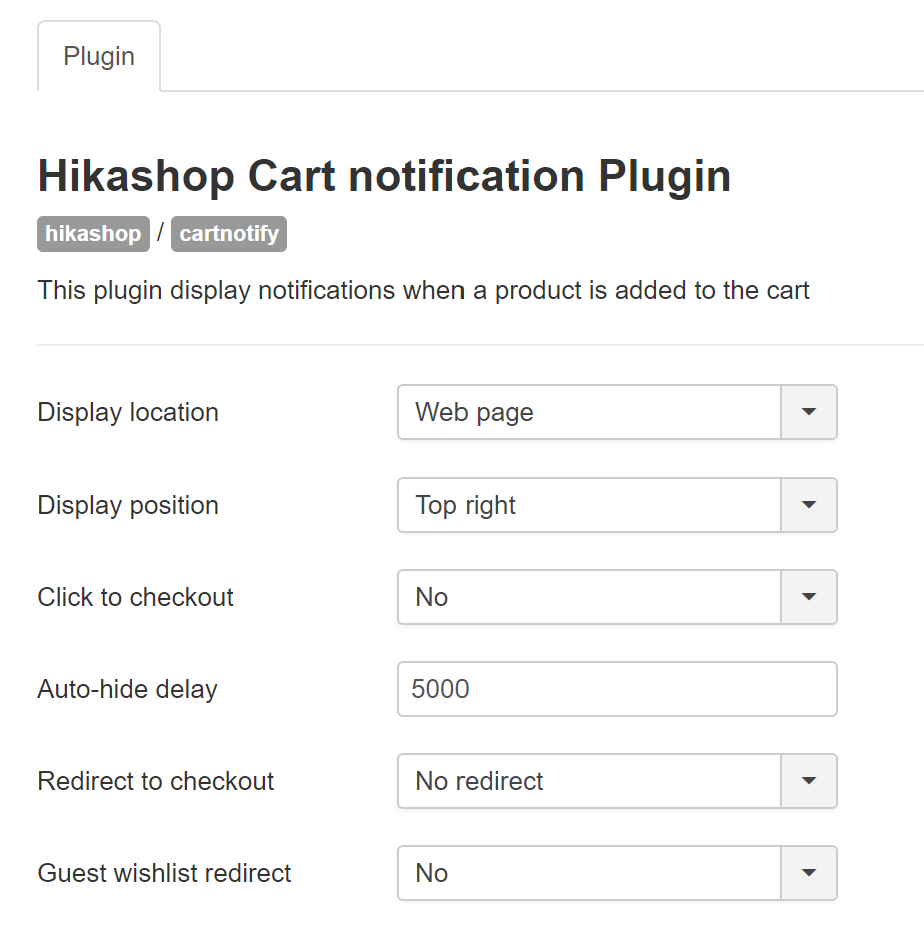
I just updated hikashop and now whenever I add a product to the cart it redirects me to the checkout even though the cart notification plugin is enabled and "redirect to checkout" is set to "no redirect"
-- HikaShop version -- : 4.4.3
-- Joomla version -- : 3.10.1
-- Browser(s) name and version -- : Chrome
Hi,
I just updated hikashop and now whenever I add a product to the cart it redirects me to the checkout even though the cart notification plugin is enabled and "redirect to checkout" is set to "no redirect"
Please Log in or Create an account to join the conversation.

5 years 1 month ago #335329
by nicolas
Replied by nicolas on topic Add to cart redirecting to checkout
Hi,
Well, first, I only see that issue the first time I add something to the cart on your website. If I then add a second product, it works properly.
And on the first time when it doesn't work properly, I can see a javascript error on the page:
i.imgur.com/aevISns.png
And I don't get that error when it then works fine.
I think the issue happens because all the HTML / javascript of the page is compressed by an optimization extension but it's too aggressive and it renders the javascript code on the invalid:
i.imgur.com/fx4hnFx.png
This leads to the javascript error, which prevents HikaShop from loading properly on the page and thus the add to cart works in degraded mode and has to redirect to the checkout as it can't display the notification box because it hasn't been initialized properly in the first place.
So I would recommend deactivating the HTML/javascript compression on your optimization extension and it should hopefully fix the problem.
Well, first, I only see that issue the first time I add something to the cart on your website. If I then add a second product, it works properly.
And on the first time when it doesn't work properly, I can see a javascript error on the page:
i.imgur.com/aevISns.png
And I don't get that error when it then works fine.
I think the issue happens because all the HTML / javascript of the page is compressed by an optimization extension but it's too aggressive and it renders the javascript code on the invalid:
i.imgur.com/fx4hnFx.png
This leads to the javascript error, which prevents HikaShop from loading properly on the page and thus the add to cart works in degraded mode and has to redirect to the checkout as it can't display the notification box because it hasn't been initialized properly in the first place.
So I would recommend deactivating the HTML/javascript compression on your optimization extension and it should hopefully fix the problem.
Please Log in or Create an account to join the conversation.
Time to create page: 0.152 seconds