
- Posts: 48
- Thank you received: 5
Set button color of cart module
- aromamassage
-
 Topic Author
- Offline
Less
More
1 year 10 months ago - 1 year 10 months ago #364557
by aromamassage
Set button color of cart module was created by aromamassage
Hi all, I created a user.css for my cassiopeia template where the buttons and cards have a dark background and light text.
now I have this problem:
the hikashop cart module (set as card module style in settings) appears with a light background and light text.
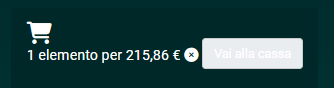
basically from what I saw of the user.css it only takes the text color

and from hikashop.css it takes the light background of the hikabtn that I can't change in any way.
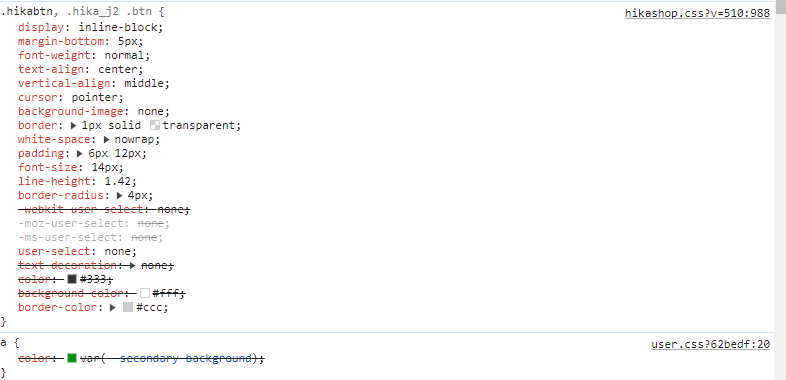
how can I set it using only the user.css? or only the hikabtn css only for this module?
___________________________________________________________________________
Moderator :
Please don't edit your message long after posting it, this messes up our ticket service system,
and increases our response times for everyone, you understand.
Thank you for understanding
now I have this problem:
the hikashop cart module (set as card module style in settings) appears with a light background and light text.
basically from what I saw of the user.css it only takes the text color
and from hikashop.css it takes the light background of the hikabtn that I can't change in any way.
how can I set it using only the user.css? or only the hikabtn css only for this module?
___________________________________________________________________________
Moderator :
Please don't edit your message long after posting it, this messes up our ticket service system,
and increases our response times for everyone, you understand.
Thank you for understanding
Last edit: 1 year 10 months ago by Philip.
Please Log in or Create an account to join the conversation.

1 year 10 months ago #364562
by nicolas
Replied by nicolas on topic Set button color of cart module
Hi,
Why can't you change the color of the hikabtn in your user.css ? I'm not following you.
For example, if you use:
in your user.css, I don't see how the CSS from the hikashop.css would be able to take priority.
Why can't you change the color of the hikabtn in your user.css ? I'm not following you.
For example, if you use:
Code:
.hikabtn{ color: blue !important; }
Please Log in or Create an account to join the conversation.
- aromamassage
-
Topic Author
- Offline
Less
More
- Posts: 48
- Thank you received: 5
1 year 10 months ago #364571
by aromamassage
Replied by aromamassage on topic Set button color of cart module
I can't change it because if I insert the string you suggested it changes all the writings of all the hika buttons, therefore also of the add to cart, details and whishlist buttons that I would like to remain the same, because they see themselves well as they are
Similarly, if I insert
it changes the background of all the buttons.
I actually want to change or set only the cart module button.
Similarly, if I insert
Code:
.hikabtn{ background-color: blue !important; }
I actually want to change or set only the cart module button.
Please Log in or Create an account to join the conversation.

1 year 10 months ago - 1 year 10 months ago #364575
by Philip
Replied by Philip on topic Set button color of cart module
Hello,
Then you can add another class/id in your selector in order to restrict the command to the required context.
In details, before :
.hikabtn{ color: blue !important; }
after :
.required_context_class_html .hikabtn{ color: blue !important; }
Regards
Then you can add another class/id in your selector in order to restrict the command to the required context.
In details, before :
.hikabtn{ color: blue !important; }
after :
.required_context_class_html .hikabtn{ color: blue !important; }
Regards
Last edit: 1 year 10 months ago by Philip.
Please Log in or Create an account to join the conversation.
- aromamassage
-
Topic Author
- Offline
Less
More
- Posts: 48
- Thank you received: 5
1 year 10 months ago #364594
by aromamassage
Replied by aromamassage on topic Set button color of cart module
Solved adding hikashop_cart_proceed_to_checkout.
Thanks
Thanks
The following user(s) said Thank You: Philip
Please Log in or Create an account to join the conversation.
Time to create page: 0.211 seconds