
- Posts: 424
- Thank you received: 11
Filter module on category order
- BluepointWebdesign
-
 Topic Author
- Offline
Less
More
4 years 10 months ago #337384
by BluepointWebdesign
Filter module on category order was created by BluepointWebdesign
-- url of the page with the problem -- :
www.halaltime.eu/la-nou
-- HikaShop version -- : 4.4.1
-- Joomla version -- : 3.10.2
-- PHP version -- : 7.4.x
Hi,
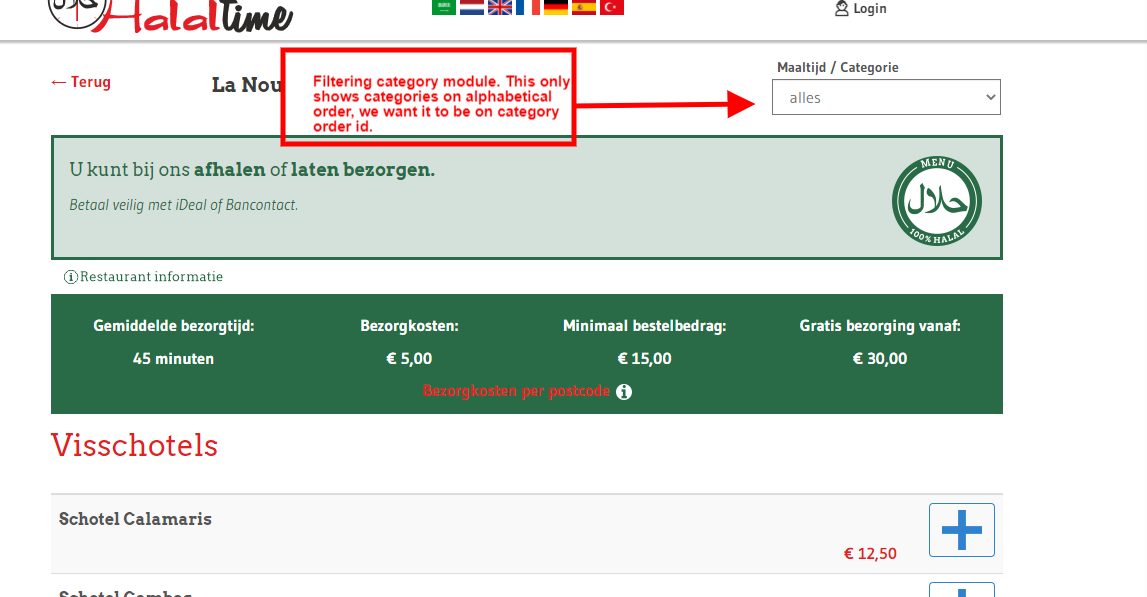
How can we set the category filtering in the module on category order instead of alphabetical order like it is standard shown??
Hope you can help..
Thanks
-- HikaShop version -- : 4.4.1
-- Joomla version -- : 3.10.2
-- PHP version -- : 7.4.x
Hi,
How can we set the category filtering in the module on category order instead of alphabetical order like it is standard shown??
Hope you can help..
Thanks
Please Log in or Create an account to join the conversation.

4 years 10 months ago #337387
by nicolas
Replied by nicolas on topic Filter module on category order
Hi,
Edit your filter and in the second category setting on the bottom right, please select your main category.
Edit your filter and in the second category setting on the bottom right, please select your main category.
Please Log in or Create an account to join the conversation.
- BluepointWebdesign
-
Topic Author
- Offline
Less
More
- Posts: 424
- Thank you received: 11
4 years 10 months ago #337423
by BluepointWebdesign
Replied by BluepointWebdesign on topic Filter module on category order
Hi Nicolas,
This option is not going to work for us, because we have a multivendor marketplace and then the filtering will only work on 1 vendor.. but we want it to work for all different vendor categories..
Is there a way around??
Hope you can help.
This option is not going to work for us, because we have a multivendor marketplace and then the filtering will only work on 1 vendor.. but we want it to work for all different vendor categories..
Is there a way around??
Hope you can help.
Please Log in or Create an account to join the conversation.
4 years 10 months ago #337427
by nicolas
Replied by nicolas on topic Filter module on category order
Hi,
The thing is that if you don't select a category there, then it will display all the categories in the filter, but in that case, it's logically impossible to use the "order" of the categories since the order of a category is set based on ordering of the subcategories of its parent category, and thus it won't work with categories having different parents since you'll have categories with the same ordering for different parent categories.
That's why the system falls back to ordering the categories by name.
The solution would be to create a custom category field, where you could enter the ordering for each category for that filtering.
Then, you would have to change the line:
$orderby = 'a.category_name ASC';
to:
$orderby = 'a.xxx ASC';
(where xxx is the column name of that custom field) in the file administrator/components/com_hikashop/classes/filter.php
Note however that this is a modification to a core file of HikaShop and thus you'll loose the modification when you update your Hikashop, and you'll have to reapply it.
The thing is that if you don't select a category there, then it will display all the categories in the filter, but in that case, it's logically impossible to use the "order" of the categories since the order of a category is set based on ordering of the subcategories of its parent category, and thus it won't work with categories having different parents since you'll have categories with the same ordering for different parent categories.
That's why the system falls back to ordering the categories by name.
The solution would be to create a custom category field, where you could enter the ordering for each category for that filtering.
Then, you would have to change the line:
$orderby = 'a.category_name ASC';
to:
$orderby = 'a.xxx ASC';
(where xxx is the column name of that custom field) in the file administrator/components/com_hikashop/classes/filter.php
Note however that this is a modification to a core file of HikaShop and thus you'll loose the modification when you update your Hikashop, and you'll have to reapply it.
Please Log in or Create an account to join the conversation.
Time to create page: 0.158 seconds