
- Posts: 27
- Thank you received: 2
Sending user details upon registration
- stefanobellu
-
 Topic Author
- Offline
Less
More
11 years 8 months ago #186416
by stefanobellu
Sending user details upon registration was created by stefanobellu
-- url of the page with the problem -- :
www.olistikavetline.eu
-- HikaShop version -- : HikaShop Starter 2.3.4
-- Joomla version -- : 3.3.6
-- PHP version -- : 5.4
-- Error-message(debug-mod must be tuned on) -- : Sendmail upon user registration, including user's details
Hi again!
This time I was asked (..hm...maybe ordered!) by my client but couldn't find a solution.
here's the scenery:
A new user registers on our site (with Hikashop)
Admin receives mail
And this is ok, but the mail only contains few informations
"Hello administrator,
A new user 'xxxx', username 'xxxxx', has registered at http://..../."
My boss wants to receive the details via mail, whicih means
username
address
VAT (IVA)
phone
ecc...
How can this task be solved?
Told him to go and searche for the user details, but it seems like 4 clicks can kill
-- HikaShop version -- : HikaShop Starter 2.3.4
-- Joomla version -- : 3.3.6
-- PHP version -- : 5.4
-- Error-message(debug-mod must be tuned on) -- : Sendmail upon user registration, including user's details
Hi again!
This time I was asked (..hm...maybe ordered!) by my client but couldn't find a solution.
here's the scenery:
A new user registers on our site (with Hikashop)
Admin receives mail
And this is ok, but the mail only contains few informations
"Hello administrator,
A new user 'xxxx', username 'xxxxx', has registered at http://..../."
My boss wants to receive the details via mail, whicih means
username
address
VAT (IVA)
phone
ecc...
How can this task be solved?
Told him to go and searche for the user details, but it seems like 4 clicks can kill
Please Log in or Create an account to join the conversation.

11 years 8 months ago #186448
by Xavier
Replied by Xavier on topic Sending user details upon registration
Hi,
You can edit the email "user_account_admin_notification" via the menu System > Emails (business edition).
And in this email in the "$this->data" PHP object you will find all the desired informations.
You can edit the email "user_account_admin_notification" via the menu System > Emails (business edition).
And in this email in the "$this->data" PHP object you will find all the desired informations.
The following user(s) said Thank You: stefanobellu
Please Log in or Create an account to join the conversation.
- stefanobellu
-
Topic Author
- Offline
Less
More
- Posts: 27
- Thank you received: 2
11 years 8 months ago #187012
by stefanobellu
Replied by stefanobellu on topic Sending user details upon registration
Ok, here i am!
Went Business (feels like more I'm a Boss now!)
In the user_account_administrator_notification
i see
?><?php
echo JText::sprintf(
'HIKA_USER_ACCOUNT_ADMIN_NOTIFICATION_BODY',
$data->name,
$data->username,
HIKASHOP_LIVE
Should I add
"$data->vat"?
Went Business (feels like more I'm a Boss now!)
In the user_account_administrator_notification
i see
?><?php
echo JText::sprintf(
'HIKA_USER_ACCOUNT_ADMIN_NOTIFICATION_BODY',
$data->name,
$data->username,
HIKASHOP_LIVE
Should I add
"$data->vat"?
Please Log in or Create an account to join the conversation.
- stefanobellu
-
Topic Author
- Offline
Less
More
- Posts: 27
- Thank you received: 2
11 years 8 months ago #187013
by stefanobellu
Replied by stefanobellu on topic Sending user details upon registration
By the way, is there a way to add the VAT or NIN in the "admin email notification of the order?"
thanks again
thanks again
Please Log in or Create an account to join the conversation.
11 years 8 months ago #187018
by Xavier
Replied by Xavier on topic Sending user details upon registration
Hi,
Yes you can add $data->vat, but you will have to edit the translation value for the key "HIKA_USER_ACCOUNT_ADMIN_NOTIFICATION_BODY" in the language file in order to add another %s to display that value.
To add data to the admin notification email you can edit the mail "order_admin_notifiication".
Yes you can add $data->vat, but you will have to edit the translation value for the key "HIKA_USER_ACCOUNT_ADMIN_NOTIFICATION_BODY" in the language file in order to add another %s to display that value.
To add data to the admin notification email you can edit the mail "order_admin_notifiication".
Please Log in or Create an account to join the conversation.
- stefanobellu
-
Topic Author
- Offline
Less
More
- Posts: 27
- Thank you received: 2
11 years 8 months ago #187436
by stefanobellu
Replied by stefanobellu on topic Sending user details upon registration
Hi Xavier, thanks for the help.
Yet, I couldln't succeed in putting the VAT in the "admin order notification"
This is the part of code in which I tried to put it, but couldn't guess the proper code to add (tried {$data->VAT} and so on, but didn't work)
<tr>
<!--{IF:BILLING_ADDRESS}-->
<td>{VAR:BILLING_ADDRESS}</td><!--{ENDIF:BILLING_ADDRESS}-->
<!--{IF:SHIPPING}--><!--{IF:SHIPPING_ADDRESS}--><td>{VAR:SHIPPING_ADDRESS}</td><!--{ENDIF:SHIPPING_ADDRESS}--><!--{ENDIF:SHIPPING}-->
</tr>
Yet, I couldln't succeed in putting the VAT in the "admin order notification"
This is the part of code in which I tried to put it, but couldn't guess the proper code to add (tried {$data->VAT} and so on, but didn't work)
<tr>
<!--{IF:BILLING_ADDRESS}-->
<td>{VAR:BILLING_ADDRESS}</td><!--{ENDIF:BILLING_ADDRESS}-->
<!--{IF:SHIPPING}--><!--{IF:SHIPPING_ADDRESS}--><td>{VAR:SHIPPING_ADDRESS}</td><!--{ENDIF:SHIPPING_ADDRESS}--><!--{ENDIF:SHIPPING}-->
</tr>
Please Log in or Create an account to join the conversation.

11 years 8 months ago #187518
by Jerome
Jerome - Obsidev.com
HikaMarket & HikaSerial developer / HikaShop core dev team.
Also helping the HikaShop support team when having some time or couldn't sleep.
By the way, do not send me private message, use the "contact us" form instead.
Replied by Jerome on topic Sending user details upon registration
Hi,
Why are you talking about the "admin order notification" ?
The email is when a user is registering so it is the email : "user_account_administrator_notification" (like it was written several times in this thread).
Regards,
Why are you talking about the "admin order notification" ?
The email is when a user is registering so it is the email : "user_account_administrator_notification" (like it was written several times in this thread).
Regards,
Jerome - Obsidev.com
HikaMarket & HikaSerial developer / HikaShop core dev team.
Also helping the HikaShop support team when having some time or couldn't sleep.
By the way, do not send me private message, use the "contact us" form instead.
Please Log in or Create an account to join the conversation.
- stefanobellu
-
Topic Author
- Offline
Less
More
- Posts: 27
- Thank you received: 2
11 years 8 months ago #187603
by stefanobellu
Hi Jerome, it was about this
Replied by stefanobellu on topic Sending user details upon registration
stefanobellu wrote: By the way, is there a way to add the VAT or NIN in the "admin email notification of the order?"
thanks again
Hi Jerome, it was about this
Please Log in or Create an account to join the conversation.
11 years 8 months ago #187662
by Jerome
Jerome - Obsidev.com
HikaMarket & HikaSerial developer / HikaShop core dev team.
Also helping the HikaShop support team when having some time or couldn't sleep.
By the way, do not send me private message, use the "contact us" form instead.
Replied by Jerome on topic Sending user details upon registration
Hi,
If you want to display easily some user custom field in the email, the best is to modify the preload and then use the tags in the HTML part.
You can see this post for more details about it:
www.hikashop.com/forum/orders-management...o-emails.html#185664
The notification emails already allow to display the data from the "order", "billing_address", "shipping_address".
The user will be added in the next release ; it was something missing (but the process to add it before that is explained in the other thread).
Regards,
If you want to display easily some user custom field in the email, the best is to modify the preload and then use the tags in the HTML part.
You can see this post for more details about it:
www.hikashop.com/forum/orders-management...o-emails.html#185664
The notification emails already allow to display the data from the "order", "billing_address", "shipping_address".
The user will be added in the next release ; it was something missing (but the process to add it before that is explained in the other thread).
Regards,
Jerome - Obsidev.com
HikaMarket & HikaSerial developer / HikaShop core dev team.
Also helping the HikaShop support team when having some time or couldn't sleep.
By the way, do not send me private message, use the "contact us" form instead.
The following user(s) said Thank You: stefanobellu
Please Log in or Create an account to join the conversation.
- stefanobellu
-
Topic Author
- Offline
Less
More
- Posts: 27
- Thank you received: 2
11 years 8 months ago #187730
by stefanobellu
Replied by stefanobellu on topic Sending user details upon registration
I tried adding 'user' => $userInfos,
in the preload
and added
{VAR:user.mycustomfieldname}
in the html, but nothing shows up in the email.
All I need, is to show the VAT in the Admin Notification email, nothing more, but can't find a way
It's been 3 days since I first posted the help request, I would need to fix it as quickly as possible since the client is getting impatient
Thanks in advance
in the preload
and added
{VAR:user.mycustomfieldname}
in the html, but nothing shows up in the email.
All I need, is to show the VAT in the Admin Notification email, nothing more, but can't find a way
It's been 3 days since I first posted the help request, I would need to fix it as quickly as possible since the client is getting impatient
Thanks in advance
Please Log in or Create an account to join the conversation.

11 years 8 months ago #187737
by nicolas
Replied by nicolas on topic Sending user details upon registration
Hi,
That's the correct way of doing it.
I see however that you're talking about adding the VAT ? I suppose that you're talking about the VAT number of the user, and in that case, I suppose that you're using the "address_vat" field which is provided by default by HikaShop so that you can configure the tax rules based on it.
This field is a custom address field, not a custom user field. So even though your code would be correct to display a custom user field, it won't help for that address_vat field.
Instead, you should edit the files "address_template" of both your frontend and backend template via the menu Display->Views and add the tag {address_vat} into them and it will then work.
Note that if you need a quick solution to your issues, the best is that you provide precise information on what you want to do (here, a screenshot of your custom fields options screen would have allowed us to directly tell you what I just wrote if your custom field was of the type address, which I'm still guessing here).
That's the correct way of doing it.
I see however that you're talking about adding the VAT ? I suppose that you're talking about the VAT number of the user, and in that case, I suppose that you're using the "address_vat" field which is provided by default by HikaShop so that you can configure the tax rules based on it.
This field is a custom address field, not a custom user field. So even though your code would be correct to display a custom user field, it won't help for that address_vat field.
Instead, you should edit the files "address_template" of both your frontend and backend template via the menu Display->Views and add the tag {address_vat} into them and it will then work.
Note that if you need a quick solution to your issues, the best is that you provide precise information on what you want to do (here, a screenshot of your custom fields options screen would have allowed us to directly tell you what I just wrote if your custom field was of the type address, which I'm still guessing here).
Please Log in or Create an account to join the conversation.
- stefanobellu
-
Topic Author
- Offline
Less
More
- Posts: 27
- Thank you received: 2
11 years 8 months ago #187827
by stefanobellu
Replied by stefanobellu on topic Sending user details upon registration
You are right, I was in such a hurry that I didn't even realize that I was the one confusing!
Here comes a clarifying screenshot of my needs
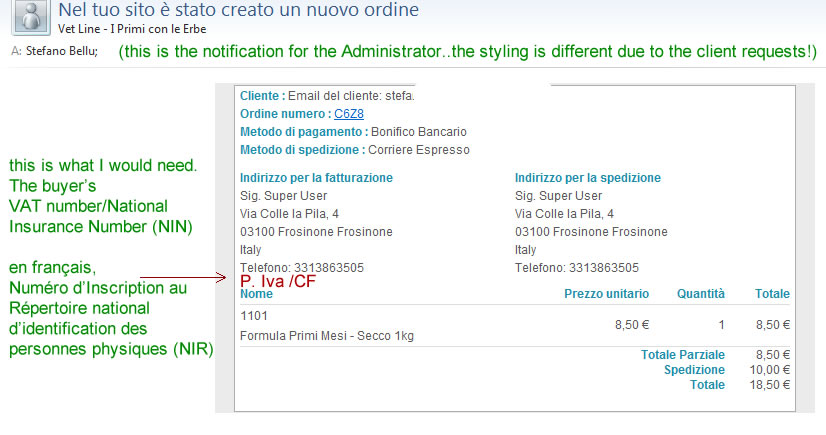
My customers add the VAT code/NIN when they register in the field "address_vat" (address table) and that's what I would need to show.
So if I'm getting it right, I should go to:
Display->Views->address_template (both frontend and backend), and add {address_vat}
right?
Here comes a clarifying screenshot of my needs
My customers add the VAT code/NIN when they register in the field "address_vat" (address table) and that's what I would need to show.
So if I'm getting it right, I should go to:
Display->Views->address_template (both frontend and backend), and add {address_vat}
right?
Please Log in or Create an account to join the conversation.
11 years 8 months ago #187896
by nicolas
Replied by nicolas on topic Sending user details upon registration
That's right
The following user(s) said Thank You: stefanobellu
Please Log in or Create an account to join the conversation.
- stefanobellu
-
Topic Author
- Offline
Less
More
- Posts: 27
- Thank you received: 2
11 years 8 months ago #188398
by stefanobellu
Replied by stefanobellu on topic Sending user details upon registration
Yes everybody, that really worked!
Now....if I want to show the same data to the "User account administrator notification"?
I did try something but the mail stopped working so I had to remove the customizations
gotta increase my php skils...a lot..
Now....if I want to show the same data to the "User account administrator notification"?
I did try something but the mail stopped working so I had to remove the customizations
gotta increase my php skils...a lot..
Please Log in or Create an account to join the conversation.
11 years 8 months ago #188425
by Jerome
Jerome - Obsidev.com
HikaMarket & HikaSerial developer / HikaShop core dev team.
Also helping the HikaShop support team when having some time or couldn't sleep.
By the way, do not send me private message, use the "contact us" form instead.
Replied by Jerome on topic Sending user details upon registration
Hi,
The email "User account administrator notification" is quite lite and does not have the same kind of "preload" part.
So even the HTML or the Text version are in PHP and does not handle the tag replacement elements.
But in the variable
You will find the content of the user address if the user have fill such kind of information during his registration.
But I fully admit that the current email is pretty raw compared to the other HikaShop emails.
Regards,
The email "User account administrator notification" is quite lite and does not have the same kind of "preload" part.
So even the HTML or the Text version are in PHP and does not handle the tag replacement elements.
But in the variable
Code:
$data->address_data
But I fully admit that the current email is pretty raw compared to the other HikaShop emails.
Regards,
Jerome - Obsidev.com
HikaMarket & HikaSerial developer / HikaShop core dev team.
Also helping the HikaShop support team when having some time or couldn't sleep.
By the way, do not send me private message, use the "contact us" form instead.
Please Log in or Create an account to join the conversation.
Time to create page: 0.245 seconds