

- Posts: 70
- Thank you received: 3
Add links to cpanel.php
8 years 3 months ago #293703
by virusys
Add links to cpanel.php was created by virusys
-- HikaShop version -- : 3.4.0
-- Joomla version -- : 3.8.8
-- PHP version -- : 5.6
-- Browser(s) name and version -- : Chrome
I'd like to add extra icons/links to the User Control panel of Hikashop.
In examining the front end page, it seemed to be pretty straightforward to do that but when I went into the cpanel.php file, it was not easily done.
Do you have these existing icons/links in some sort of array that is defined somewhere?
How do I add things to it?
-- Joomla version -- : 3.8.8
-- PHP version -- : 5.6
-- Browser(s) name and version -- : Chrome
I'd like to add extra icons/links to the User Control panel of Hikashop.
In examining the front end page, it seemed to be pretty straightforward to do that but when I went into the cpanel.php file, it was not easily done.
Do you have these existing icons/links in some sort of array that is defined somewhere?
How do I add things to it?
Please Log in or Create an account to join the conversation.

8 years 3 months ago #293716
by nicolas
Replied by nicolas on topic Add links to cpanel.php
Hi,
The best is to implement the onUserAccountDisplay trigger in a small joomla plugin of the group "hikashop" to add that.
You can look at the files in plugins/hikashop/user_account/
It's a plugin which adds the link to the Joomla user profile edition page.
So you can copy the plugin, change its name and change the link attributes to fit your needs, zip the files and install the zip via the Joomla installer and enable it to get that extra link to the control panel.
Doing it with a plugin is the best way to do it. Now you can also add extra HTML to the cpanel.php view file if you want but I would rather recommend doing a plugin.
The best is to implement the onUserAccountDisplay trigger in a small joomla plugin of the group "hikashop" to add that.
You can look at the files in plugins/hikashop/user_account/
It's a plugin which adds the link to the Joomla user profile edition page.
So you can copy the plugin, change its name and change the link attributes to fit your needs, zip the files and install the zip via the Joomla installer and enable it to get that extra link to the control panel.
Doing it with a plugin is the best way to do it. Now you can also add extra HTML to the cpanel.php view file if you want but I would rather recommend doing a plugin.
Please Log in or Create an account to join the conversation.
8 years 3 months ago - 8 years 3 months ago #293893
by virusys
Replied by virusys on topic Add links to cpanel.php
OK - I see that file but not where the array is defined to include the link urls and icon images shown in the user cpanel.
Can you point me to where the plugin knows where to find the images and links shown in the attached?
Thanks
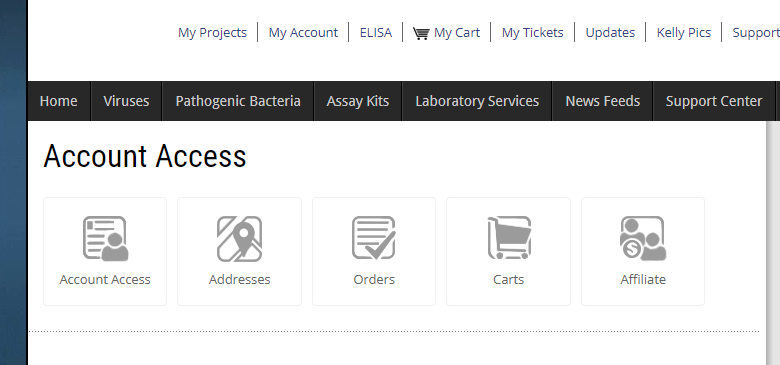
Can you point me to where the plugin knows where to find the images and links shown in the attached?
Thanks
Last edit: 8 years 3 months ago by virusys.
Please Log in or Create an account to join the conversation.
8 years 3 months ago #293896
by nicolas
Replied by nicolas on topic Add links to cpanel.php
Hi,
The images are defined in the CSS of HikaShop. So if you need extra or other images, you can just add your own CSS to define your own images, that you can place wherever you want.
Just look at the image with the developer tools of your browser and you'll see the class and the CSS associated with each one. You'll see that the CSS class uses the "image" parameter in the class.
For example, with the parameter 'user2', you get the class icon-48-user2
And then, if you check the CSS of HikaShop, you can see this code corresponding to it:
The images are defined in the CSS of HikaShop. So if you need extra or other images, you can just add your own CSS to define your own images, that you can place wherever you want.
Just look at the image with the developer tools of your browser and you'll see the class and the CSS associated with each one. You'll see that the CSS class uses the "image" parameter in the class.
For example, with the parameter 'user2', you get the class icon-48-user2
And then, if you check the CSS of HikaShop, you can see this code corresponding to it:
Code:
span.hkIcon.icon-48-user2 {
background-image: url("../images/icon-48/flatgrey/account.png") !important;
}
Please Log in or Create an account to join the conversation.
Time to create page: 0.151 seconds