

- Posts: 35
- Thank you received: 4
Need to change the required attribute of a custom field with jQuery
7 years 5 months ago - 7 years 5 months ago #305411
by garstud
-- HikaShop version -- : 4.0.3
-- Joomla version -- : 3.9.4
-- PHP version -- : 7.1.27
Hello Team
I have added a required custom field in the Order checkout process. It's a single list.
I have add JS code in the correct view (checkout / show_block_shipping.php) to change the state of the required attribute in some case.
But it does'nt seem that Hikashop used a "required" attribute !?
How can i let the required attribute setted in the field configuration ... and change it "on-the-fly" with some JS code when i want to ?
Thanks a lot
-- Joomla version -- : 3.9.4
-- PHP version -- : 7.1.27
Hello Team
I have added a required custom field in the Order checkout process. It's a single list.
I have add JS code in the correct view (checkout / show_block_shipping.php) to change the state of the required attribute in some case.
But it does'nt seem that Hikashop used a "required" attribute !?
Code:
<select id="magasin" name="checkout[fields][magasin]" size="1" class="hikashop_field_dropdown hkform-control" onchange="window.hikashop.toggleField(this.value,'magasin','order_2_1',0,'hikashop_');">
<option value="" id="magasin_">-Veuillez indiquer le magasin-</option>
<option value="3" id="magasin_3" selected="selected">Gordes</option>
<option value="4" id="magasin_4">Roussillon</option>
</select>
How can i let the required attribute setted in the field configuration ... and change it "on-the-fly" with some JS code when i want to ?
Thanks a lot
Last edit: 7 years 5 months ago by garstud.
Please Log in or Create an account to join the conversation.

7 years 5 months ago #305442
by nicolas
Replied by nicolas on topic Need to change the required attribute of a custom field with jQuery
Hi,
I don't see how that is possible.
The check of whether someone entered something in a required custom field or not is done on the server side based on the settings of the custom field loaded from the database.
So regardless of how you change the HTML of the custom field with javascript, you won't be able to change the required check.
If you need to have a dynamic required custom field, then you want to turn off the "required" setting of the custom field so that no check happens on the server-side, and then add the check yourself on the onsubmit event of the form where you have the custom field.
stackoverflow.com/questions/24335734/how...-to-form-with-jquery
The id of the form on the checkout is hikashop_checkout_form so this should help:
From what I'm extrapolating of what you're doing, you want the custom field to be visible and required only for one shipping method and not visible/ not required otherwise.
A simpler approach is to actually create a new shipping plugin based on the manual shipping method and add a an input field to the shipping plugin. That way, the input will automatically appear/disappear based on which shipping method is selected.
This is possible since HikaShop 4.0.1 and was already implemented in the Colissimo and Mondial Relay plugins made by Obsidev and available on our marketplace:
www.hikashop.com/marketplace/category/34-shipping.html
Using that same technic, these plugins add a pickup point selection interface to the checkout when their shipping methods are selected (and the selection of the pickup point is required.
So you might want to contact Obsidev for more information on how to do that. I believe it would be a much cleaner approach to what you're currently doing.
I don't see how that is possible.
The check of whether someone entered something in a required custom field or not is done on the server side based on the settings of the custom field loaded from the database.
So regardless of how you change the HTML of the custom field with javascript, you won't be able to change the required check.
If you need to have a dynamic required custom field, then you want to turn off the "required" setting of the custom field so that no check happens on the server-side, and then add the check yourself on the onsubmit event of the form where you have the custom field.
stackoverflow.com/questions/24335734/how...-to-form-with-jquery
The id of the form on the checkout is hikashop_checkout_form so this should help:
Code:
$('#hikashop_checkout_form').on('submit', function() {
// your javascript code to check the select dropdown if present on the page and if you want to require it
});
From what I'm extrapolating of what you're doing, you want the custom field to be visible and required only for one shipping method and not visible/ not required otherwise.
A simpler approach is to actually create a new shipping plugin based on the manual shipping method and add a an input field to the shipping plugin. That way, the input will automatically appear/disappear based on which shipping method is selected.
This is possible since HikaShop 4.0.1 and was already implemented in the Colissimo and Mondial Relay plugins made by Obsidev and available on our marketplace:
www.hikashop.com/marketplace/category/34-shipping.html
Using that same technic, these plugins add a pickup point selection interface to the checkout when their shipping methods are selected (and the selection of the pickup point is required.
So you might want to contact Obsidev for more information on how to do that. I believe it would be a much cleaner approach to what you're currently doing.
Please Log in or Create an account to join the conversation.
7 years 5 months ago - 7 years 5 months ago #305497
by garstud
Replied by garstud on topic Need to change the required attribute of a custom field with jQuery
Hello,
Thank you for this answer. i have tried some tests without the required attribute in my custom field.
I have tried to use the code with "#hikashop_checkout_form').on('submit',..." but it is never called !?
So i take a look in your "/media/com_hikashop/js/checkout.js" and found some explanation about "#hikashop_checkout_form'"...
It is used with a property called "submit_in_progress".
If i set this property to true or false, it seems to block or not the screen validation,
So, by this way, i can stop the validation form if the user has check the "Magasin" mode and don't choose a shop.
Just a question : can you tell me if there is some cons-indications to use the property "submit_in_progress" ?
Is it reserved for something i go wrong with my code ?
Here is the code i added a the end of the "show_block_shipping.php" file in the checkout view :
Thank you for this answer. i have tried some tests without the required attribute in my custom field.
I have tried to use the code with "#hikashop_checkout_form').on('submit',..." but it is never called !?
So i take a look in your "/media/com_hikashop/js/checkout.js" and found some explanation about "#hikashop_checkout_form'"...
It is used with a property called "submit_in_progress".
If i set this property to true or false, it seems to block or not the screen validation,
So, by this way, i can stop the validation form if the user has check the "Magasin" mode and don't choose a shop.
Just a question : can you tell me if there is some cons-indications to use the property "submit_in_progress" ?
Is it reserved for something i go wrong with my code ?
Here is the code i added a the end of the "show_block_shipping.php" file in the checkout view :
Code:
...var b = prefix + data.id;
...window.hikashop.setArrayDisplay([b + '__custom'], true);
// code added !
if(data.id=="9") { // my shop delivery mode
el = document.getElementById('hikashop_checkout_form');
if(jQuery("#magasin option:selected").val()=="") { // no shop has been chosen
el.submit_in_progress = true; // block the validation
} else {
el.submit_in_progress = false; // validation is ok
}
...
Last edit: 7 years 5 months ago by garstud.
Please Log in or Create an account to join the conversation.
7 years 5 months ago #305498
by nicolas
Replied by nicolas on topic Need to change the required attribute of a custom field with jQuery
Hi,
That's an interesting way to go about it.
I suppose that you also have a onchange on the custom field dropdown to set the submit_in_progress when the selection is made so that the checkout can progress.
As a customization, I would say that it's ok to do it like that.
That's an interesting way to go about it.
I suppose that you also have a onchange on the custom field dropdown to set the submit_in_progress when the selection is made so that the checkout can progress.
As a customization, I would say that it's ok to do it like that.
Please Log in or Create an account to join the conversation.
7 years 5 months ago - 7 years 5 months ago #305518
by garstud
Replied by garstud on topic Need to change the required attribute of a custom field with jQuery
Hello Nicolas,
Thanks for your validation.
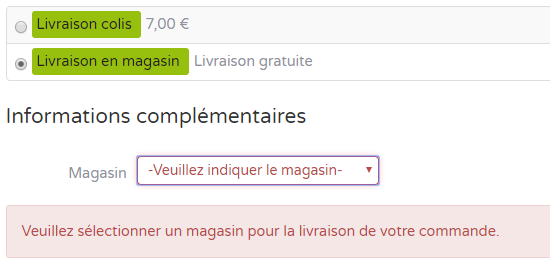
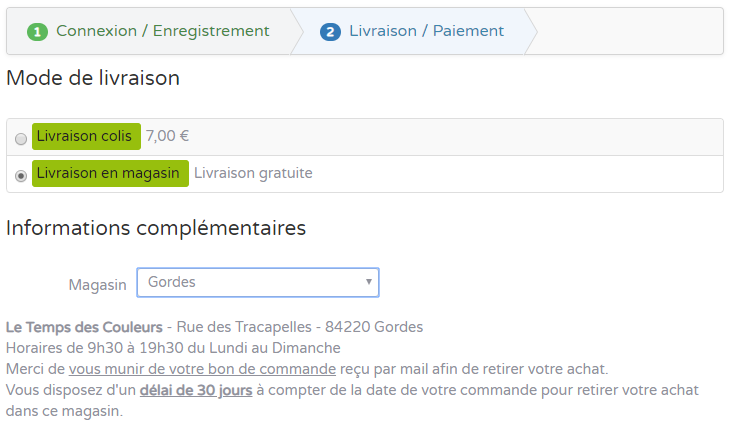
And yes, according to the value (empty or correct shop selection) i use a change event to display an alert (if empty) or display some useful information about the shop (hours, address) if it is a correct selection :
I post this code at the end oh the "Checkout >show_block_fields" file line 119
the #info_magasin is a div added in line 105 :
if no shop selected:
If a shop is selected, display extra infos:
Thanks for your validation.
And yes, according to the value (empty or correct shop selection) i use a change event to display an alert (if empty) or display some useful information about the shop (hours, address) if it is a correct selection :
I post this code at the end oh the "Checkout >show_block_fields" file line 119
Code:
115 : if(empty($this->ajax)) { ?>
</div>
<script type="text/javascript">
jQuery( document ).ready(function() { //start of the personnalization
jQuery("#magasin").change(function () { // shop value change !
var shopInfos = new Array();
<?php
foreach($cart->order_fields[magasin]->field_value as $shopid => $shopName) { // prepare JS array to display shop infos
if($shopid) { ?>
shopInfos["<?php echo $shopid ?>"] = "<?php echo JText::_('FR_LTDC_MAGASIN_'.strtoupper($shopid).'_INFOS') ?>";
<?php
}
}
?>
var str = ""; // get the current selected shop and its infos lang string
jQuery( "#magasin option:selected" ).each(function() {
str = jQuery(this).val();
});
el = document.getElementById('hikashop_checkout_form');
if(str=="") { // no shop, display error
var msg = "<div class='alert alert-error'>Veuillez sélectionner un magasin pour la livraison de votre commande.</div>"
jQuery("#info_magasin").html(msg);
el.submit_in_progress = true;
} else
el.submit_in_progress = false;
jQuery("#info_magasin").html(shopInfos[str]);
}).change();
});
if(!window.checkout) window.checkout = {};
the #info_magasin is a div added in line 105 :
Code:
102: ?>
</fieldset>
<div id="info_magasin" class="info_magasin"></div> <?php // info block for shop selection ?>
<?php
if(!empty($this->options['js'])) {
if no shop selected:
If a shop is selected, display extra infos:
Last edit: 7 years 5 months ago by garstud.
Please Log in or Create an account to join the conversation.
7 years 5 months ago #305520
by nicolas
Replied by nicolas on topic Need to change the required attribute of a custom field with jQuery
Hi,
That's great ! Good job !
That's great ! Good job !
Please Log in or Create an account to join the conversation.
Time to create page: 0.260 seconds