

- Posts: 637
- Thank you received: 26
Google map address auto fill - Feature Request
6 years 10 months ago - 6 years 10 months ago #312626
by Lumiga
Kind regards,
Lumiga
Google map address auto fill - Feature Request was created by Lumiga
-- HikaShop version -- : 4.2.2
-- Joomla version -- : 3.9.12
-- PHP version -- : 7.3
Hi Hikashop team,
I have successfully installed the Google map address auto fill and it's working almost fine.
I have some improvements and wishes.
Improvements:
1 - When you fill in the address en select it with the cursors and then choose with a enter on the keyboard you get this issue. Also the address field is gone.
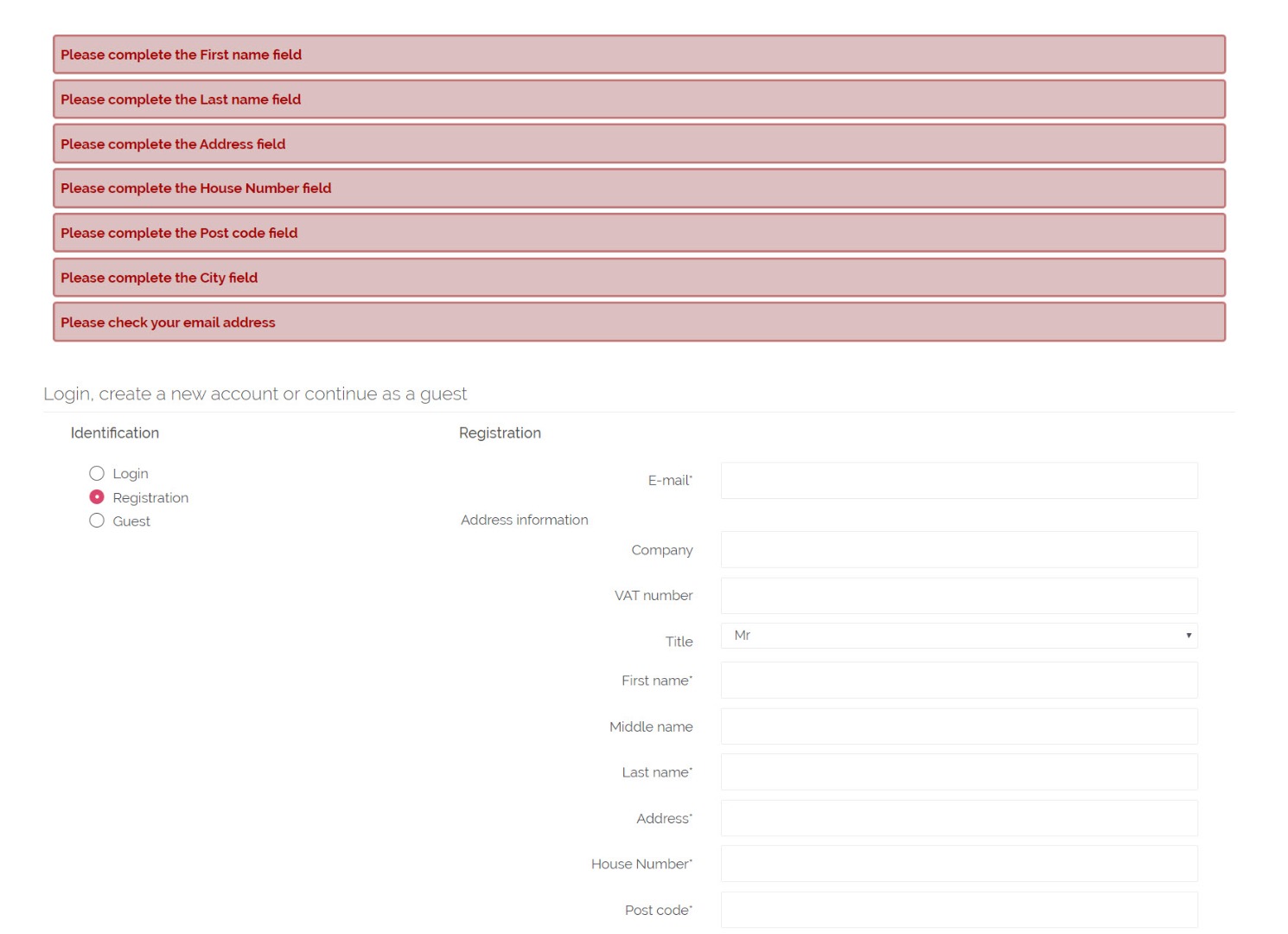
2 - When you select the address with your mouse it works fine. But there is always a space before the street name.
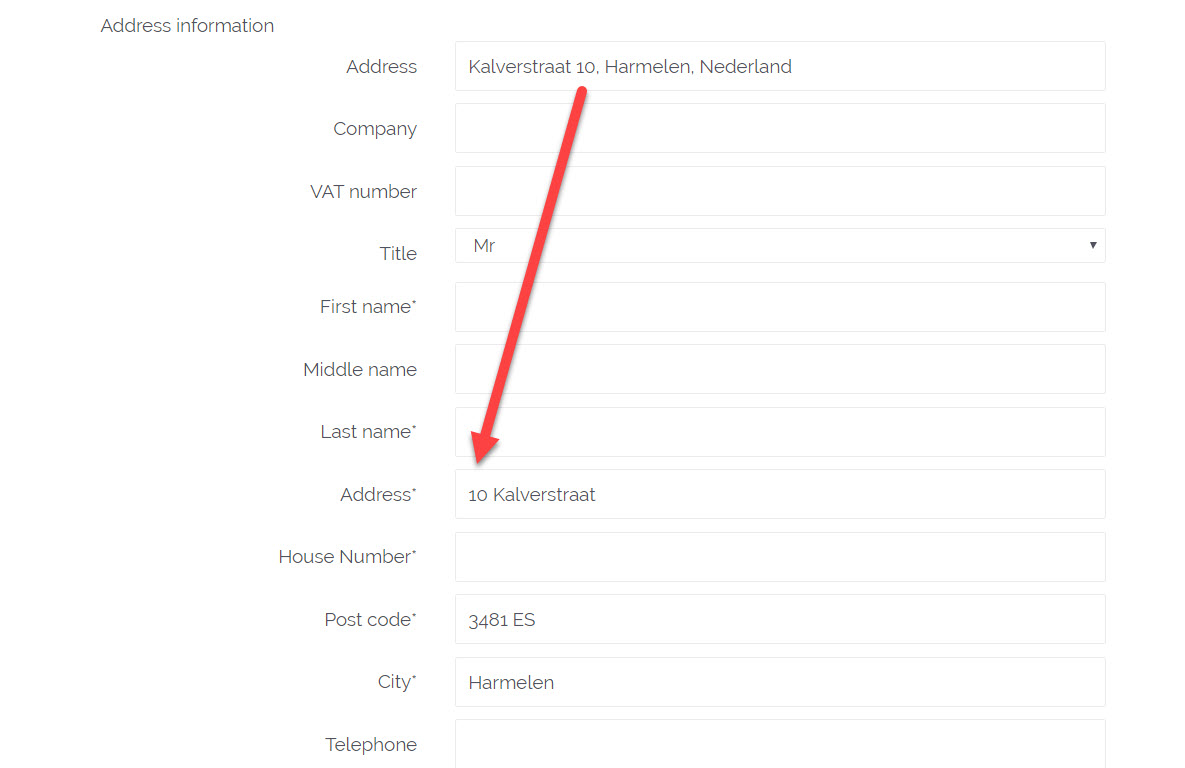
3 - If you choose also too add a house number in the google address field then the house number is placed before the street name. Lik in this example.
Wishes:
4 - Optional separate the house number from the street address and let us choose which custom field can be filled with the house number. In my example we use the "address_street2" for the house number.
Keep up with the good work!
Kind regards,
Lumiga
-- Joomla version -- : 3.9.12
-- PHP version -- : 7.3
Hi Hikashop team,
I have successfully installed the Google map address auto fill and it's working almost fine.
I have some improvements and wishes.
Improvements:
1 - When you fill in the address en select it with the cursors and then choose with a enter on the keyboard you get this issue. Also the address field is gone.
2 - When you select the address with your mouse it works fine. But there is always a space before the street name.
3 - If you choose also too add a house number in the google address field then the house number is placed before the street name. Lik in this example.
Wishes:
4 - Optional separate the house number from the street address and let us choose which custom field can be filled with the house number. In my example we use the "address_street2" for the house number.
Keep up with the good work!
Kind regards,
Lumiga
Kind regards,
Lumiga
Last edit: 6 years 10 months ago by Lumiga. Reason: numbering the issues
Please Log in or Create an account to join the conversation.

Less
More
- Posts: 12953
- Thank you received: 1778
6 years 10 months ago #312680
by Mohamed Thelji
Replied by Mohamed Thelji on topic Google map address auto fill - Feature Request
Hello Lumiga,
Thank you for your feedback !
Improvements :
We'll try to add a solution about it, but the google map dropdown API will actually require you to click on one of the addresses on the address dropdown.
Wishes:
It's actually but it will require the customization of the JavaScript code of the auto fill plugin.
Kind regards,
Mohamed.
Thank you for your feedback !
Improvements :
When you fill in the address en select it with the cursors and then choose with a enter on the keyboard you get this issue. Also the address field is gone.
We'll try to add a solution about it, but the google map dropdown API will actually require you to click on one of the addresses on the address dropdown.
We tested it multiple time on our end without success, can you tell us in which page you're having that issue ? Thank you.When you select the address with your mouse it works fine. But there is always a space before the street name.
A good Idea would be to add a "house number before/after address" options. We'll add it on our todo list.If you choose also too add a house number in the google address field then the house number is placed before the street name. Lik in this example.
Wishes:
Optional separate the house number from the street address en let us choose which custom field can be filled with the house number. In my example we use the "address_street2" for the house number.
It's actually but it will require the customization of the JavaScript code of the auto fill plugin.
Kind regards,
Mohamed.
The following user(s) said Thank You: Lumiga
Please Log in or Create an account to join the conversation.
6 years 10 months ago #312698
by Lumiga
Kind regards,
Lumiga
Replied by Lumiga on topic Google map address auto fill - Feature Request
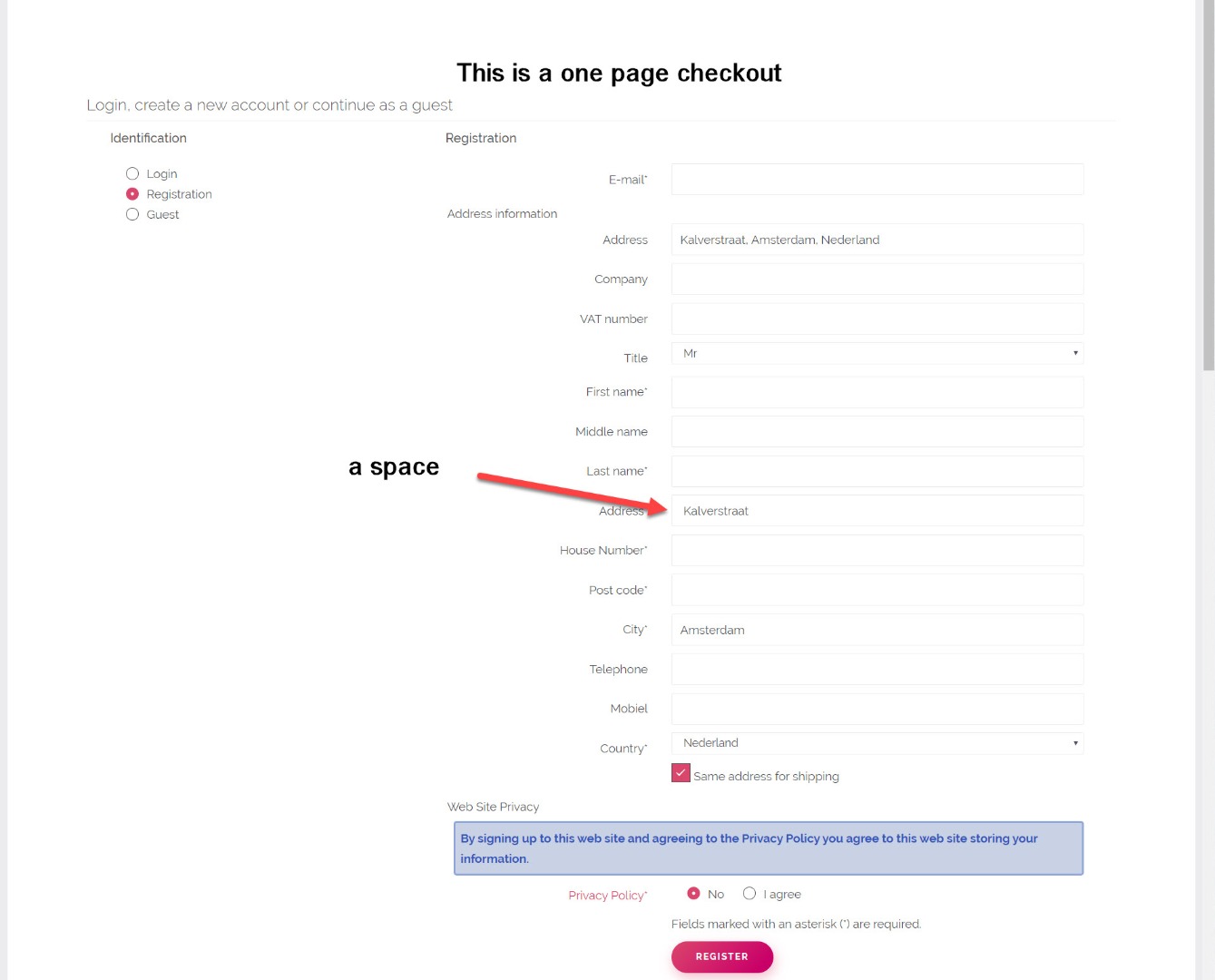
2 - When you select the address with your mouse it works fine. But there is always a space before the street name.
We have this issue on the one page checkout when you choose to register. See screenshot or use this url to test it by yourself.
Kind regards,
Lumiga
We tested it multiple time on our end without success, can you tell us in which page you're having that issue ? Thank you.
We have this issue on the one page checkout when you choose to register. See screenshot or use this url to test it by yourself.
This message contains confidential information
Kind regards,
Lumiga
Kind regards,
Lumiga
Please Log in or Create an account to join the conversation.
Less
More
- Posts: 12953
- Thank you received: 1778
6 years 10 months ago #312716
by Mohamed Thelji
Replied by Mohamed Thelji on topic Google map address auto fill - Feature Request
Hello,
I wasn't able to reproduce it on my end, so it's probably coming from a CSS issue, can you give us a link where we can reproduce it ? Thank you.
Kind regards,
Mohamed.
I wasn't able to reproduce it on my end, so it's probably coming from a CSS issue, can you give us a link where we can reproduce it ? Thank you.
Kind regards,
Mohamed.
Please Log in or Create an account to join the conversation.
6 years 10 months ago #312761
by Lumiga
Kind regards,
Lumiga
Replied by Lumiga on topic Google map address auto fill - Feature Request
Hi Mohamed,
See the link in Confidential information.
Kind regards,
Lumiga
See the link in Confidential information.
Kind regards,
Lumiga
Kind regards,
Lumiga
Please Log in or Create an account to join the conversation.
Less
More
- Posts: 12953
- Thank you received: 1778
6 years 10 months ago #312780
by Mohamed Thelji
Replied by Mohamed Thelji on topic Google map address auto fill - Feature Request
Hello,
We just released a new version of the Google map auto fill address plugin, so can you download, install and test it again ? Thank you.
Kind regards,
Mohamed.
We just released a new version of the Google map auto fill address plugin, so can you download, install and test it again ? Thank you.
Kind regards,
Mohamed.
Please Log in or Create an account to join the conversation.
6 years 10 months ago #312842
by Lumiga
Kind regards,
Lumiga
Replied by Lumiga on topic Google map address auto fill - Feature Request
Hi Mohamed,
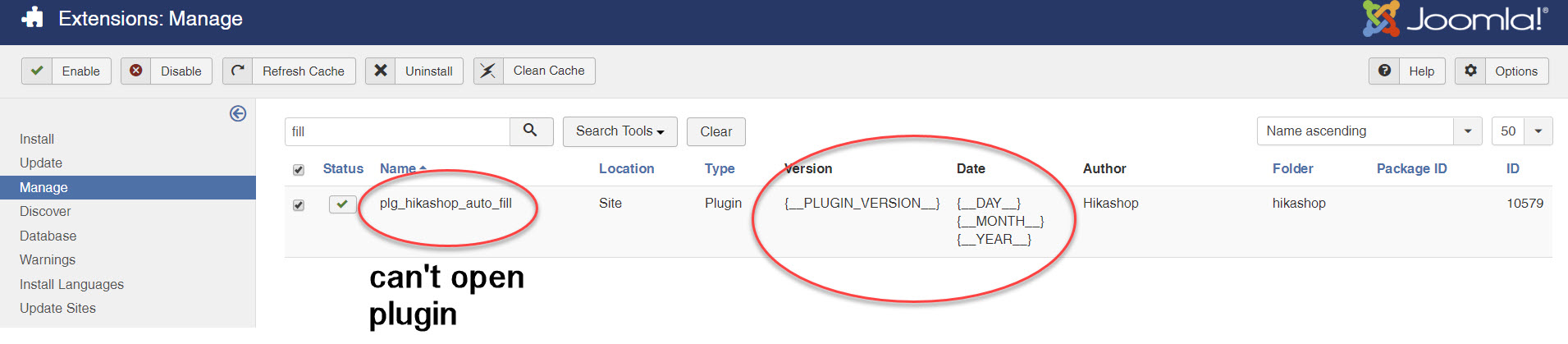
I have download en install the new version. But I can't open the plugin after installation and it shows language code.
See screenshot:
(Point 2) It looks like the space is gone, thanks for that.
But the house number is still at the beginning and there is no option to put it on a separated custom field. But maybe you didn't work on that issue /wish yet.
Is there any news about point 1? I'm sorry to say it, but without a fix for that issue we can't use it for our customers.
Kind regards,
Lumiga
I have download en install the new version. But I can't open the plugin after installation and it shows language code.
See screenshot:
(Point 2) It looks like the space is gone, thanks for that.
But the house number is still at the beginning and there is no option to put it on a separated custom field. But maybe you didn't work on that issue /wish yet.
Is there any news about point 1? I'm sorry to say it, but without a fix for that issue we can't use it for our customers.
Kind regards,
Lumiga
Kind regards,
Lumiga
Please Log in or Create an account to join the conversation.
Less
More
- Posts: 12953
- Thank you received: 1778
6 years 10 months ago #312865
by Mohamed Thelji
Replied by Mohamed Thelji on topic Google map address auto fill - Feature Request
Hello Lumiga,
1. You'll have to go to the page "Extensions->Plugins" and not "Extensions->Manage".
2. Regarding that point, we already added it on our todo list and will work on it as soon as possible !
Kind regards,
Mohamed.
1. You'll have to go to the page "Extensions->Plugins" and not "Extensions->Manage".
2. Regarding that point, we already added it on our todo list and will work on it as soon as possible !
Kind regards,
Mohamed.
The following user(s) said Thank You: Lumiga
Please Log in or Create an account to join the conversation.
6 years 9 months ago - 6 years 9 months ago #313828
by Lumiga
Kind regards,
Lumiga
Replied by Lumiga on topic Google map address auto fill - Feature Request
Hi,
Mohamed, is there any news yet?
Did you find the time to fix the issue nr. 1 and 3 from my first post?
Hope to hear from you.
Kind regards,
Lumiga
Mohamed, is there any news yet?
Did you find the time to fix the issue nr. 1 and 3 from my first post?
Hope to hear from you.
Kind regards,
Lumiga
Kind regards,
Lumiga
Last edit: 6 years 9 months ago by Lumiga.
Please Log in or Create an account to join the conversation.

6 years 9 months ago #313848
by nicolas
Replied by nicolas on topic Google map address auto fill - Feature Request
Hi,
Mohamed has been in holidays for 1 month now. In fact, he replied to you here just before leaving.
So no development was made by him in this period of time.
He'll come back next week though I can't say when he might be able to work on this.
Mohamed has been in holidays for 1 month now. In fact, he replied to you here just before leaving.
So no development was made by him in this period of time.
He'll come back next week though I can't say when he might be able to work on this.
The following user(s) said Thank You: Lumiga
Please Log in or Create an account to join the conversation.
6 years 5 months ago #317719
by Lumiga
Kind regards,
Lumiga
Replied by Lumiga on topic Google map address auto fill - Feature Request
Hi Mohamed,
Is there any news yet?
Did you find the time to fix the issue nr. 1 and 3 from my first post?
Kind regards,
Lumiga
Is there any news yet?
Did you find the time to fix the issue nr. 1 and 3 from my first post?
Kind regards,
Lumiga
Kind regards,
Lumiga
Please Log in or Create an account to join the conversation.
6 years 5 months ago #317721
by nicolas
Replied by nicolas on topic Google map address auto fill - Feature Request
Hi,
We've worked on that. However, this will first require the release of the next version of HikaShop and some more testing when Mohamed comes back to work (he is not here since 1 month ago following the pandemic confinement). So hopefully we have these will be sorted out by the beginning of the summer.
We've worked on that. However, this will first require the release of the next version of HikaShop and some more testing when Mohamed comes back to work (he is not here since 1 month ago following the pandemic confinement). So hopefully we have these will be sorted out by the beginning of the summer.
The following user(s) said Thank You: Lumiga
Please Log in or Create an account to join the conversation.
Time to create page: 0.278 seconds