

- Posts: 41
- Thank you received: 9
Remove unnecessary columns from CSV
12 years 8 months ago - 11 years 11 months ago #138750
by Savickis
Remove unnecessary columns from CSV was created by Savickis
-- HikaShop version -- : 2.2.3 Business
-- Joomla version -- : 2.5.17
Hi!
How to to remove some columns when exporting csv file "Orders > Export" ?
When I export orders list as CSV, there are lot of columns that are unecessary for our accountant (e.g. user_params, user_partner_id, user_created_ip, etc.). Which file must be edited and overrided, so I can get rid of these columns? I found "administrator\components\com_hikashop\classes\widget.php" but it doesn't conrain column IDs? :huh:
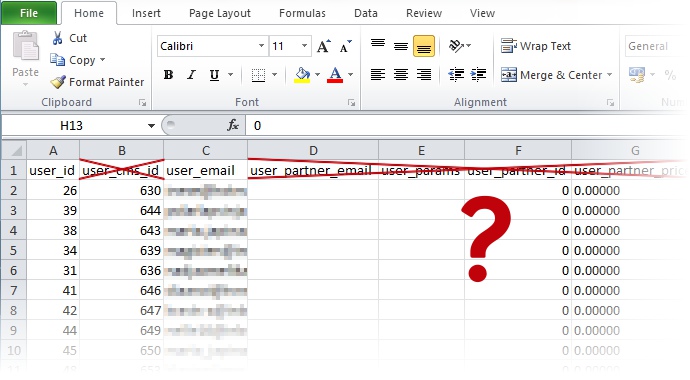
Thank you in advance for advice.
Best regards!
-- Joomla version -- : 2.5.17
Hi!
How to to remove some columns when exporting csv file "Orders > Export" ?
When I export orders list as CSV, there are lot of columns that are unecessary for our accountant (e.g. user_params, user_partner_id, user_created_ip, etc.). Which file must be edited and overrided, so I can get rid of these columns? I found "administrator\components\com_hikashop\classes\widget.php" but it doesn't conrain column IDs? :huh:
Thank you in advance for advice.
Best regards!
Last edit: 11 years 11 months ago by Xavier.
Please Log in or Create an account to join the conversation.

Less
More
- Posts: 12953
- Thank you received: 1778
12 years 8 months ago #138772
by Mohamed Thelji
Replied by Mohamed Thelji on topic Remove columns from orders export CSV
Hi,
The solution will be to edit the code of the file "export" of the view "order" of your back-end template through "Hikashop->Display->Views", but note that some development skills will be required to do that.
Also, you'll probably find some information through this thread :
The solution will be to edit the code of the file "export" of the view "order" of your back-end template through "Hikashop->Display->Views", but note that some development skills will be required to do that.
Also, you'll probably find some information through this thread :
All the code which generate the CSV file is in the view " backend | your_backend_template | order | export ".
You can edit the view in order to change how the export is made. Removing or adding new columns.
The first part of the view create the first line with the column title and after, there is a loop (a "foreach") on every selected orders to export their content.
Please Log in or Create an account to join the conversation.
12 years 8 months ago - 12 years 8 months ago #138853
by Savickis
Replied by Savickis on topic Remove columns from orders export CSV
Hi, and thanks for pointing direction. However a bit additional help is needed -
By default it seems that "foreach" loop exports ALL fields available in order. As I actaully need to only show few of the columns, how to rewrite following part to only include, for example, just columns "user_email, order_id, order_full_price"?
By default it seems that "foreach" loop exports ALL fields available in order. As I actaully need to only show few of the columns, how to rewrite following part to only include, for example, just columns "user_email, order_id, order_full_price"?
Code:
if($maxProd && !empty($productFields)) {
$first = array();
$o = reset($this->orders);
foreach($o as $key => $val) {
if(is_array($val))
continue;
$first[] = $key;
}
$o = null;
for($i=1;$i<=$maxProd;$i++){
foreach($productFields as $field){
$first[] = 'item'.$i.'_'.$field;
}
}
} else {
$first = array_keys(get_object_vars(reset($this->orders)));
}
$export->writeLine($first);
Last edit: 12 years 8 months ago by Savickis.
Please Log in or Create an account to join the conversation.

12 years 8 months ago #138921
by nicolas
Replied by nicolas on topic Remove columns from orders export CSV
You can change the line:
to something like:
Code:
$first[] = $key;
Code:
if(in_array($key,array('user_email','order_id','order_full_price'))) $first[] = $key;
The following user(s) said Thank You: vaclav
Please Log in or Create an account to join the conversation.
12 years 8 months ago - 12 years 8 months ago #139002
by Savickis
Replied by Savickis on topic Remove columns from orders export CSV
Hello, and thanks for help.
This is the final working code, if somebody else is interested.\
As an example, it returns only three of all columns (defined in "key, array" row):
This is the final working code, if somebody else is interested.\
As an example, it returns only three of all columns (defined in "key, array" row):
Code:
if(!empty($this->orders)){
$maxProd = 0;
$productFields = null;
foreach($this->orders as $order){
$nbProd = count($order->products);
if($maxProd < $nbProd){
$maxProd = $nbProd;
if(empty($productFields)){
$productFields = array_keys(get_object_vars(reset($order->products)));
}
}
}
if($maxProd && !empty($productFields)) {
$first = array();
$o = reset($this->orders);
foreach($o as $key => $val) {
if(is_array($val))
continue;
if(in_array($key,array('order_number','user_created','user_email')))
$first[] = $key;
}
$o = null;
for($i=1;$i<=$maxProd;$i++){
foreach($productFields as $field){
$first[] = 'item'.$i.'_'.$field;
}
}
} else {
$first = array_keys(get_object_vars(reset($this->orders)));
}
$export->writeLine($first);
foreach($this->orders as $row){
if(!empty($row->user_created)) $row->user_created = hikashop_getDate($row->user_created,'%Y-%m-%d %H:%M:%S');
if(!empty($row->order_created)) $row->order_created = hikashop_getDate($row->order_created,'%Y-%m-%d %H:%M:%S');
if(!empty($row->order_modified)) $row->order_modified = hikashop_getDate($row->order_modified,'%Y-%m-%d %H:%M:%S');
$new_row = array();
foreach ($row as $key => $value) {
if(in_array($key,array('order_number','user_created','user_email')))
$new_row[$key] = $value;
}
if($maxProd && !empty($productFields)){
for($i=1;$i<=$maxProd;$i++){
$prod =& $row->products[$i-1];
foreach($productFields as $field){
$n = 'item_'.$i.'_'.$field;
$row->$n = @$prod->$field;
}
}
}
$export->writeLine($new_row);
}
}
Last edit: 12 years 8 months ago by Savickis.
Please Log in or Create an account to join the conversation.

Less
More
- Posts: 90
- Thank you received: 0
11 years 11 months ago #174952
by tanyatanya
Replied by tanyatanya on topic Remove columns from orders export CSV
Hi,
I've used the code you posted to customise my order export and it has all worked well with one exception. I'm only getting the order info and none of the purchased products info. Any ideas what I'm doing wrong?
Thanks
I've used the code you posted to customise my order export and it has all worked well with one exception. I'm only getting the order info and none of the purchased products info. Any ideas what I'm doing wrong?
Thanks
Please Log in or Create an account to join the conversation.
11 years 11 months ago #176331
by vaclav
Replied by vaclav on topic Add product code and qty to the edited export file
Hello Nicolas,
thanks for this help.
I am trying to do the same - it works as I need for these columns:
order_number','order_full_price','order_payment_method','shipping_address_firstname','shipping_address_lastname','shipping_address_street','shipping_address_post_code','shipping_address_city','shipping_address_country'
I would need to add these columns to the columns above but working as in original order view file (making a column for each product in exported order but only for these two columns - like: 'item1_order_product_quantity','item1_order_product_code','item2_order_product_quantity','item2_order_product_code','item3_order_product_quantity','item3_order_product_code'..........):
'item_order_product_quantity','item_order_product_code' (to make columns for all product in each order)
How can I do this?
Thanks
Vaclav
thanks for this help.
I am trying to do the same - it works as I need for these columns:
order_number','order_full_price','order_payment_method','shipping_address_firstname','shipping_address_lastname','shipping_address_street','shipping_address_post_code','shipping_address_city','shipping_address_country'
I would need to add these columns to the columns above but working as in original order view file (making a column for each product in exported order but only for these two columns - like: 'item1_order_product_quantity','item1_order_product_code','item2_order_product_quantity','item2_order_product_code','item3_order_product_quantity','item3_order_product_code'..........):
'item_order_product_quantity','item_order_product_code' (to make columns for all product in each order)
How can I do this?
Thanks
Vaclav
Please Log in or Create an account to join the conversation.
11 years 11 months ago #176337
by nicolas
Replied by nicolas on topic Add product code and qty to the edited export file
Hi,
for the product columns, you can change the code:
to:
for the product columns, you can change the code:
Code:
$first[] = 'item'.$i.'_'.$field;
Code:
if(in_array($field,array('order_product_code','order_product_quantity'))) $first[] = 'item'.$i.'_'.$field;
Please Log in or Create an account to join the conversation.
11 years 11 months ago - 11 years 11 months ago #176763
by vaclav
Replied by vaclav on topic Add product code and qty to the edited export file
Hello Nicolas,
thanks for your reply. It is not working. It only changed the column names to the columns I need to be exported but there are no data for any product in the exported file.
See attached file for reference - export file and my edited order export view file.
Thanks
Vaclav
thanks for your reply. It is not working. It only changed the column names to the columns I need to be exported but there are no data for any product in the exported file.
See attached file for reference - export file and my edited order export view file.
Thanks
Vaclav
Last edit: 11 years 11 months ago by Xavier.
Please Log in or Create an account to join the conversation.
11 years 11 months ago #176913
by nicolas
Replied by nicolas on topic Add product code and qty to the edited export file
Hi,
Ok, try instead to change the line:
to:
Ok, try instead to change the line:
Code:
$productFields = array_keys(get_object_vars(reset($order->products)));
Code:
$productFields = array('order_product_code','order_product_quantity');
Please Log in or Create an account to join the conversation.
11 years 10 months ago #177984
by radisnoir
Replied by radisnoir on topic Add product code and qty to the edited export file
Hello I have the same problem.
I tried what you say in this discussion and I get a very satisfactory result, except for the products.
I tried
But it does not work for me.
Can you help me?
I tried what you say in this discussion and I get a very satisfactory result, except for the products.
I tried
$ productFields = array ('order_product_code', 'order_product_quantity');
But it does not work for me.
Can you help me?
Please Log in or Create an account to join the conversation.
11 years 10 months ago #177996
by vaclav
Replied by vaclav on topic Add product code and qty to the edited export file
Hello Nicolas,
thanks for your reply.
This solution does not work. All is as I need except products - it just shows the column names but any data.
Any other idea?
Thanks
Vaclabv
thanks for your reply.
This solution does not work. All is as I need except products - it just shows the column names but any data.
Any other idea?
Thanks
Vaclabv
Please Log in or Create an account to join the conversation.
11 years 10 months ago #178033
by nicolas
Replied by nicolas on topic Add product code and qty to the edited export file
Hi,
We're already way beyond user support here. I already gave several potential solutions but without proper development and debug I can't say exactly. This would require proper development to get the desired format.
I invite you to contact our partners for a quote on such customization: www.hikashop.com/home/our-partners.html
We're already way beyond user support here. I already gave several potential solutions but without proper development and debug I can't say exactly. This would require proper development to get the desired format.
I invite you to contact our partners for a quote on such customization: www.hikashop.com/home/our-partners.html
Please Log in or Create an account to join the conversation.
11 years 10 months ago #178096
by radisnoir
Replied by radisnoir on topic Add product code and qty to the edited export file
I finally managed to do what I wanted. Info command + products.
Thanks to you.
Here is my code:
Thanks to you.
Here is my code:
Code:
<?php
/**
* @package HikaShop for Joomla!
* @version 2.3.2
* @author hikashop.com
* @copyright (C) 2010-2014 HIKARI SOFTWARE. All rights reserved.
* @license GNU/GPLv3 http://www.gnu.org/licenses/gpl-3.0.html
*/
defined('_JEXEC') or die('Restricted access');
?><?php
while(ob_get_level() > 1)
ob_end_clean();
$config =& hikashop_config();
$format = $config->get('export_format','csv');
$separator = $config->get('csv_separator',';');
$force_quote = $config->get('csv_force_quote',1);
$export = hikashop_get('helper.spreadsheet');
$export->init($format, 'hikashop_export', $separator, $force_quote);
if(!empty($this->orders)){
$maxProd = 0;
$productFields = null;
foreach($this->orders as $order){
$nbProd = count($order->products);
if($maxProd < $nbProd){
$maxProd = $nbProd;
if(empty($productFields)){
$productFields = array('order_product_code','order_product_quantity');
}
}
}
if($maxProd && !empty($productFields)) {
$first = array();
$o = reset($this->orders);
foreach($o as $key => $val) {
if(is_array($val))
continue;
if(in_array($key,array('order_number','user_created','user_email','order_status','order_payment_method','order_full_price','order_discount_price','shipping_address_title','shipping_address_firstname','shipping_address_lastname','shipping_address_street','shipping_address_street2','shipping_address_post_code','shipping_address_post_code','shipping_address_city','shipping_address_telephone','shipping_address_state','shipping_address_country' )))
$first[] = $key;
}
$o = null;
for($i=1;$i<=$maxProd;$i++){
foreach($productFields as $field){
if(in_array($field,array('order_product_code','order_product_quantity')))
$first[] = 'item'.$i.'_'.$field;
}
}
} else {
$first = array_keys(get_object_vars(reset($this->orders)));
}
$export->writeLine($first);
foreach($this->orders as $row){
if(!empty($row->user_created)) $row->user_created = hikashop_getDate($row->user_created,'%Y-%m-%d %H:%M:%S');
if(!empty($row->order_created)) $row->order_created = hikashop_getDate($row->order_created,'%Y-%m-%d %H:%M:%S');
if(!empty($row->order_modified)) $row->order_modified = hikashop_getDate($row->order_modified,'%Y-%m-%d %H:%M:%S');
$new_row = array();
foreach ($row as $key => $value) {
if(in_array($key,array('order_number','user_created','user_email','order_status','order_payment_method','order_full_price','order_discount_price','shipping_address_title','shipping_address_firstname','shipping_address_lastname','shipping_address_street','shipping_address_street2','shipping_address_post_code','shipping_address_post_code','shipping_address_city','shipping_address_telephone','shipping_address_state','shipping_address_country' )))
$new_row[$key] = $value;
}
if($maxProd && !empty($productFields)){
for($i=1;$i<=$maxProd;$i++){
$prod =& $row->products[$i-1];
foreach($productFields as $field){
$n = 'item_'.$i.'_'.$field;
$new_row[$n] = @$prod->$field;
}
}
}
$export->writeLine($new_row);
}
}
$export->send();
exit;
Please Log in or Create an account to join the conversation.
Time to create page: 0.266 seconds