

- Posts: 23
- Thank you received: 0
Error after update
12 years 1 month ago #166788
by Mikemike
Error after update was created by Mikemike
-- url of the page with the problem -- :
www.roadburger.at
-- HikaShop version -- : 2.3.2 Business
-- Joomla version -- : 3.3.3
-- PHP version -- : 5.4
-- Browser(s) name and version -- : Firefox
-- Error-message(debug-mod must be tuned on) -- : Error: The folder /home/.sites/275/site3961994/web/media/com_hikashop/upload/thumbnails/0x0f is not writeable
Hey guys, me again,
I did a update to 2.3.2 Business version. After that, I get an error on one of my hika site, see the screenshot below.
In english it means: Error: The folder /home/.sites/275/site3961994/web/media/com_hikashop/upload/thumbnails/0x0f is not writeable. But the folder rights are, as usual 755.
Any ideas?
Thanks
-- HikaShop version -- : 2.3.2 Business
-- Joomla version -- : 3.3.3
-- PHP version -- : 5.4
-- Browser(s) name and version -- : Firefox
-- Error-message(debug-mod must be tuned on) -- : Error: The folder /home/.sites/275/site3961994/web/media/com_hikashop/upload/thumbnails/0x0f is not writeable
Hey guys, me again,
I did a update to 2.3.2 Business version. After that, I get an error on one of my hika site, see the screenshot below.
In english it means: Error: The folder /home/.sites/275/site3961994/web/media/com_hikashop/upload/thumbnails/0x0f is not writeable. But the folder rights are, as usual 755.
Any ideas?
Thanks
Please Log in or Create an account to join the conversation.

12 years 1 month ago #166793
by nicolas
Replied by nicolas on topic Error after update
Hi,
Well, the error doesn't lie. That folder either doesn't exist and your website doesn't have the right to write in the parent folder, or it exists and the website doesn't have the right to write in it.
755 might not be enough if your website user is not the same as the owner of the folder.
Well, the error doesn't lie. That folder either doesn't exist and your website doesn't have the right to write in the parent folder, or it exists and the website doesn't have the right to write in it.
755 might not be enough if your website user is not the same as the owner of the folder.
Please Log in or Create an account to join the conversation.
12 years 1 month ago #168616
by handsun
Replied by handsun on topic Error after update
I get the same error and the folder does not exist, all my folders are named thumbnail not thumbnails what should I do?
Please Log in or Create an account to join the conversation.

12 years 1 month ago #168619
by Jerome
Jerome - Obsidev.com
HikaMarket & HikaSerial developer / HikaShop core dev team.
Replied by Jerome on topic Error after update
Hi,
The "thumbnails" folder as been progressively introduced in HikaShop 2.1 - 2.2 ; it is link to the new HikaShop image helper system which provide new options for the thumbnail generation.
If the folder does not exist, HikaShop should create it ; so it means that the "upload" folder (the parent folder) does not have write access ?
More than the helper image, you should check your image configuration in HikaShop.
0x0 is the requested image size (which is a null size) and "f" is a parameter in order to "force the size".
So your configuration ask for a null forced image ; which is not really good for the function.
In which page do you have your problem ?
What is your HikaShop image configuration ?
What is the image configuration in your HikaShop menus/modules (you can override the default configuration per menu/module) ?
Regards,
The "thumbnails" folder as been progressively introduced in HikaShop 2.1 - 2.2 ; it is link to the new HikaShop image helper system which provide new options for the thumbnail generation.
If the folder does not exist, HikaShop should create it ; so it means that the "upload" folder (the parent folder) does not have write access ?
More than the helper image, you should check your image configuration in HikaShop.
0x0 is the requested image size (which is a null size) and "f" is a parameter in order to "force the size".
So your configuration ask for a null forced image ; which is not really good for the function.
In which page do you have your problem ?
What is your HikaShop image configuration ?
What is the image configuration in your HikaShop menus/modules (you can override the default configuration per menu/module) ?
Regards,
Jerome - Obsidev.com
HikaMarket & HikaSerial developer / HikaShop core dev team.
Please Log in or Create an account to join the conversation.
12 years 1 week ago #172889
by wynchcote
Replied by wynchcote on topic Error after update
Hi Jerome,
Strange - just updated customer website to HikaShop 3.3.4 from an older evrsion which they had not updated because their license was out of date.
Thanks to your enabling expired licensees to update the upgrade wen through without a hitch.
However, ONLY on the Home Page (nowhere else) we now see Error Message:
public_html/media/com_hikashop/upload/thumbnails/0x0f is not writable
Permissions are currently set at 755 for the above directory.
When I change to 775 and 777 there is no difference (despite clearing browser cache).
I don't understand why the error is not presented across the site.
Website = www.chicchildrensfurniture.co.uk
Thnaks
Ken
Strange - just updated customer website to HikaShop 3.3.4 from an older evrsion which they had not updated because their license was out of date.
Thanks to your enabling expired licensees to update the upgrade wen through without a hitch.
However, ONLY on the Home Page (nowhere else) we now see Error Message:
public_html/media/com_hikashop/upload/thumbnails/0x0f is not writable
Permissions are currently set at 755 for the above directory.
When I change to 775 and 777 there is no difference (despite clearing browser cache).
I don't understand why the error is not presented across the site.
Website = www.chicchildrensfurniture.co.uk
Thnaks
Ken
Please Log in or Create an account to join the conversation.
12 years 1 week ago #172900
by wynchcote
Replied by wynchcote on topic Error after update
OK - it does present across the site but only on categories view screens.
Category screens (displaying multiple products in category) are OK.
Product screens are OK.
Hope this helps find a solution.
Ken
Category screens (displaying multiple products in category) are OK.
Product screens are OK.
Hope this helps find a solution.
Ken
Please Log in or Create an account to join the conversation.
12 years 1 week ago #172907
by wynchcote
Replied by wynchcote on topic Error after update
OK - I have investigated further having read your earlier comment:
More than the helper image, you should check your image configuration in HikaShop.
0x0 is the requested image size (which is a null size) and "f" is a parameter in order to "force the size".
So your configuration ask for a null forced image ; which is not really good for the function.
I visited the HikaShop Content Menu Views for the Categories menu links, example Home and Bedroom Furniture.
I checked the current Content Menu DIV image width field. These were as follows for:
Home: 300
Bedroom Furniture: blank
When I changed both to any width less than or equal to 100 the error message disappeared.
Problem is, customer wants the original image sizes to be applied.
Hope this is useful extra info to help resolve this.
More than the helper image, you should check your image configuration in HikaShop.
0x0 is the requested image size (which is a null size) and "f" is a parameter in order to "force the size".
So your configuration ask for a null forced image ; which is not really good for the function.
I visited the HikaShop Content Menu Views for the Categories menu links, example Home and Bedroom Furniture.
I checked the current Content Menu DIV image width field. These were as follows for:
Home: 300
Bedroom Furniture: blank
When I changed both to any width less than or equal to 100 the error message disappeared.
Problem is, customer wants the original image sizes to be applied.
Hope this is useful extra info to help resolve this.
Please Log in or Create an account to join the conversation.
12 years 1 week ago #172960
by nicolas
Replied by nicolas on topic Error after update
Hi,
If you don't want to force the size of the image, then simply turn off the "force size" option of the Images section of the HikaShop configuration. That should solve your problem.
If you don't want to force the size of the image, then simply turn off the "force size" option of the Images section of the HikaShop configuration. That should solve your problem.
Please Log in or Create an account to join the conversation.
12 years 1 week ago #173040
by wynchcote
Replied by wynchcote on topic Error after update
Heads up for anyone else experiencing this, problem solved!
Thanks for the fantastic support! Ken
Thanks for the fantastic support! Ken
Please Log in or Create an account to join the conversation.

11 years 2 months ago - 11 years 2 months ago #209237
by tomhika
Replied by tomhika on topic Error after update
I have the same issue after update and I can not solve it, also hikashop created an com_hikashop folder in /images.
The solutions mention here do not work for me because I need the thumbnails on, how can I fix this issue?
www.designedforchristians.com/index.php/test-1
The solutions mention here do not work for me because I need the thumbnails on, how can I fix this issue?
www.designedforchristians.com/index.php/test-1
Last edit: 11 years 2 months ago by tomhika.
Please Log in or Create an account to join the conversation.
11 years 2 months ago - 11 years 2 months ago #209238
by tomhika
Replied by tomhika on topic Error after update
It still giving me the error even though all the permissons on every folder are 755

designedforchristians.com/index.php/test-1
designedforchristians.com/index.php/test-1
Last edit: 11 years 2 months ago by tomhika.
Please Log in or Create an account to join the conversation.
11 years 2 months ago #209246
by nicolas
Replied by nicolas on topic Error after update
Hi,
I see that the error you have is:
So as I said a few posts above:
I see that the error you have is:
This means that you have the "force size" setting of the HikaShop configuration turned on.The folder /home/designedforchris/public_html/media/com_hikashop/upload/thumbnails/300x0f is not writable
So as I said a few posts above:
If you don't want to force the size of the image, then simply turn off the "force size" option of the Images section of the HikaShop configuration. That should solve your problem.
Please Log in or Create an account to join the conversation.
11 years 2 months ago - 11 years 2 months ago #209322
by tomhika
Replied by tomhika on topic Error after update
Hello, Yes, I forced the size because I want a specific size in order to maintain the look, my question is how do I prevent the error while forcing the size.
thank you
this is the look I want to create and that is why I force the size
designedforchristians.com/index.php/test...roduct/5-black-shoes
thank you
this is the look I want to create and that is why I force the size
designedforchristians.com/index.php/test...roduct/5-black-shoes
Last edit: 11 years 2 months ago by tomhika.
Please Log in or Create an account to join the conversation.
11 years 2 months ago #209328
by tomhika
Replied by tomhika on topic Error after update
Never mind, and thank you for your help, it does not happen with new categories and items, it only happens with the stuff from the demo installation that has the original images.
Thank you
Thank you
Please Log in or Create an account to join the conversation.
11 years 1 month ago #212420
by Henrik
Thanks
Henrik Ris
Replied by Henrik on topic Error after update
Hello.
I think I have an error related to this error.
When I make a menu item called categories, and will have all products in a category of the page. But there are no pictures?
Is there anyone who knows what mistakes I make?
Link to the error: engensgarnshop.dk/index.php/produkter/ga...ffektgarn/Cotton-8-4
and one more thing I do not get the popup to work, in the shopping cart and business conditions.
Thanks
Henrik
I think I have an error related to this error.
When I make a menu item called categories, and will have all products in a category of the page. But there are no pictures?
Is there anyone who knows what mistakes I make?
Link to the error: engensgarnshop.dk/index.php/produkter/ga...ffektgarn/Cotton-8-4
and one more thing I do not get the popup to work, in the shopping cart and business conditions.
Thanks
Henrik
Thanks
Henrik Ris
Please Log in or Create an account to join the conversation.
11 years 1 month ago #212447
by tomhika
Replied by tomhika on topic Error after update
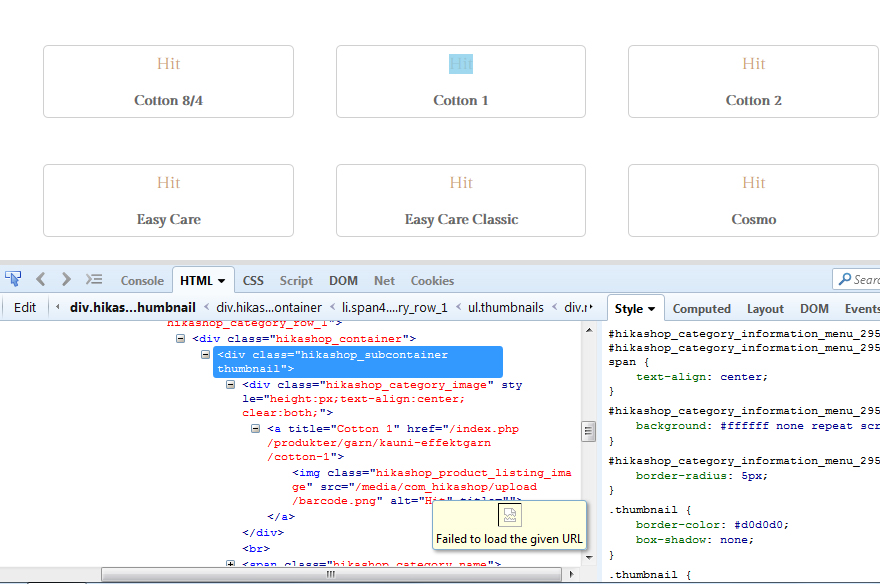
Hello Henrik, using firebug I can see that the code is calling the image, so I dont think is a hikashop problem. In the image you see the error fail to load given URL
You can check Display > Content modules > Parameter for divs > types of item layout.
And same thing for Content menu, where you will also see the same button for the associated module.
You can check Display > Content modules > Parameter for divs > types of item layout.
And same thing for Content menu, where you will also see the same button for the associated module.
The following user(s) said Thank You: Henrik
Please Log in or Create an account to join the conversation.
11 years 1 month ago #212477
by nicolas
Replied by nicolas on topic Error after update
Hi,
1. That link is a categories listing. The images of the products inside the categories display fine. So it would indicate that the category images have been deleted from your web server after adding them to the categories via the interface. Edit your categories via the Products>Categories menu of HikaShop and add the images again to your categories and that should help.
2. Change the "popup mode" setting of the HikaShop configuration to "mootools" that will circumvent the issue with your Joomla template not supporting Joomla 3 popups.
1. That link is a categories listing. The images of the products inside the categories display fine. So it would indicate that the category images have been deleted from your web server after adding them to the categories via the interface. Edit your categories via the Products>Categories menu of HikaShop and add the images again to your categories and that should help.
2. Change the "popup mode" setting of the HikaShop configuration to "mootools" that will circumvent the issue with your Joomla template not supporting Joomla 3 popups.
The following user(s) said Thank You: Henrik
Please Log in or Create an account to join the conversation.
11 years 1 month ago #212483
by Henrik
Thanks
Henrik Ris
Replied by Henrik on topic Error after update
Hello.
Thanks a lot for the help.
I will add pictures in the categories. that works
Now the pop up work in business conditions also, but when I put something in my shopping cart i cant get it to pop up, and if i run my cursor over the menu, after i ha added something in my cart, then the menu disappears?
Thanks
Henrik
Thanks a lot for the help.
I will add pictures in the categories. that works
Now the pop up work in business conditions also, but when I put something in my shopping cart i cant get it to pop up, and if i run my cursor over the menu, after i ha added something in my cart, then the menu disappears?
Thanks
Henrik
Thanks
Henrik Ris
Please Log in or Create an account to join the conversation.

Less
More
- Posts: 12953
- Thank you received: 1778
11 years 1 month ago #212490
by Mohamed Thelji
Replied by Mohamed Thelji on topic Error after update
Hello Henrik,
2. Can you give me more information about it so that I can understand and reproduce that issue ?
Thanks.
1. Did you try it with the "After a product is added to the cart" option set to "Stay and display a popup notice" via "Hikashop->System->Configuration->Main" ? If yes, can you also set the "Use AJAX when possible for add to cart buttons" option to YES ?Now the pop up work in business conditions also, but when I put something in my shopping cart i cant get it to pop up, and if i run my cursor over the menu, after i ha added something in my cart, then the menu disappears?
2. Can you give me more information about it so that I can understand and reproduce that issue ?
Thanks.
Please Log in or Create an account to join the conversation.
11 years 1 month ago #212594
by Henrik
Thanks
Henrik Ris
Replied by Henrik on topic Error after update
Hey
I have tried with your suggestions, but it dont work, when i put products in the cart, it dont popup and the menu disappears when i move the cursor over it?
engensgarnshop.dk/index.php/produkter/ga...66-easy-care?popup=1
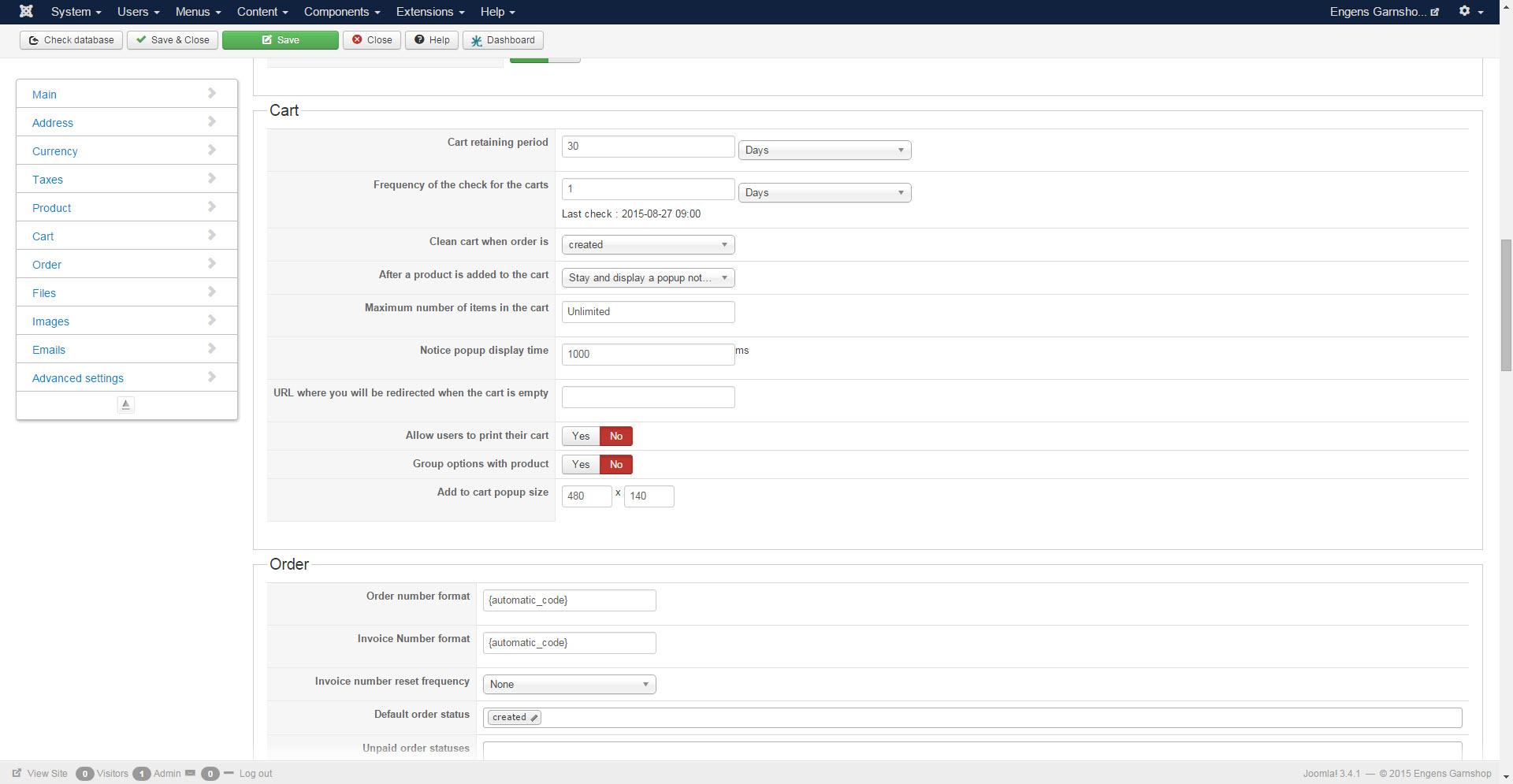
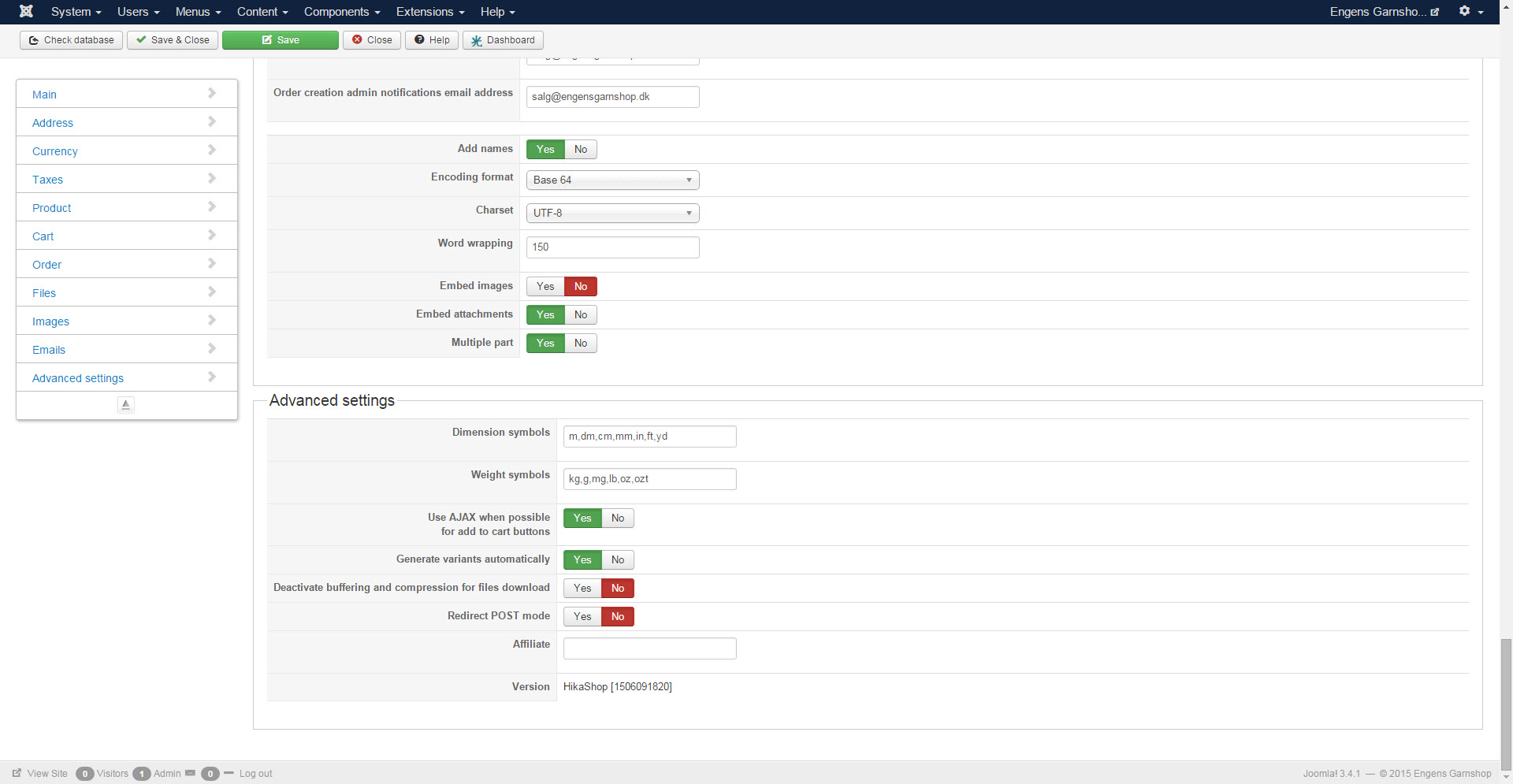
Here you can se the settings in Admin.
Thanks
Henrik
I have tried with your suggestions, but it dont work, when i put products in the cart, it dont popup and the menu disappears when i move the cursor over it?
engensgarnshop.dk/index.php/produkter/ga...66-easy-care?popup=1
Here you can se the settings in Admin.
Thanks
Henrik
Thanks
Henrik Ris
Please Log in or Create an account to join the conversation.
Time to create page: 0.311 seconds