

- Posts: 61
- Thank you received: 0
Error Please enter a username on Simplified registration with password
9 years 8 months ago #260311
by DimLVL
-- HikaShop version -- : 3.0.0
-- Joomla version -- : 3.6.5
-- Error-message(debug-mod must be tuned on) -- : Error
Please enter a username.
Hi!
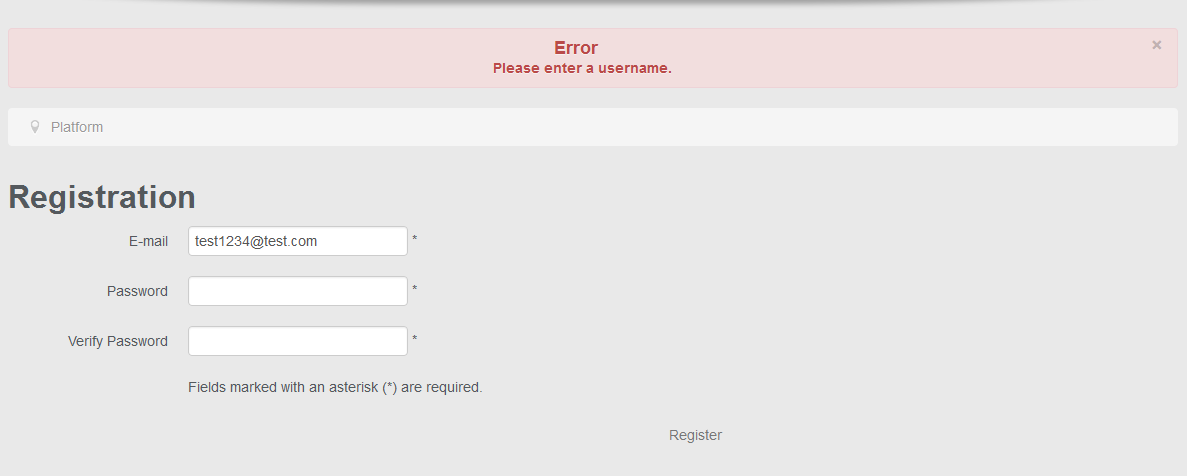
I'm using Simplified registration with password. When I'm trying to register, I see the error message - Error Please enter a username.
Where could be the reason?
-- Joomla version -- : 3.6.5
-- Error-message(debug-mod must be tuned on) -- : Error
Please enter a username.
Hi!
I'm using Simplified registration with password. When I'm trying to register, I see the error message - Error Please enter a username.
Where could be the reason?
Please Log in or Create an account to join the conversation.

9 years 8 months ago #260312
by Jerome
Jerome - Obsidev.com
HikaMarket & HikaSerial developer / HikaShop core dev team.
Replied by Jerome on topic Error Please enter a username on Simplified registration with password
Hi,
We updated the package this yesterday afternoon with a patch for that issue.
Regards,
We updated the package this yesterday afternoon with a patch for that issue.
Regards,
Jerome - Obsidev.com
HikaMarket & HikaSerial developer / HikaShop core dev team.
Please Log in or Create an account to join the conversation.
9 years 8 months ago - 9 years 8 months ago #260346
by DimLVL
Replied by DimLVL on topic Error Please enter a username on Simplified registration with password
Thanks, that problem is solved now.
But my checkout page is not working anymore. all css lost, some fields are missing
The problem appears only if user don't have any billing address. When I'm asking it during registration, all ok. I guess something wrong with my checkout page. it was all ok in Hikashop 2.6.5
Maybe you tell me the way, I have to investigate that problem? What exactly could be changed there?
But my checkout page is not working anymore. all css lost, some fields are missing
The problem appears only if user don't have any billing address. When I'm asking it during registration, all ok. I guess something wrong with my checkout page. it was all ok in Hikashop 2.6.5
Maybe you tell me the way, I have to investigate that problem? What exactly could be changed there?
Last edit: 9 years 8 months ago by DimLVL.
Please Log in or Create an account to join the conversation.

9 years 8 months ago #260355
by nicolas
Replied by nicolas on topic Error Please enter a username on Simplified registration with password
Hi,
I've checked your website but I couldn't find missing CSS or missing fields.
So we would need more details to say anything.
We did update many things in the checkout yesterday. But nothing that should remove fields as far as I know.
I've checked your website but I couldn't find missing CSS or missing fields.
So we would need more details to say anything.
We did update many things in the checkout yesterday. But nothing that should remove fields as far as I know.
Please Log in or Create an account to join the conversation.
9 years 7 months ago #260913
by nicolas
Replied by nicolas on topic Error Please enter a username on Simplified registration with password
Hi,
We got your accesses, but I'm not able to access your backend:
monosnap.com/file/Q111hwuf6pCiGDTeIu8XlONGEi0TaK
Regarding the error with when you access your checkout with a user without a billing address, I can see that you get a fatal error which stops the processing of the page.
There are two things to do:
1. Download again the install package on our website and install it on yours. We've added several patches since last week and one of them might help fix that problem from what I can see.
2. Otherwise, if you still have the problem, turn on the "error reporting" and "debug mode" settings of the HikaShop configuration and try again. That should display an error message on that page which will help us understand what's going on.
We got your accesses, but I'm not able to access your backend:
monosnap.com/file/Q111hwuf6pCiGDTeIu8XlONGEi0TaK
Regarding the error with when you access your checkout with a user without a billing address, I can see that you get a fatal error which stops the processing of the page.
There are two things to do:
1. Download again the install package on our website and install it on yours. We've added several patches since last week and one of them might help fix that problem from what I can see.
2. Otherwise, if you still have the problem, turn on the "error reporting" and "debug mode" settings of the HikaShop configuration and try again. That should display an error message on that page which will help us understand what's going on.
Please Log in or Create an account to join the conversation.
9 years 7 months ago #261001
by DimLVL
Replied by DimLVL on topic Error Please enter a username on Simplified registration with password
Hi! After I update, it's working again. But...
I have a problem with customer's control panel now
gyazo.com/47f7c9c0cafb8486d1951a250625cf80
Besides, when I'm installing updated Hikashop, I see the error message:
gyazo.com/e41910c27581d4b6189bf3925523f2bd
I would appreciate if you could give me further instructions.
I have a problem with customer's control panel now
gyazo.com/47f7c9c0cafb8486d1951a250625cf80
Besides, when I'm installing updated Hikashop, I see the error message:
Code:
Message
The folder path "/home/diz/time4digi.com/../../uploads/time4digi.com/upload/safe/" contains ".." in it and this is not allowed
×
Warning
JFolder::create: Could not create folder.Path: /home/diz/time4digi.com/../../uploads
I would appreciate if you could give me further instructions.
Please Log in or Create an account to join the conversation.
9 years 7 months ago #261006
by nicolas
Replied by nicolas on topic Error Please enter a username on Simplified registration with password
Hi,
1. The issue with the control panel is because you have selected the "custom" frontend CSS in the HikaShop configuration instead of the default one.
So you're using CSS made for the 2.6.4 for HikaShop 3.0.0 and thus it's not compatible.
Try changing it back to default and see if that helps.
2. The upload safe path has to be relative or absolute but cannot contain the .. text (to go up the folder hierarchy) for security reasons. So please make sure you don't do that.
1. The issue with the control panel is because you have selected the "custom" frontend CSS in the HikaShop configuration instead of the default one.
So you're using CSS made for the 2.6.4 for HikaShop 3.0.0 and thus it's not compatible.
Try changing it back to default and see if that helps.
2. The upload safe path has to be relative or absolute but cannot contain the .. text (to go up the folder hierarchy) for security reasons. So please make sure you don't do that.
Please Log in or Create an account to join the conversation.
9 years 7 months ago #261861
by DimLVL
Replied by DimLVL on topic Error Please enter a username on Simplified registration with password
Thanks for advice.
Just today updated Hikashop again, and now when I'm going to Products -> Products menu, I see
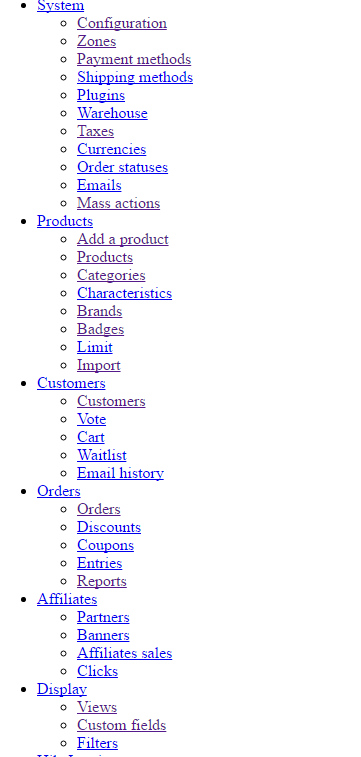
Just today updated Hikashop again, and now when I'm going to Products -> Products menu, I see
Please Log in or Create an account to join the conversation.
9 years 7 months ago #261868
by Jerome
Jerome - Obsidev.com
HikaMarket & HikaSerial developer / HikaShop core dev team.
Replied by Jerome on topic Error Please enter a username on Simplified registration with password
Hi,
It indicates that you have a PHP fatal error in the page.
As usual, please take a look at your PHP error log file in order to get the full error message and the corresponding file and line.
You can also set temporally the "error reporting level" to "maximum" in your Joomla global configuration in ordre to see the message directly in the web page.
Regards,
It indicates that you have a PHP fatal error in the page.
As usual, please take a look at your PHP error log file in order to get the full error message and the corresponding file and line.
You can also set temporally the "error reporting level" to "maximum" in your Joomla global configuration in ordre to see the message directly in the web page.
Regards,
Jerome - Obsidev.com
HikaMarket & HikaSerial developer / HikaShop core dev team.
Please Log in or Create an account to join the conversation.
9 years 5 months ago - 9 years 5 months ago #267883
by DimLVL
Replied by DimLVL on topic Error Please enter a username on Simplified registration with password
Hi! I was on a long vocation but the problem still persist
The error message is
Besides I can't open Configuration -> Taxes page
As I understand, it's a problem because of hikainvoices extention. It was not updated since 2.x hikashop. Should I update it, right?
but the problem still persist The error message is
Code:
Fatal error: Class 'hikashopItem' not found in ....site.com/administrator/components/com_hikainvoices/types/product_taxcategory.php on line 30
Code:
Fatal error: Class 'hikashoptext' not found in ....site.com/administrator/components/com_hikainvoices/helpers/helper.php on line 966
Last edit: 9 years 5 months ago by DimLVL.
Please Log in or Create an account to join the conversation.
9 years 5 months ago #267885
by Jerome
Jerome - Obsidev.com
HikaMarket & HikaSerial developer / HikaShop core dev team.
Replied by Jerome on topic Error Please enter a username on Simplified registration with password
Hello,
The problem is located in "HikaInvoices" an add-on made by a partner / third party.
Please check that you're up to date with that component because some modifications in the HikaShop 3 core affect the classnames of the custom fields.
So "hikashopItem" does not exist anymore in HikaShop 3 and has been rename "hikashopFieldItem".
As for "hikashopText" which is now "hikashopFieldText".
Regards,
The problem is located in "HikaInvoices" an add-on made by a partner / third party.
Please check that you're up to date with that component because some modifications in the HikaShop 3 core affect the classnames of the custom fields.
So "hikashopItem" does not exist anymore in HikaShop 3 and has been rename "hikashopFieldItem".
As for "hikashopText" which is now "hikashopFieldText".
Regards,
Jerome - Obsidev.com
HikaMarket & HikaSerial developer / HikaShop core dev team.
Please Log in or Create an account to join the conversation.
Time to create page: 0.233 seconds