
- Posts: 11
- Thank you received: 0
No Hika option when I create a new menu item 'category listing'
- henk de kip
-
 Topic Author
- Offline
Less
More
9 years 5 months ago #268272
by henk de kip
-- HikaShop version -- : 3.0.1
-- Joomla version -- : 3.7.0
Today I updated Joomla to 3.7.0.
I dont get the 'Hika option' anymore when I create a new menu item 'category listing'. So I can't connect my Hikashop categories to the menu.
Please an answer. Is this a bug? and is it possible to fix it or do I do something wrong.
Thanks
-- Joomla version -- : 3.7.0
Today I updated Joomla to 3.7.0.
I dont get the 'Hika option' anymore when I create a new menu item 'category listing'. So I can't connect my Hikashop categories to the menu.
Please an answer. Is this a bug? and is it possible to fix it or do I do something wrong.
Thanks
Please Log in or Create an account to join the conversation.

9 years 5 months ago #268273
by Jerome
Jerome - Obsidev.com
HikaMarket & HikaSerial developer / HikaShop core dev team.
Replied by Jerome on topic No Hika option when I create a new menu item 'category listing'
Hello,
I'm not able to reproduce your issue in my test websites.
Can you please take a look at your browser console log in order to see if you have some javascript errors ?
Regards,
I'm not able to reproduce your issue in my test websites.
Can you please take a look at your browser console log in order to see if you have some javascript errors ?
Regards,
Jerome - Obsidev.com
HikaMarket & HikaSerial developer / HikaShop core dev team.
Please Log in or Create an account to join the conversation.
- henk de kip
-
Topic Author
- Offline
Less
More
- Posts: 11
- Thank you received: 0
9 years 5 months ago #268345
by henk de kip
Replied by henk de kip on topic No Hika option when I create a new menu item 'category listing'
I've got this...
JQMIGRATE: Migrate is installed, version 1.4.1 jquery-migrate.min.js:2:542
Lege string doorgegeven aan getElementById(). jquery.min.
JQMIGRATE: Migrate is installed, version 1.4.1 jquery-migrate.min.js:2:542
Lege string doorgegeven aan getElementById(). jquery.min.
Please Log in or Create an account to join the conversation.
- henk de kip
-
Topic Author
- Offline
Less
More
- Posts: 11
- Thank you received: 0
9 years 5 months ago - 9 years 5 months ago #268346
by henk de kip
Replied by henk de kip on topic No Hika option when I create a new menu item 'category listing'
I've got this...
Lege string doorgegeven aan getElementById(). jquery.min.js:2:24932
Lege string doorgegeven aan getElementById(). jquery.min.js:2:24932
Last edit: 9 years 5 months ago by henk de kip.
Please Log in or Create an account to join the conversation.
- henk de kip
-
Topic Author
- Offline
Less
More
- Posts: 11
- Thank you received: 0
9 years 5 months ago #268347
by henk de kip
Replied by henk de kip on topic No Hika option when I create a new menu item 'category listing'
Okay, don't know if this fixed my issue but I updated JCE System Plugin and now it works again.
Thanks anyway for your help.
Thanks anyway for your help.
Please Log in or Create an account to join the conversation.

9 years 5 months ago #268436
by Webdexter
Replied by Webdexter on topic No Hika option when I create a new menu item 'category listing'
We still have this issue and it is not related to JCE in our case. We need some help because using a back-up is not an issue. We use also Joomla 3.7x and HikaShop 3.0.1
Please Log in or Create an account to join the conversation.
9 years 5 months ago - 9 years 5 months ago #268470
by syno
Replied by syno on topic No Hika option when I create a new menu item 'category listing'
Hello,
I have the same problem since upgrading to Joomla 3.7. JCE is latest and I also tried to disable JCE completely. The Browser console gives the following info when creating a new menuitem:
Please help!
I have the same problem since upgrading to Joomla 3.7. JCE is latest and I also tried to disable JCE completely. The Browser console gives the following info when creating a new menuitem:
Code:
Uncaught Error: cannot call methods on tooltip prior to initialization; attempted to call method 'destroy'
at Function.error (/media/jui/js/jquery.min.js?359a2698091beaad6c48e6f404defdd2:2:1814)
at HTMLInputElement.<anonymous> (/media/com_hikashop/js/jquery-ui.min.js:12:6122)
at Function.each (media/jui/js/jquery.min.js?359a2698091beaad6c48e6f404defdd2:2:2881)
at a.fn.init.each (/media/jui/js/jquery.min.js?359a2698091beaad6c48e6f404defdd2:2:846)
at a.fn.init.t.fn.(anonymous function) [as tooltip] (/media/com_hikashop/js/jquery-ui.min.js:12:5897)
at a.fieldMedia.updatePreview (/media/media/js/mediafield.min.js?359a2698091beaad6c48e6f404defdd2:1:3559)
at new a.fieldMedia (/media/media/js/mediafield.min.js?359a2698091beaad6c48e6f404defdd2:1:2026)
at HTMLDivElement.<anonymous> (/media/media/js/mediafield.min.js?359a2698091beaad6c48e6f404defdd2:1:4383)
at Function.each (/media/jui/js/jquery.min.js?359a2698091beaad6c48e6f404defdd2:2:2881)
at a.fn.init.each (/media/jui/js/jquery.min.js?359a2698091beaad6c48e6f404defdd2:2:846)
error @ jquery.min.js?359a269…:2
(anonymous) @ jquery-ui.min.js:12
each @ jquery.min.js?359a269…:2
each @ jquery.min.js?359a269…:2
t.fn.(anonymous function) @ jquery-ui.min.js:12
a.fieldMedia.updatePreview @ mediafield.min.js?359a269…:1
a.fieldMedia @ mediafield.min.js?359a269…:1
(anonymous) @ mediafield.min.js?359a269…:1
each @ jquery.min.js?359a269…:2
each @ jquery.min.js?359a269…:2
a.fn.fieldMedia @ mediafield.min.js?359a269…:1
(anonymous) @ mediafield.min.js?359a269…:1
i @ jquery.min.js?359a269…:2
fireWith @ jquery.min.js?359a269…:2
ready @ jquery.min.js?359a269…:2
K @ jquery.min.js?359a269…:2
Please help!
Last edit: 9 years 5 months ago by Jerome. Reason: [cite] tag does not exist...
Please Log in or Create an account to join the conversation.

9 years 5 months ago #268527
by nicolas
Replied by nicolas on topic No Hika option when I create a new menu item 'category listing'
Hi,
I've tried with Joomla 3.7 with the latest version of HikaShop and with and without the latest version of JCE and it works regardless.
Open the file media/com_hikashop/js/jquery-ui.min.js and make sure that you have:
/*! jQuery UI - v1.12.1 - 2017-02-26
on the first line.
If you have a different text, it means that Joomla couldn't update the file during the update due to permissions on the files.
So change the permissions to allow Joomla to update them, install the 3.0.1 install package from our website on yours again and it should then work.
If you have that text and it still doesn't work, try with another browser. It's possible that the issue is just that you have the old js file cached by your browser instead of the new one and thus clearing the cache on your browser should make it work properly.
I don't see any other reasons.
I've tried with Joomla 3.7 with the latest version of HikaShop and with and without the latest version of JCE and it works regardless.
Open the file media/com_hikashop/js/jquery-ui.min.js and make sure that you have:
/*! jQuery UI - v1.12.1 - 2017-02-26
on the first line.
If you have a different text, it means that Joomla couldn't update the file during the update due to permissions on the files.
So change the permissions to allow Joomla to update them, install the 3.0.1 install package from our website on yours again and it should then work.
If you have that text and it still doesn't work, try with another browser. It's possible that the issue is just that you have the old js file cached by your browser instead of the new one and thus clearing the cache on your browser should make it work properly.
I don't see any other reasons.
Please Log in or Create an account to join the conversation.
9 years 4 months ago #269498
by syno
Replied by syno on topic No Hika option when I create a new menu item 'category listing'
Hello Nicolas,
thank you for your answer.
Unfortunately our subscription expired and we only have the possibility to reinstall 2.6.4 . Installing 2.6.4 downgrades jqueryUI to 1.10 again!
I tried to upgrade jqueryUI manually but I could not test if it works because I got another issue after installing 2.6.4 again. Please check the screenshot:
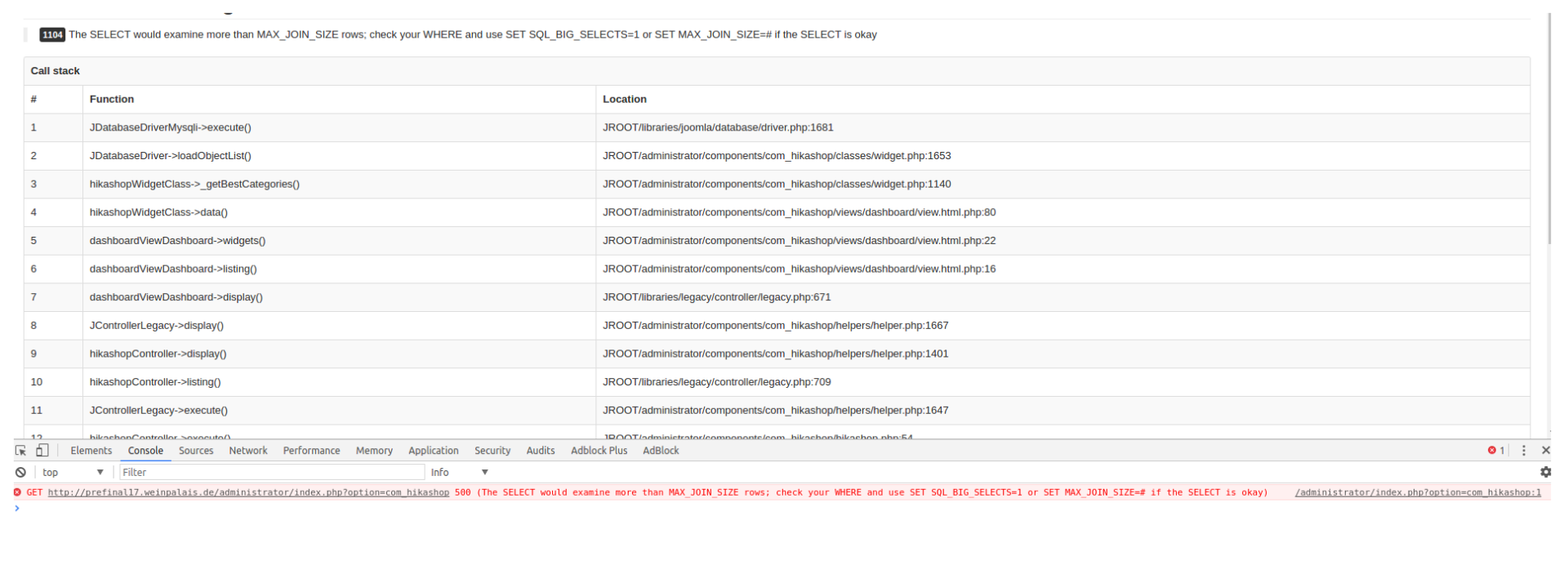
So what to do next? Is it possible to use 2.6.4 on Joomla 3.7? Or do wee need to purchase a subscription?
Thank you for your help!
thank you for your answer.
Unfortunately our subscription expired and we only have the possibility to reinstall 2.6.4 . Installing 2.6.4 downgrades jqueryUI to 1.10 again!
I tried to upgrade jqueryUI manually but I could not test if it works because I got another issue after installing 2.6.4 again. Please check the screenshot:
So what to do next? Is it possible to use 2.6.4 on Joomla 3.7? Or do wee need to purchase a subscription?
Thank you for your help!
Please Log in or Create an account to join the conversation.
9 years 4 months ago #269511
by nicolas
Replied by nicolas on topic No Hika option when I create a new menu item 'category listing'
Hi,
HikaShop 2.6.4 has not been made to be compatible with Joomla 3.7 since Joomla 3.7 didn't exist when it was released.
That's why you get that error. Update to HikaShop 3.0.1 and it will work.
If your subscription expired, you can go in the menu My account>My susbcriptions on our website and click on the renew link there to renew your subscription. Once renewed, download the install package and install it on your website and it will fix the problem.
Note however that if you customized HikaShop, you might have some issues after the update as HikaShop 3 bring a lot of improvements and changes. So make sure that you first try on a copy of your website so that you can check that everything is still working after the update.
HikaShop 2.6.4 has not been made to be compatible with Joomla 3.7 since Joomla 3.7 didn't exist when it was released.
That's why you get that error. Update to HikaShop 3.0.1 and it will work.
If your subscription expired, you can go in the menu My account>My susbcriptions on our website and click on the renew link there to renew your subscription. Once renewed, download the install package and install it on your website and it will fix the problem.
Note however that if you customized HikaShop, you might have some issues after the update as HikaShop 3 bring a lot of improvements and changes. So make sure that you first try on a copy of your website so that you can check that everything is still working after the update.
Please Log in or Create an account to join the conversation.
Time to create page: 0.235 seconds