
- Posts: 8
- Thank you received: 0
adding to the cart I would like to have a pop-up window...
- Barszczewski
-
 Topic Author
- Offline
Less
More
8 years 6 months ago #289383
by Barszczewski
-- url of the page with the problem -- :
zbieramyrazem.org/sklep.html
-- HikaShop version -- : 3.3.0
-- Joomla version -- : 3.8.5
-- PHP version -- : 7.0.5
-- Browser(s) name and version -- : chrome
I warmly welcome.
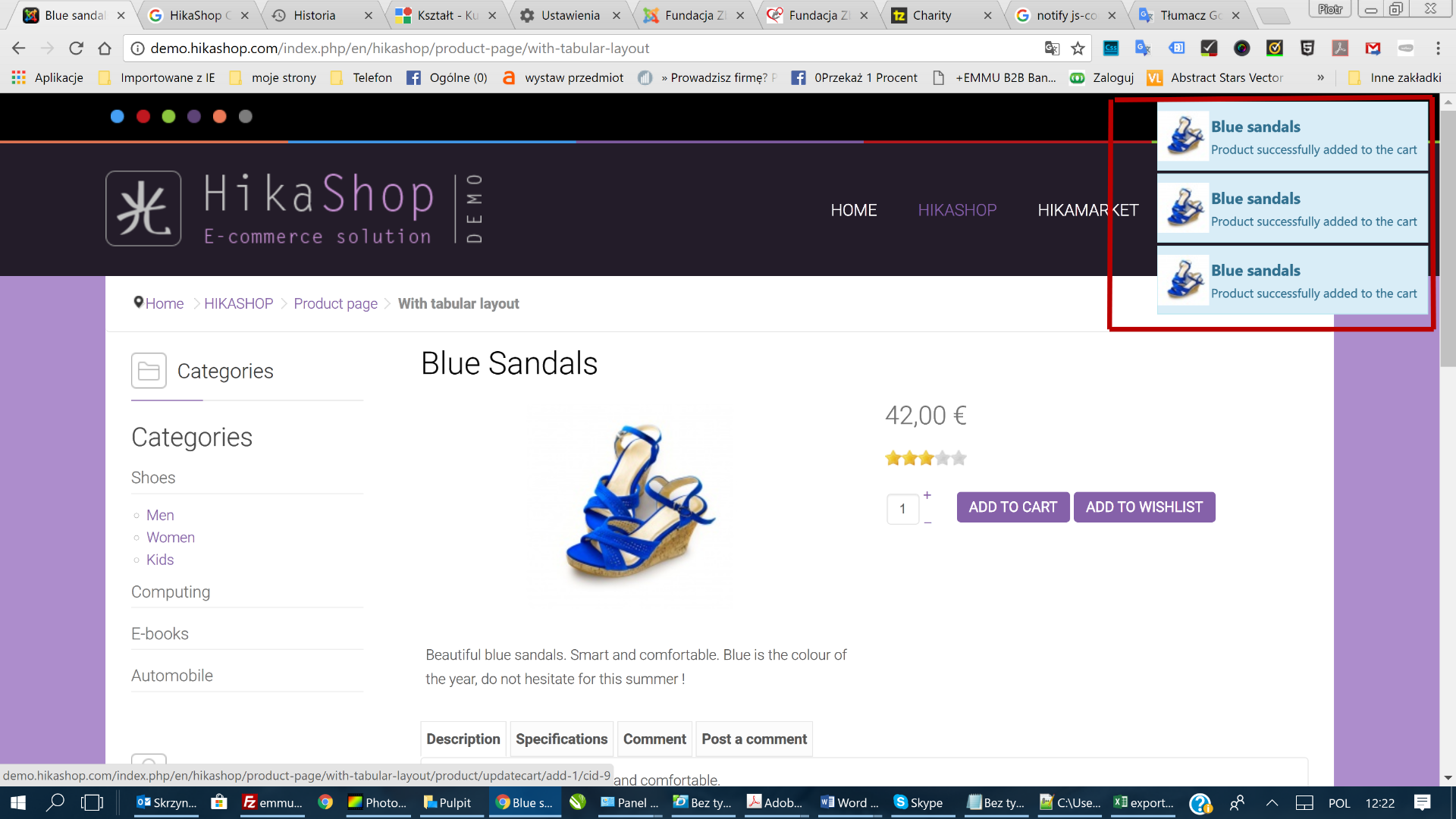
When adding to the cart I would like to have a pop-up window like in the picture.
I do not know how to set it.
Regards.
-- HikaShop version -- : 3.3.0
-- Joomla version -- : 3.8.5
-- PHP version -- : 7.0.5
-- Browser(s) name and version -- : chrome
I warmly welcome.
When adding to the cart I would like to have a pop-up window like in the picture.
I do not know how to set it.
Regards.
Please Log in or Create an account to join the conversation.

8 years 6 months ago #289384
by lousyfool
Need help with customisations of layouts, style or other site development? PM me!
(Don't forget to turn on "E-mail notification of new messages" )
Replied by lousyfool on topic adding to the cart I would like to have a pop-up window...
Hi,
In the Joomla backend -> Extensions -> Plugins look for the "HikaShop Add to Cart notification Plugin".
Make sure it's enabled and configured to your liking.
In the Joomla backend -> Extensions -> Plugins look for the "HikaShop Add to Cart notification Plugin".
Make sure it's enabled and configured to your liking.
Need help with customisations of layouts, style or other site development? PM me!
(Don't forget to turn on "E-mail notification of new messages" )
The following user(s) said Thank You: Jerome
Please Log in or Create an account to join the conversation.
- Barszczewski
-
Topic Author
- Offline
Less
More
- Posts: 8
- Thank you received: 0
8 years 6 months ago #289388
by Barszczewski
Replied by Barszczewski on topic adding to the cart I would like to have a pop-up window...
Turned on and does not work. If it were easy, I would not write 
other ideas.
Piotr
other ideas.
Piotr
Please Log in or Create an account to join the conversation.

8 years 6 months ago #289392
by Jerome
Jerome - Obsidev.com
HikaMarket & HikaSerial developer / HikaShop core dev team.
Replied by Jerome on topic adding to the cart I would like to have a pop-up window...
Hello,
The thing is, you're use the "legacy" add to cart system.
The plugin is only working when you're using the new add to cart system (added in HikaShop 3.0).
www.hikashop.com/support/documentation/5...html#advanced_legacy
www.hikashop.com/home/blog/357-hikashop-3-0-beta.html
Regards,
The thing is, you're use the "legacy" add to cart system.
The plugin is only working when you're using the new add to cart system (added in HikaShop 3.0).
www.hikashop.com/support/documentation/5...html#advanced_legacy
www.hikashop.com/home/blog/357-hikashop-3-0-beta.html
Regards,
Jerome - Obsidev.com
HikaMarket & HikaSerial developer / HikaShop core dev team.
Please Log in or Create an account to join the conversation.
- Barszczewski
-
Topic Author
- Offline
Less
More
- Posts: 8
- Thank you received: 0
8 years 6 months ago #289446
by Barszczewski
Replied by Barszczewski on topic adding to the cart I would like to have a pop-up window...
Welcome.
That's right. Only how to solve the problem. Awarding "Add to cart legacy" causes that the cart does not work. The product can not be added.
Should I uninstall hikashop and install it again?
Piotr
That's right. Only how to solve the problem. Awarding "Add to cart legacy" causes that the cart does not work. The product can not be added.
Should I uninstall hikashop and install it again?
Piotr
Please Log in or Create an account to join the conversation.

8 years 6 months ago #289459
by nicolas
Replied by nicolas on topic adding to the cart I would like to have a pop-up window...
Hi,
You want to have the "add to cart legacy" setting activated. Then, the plugin should display the popup notifications like on our demo website.
If you have an issue with the add to cart buttons not working that way, then there must be some issue with your template and the way it customizes the view displaying the add to cart.
In that case, switch temporarily to the default template of Joomla and see if that helps. If so, then you'll have to rename some of the files in templates/YOUR_TEMPLATE/html/com_hikashop/product/ to make it work. You can rename them one by one to find out which one(s) are creating the problem.
You want to have the "add to cart legacy" setting activated. Then, the plugin should display the popup notifications like on our demo website.
If you have an issue with the add to cart buttons not working that way, then there must be some issue with your template and the way it customizes the view displaying the add to cart.
In that case, switch temporarily to the default template of Joomla and see if that helps. If so, then you'll have to rename some of the files in templates/YOUR_TEMPLATE/html/com_hikashop/product/ to make it work. You can rename them one by one to find out which one(s) are creating the problem.
Please Log in or Create an account to join the conversation.
- Barszczewski
-
Topic Author
- Offline
Less
More
- Posts: 8
- Thank you received: 0
8 years 6 months ago #289509
by Barszczewski
Replied by Barszczewski on topic adding to the cart I would like to have a pop-up window...
hi,
I changed the templates and does not work.
As you have noticed, the website is on the template "templaza" tz_charity recommended by you.
Any other ideas?
Piotr
I changed the templates and does not work.
As you have noticed, the website is on the template "templaza" tz_charity recommended by you.
Any other ideas?
Piotr
Please Log in or Create an account to join the conversation.
8 years 6 months ago #289512
by Jerome
Jerome - Obsidev.com
HikaMarket & HikaSerial developer / HikaShop core dev team.
Replied by Jerome on topic adding to the cart I would like to have a pop-up window...
Hello,
CF : www.hikashop.com/download/templates-for-hikashop.html
Since we can't see your website with another template or with the non legacy add to cart system ; I'm afraid that it will be difficult for our support to continue on the investigation.
In order to have other ideas we need to "see" the problem.
Unfortunately, "and does not work" do not provide us the necessary elements to understand what is going on.
Regards,
CF : www.hikashop.com/download/templates-for-hikashop.html
HikaShop is compatible with any Joomla template, and you'll find thousands of them with a search engine.
Then, some template providers developed Joomla templates with additional styling specifically for our e-commerce solution.
These joomla templates optimized for HikaShop are listed below.
That way you can install a Joomla theme and have your HikaShop directly styled to fit the global template.
That page is just a listing of templates we know were made for HikaShop.
Since we can't see your website with another template or with the non legacy add to cart system ; I'm afraid that it will be difficult for our support to continue on the investigation.
In order to have other ideas we need to "see" the problem.
Unfortunately, "and does not work" do not provide us the necessary elements to understand what is going on.
Regards,
Jerome - Obsidev.com
HikaMarket & HikaSerial developer / HikaShop core dev team.
Please Log in or Create an account to join the conversation.
- Barszczewski
-
Topic Author
- Offline
Less
More
- Posts: 8
- Thank you received: 0
8 years 6 months ago - 8 years 6 months ago #289569
by Barszczewski
Replied by Barszczewski on topic adding to the cart I would like to have a pop-up window...
[strike]As you wrote, I changed the settings to Joomla standard templates and the pop-up window does not work. You wrote that this is due to the fact that hikashop was updated from an older version that did not support the function. And so it is.
How to do to solve this problem or uninstalling the current version of hikashop and reinstalling it will fix the problem?[/strike]
100% this file "quantity.php" causes problems. my level of php knowledge is weak, I do not know where the error is. Please help me attach the entire php code of the file.
How to do to solve this problem or uninstalling the current version of hikashop and reinstalling it will fix the problem?[/strike]
100% this file "quantity.php" causes problems. my level of php knowledge is weak, I do not know where the error is. Please help me attach the entire php code of the file.
Code:
code removed. Please be sure that the support team have access to the HikaShop source code
Last edit: 8 years 6 months ago by Jerome.
Please Log in or Create an account to join the conversation.
8 years 6 months ago #289570
by nicolas
Replied by nicolas on topic adding to the cart I would like to have a pop-up window...
Hi,
Reinstalling won't work.
You're saying that even with the default template of Joomla and the "add to cart legacy" setting deactivated, you don't get the notification boxes with the new add to cart buttons ?
I don't see how that's possible.
Please provide a link to a page where we can see that in order to understand the situation.
Reinstalling won't work.
You're saying that even with the default template of Joomla and the "add to cart legacy" setting deactivated, you don't get the notification boxes with the new add to cart buttons ?
I don't see how that's possible.
Please provide a link to a page where we can see that in order to understand the situation.
Please Log in or Create an account to join the conversation.
- Barszczewski
-
Topic Author
- Offline
Less
More
- Posts: 8
- Thank you received: 0
8 years 6 months ago #289600
by Barszczewski
Replied by Barszczewski on topic adding to the cart I would like to have a pop-up window...
Hello.
The popup window works on standard Joomla templates. It helped uninstalling the plugin and reinstalling Hikashop. But it still does not work on the Tz_charity template which is the default for my website.
I discovered the reason is the quantity.php file included in my template. I do not know how to fix it because my knowledge of php is poor.
zbieramyrazem.org/sklep/product/174-chwila-rado%C5%9Bci.html#
in the attachment file I changed only the distinction to .txt
Piotr
The popup window works on standard Joomla templates. It helped uninstalling the plugin and reinstalling Hikashop. But it still does not work on the Tz_charity template which is the default for my website.
I discovered the reason is the quantity.php file included in my template. I do not know how to fix it because my knowledge of php is poor.
zbieramyrazem.org/sklep/product/174-chwila-rado%C5%9Bci.html#
in the attachment file I changed only the distinction to .txt
Piotr
This attachment is hidden for guests.
Please log in or register to see it.
Please log in or register to see it.
Please Log in or Create an account to join the conversation.
8 years 6 months ago #289607
by nicolas
Replied by nicolas on topic adding to the cart I would like to have a pop-up window...
Hi,
That's a really old quantity.php file from the 2.6.0
I would recommend to just rename that file in your template to remove the override on it so that you use the default view of HikaShop.
Otherwise, I'm afraid you'll have to contact your template provider so that they can update their template view override to the new version of it from the HikaShop 3.x series.
That's a really old quantity.php file from the 2.6.0
I would recommend to just rename that file in your template to remove the override on it so that you use the default view of HikaShop.
Otherwise, I'm afraid you'll have to contact your template provider so that they can update their template view override to the new version of it from the HikaShop 3.x series.
The following user(s) said Thank You: Barszczewski
Please Log in or Create an account to join the conversation.
Time to create page: 0.221 seconds