
- Posts: 5
- Thank you received: 0
problem with box quantity
- kiriakos83
-
 Topic Author
- Offline
Less
More
8 years 6 months ago #290029
by kiriakos83
problem with box quantity was created by kiriakos83
-- url of the page with the problem -- : shop.petratoskefallonia.com
how can I increase the size of the box quantity
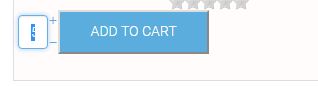
how can I increase the size of the box quantity
Please Log in or Create an account to join the conversation.

8 years 6 months ago #290031
by lousyfool
Need help with customisations of layouts, style or other site development? PM me!
(Don't forget to turn on "E-mail notification of new messages" )
Replied by lousyfool on topic problem with box quantity
Hi,
Please see www.hikashop.com/forum/product-category-...ntity-box-width.html
And in the documentation:
www.hikashop.com/support/documentation/1...the-display.html#css
www.hikashop.com/support/documentation/84-css-styling.html
Please see www.hikashop.com/forum/product-category-...ntity-box-width.html
And in the documentation:
www.hikashop.com/support/documentation/1...the-display.html#css
www.hikashop.com/support/documentation/84-css-styling.html
Need help with customisations of layouts, style or other site development? PM me!
(Don't forget to turn on "E-mail notification of new messages" )
Please Log in or Create an account to join the conversation.
- kiriakos83
-
Topic Author
- Offline
Less
More
- Posts: 5
- Thank you received: 0
8 years 6 months ago #290083
by kiriakos83
Replied by kiriakos83 on topic problem with box quantity
The problem continues and the button as you can see I can not put it in the middle while I set it
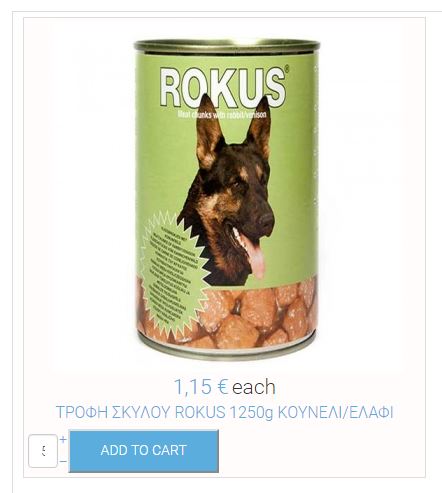
there is some other way to bring them to the middle and the quantity of the product to look better
there is some other way to bring them to the middle and the quantity of the product to look better
Please Log in or Create an account to join the conversation.

8 years 6 months ago #290106
by nicolas
Replied by nicolas on topic problem with box quantity
Hi,
The issue comes from the padding added by the CSS of your template.
You can potentially increase the width of the input with such CSS:
input.hikashop_product_quantity_field {
width: 45px !important;
}
You can add it as explained here:
www.hikashop.com/support/documentation/1...ize-the-display.html
Also, regarding the centering, the issue is that you're using the "image and description" layout in your menu item instead of "image and title" and your thumbnail size is too big.
You can change that under the "product options" tab of your menu item in the Joomla menu manager.
The issue comes from the padding added by the CSS of your template.
You can potentially increase the width of the input with such CSS:
input.hikashop_product_quantity_field {
width: 45px !important;
}
You can add it as explained here:
www.hikashop.com/support/documentation/1...ize-the-display.html
Also, regarding the centering, the issue is that you're using the "image and description" layout in your menu item instead of "image and title" and your thumbnail size is too big.
You can change that under the "product options" tab of your menu item in the Joomla menu manager.
Please Log in or Create an account to join the conversation.
- kiriakos83
-
Topic Author
- Offline
Less
More
- Posts: 5
- Thank you received: 0
8 years 6 months ago #290155
by kiriakos83
Replied by kiriakos83 on topic problem with box quantity
there is a way to put the button in the center of the box product?
Please Log in or Create an account to join the conversation.
8 years 6 months ago #290164
by nicolas
Replied by nicolas on topic problem with box quantity
Hi,
Sure. You can simply use such CSS on your website:
.hikashop_products_listing .hikashop_product_stock{
margin: auto;
width: 50%;
}
Sure. You can simply use such CSS on your website:
.hikashop_products_listing .hikashop_product_stock{
margin: auto;
width: 50%;
}
Please Log in or Create an account to join the conversation.
Time to create page: 0.179 seconds