

- Posts: 127
- Thank you received: 6
Move existing image directory
7 years 9 months ago #301423
by Bobwales
Move existing image directory was created by Bobwales
-- HikaShop version -- : 4.01
-- Joomla version -- : 3.6.5
-- PHP version -- : 7
Hi
I've noticed that Hikashop have changed the image directory to allow better access for Google to discover.
Is there an easy way to update product images?
I have copied the existing images (hundreds) from media/com_hikashop/upload to templates/template/images/com_hikashop/upload
When I change the directory in configuration settings the product images path are not updated.
It would be nice not to edit every product! And the SEO of having images indexed by Google would be very useful.
Hope you can help.
KR, Bob
-- Joomla version -- : 3.6.5
-- PHP version -- : 7
Hi
I've noticed that Hikashop have changed the image directory to allow better access for Google to discover.
Is there an easy way to update product images?
I have copied the existing images (hundreds) from media/com_hikashop/upload to templates/template/images/com_hikashop/upload
When I change the directory in configuration settings the product images path are not updated.
It would be nice not to edit every product! And the SEO of having images indexed by Google would be very useful.
Hope you can help.
KR, Bob
Please Log in or Create an account to join the conversation.

7 years 9 months ago #301434
by nicolas
Replied by nicolas on topic Move existing image directory
Hi,
PHP scripts are limited by your php.ini in memory limit and in processing time.
Because of these limits, we avoid as much as possible to do intensive processing in order to avoid fatal errors and crashes generated by these limits.
Moving all the images of all the products at once is a process which could do that if we were to do it.
So when you change the folder in the HikaShop configuration, it's up to you to move the files from the old folder to the new one via FTP or your cpanel or the SSH of your server.
You don't have to edit each product. Just move the files as explained above.
PHP scripts are limited by your php.ini in memory limit and in processing time.
Because of these limits, we avoid as much as possible to do intensive processing in order to avoid fatal errors and crashes generated by these limits.
Moving all the images of all the products at once is a process which could do that if we were to do it.
So when you change the folder in the HikaShop configuration, it's up to you to move the files from the old folder to the new one via FTP or your cpanel or the SSH of your server.
You don't have to edit each product. Just move the files as explained above.
Please Log in or Create an account to join the conversation.
7 years 9 months ago #301471
by Bobwales
Replied by Bobwales on topic Move existing image directory
Thank you Nicolas - I did try that, moving first by FTP.
Perhaps I did something daft. I will try again.
So, you say the directory part is not saved with the image file name, but is saved in the configuration.
Perhaps I did something daft. I will try again.
So, you say the directory part is not saved with the image file name, but is saved in the configuration.
Please Log in or Create an account to join the conversation.
7 years 9 months ago - 7 years 9 months ago #301500
by Bobwales
Replied by Bobwales on topic Move existing image directory
Weird - I confirm the images are now at the location in Configuration setting...
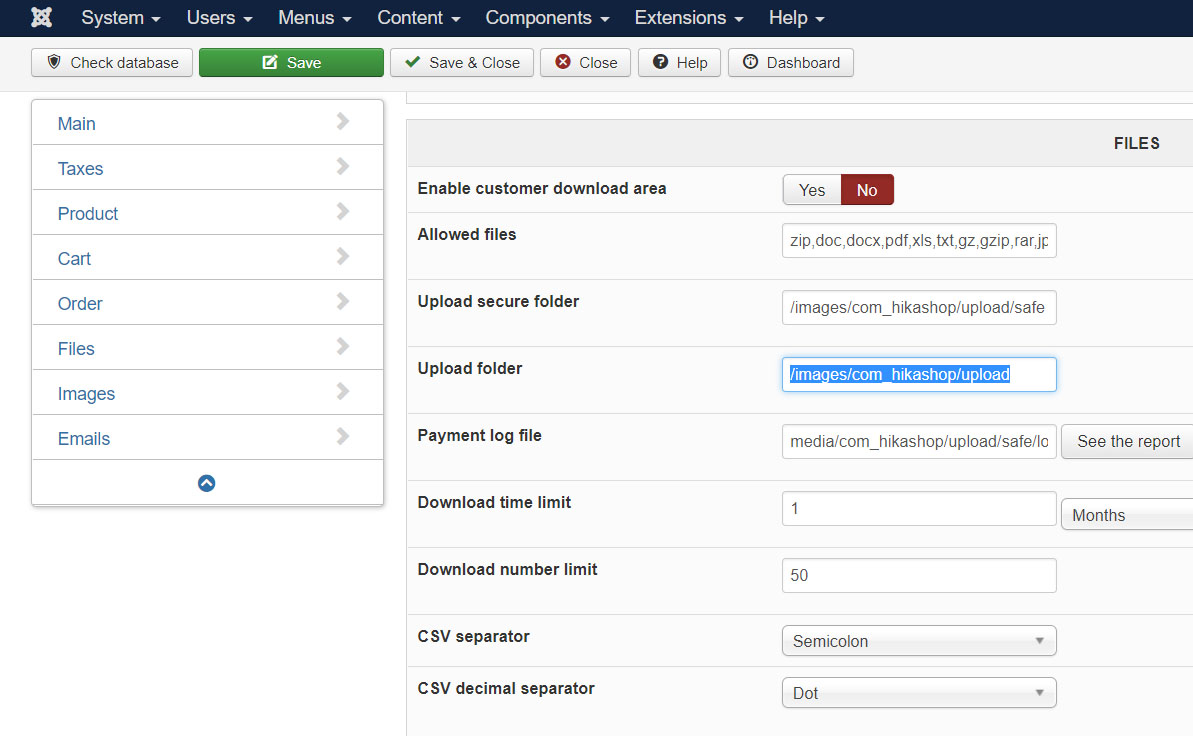
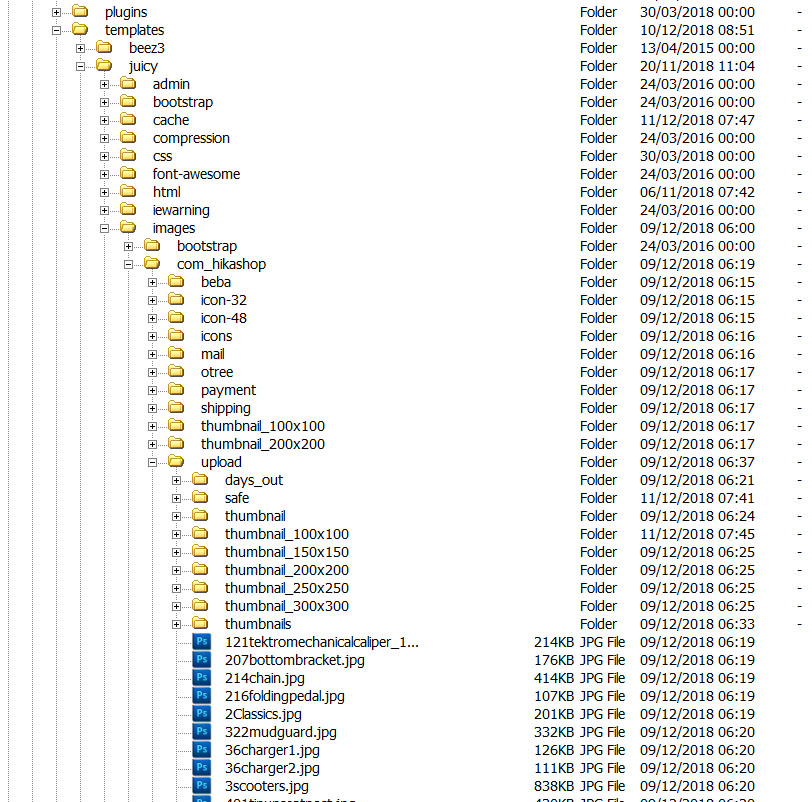
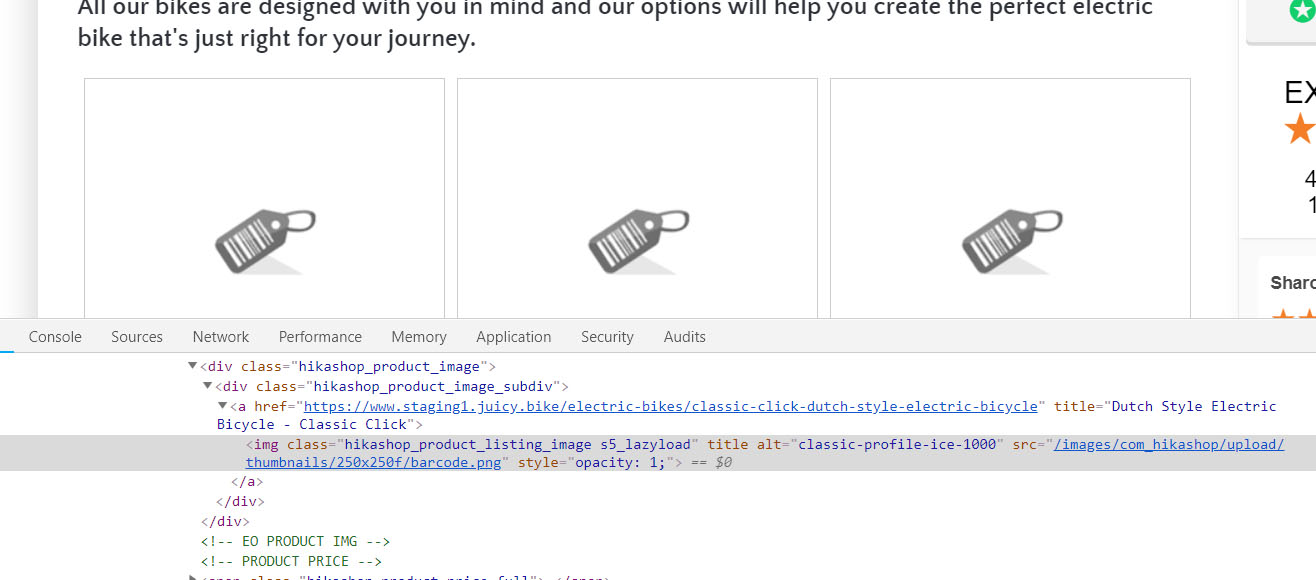
But when I inspect I just see the default image...
Confused!
But when I inspect I just see the default image...
Confused!
Last edit: 7 years 9 months ago by Bobwales.
Please Log in or Create an account to join the conversation.
7 years 9 months ago #301502
by nicolas
Replied by nicolas on topic Move existing image directory
Hi,
1. Yes. Only the relative path is stored.
If your product image is stored in images/com_hikashop/upload/myfolder/myimage.jpg and supposing you have images/com_hikashop/upload in the HikaShop configuration, you'll have only myfolder/myimage.jpg in the database. That way, you can easily move the whole folder structure to the new place after or before you change the setting.
2. You stored the images in the folder templates/juicy/images/com_hikashop/upload/ but you entered the path images/com_hikashop/upload/ instead in the configuration. That's why HikaShop can't find the images. Enter the correct path and it will work.
1. Yes. Only the relative path is stored.
If your product image is stored in images/com_hikashop/upload/myfolder/myimage.jpg and supposing you have images/com_hikashop/upload in the HikaShop configuration, you'll have only myfolder/myimage.jpg in the database. That way, you can easily move the whole folder structure to the new place after or before you change the setting.
2. You stored the images in the folder templates/juicy/images/com_hikashop/upload/ but you entered the path images/com_hikashop/upload/ instead in the configuration. That's why HikaShop can't find the images. Enter the correct path and it will work.
The following user(s) said Thank You: Bobwales
Please Log in or Create an account to join the conversation.
7 years 9 months ago #301540
by Bobwales
Replied by Bobwales on topic Move existing image directory
Thank you Nicolas - I will remember to change that setting when I change templates.
Please Log in or Create an account to join the conversation.
Time to create page: 0.219 seconds