

- Posts: 90
- Thank you received: 2
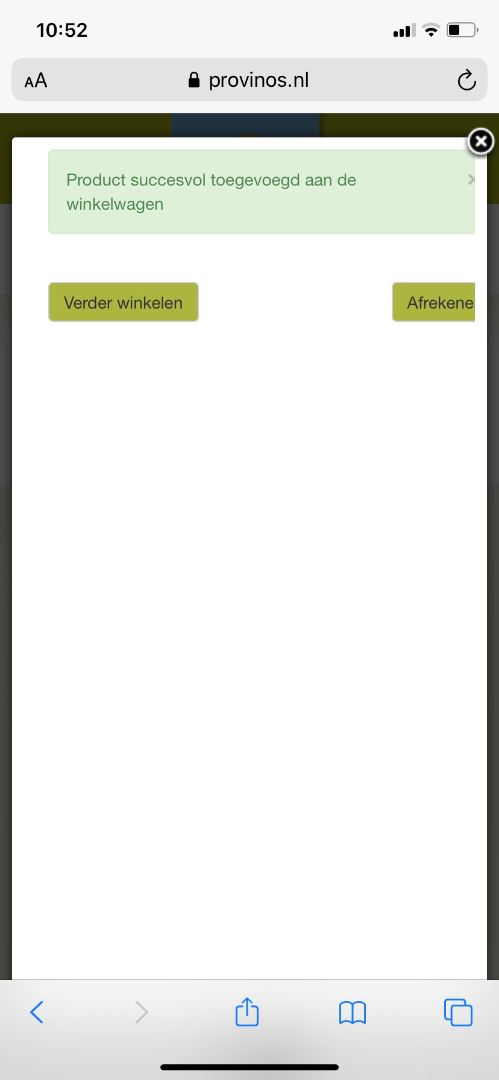
Button in pop up on mobile device is not visible
6 years 4 months ago #319392
by gielhier
Button in pop up on mobile device is not visible was created by gielhier
-- url of the page with the problem -- :
www.provinos.nl/
-- HikaShop version -- : 4.3.0
-- Joomla version -- : 3.9.18
-- PHP version -- : 7.3
-- Browser(s) name and version -- : Chrome
Hi,
Can you help me to adjust the pop up so that it fits the screen?
Regards,
Raoul
-- HikaShop version -- : 4.3.0
-- Joomla version -- : 3.9.18
-- PHP version -- : 7.3
-- Browser(s) name and version -- : Chrome
Hi,
Can you help me to adjust the pop up so that it fits the screen?
Regards,
Raoul
Please Log in or Create an account to join the conversation.

6 years 4 months ago #319395
by nicolas
Replied by nicolas on topic Button in pop up on mobile device is not visible
Hi
Turn off the "add to cart legacy" setting of the HikaShop configuration in order to use the new add to cart system of HikaShop 3.x and 4.x.
Then, in the HikaShop cart notification plugin settings (via the joomla plugins manager), set the "Display location" setting to "popup".
That way, you'll use the new popup notification system which will display properly on mobile devices.
Turn off the "add to cart legacy" setting of the HikaShop configuration in order to use the new add to cart system of HikaShop 3.x and 4.x.
Then, in the HikaShop cart notification plugin settings (via the joomla plugins manager), set the "Display location" setting to "popup".
That way, you'll use the new popup notification system which will display properly on mobile devices.
Please Log in or Create an account to join the conversation.
Time to create page: 0.201 seconds