

- Posts: 220
- Thank you received: 10
Additional fields are not copied when creating a variant
6 years 3 months ago #320753
by ilyaminsk
Hello. Additional fields are not copied when creating a variant. How to make the information from the card in the product copied from additional fields to options?
Please Log in or Create an account to join the conversation.

6 years 3 months ago - 6 years 3 months ago #320756
by Philip
Replied by Philip on topic Additional fields are not copied when creating a variant
Hello,
Sorry for this return, but we aren't sure to understand your question, in order to progress can you details your question with :
- Relative screenshot configuration (with if needed annotations)
- Describe what you mean by "from the card" and "from additional fields to options" please
Awaiting news from you to be able to answer you
Regards
Sorry for this return, but we aren't sure to understand your question, in order to progress can you details your question with :
- Relative screenshot configuration (with if needed annotations)
- Describe what you mean by "from the card" and "from additional fields to options" please
Awaiting news from you to be able to answer you
Regards
Last edit: 6 years 3 months ago by Philip.
Please Log in or Create an account to join the conversation.
6 years 3 months ago #320803
by ilyaminsk
Replied by ilyaminsk on topic Additional fields are not copied when creating a variant
Hello.
drive.google.com/file/d/1sl2N_W51jDC1Wsk...QXt/view?usp=sharing
Additional fields in the card are these:
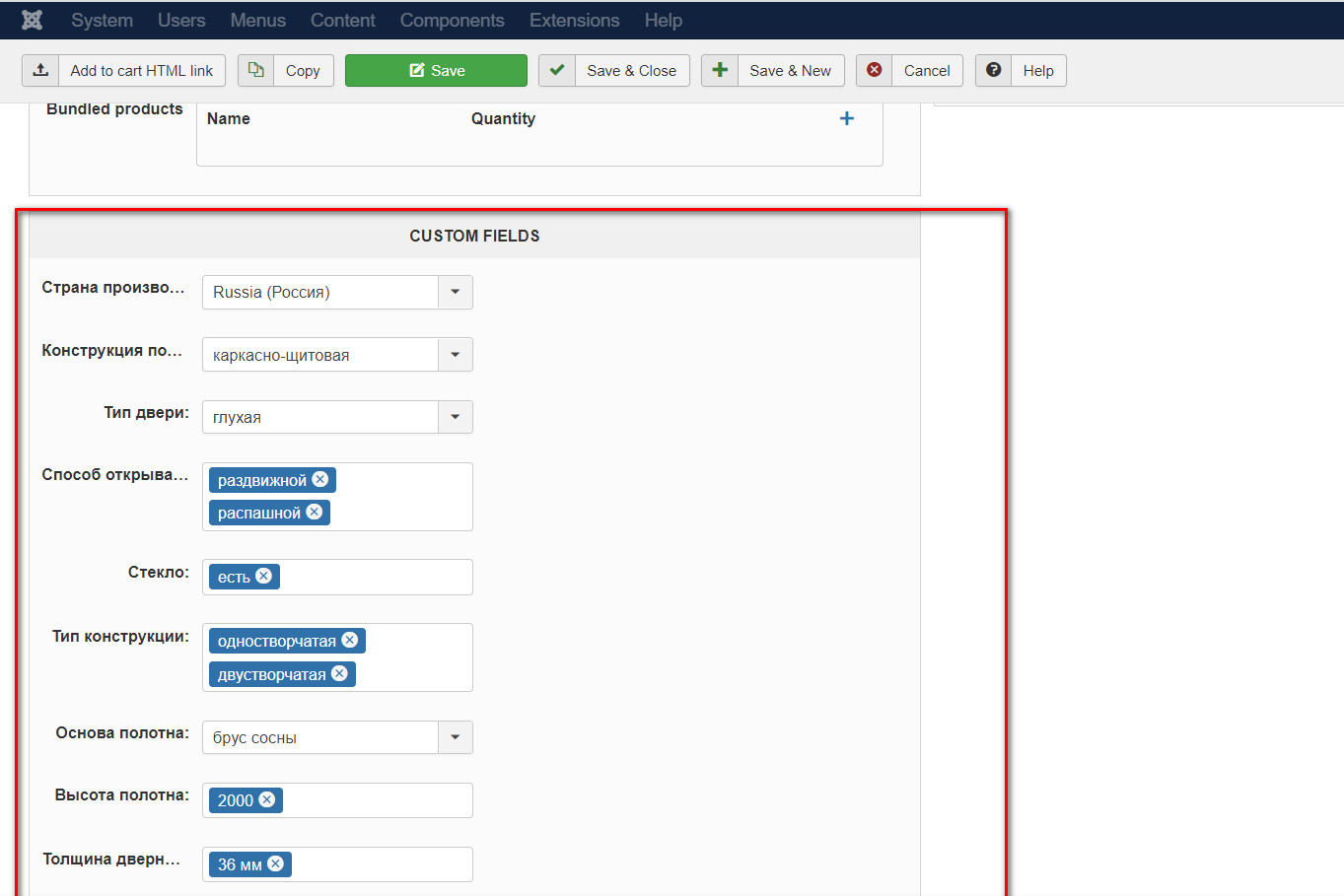
They were not copied to the options.
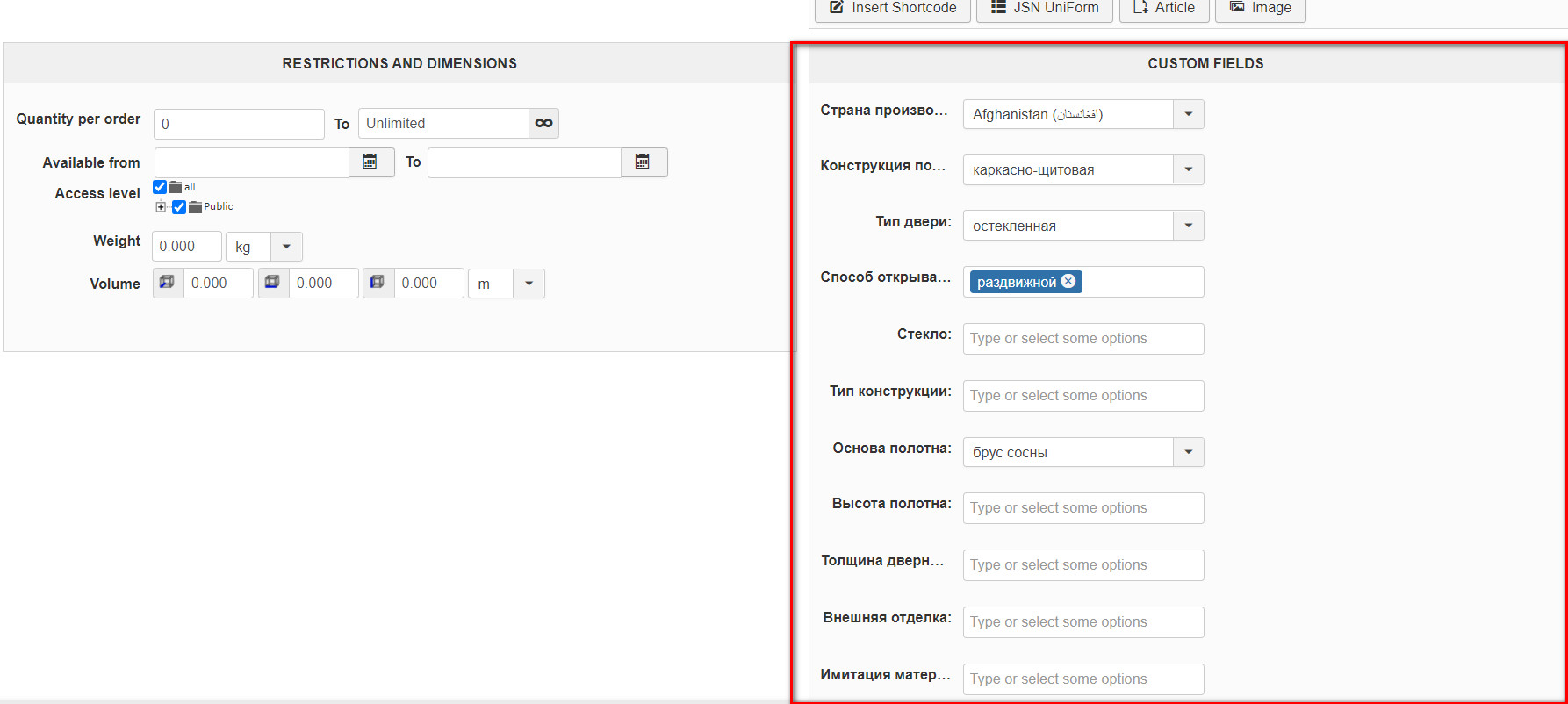
Why?
drive.google.com/file/d/1sl2N_W51jDC1Wsk...QXt/view?usp=sharing
Additional fields in the card are these:
They were not copied to the options.
Why?
Please Log in or Create an account to join the conversation.
6 years 3 months ago #320809
by ilyaminsk
Replied by ilyaminsk on topic Additional fields are not copied when creating a variant
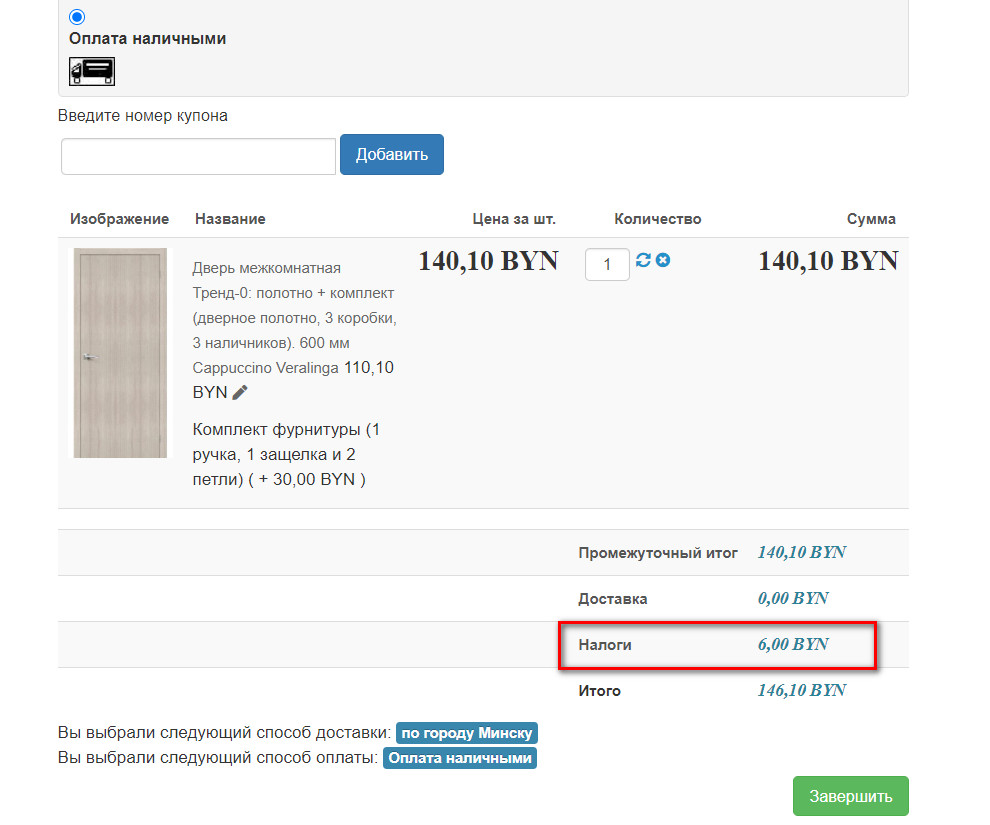
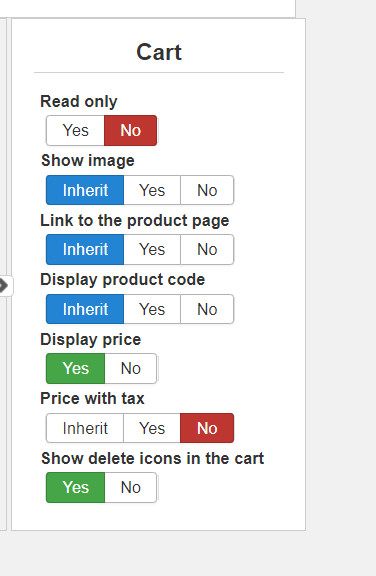
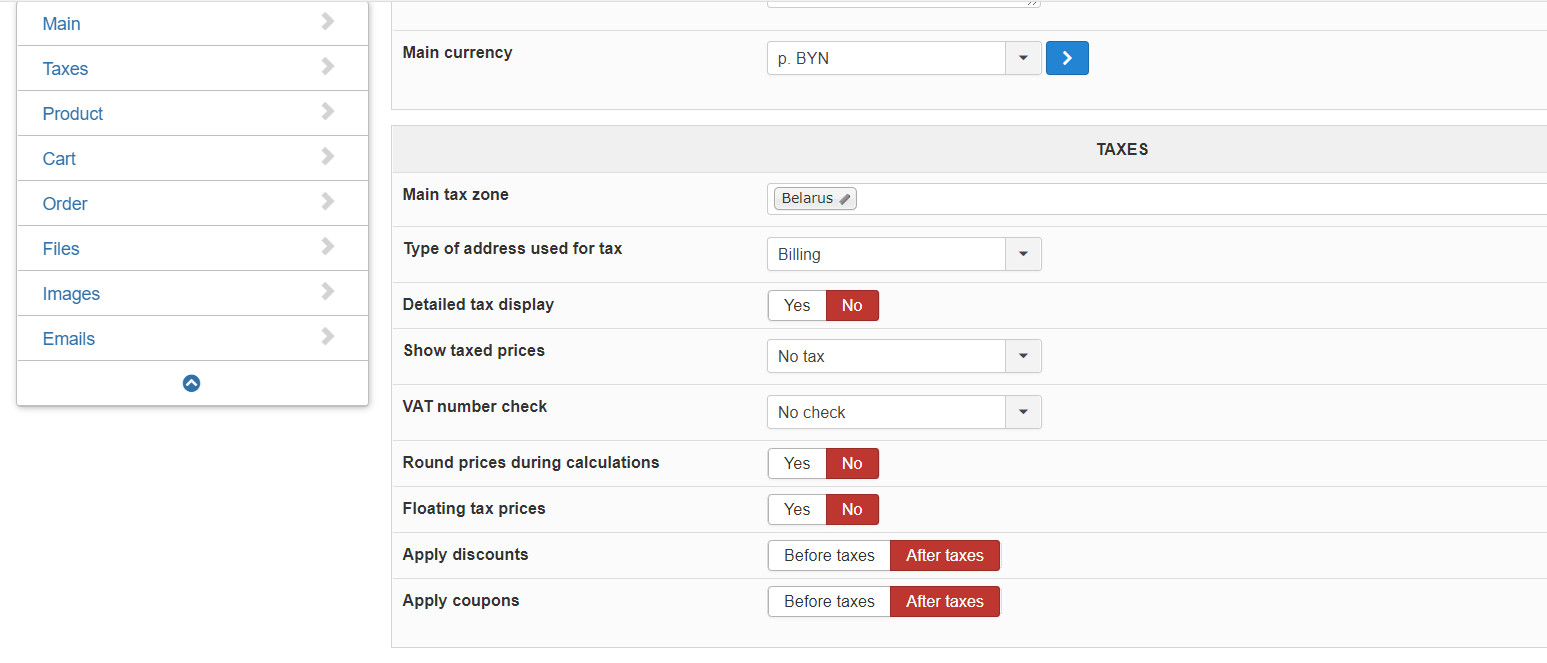
2. How to disable the display of taxes? They are disabled in my settings, but for some reason, in the product, when they are displayed in the basket.
Please Log in or Create an account to join the conversation.

6 years 3 months ago #320894
by nicolas
Replied by nicolas on topic Additional fields are not copied when creating a variant
Hi,
1. Note that none of the information of the main product is copied to the variant when you create a variant.
For example, the description too is not copied to the variant if you have one in the main product.
That's normal.
The copy is actually done on the frontend when the product is being displayed. So you should leave the custom fields empty in the variant so that the variant will automatically take the value from the main product.
2. There is no option to remove the row of taxes between the subtotal and the total.
That's because in most countries, having that row is mandatory.
The "price with tax" setting is to configure whether the price of the products should appear with or without taxes.
Now if you really want to hide it, you can do it with a bit of CSS. But I would first recommend that you check with your tax office and / or accountant that you are allowed to do that.
1. Note that none of the information of the main product is copied to the variant when you create a variant.
For example, the description too is not copied to the variant if you have one in the main product.
That's normal.
The copy is actually done on the frontend when the product is being displayed. So you should leave the custom fields empty in the variant so that the variant will automatically take the value from the main product.
2. There is no option to remove the row of taxes between the subtotal and the total.
That's because in most countries, having that row is mandatory.
The "price with tax" setting is to configure whether the price of the products should appear with or without taxes.
Now if you really want to hide it, you can do it with a bit of CSS. But I would first recommend that you check with your tax office and / or accountant that you are allowed to do that.
Please Log in or Create an account to join the conversation.
6 years 3 months ago #320904
by ilyaminsk
Replied by ilyaminsk on topic Additional fields are not copied when creating a variant
Hello
1. It turns out if I duplicate the option, when editing I need to fill it out from the very beginning?
2. In this case, we work without VAT. Tell me how to remove in CSS?
1. It turns out if I duplicate the option, when editing I need to fill it out from the very beginning?
2. In this case, we work without VAT. Tell me how to remove in CSS?
Please Log in or Create an account to join the conversation.
6 years 3 months ago #320911
by nicolas
Replied by nicolas on topic Additional fields are not copied when creating a variant
Hi,
1. When you copy a product, the variants of the products are copied too. The data of the variants will be copied too, and that should also include the custom fields data. Is that not the case ? Is that your problem ?
2.
I checked the situation, and I think you'll have to do it with a code modification. You have to edit the file show_block_cart.php via the menu Display>Views and remove the code:
1. When you copy a product, the variants of the products are copied too. The data of the variants will be copied too, and that should also include the custom fields data. Is that not the case ? Is that your problem ?
2.
I checked the situation, and I think you'll have to do it with a code modification. You have to edit the file show_block_cart.php via the menu Display>Views and remove the code:
Code:
if(!empty($this->options['show_price']) && $taxes > 0){
if($this->config->get('detailed_tax_display') && isset($cart->full_total->prices[0]->taxes)) {
foreach($cart->full_total->prices[0]->taxes as $tax) {
?>
<tr>
<td colspan="<?php echo $row_count - 2; ?>" class="hikashop_cart_empty_footer"></td>
<td id="hikashop_checkout_cart_tax_title" class="hikashop_cart_tax_title hikashop_cart_title"><?php
echo hikashop_translate($tax->tax_namekey);
?></td>
<td class="hikashop_cart_tax_value" data-title="<?php echo $tax->tax_namekey; ?>">
<span class="hikashop_checkout_cart_taxes"><?php
echo $this->currencyClass->format($tax->tax_amount, $cart->full_total->prices[0]->price_currency_id);
?></span>
</td>
</tr>
<?php
}
} else {
?>
<tr>
<td colspan="<?php echo $row_count - 2; ?>" class="hikashop_cart_empty_footer"></td>
<td id="hikashop_checkout_cart_tax_title" class="hikashop_cart_tax_title hikashop_cart_title"><?php
echo JText::_('TAXES');
?></td>
<td class="hikashop_cart_tax_value" data-title="<?php echo Jtext::_('TAXES'); ?>">
<span class="hikashop_checkout_cart_taxes"><?php
echo $this->currencyClass->format($taxes, $cart->full_total->prices[0]->price_currency_id);
?></span>
</td>
</tr>
<?php
}
}
Please Log in or Create an account to join the conversation.
6 years 3 months ago - 6 years 3 months ago #321007
by ilyaminsk
Replied by ilyaminsk on topic Additional fields are not copied when creating a variant
Hello
1.Video example drive.google.com/file/d/1ZxIbuCn5A4-EE-g...NtR/view?usp=sharing
2. The tax is now not displayed, but for some reason is added to the price
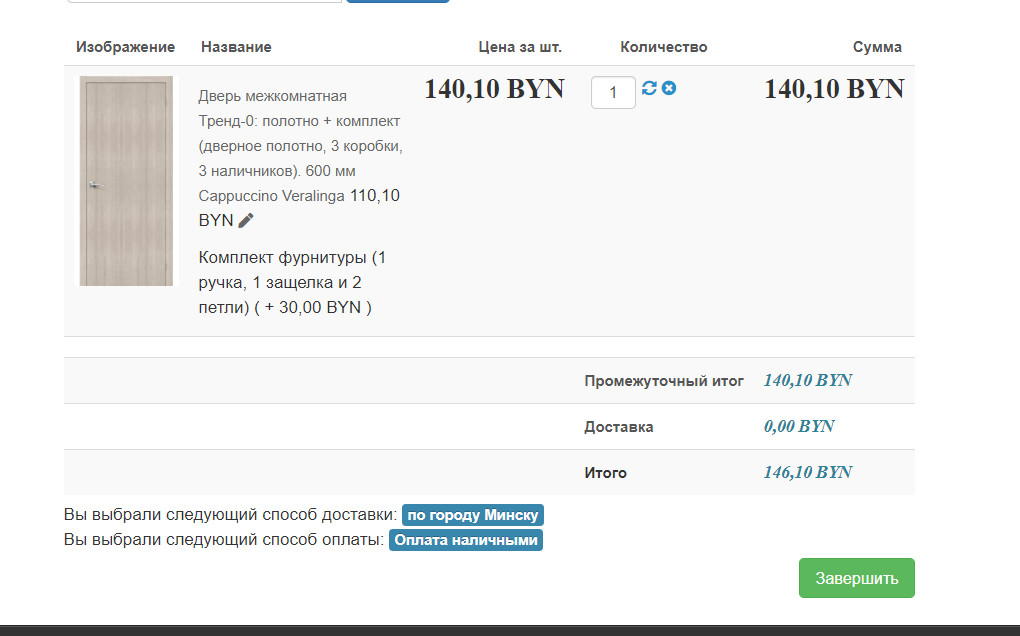
1.Video example drive.google.com/file/d/1ZxIbuCn5A4-EE-g...NtR/view?usp=sharing
2. The tax is now not displayed, but for some reason is added to the price
Last edit: 6 years 3 months ago by ilyaminsk.
Please Log in or Create an account to join the conversation.
6 years 3 months ago #321019
by nicolas
Replied by nicolas on topic Additional fields are not copied when creating a variant
Hi,
1. Ah yes, you're talking about the "duplicate" button for the variants of products. Indeed. The data is not copied.
2. Well, that's normal. This modification just removes the taxes display, not the fact that taxes are applied to the prices of your products.
If you don't want taxes, then you can disable them in the menu System>Taxes, no need to modify the views.
1. Ah yes, you're talking about the "duplicate" button for the variants of products. Indeed. The data is not copied.
2. Well, that's normal. This modification just removes the taxes display, not the fact that taxes are applied to the prices of your products.
If you don't want taxes, then you can disable them in the menu System>Taxes, no need to modify the views.
Please Log in or Create an account to join the conversation.
6 years 3 months ago - 6 years 3 months ago #321039
by ilyaminsk
Replied by ilyaminsk on topic Additional fields are not copied when creating a variant
Hello.
1. Sorry
2. They are disabled, but for some reason are displayed.
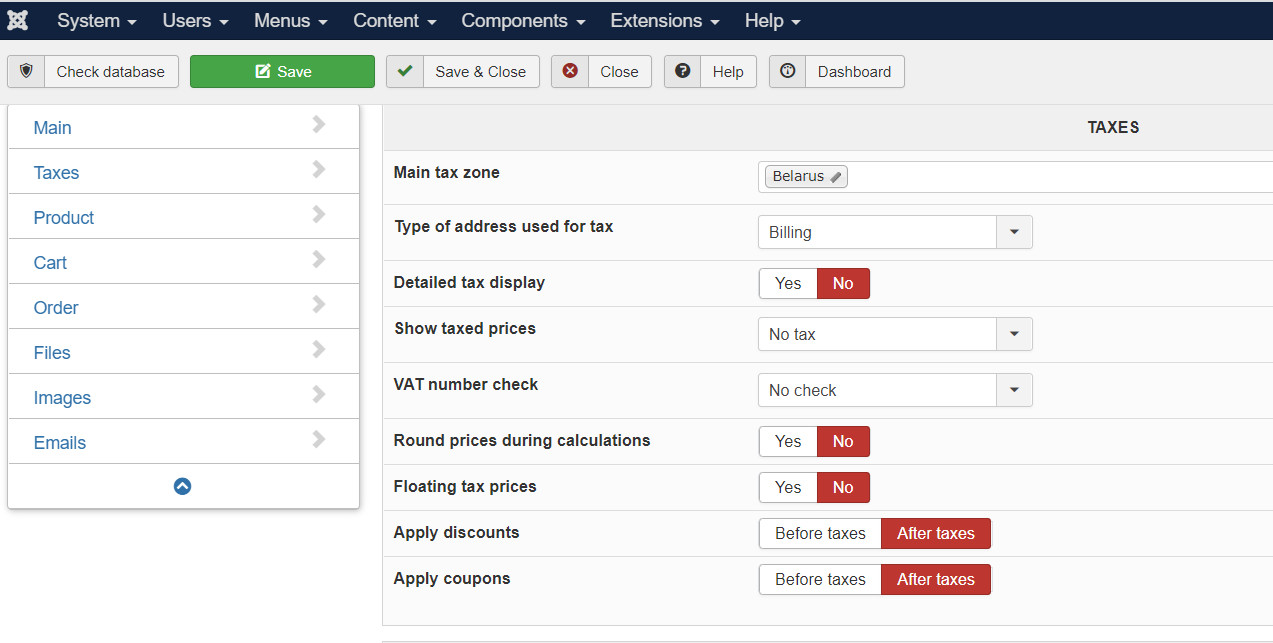
1. Sorry
2. They are disabled, but for some reason are displayed.
Last edit: 6 years 3 months ago by ilyaminsk.
Please Log in or Create an account to join the conversation.
6 years 3 months ago - 6 years 3 months ago #321094
by Philip
Replied by Philip on topic Additional fields are not copied when creating a variant
Hello,
Can you provide an Url link to see this by oursleves and be able to process some tests.
Awaiting news to progress on your subject.
Regards
Can you provide an Url link to see this by oursleves and be able to process some tests.
Awaiting news to progress on your subject.
Regards
Last edit: 6 years 3 months ago by Philip.
Please Log in or Create an account to join the conversation.
6 years 3 months ago #321097
by ilyaminsk
Replied by ilyaminsk on topic Additional fields are not copied when creating a variant
Please Log in or Create an account to join the conversation.
6 years 3 months ago - 6 years 3 months ago #321107
by Philip
Replied by Philip on topic Additional fields are not copied when creating a variant
Hello,
I'm sorry but maybe I don't understand you well, the product as in his price (here, 60.60 Byn) include tax ? I'm a little lost because In your checkout or your product page, unless I am mistaken there are no taxes at all, right ?
Can you provide your complete product setting screenshot ?
Can you details, what you are expected about your price displays and more especially what is the issue.
Regards
I'm sorry but maybe I don't understand you well, the product as in his price (here, 60.60 Byn) include tax ? I'm a little lost because In your checkout or your product page, unless I am mistaken there are no taxes at all, right ?
Can you provide your complete product setting screenshot ?
Can you details, what you are expected about your price displays and more especially what is the issue.
Regards
Last edit: 6 years 3 months ago by Philip.
Please Log in or Create an account to join the conversation.
6 years 3 months ago #321146
by ilyaminsk
Replied by ilyaminsk on topic Additional fields are not copied when creating a variant
Hello. We removed the tax display in css, but it is displayed in the basket, for example, in the video:
drive.google.com/file/d/1VZaROtCDMUVIG5s...dL6/view?usp=sharing
For some reason, it is added when I add options to the product.
For some reason, it is added when I add options to the product.
Please Log in or Create an account to join the conversation.
6 years 3 months ago #321154
by nicolas
Replied by nicolas on topic Additional fields are not copied when creating a variant
Hi,
No, if you want to completely remove taxes, you need to disable them in the menu System>Taxes.
No, if you want to completely remove taxes, you need to disable them in the menu System>Taxes.
Please Log in or Create an account to join the conversation.
6 years 3 months ago #321174
by ilyaminsk
Replied by ilyaminsk on topic Additional fields are not copied when creating a variant
Hello. Thanks
The following user(s) said Thank You: Philip
Please Log in or Create an account to join the conversation.
Time to create page: 0.338 seconds