

- Posts: 220
- Thank you received: 10
Price filter
3 years 1 month ago #354460
by ilyaminsk
Price filter was created by ilyaminsk
-- url of the page with the problem -- :
ilsanmarket.by/katalog/mezhkomnatnye-dveri.html
Hello, there was a problem with the price filter, it does not work correctly. Could you point out what I've set up wrong? How to make it so that it is filtered directly in the category where I am?
Here are the settings:
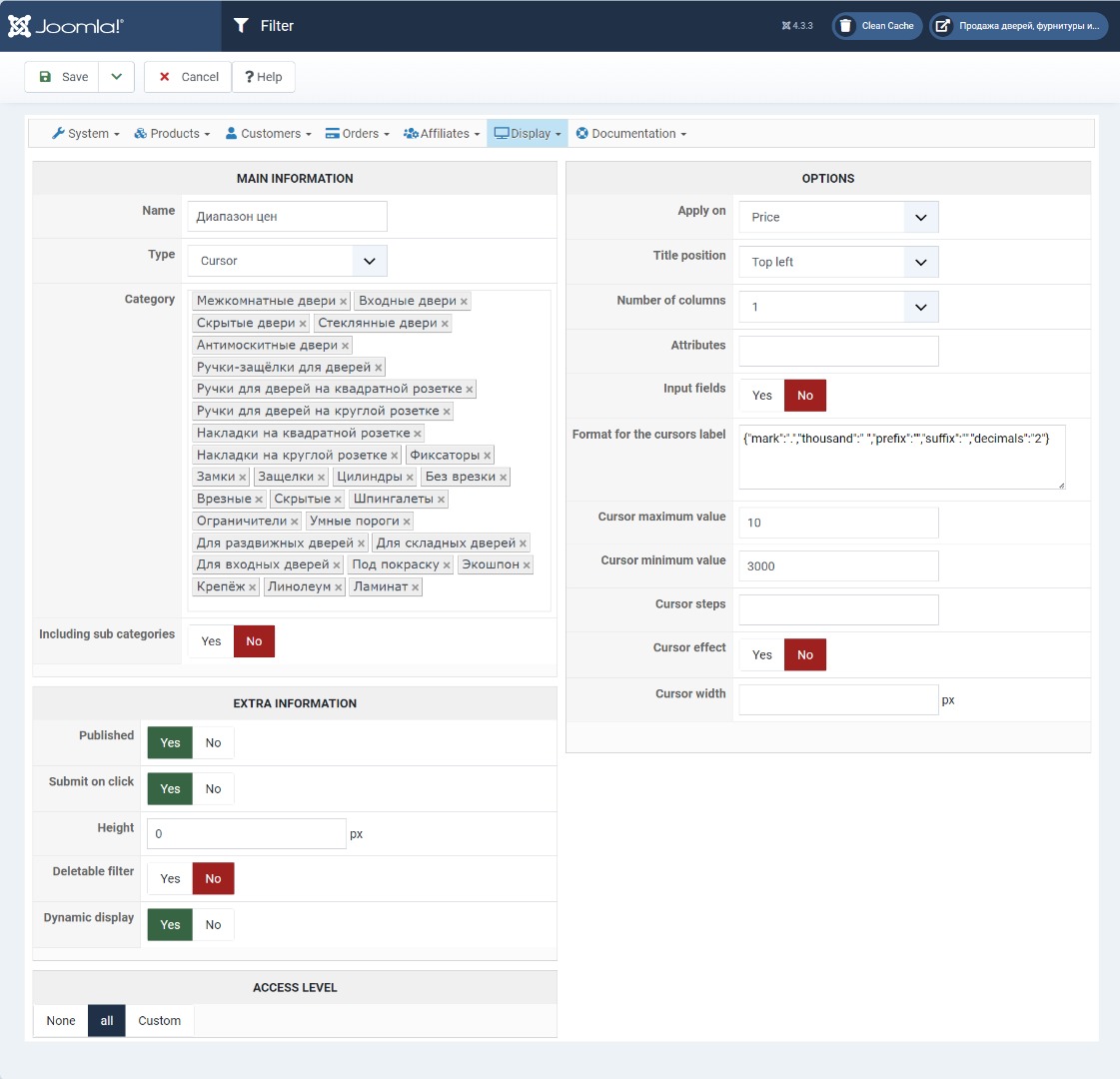
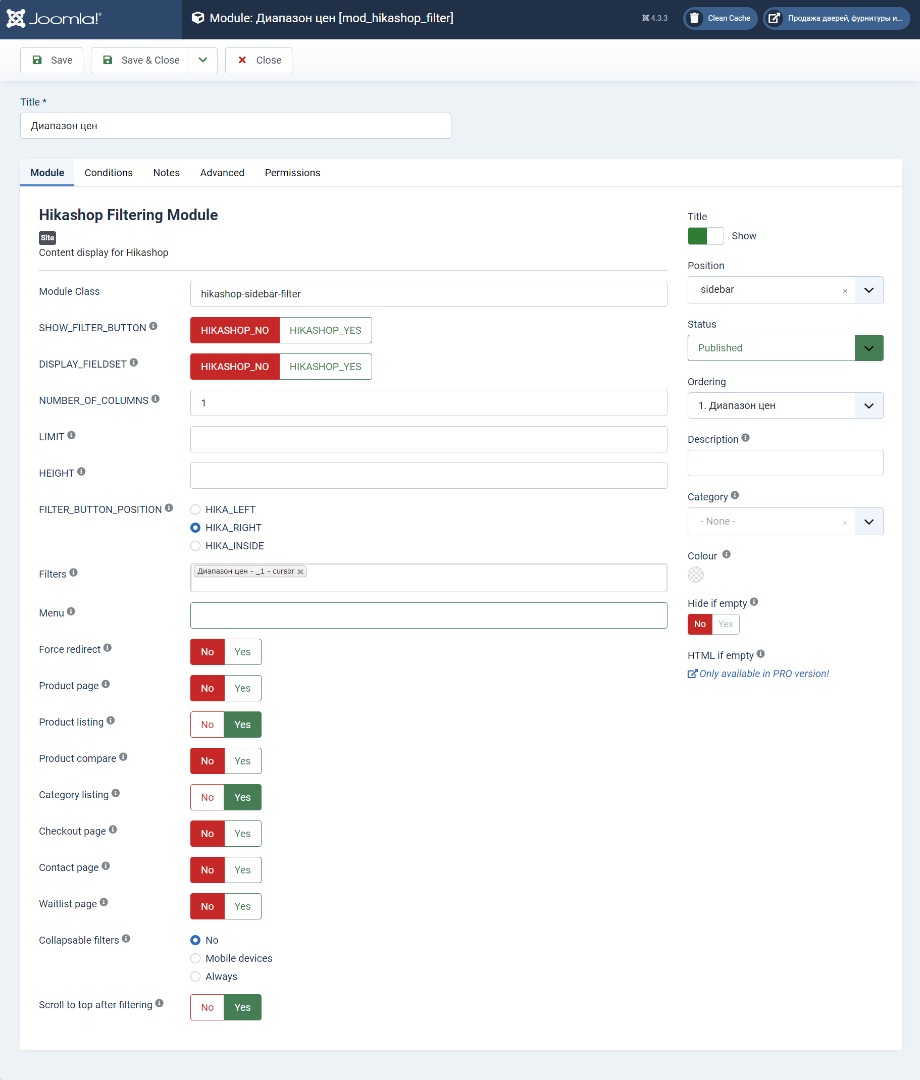
Hello, there was a problem with the price filter, it does not work correctly. Could you point out what I've set up wrong? How to make it so that it is filtered directly in the category where I am?
Here are the settings:
Please Log in or Create an account to join the conversation.

3 years 1 month ago #354465
by nicolas
Replied by nicolas on topic Price filter
Hi,
I looked at your link and when I use the price filter there, it filters the products on the right side and doesn't change the page or display products from other categories.
So it seems that your main question
I looked at your link and when I use the price filter there, it filters the products on the right side and doesn't change the page or display products from other categories.
So it seems that your main question
is already solved. Or I didn't understand what you mean.How to make it so that it is filtered directly in the category where I am
Please Log in or Create an account to join the conversation.
3 years 1 month ago - 3 years 1 month ago #354481
by ilyaminsk
Replied by ilyaminsk on topic Price filter
The price filter does not work. If you filter by price, it uses only one price for the filter. Try changing the values.
ilsanmarket.by/katalog/linoleum.html
It doesn't even display correctly:
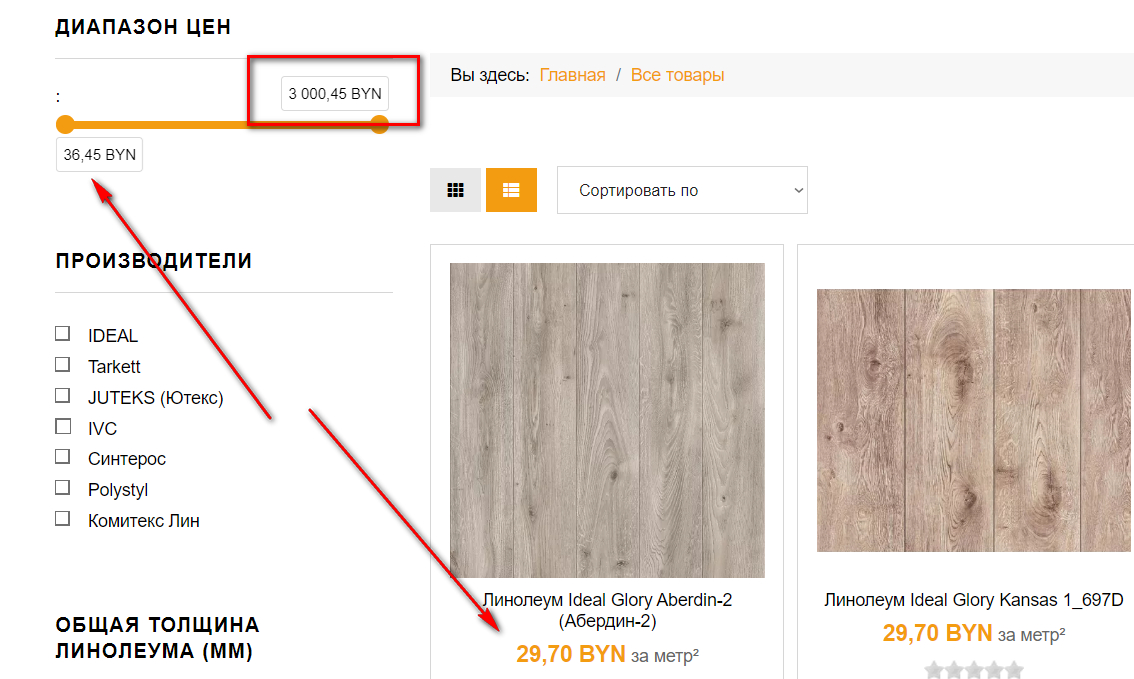
It doesn't even display correctly:
Last edit: 3 years 1 month ago by ilyaminsk.
Please Log in or Create an account to join the conversation.
3 years 1 month ago #354487
by nicolas
Replied by nicolas on topic Price filter
Hi,
Ok, on that page I do see a problem indeed. The filtering is working, but the min and max values of the filter are wonky for some reason.
We would need a backend and a FTP access in order to investigate.
Could you provide that via our contact form ?
www.hikashop.com/support/contact-us.html
Ok, on that page I do see a problem indeed. The filtering is working, but the min and max values of the filter are wonky for some reason.
We would need a backend and a FTP access in order to investigate.
Could you provide that via our contact form ?
www.hikashop.com/support/contact-us.html
Please Log in or Create an account to join the conversation.
3 years 1 month ago #354525
by ilyaminsk
Replied by ilyaminsk on topic Price filter
Hello. Sent data
Please Log in or Create an account to join the conversation.
3 years 1 month ago #354795
by ilyaminsk
Replied by ilyaminsk on topic Price filter
Hi. Did you understand what is the reason?
Please Log in or Create an account to join the conversation.
3 years 3 weeks ago - 3 years 3 weeks ago #354860
by ilyaminsk
Replied by ilyaminsk on topic Price filter
Hello, any news regarding the filter?
Last edit: 3 years 3 weeks ago by ilyaminsk.
Please Log in or Create an account to join the conversation.
3 years 3 weeks ago - 3 years 3 weeks ago #354863
by ilyaminsk
 Hello, is it possible to display menu items in the module settings separated by commas?
I tried to enter one menu item and several separated by commas, it still does not work
[Moderator :] Please do NOT multiply topics & problems in the same subject.
So, I invite you to create another subject, and also add elements of context and what you concretely want to obtain with this configuration.
Thank you for your attention
Replied by ilyaminsk on topic Price filter
I tried to enter one menu item and several separated by commas, it still does not work
[Moderator :] Please do NOT multiply topics & problems in the same subject.
So, I invite you to create another subject, and also add elements of context and what you concretely want to obtain with this configuration.
Thank you for your attention
Last edit: 3 years 3 weeks ago by Philip.
Please Log in or Create an account to join the conversation.
3 years 3 weeks ago #354906
by nicolas
Replied by nicolas on topic Price filter
Hi,
Sorry for not answering here ealier. I was in holidays and I didn't had the time to work on this.
I tried to look at the issue today, but the code I added via FTP was not taken into account by your website.
So I'm thinking you probably have some caching on the pages.
Could you temporarily disable it or provide a way to easily flush it ? With a backend access maybe ?
Regarding the "menu" setting of the filter module, you can only enter the id of one menu item.
Also, it will only be used when the current page is not a products listing, or, if you have the "force redirect" setting below activated, it will also redirect to that menu item if the current menu item is not the one with that id.
Sorry for not answering here ealier. I was in holidays and I didn't had the time to work on this.
I tried to look at the issue today, but the code I added via FTP was not taken into account by your website.
So I'm thinking you probably have some caching on the pages.
Could you temporarily disable it or provide a way to easily flush it ? With a backend access maybe ?
Regarding the "menu" setting of the filter module, you can only enter the id of one menu item.
Also, it will only be used when the current page is not a products listing, or, if you have the "force redirect" setting below activated, it will also redirect to that menu item if the current menu item is not the one with that id.
Please Log in or Create an account to join the conversation.
3 years 3 weeks ago #354913
by ilyaminsk
Replied by ilyaminsk on topic Price filter
Hello. caching disabled
Please Log in or Create an account to join the conversation.
3 years 3 weeks ago #354926
by ilyaminsk
Replied by ilyaminsk on topic Price filter
Is there anything else I need to do?
Please Log in or Create an account to join the conversation.
3 years 3 weeks ago #354931
by nicolas
Replied by nicolas on topic Price filter
Hi,
Thanks for turn off the caching.
Please understand that this kind of issue is quite complex to debug. It took me several hours today to debug it, and I also had many other messages to answer to from other users.
I found that the issue is linked to improvements we've made to the dynamic filters in the 4.7.4:
I've made a few patches on your website and did some tests and it seems to work fine now.
We'll include these patches on our end for the next version of HikaShop.
Thanks for your cooperation.
Thanks for turn off the caching.
Please understand that this kind of issue is quite complex to debug. It took me several hours today to debug it, and I also had many other messages to answer to from other users.
I found that the issue is linked to improvements we've made to the dynamic filters in the 4.7.4:
www.hikashop.com/support/documentation/5...ashop-changelog.htmlFilters with their "dynamic display" setting turned on will now keep their values once they are used until the filters are reset.
I've made a few patches on your website and did some tests and it seems to work fine now.
We'll include these patches on our end for the next version of HikaShop.
Thanks for your cooperation.
The following user(s) said Thank You: ilyaminsk
Please Log in or Create an account to join the conversation.
3 years 3 weeks ago #354951
by ilyaminsk
Replied by ilyaminsk on topic Price filter
Thank you !
Please Log in or Create an account to join the conversation.
3 years 2 weeks ago #355014
by ilyaminsk
Replied by ilyaminsk on topic Price filter
Hello. I noticed this problem in the section:
ilsanmarket.by/katalog/mezhkomnatnye-dveri.html
Having moved to another section, for some reason the countdown of ideas is already from “0”
ilsanmarket.by/katalog/linoleum.html
Having moved to another section, for some reason the countdown of ideas is already from “0”
ilsanmarket.by/katalog/linoleum.html
Please Log in or Create an account to join the conversation.
3 years 2 weeks ago #355016
by ilyaminsk
Replied by ilyaminsk on topic Price filter
Please Log in or Create an account to join the conversation.
3 years 2 weeks ago #355025
by nicolas
Replied by nicolas on topic Price filter
Hi,
I'm sorry but I don't see any problem on your links. Could you explain what problem you're seeing there ?
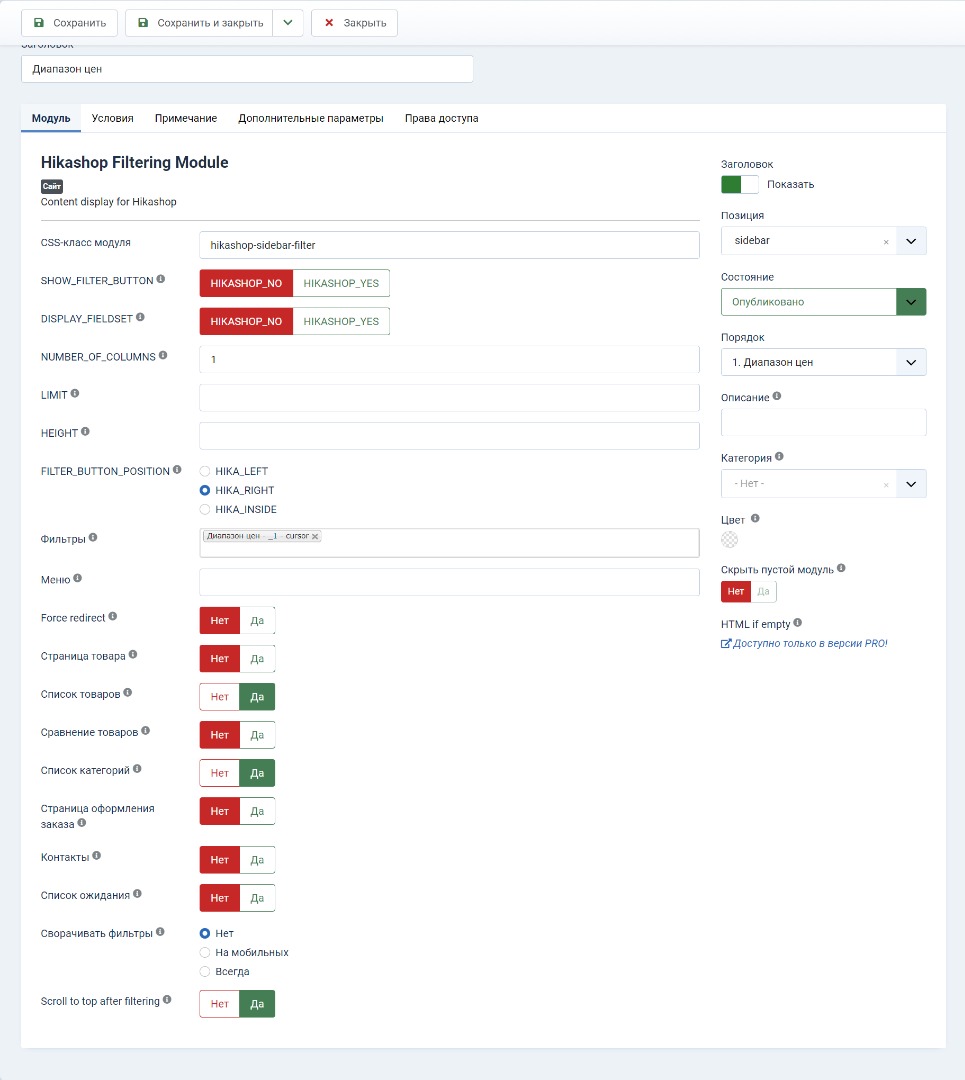
And what is the link with the new screenshot of the filter module settings ?
I'm sorry but I don't see any problem on your links. Could you explain what problem you're seeing there ?
And what is the link with the new screenshot of the filter module settings ?
Please Log in or Create an account to join the conversation.
3 years 2 weeks ago #355032
by ilyaminsk
Replied by ilyaminsk on topic Price filter
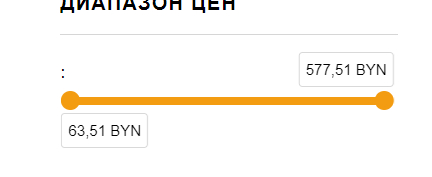
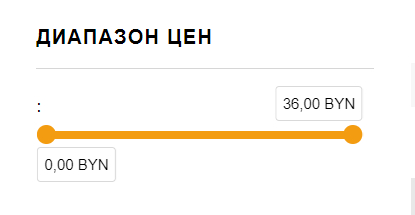
Hello. I wanted to clarify why in this category the filter starts with the minimum price of the product, and in another category it starts with “0”?
Please Log in or Create an account to join the conversation.
3 years 2 weeks ago #355038
by nicolas
Replied by nicolas on topic Price filter
Hi,
Doesn't that mean that you have a product without a price set in it ?
The system will load the price of each product on the listing to calculate the minimum and maximum.
It could be that the product doesn't have prices (for example, if you only set the price of that product in the different variants).
Doesn't that mean that you have a product without a price set in it ?
The system will load the price of each product on the listing to calculate the minimum and maximum.
It could be that the product doesn't have prices (for example, if you only set the price of that product in the different variants).
Please Log in or Create an account to join the conversation.
3 years 2 weeks ago #355077
by ilyaminsk
Replied by ilyaminsk on topic Price filter
That's right, there is one. I made this product to order
Please Log in or Create an account to join the conversation.
3 years 2 weeks ago #355082
by nicolas
Replied by nicolas on topic Price filter
Hi,
Then it's normal, right ? What is your question then ?
Then it's normal, right ? What is your question then ?
Please Log in or Create an account to join the conversation.
Time to create page: 0.302 seconds