

- Posts: 157
- Thank you received: 2
Add total quantity of products in invoice
12 years 3 months ago #158370
by Carolek
Add total quantity of products in invoice was created by Carolek
-- url of the page with the problem -- :
mywebsite.com/mypage
-- HikaShop version -- :2.3.0
-- Joomla version -- : 2.5.20
Hello again
My client wants that the invoice that is sent to the customer shows in the subtotal row the quantity of products that is sent.
Is that possible?
So the customer can see in the subtotal row the quantity of products that is sent to him.
Thank you.
(attached view)
-- HikaShop version -- :2.3.0
-- Joomla version -- : 2.5.20
Hello again
My client wants that the invoice that is sent to the customer shows in the subtotal row the quantity of products that is sent.
Is that possible?
So the customer can see in the subtotal row the quantity of products that is sent to him.
Thank you.
(attached view)
Please Log in or Create an account to join the conversation.

Less
More
- Posts: 12953
- Thank you received: 1778
12 years 3 months ago #158373
by Mohamed Thelji
Replied by Mohamed Thelji on topic Add total quantity of products in invoice
Hello,
By :
And these lines :
By :
If you want to show the quantity of products in your order in the subtotal row, you'll have to edit the ''Invoice" file of the "order" view of your back-end template through "Hikashop->Display->Views" and change this line :My client wants that the invoice that is sent to the customer shows in the subtotal row the quantity of products that is sent.
Code:
foreach($this->order->products as $product){
Code:
$total_quantity = 0;
foreach($this->order->products as $product){
$total_quantity += $product->order_product_quantity;
And these lines :
Code:
<?php
if($this->config->get('price_with_tax')){
echo $this->currencyHelper->format($this->order->order_subtotal,$this->order->order_currency_id);
}else{
echo $this->currencyHelper->format($this->order->order_subtotal_no_vat,$this->order->order_currency_id);
} ?>
Code:
<?php
if($this->config->get('price_with_tax')){
echo $this->currencyHelper->format($this->order->order_subtotal,$this->order->order_currency_id);
}else{
echo $this->currencyHelper->format($this->order->order_subtotal_no_vat,$this->order->order_currency_id);
}
echo 'for '.$total_quantity.' product(s)';
?>
Please Log in or Create an account to join the conversation.
12 years 3 months ago #158489
by Carolek
Replied by Carolek on topic Add total quantity of products in invoice
Thanks. I' made the changes but nothing happened. :dry:
Do you have an idea why?
Do you have an idea why?
Please Log in or Create an account to join the conversation.
Less
More
- Posts: 12953
- Thank you received: 1778
12 years 3 months ago #158590
by Mohamed Thelji
Replied by Mohamed Thelji on topic Add total quantity of products in invoice
My bad, I thought that you were talking about the invoice, but regarding the screenshot that you sent, you were talking about your email.
The solution will be directly edit the code of the "preload version" of your email through "Hikashop->System->Emails->Your emails"
The solution will be directly edit the code of the "preload version" of your email through "Hikashop->System->Emails->Your emails"
Please Log in or Create an account to join the conversation.
12 years 3 months ago #158616
by Carolek
Replied by Carolek on topic Add total quantity of products in invoice
Ok, I edited it but not so good. I don't know what is the code for this. I write something like this:
I attached what I got. I need the total of product to be only in the first row of the order footer. Can you please help me with this row?
Thanks!
Code:
<tr>
<td colspan="3" style="text-align:right;color:#1c8faf !important;font-size:12px;font-weight:bold;">{LINEVAR:NAME}</td>
<td style="text-align:right">{LINEVAR:TOTAL_QUANTITY}</td>
<td style="text-align:right">{LINEVAR:VALUE}</td>
</tr>
Thanks!
Please Log in or Create an account to join the conversation.
Less
More
- Posts: 12953
- Thank you received: 1778
12 years 3 months ago #158803
by Mohamed Thelji
Replied by Mohamed Thelji on topic Add total quantity of products in invoice
Hello,
The solution will just be to edit the "preload version" of your email and change these lines :
By :
And these lines :
By :
The solution will just be to edit the "preload version" of your email and change these lines :
Code:
foreach($data->cart->products as $item) {
if($group && $item->order_product_option_parent_id)
continue;
$product = $productClass->products[$item->product_id];
$cartProduct = array(
'PRODUCT_CODE' => $item->order_product_code,
'PRODUCT_QUANTIY' => $item->order_product_quantity,
'PRODUCT_IMG' => '',
'item' => $item,
'product' => $product,
);
Code:
$total_quantity = 0;
foreach($data->cart->products as $item) {
if($group && $item->order_product_option_parent_id)
continue;
$product = $productClass->products[$item->product_id];
$cartProduct = array(
'PRODUCT_CODE' => $item->order_product_code,
'PRODUCT_QUANTIY' => $item->order_product_quantity,
'PRODUCT_IMG' => '',
'item' => $item,
'product' => $product,
);
$total_quantity += $item->order_product_quantity;
And these lines :
Code:
if(bccomp($data->cart->order_discount_price,0,5) || bccomp($data->cart->order_shipping_price,0,5) || bccomp($data->cart->order_payment_price,0,5) || ($data->cart->full_total->prices[0]->price_value!=$data->cart->full_total->prices[0]->price_value_with_tax) || !empty($data->cart->additional)){
$cartFooters[] = array(
'NAME' => JText::_('SUBTOTAL'),
'VALUE' => $currencyHelper->format($subtotal,$data->cart->order_currency_id)
);
}
Code:
if(bccomp($data->cart->order_discount_price,0,5) || bccomp($data->cart->order_shipping_price,0,5) || bccomp($data->cart->order_payment_price,0,5) || ($data->cart->full_total->prices[0]->price_value!=$data->cart->full_total->prices[0]->price_value_with_tax) || !empty($data->cart->additional)){
$cartFooters[] = array(
'NAME' => JText::_('SUBTOTAL'),
'VALUE' => $currencyHelper->format($subtotal,$data->cart->order_currency_id) . ' for '.$total_quantity.' product(s)'
);
}
The following user(s) said Thank You: Carolek
Please Log in or Create an account to join the conversation.

3 years 9 months ago #347152
by deboni
Replied by deboni on topic Add total quantity of products in invoice
Hi Mohamed
I should do the same thing for my customer but could't find these lines anywhere in the «preload version».
It is also a rather old post so maybe this isn't done the same way anymore.
The idea is to show the total quantity of products in the mails to admin and customer.
Is there a way to do that?
regards
I should do the same thing for my customer but could't find these lines anywhere in the «preload version».
It is also a rather old post so maybe this isn't done the same way anymore.
The idea is to show the total quantity of products in the mails to admin and customer.
Is there a way to do that?
regards
Please Log in or Create an account to join the conversation.

3 years 9 months ago #347154
by nicolas
Replied by nicolas on topic Add total quantity of products in invoice
Hi,
While the code changed, it's still roughly the same. If you look carefully in the preload, you'll see the pieces of code, with slight differences and you can apply the changes.
For example, for the first piece of code, it is now:
As you can see, there is only the line
which is different.
So you can apply the same changes and you'll get:
And it's the same for the second code. It is now:
as you can see, it's only the first line which change and thus you can still change the line:
to:
While the code changed, it's still roughly the same. If you look carefully in the preload, you'll see the pieces of code, with slight differences and you can apply the changes.
For example, for the first piece of code, it is now:
Code:
foreach($data->cart->products as $item) {
if($group && $item->order_product_option_parent_id)
continue;
$product = @$productClass->all_products[$item->product_id];
$cartProduct = array(
'PRODUCT_CODE' => $item->order_product_code,
'PRODUCT_QUANTITY' => $item->order_product_quantity,
'PRODUCT_IMG' => '',
'item' => $item,
'product' => $product,
);
Code:
$product = @$productClass->all_products[$item->product_id];
So you can apply the same changes and you'll get:
Code:
$total_quantity = 0;
foreach($data->cart->products as $item) {
if($group && $item->order_product_option_parent_id)
continue;
$product = @$productClass->all_products[$item->product_id];
$cartProduct = array(
'PRODUCT_CODE' => $item->order_product_code,
'PRODUCT_QUANTITY' => $item->order_product_quantity,
'PRODUCT_IMG' => '',
'item' => $item,
'product' => $product,
);
$total_quantity += $item->order_product_quantity;
And it's the same for the second code. It is now:
Code:
if(bccomp(sprintf('%F',$data->cart->order_discount_price),0,5) != 0 || bccomp(sprintf('%F',$data->cart->order_shipping_price),0,5) != 0 || bccomp(sprintf('%F',$data->cart->order_payment_price),0,5) != 0 || ($data->cart->full_total->prices[0]->price_value!=$data->cart->full_total->prices[0]->price_value_with_tax) || !empty($data->cart->additional)){
$cartFooters[] = array(
'CLASS' => 'subtotal',
'NAME' => JText::_('SUBTOTAL'),
'VALUE' => $currencyHelper->format($subtotal,$data->cart->order_currency_id)
);
}
Code:
'VALUE' => $currencyHelper->format($subtotal,$data->cart->order_currency_id)
Code:
'VALUE' => $currencyHelper->format($subtotal,$data->cart->order_currency_id) . ' for '.$total_quantity.' product(s)'
Please Log in or Create an account to join the conversation.
3 years 9 months ago - 3 years 9 months ago #347175
by deboni
Replied by deboni on topic Add total quantity of products in invoice
Hi Mohamed
Thank you.
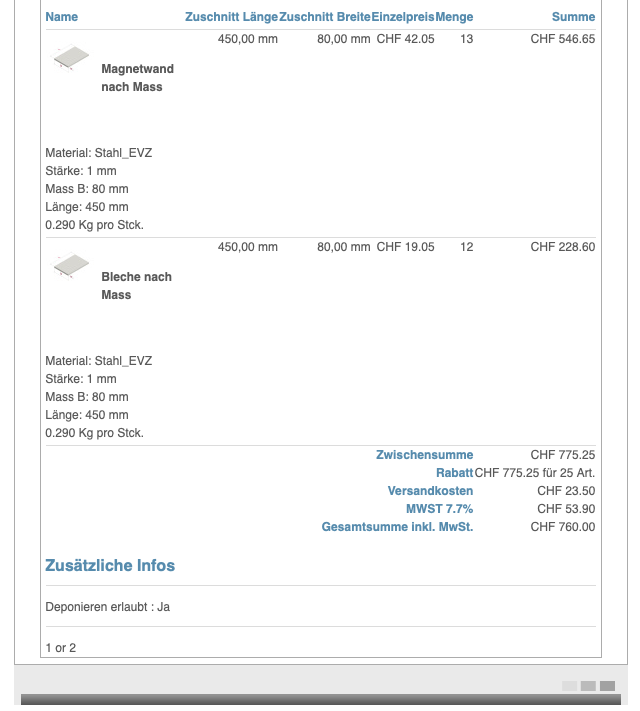
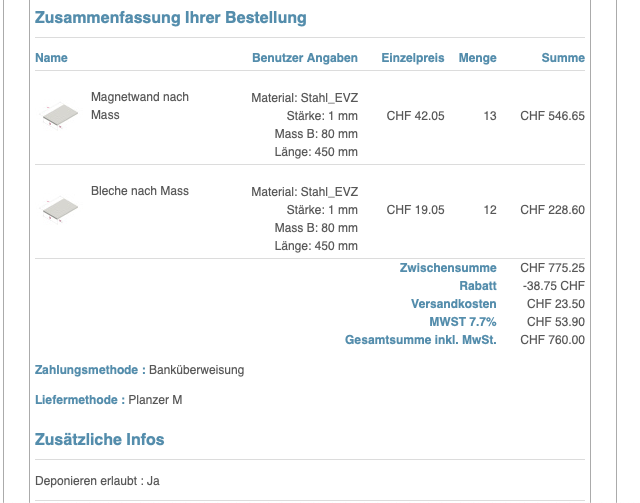
I got this to work with your code and it calculates the total quantity of ordered items correctly.
However, it puts the value in the Discount (Rabatt), and it is also labeled Discount (Rabatt).
Is it not possible to make a separate line for this: i.e. Total Items 25
The customer gets the mail correctly with the proper discount.
regards
Thank you.
I got this to work with your code and it calculates the total quantity of ordered items correctly.
However, it puts the value in the Discount (Rabatt), and it is also labeled Discount (Rabatt).
Is it not possible to make a separate line for this: i.e. Total Items 25
The customer gets the mail correctly with the proper discount.
regards
Last edit: 3 years 9 months ago by deboni.
Please Log in or Create an account to join the conversation.
3 years 9 months ago #347176
by nicolas
Replied by nicolas on topic Add total quantity of products in invoice
Hi,
If you have it added to the discount it means that you didn't do the last change properly.
So revert that last change.
Instead, you can add:
before the code:
and it will be added as an extra line before the subtotal.
If you have it added to the discount it means that you didn't do the last change properly.
So revert that last change.
Instead, you can add:
Code:
$cartFooters[] = array(
'CLASS' => 'quantity',
'NAME' => 'Total quantity',
'VALUE' =>$total_quantity
);
Code:
$cartFooters[] = array(
'CLASS' => 'subtotal',
'NAME' => JText::_('SUBTOTAL'),
'VALUE' => $currencyHelper->format($subtotal,$data->cart->order_currency_id)
);
Please Log in or Create an account to join the conversation.
3 years 9 months ago #347511
by deboni
Replied by deboni on topic Add total quantity of products in invoice
Hi Mohamed
thanks! That worked now.
The customer would like to show that value somewhere near the top. Is it even possible to show it somewhere else or can that only be done in the footer?
regards
thanks! That worked now.
The customer would like to show that value somewhere near the top. Is it even possible to show it somewhere else or can that only be done in the footer?
regards
Please Log in or Create an account to join the conversation.
3 years 9 months ago #347514
by nicolas
Replied by nicolas on topic Add total quantity of products in invoice
Hi,
It would be great if you could explain precisely what you want from the start next time.
It can be done yes.
Before the line:
add the code:
Then, you can use the tag {VAR:TOTAL_QUANTITY} in the HTML area to place the total quantity wherever you want in the email.
It would be great if you could explain precisely what you want from the start next time.
It can be done yes.
Before the line:
Code:
$cartFooters[] = array(
Code:
$vars['TOTAL_QUANTITY'] = $total_quantity;
Please Log in or Create an account to join the conversation.
3 years 9 months ago #347532
by deboni
Replied by deboni on topic Add total quantity of products in invoice
Thank you very much and sorry for the inconvenience.
I'm trying to avoid this with my customers and in this case I couldn't avoid it.
It works great now!
regards
I'm trying to avoid this with my customers and in this case I couldn't avoid it.
It works great now!
regards
Please Log in or Create an account to join the conversation.
Time to create page: 0.311 seconds