

- Posts: 41
- Thank you received: 1
Quantity Removal in Category View
12 years 6 months ago #150070
by wild4gsus
Quantity Removal in Category View was created by wild4gsus
-- url of the page with the problem -- :
mywebsite.com/mypage
-- HikaShop version -- : 2.3.0
-- Joomla version -- : 3.2
-- PHP version -- : 5.4
-- Browser(s) name and version -- : XXXXX x.x.x
-- Error-message(debug-mod must be tuned on) -- : Error_message
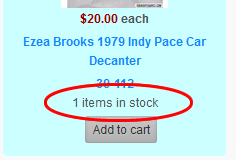
Not sure what I'm doing wrong, as it is probably something simple. When I click on a category in the front end and it displays my products, it displays the quantity in stock (or "no stock" if there are none). I'm looking to remove the quantity. Where do I do this? I have made sure everything says "No" under "Show the Number of Products".
-- HikaShop version -- : 2.3.0
-- Joomla version -- : 3.2
-- PHP version -- : 5.4
-- Browser(s) name and version -- : XXXXX x.x.x
-- Error-message(debug-mod must be tuned on) -- : Error_message
Not sure what I'm doing wrong, as it is probably something simple. When I click on a category in the front end and it displays my products, it displays the quantity in stock (or "no stock" if there are none). I'm looking to remove the quantity. Where do I do this? I have made sure everything says "No" under "Show the Number of Products".
Please Log in or Create an account to join the conversation.

Less
More
- Posts: 12953
- Thank you received: 1778
12 years 5 months ago #150259
by Mohamed Thelji
Replied by Mohamed Thelji on topic Quantity Removal in Category View
Hello,
1. Did you done some modifications through the files of the product view of your front-end template via "Hikashop->Display->Views" ? If that's the case, can you remove them and test it again ?
2. Can you show me some screenshots of how did you configured your :
- Category listing content menu
- Product listing associated module
3. Can you give me a link to the page where you are having that issue so that I can directly test it ?
1. Did you done some modifications through the files of the product view of your front-end template via "Hikashop->Display->Views" ? If that's the case, can you remove them and test it again ?
2. Can you show me some screenshots of how did you configured your :
- Category listing content menu
- Product listing associated module
3. Can you give me a link to the page where you are having that issue so that I can directly test it ?
Please Log in or Create an account to join the conversation.

12 years 5 months ago #150260
by Xavier
Replied by Xavier on topic Quantity Removal in Category View
Hi,
You have to make a translation override on the key: X_ITEMS_IN_STOCK like:
If you still want to display this text in the product page, so you will have to edit the view "product / quantity" via the menu Display > Views and add an if condition around the line:
Something like:
You have to make a translation override on the key: X_ITEMS_IN_STOCK like:
www.hikashop.com/support/faq.html#tranX_ITEMS_IN_STOCK=""
If you still want to display this text in the product page, so you will have to edit the view "product / quantity" via the menu Display > Views and add an if condition around the line:
Code:
echo '<span class="hikashop_product_stock_count">'.JText::sprintf('X_ITEMS_IN_STOCK',$this->row->product_quantity).'<br/></span>';
Code:
if(JRequest::getVar('layout','show') != 'listing'){
echo '<span class="hikashop_product_stock_count">'.JText::sprintf('X_ITEMS_IN_STOCK',$this->row->product_quantity).'<br/></span>';
}
Please Log in or Create an account to join the conversation.
12 years 5 months ago #150389
by wild4gsus
Thank you both for the fast reply.
Replied by wild4gsus on topic Quantity Removal in Category View
Hadn't thought about this. That does the job!Xavier wrote: Hi,
You have to make a translation override on the key: X_ITEMS_IN_STOCK like:X_ITEMS_IN_STOCK=""
Thank you both for the fast reply.
Please Log in or Create an account to join the conversation.
Time to create page: 0.165 seconds