

- Posts: 11
- Thank you received: 0
product display page (listing tabel view)
12 years 2 months ago #163703
by RWouters
product display page (listing tabel view) was created by RWouters
* @package HikaShop for Joomla!
* @version 2.3.1
Hi,
Working with a product listing table i encountered a problem.
Because we are working with products with prices in relation to bulk prices per piece, i want to show the bulk prices in a tabel view.
On the forum i found a (almost) solution for my problem, but it is still not working as it should.
Enclosed is a pict. from the generated view including php code and VAR_dump. As you probably will see, i need some help.
The solution i found was from Xavier :
$prodClass = hikashop_get('class.product');
$prodClass->getProducts($this->row->product_id);
echo $this->currencyHelper->format(@$prodClass->products[1]->prices[0]->price_value,4);
echo '</td><td>';
echo $this->currencyHelper->format(@$prodClass->products[1]->prices[1]->price_value,4);
But the result is still (value of 0) for secondary prices (bulk prices).
If i change (see pict) prices[1] to prices[250] it will give the correct number, otherwise the value is 0.
The thing is, that not every product has the same bulk prices!
Product (a), size (10x10x10) list price (10), per 50(7), per 100(5)
product (b), size (10x15x10) list price (15), per 25(10), per 50( , per 100(5)
in my example (pict) the price per 15 and 25 are not in the list.
Any advise is welcome.
Richard
* @version 2.3.1
Hi,
Working with a product listing table i encountered a problem.
Because we are working with products with prices in relation to bulk prices per piece, i want to show the bulk prices in a tabel view.
On the forum i found a (almost) solution for my problem, but it is still not working as it should.
Enclosed is a pict. from the generated view including php code and VAR_dump. As you probably will see, i need some help.
The solution i found was from Xavier :
$prodClass = hikashop_get('class.product');
$prodClass->getProducts($this->row->product_id);
echo $this->currencyHelper->format(@$prodClass->products[1]->prices[0]->price_value,4);
echo '</td><td>';
echo $this->currencyHelper->format(@$prodClass->products[1]->prices[1]->price_value,4);
But the result is still (value of 0) for secondary prices (bulk prices).
If i change (see pict) prices[1] to prices[250] it will give the correct number, otherwise the value is 0.
The thing is, that not every product has the same bulk prices!
Product (a), size (10x10x10) list price (10), per 50(7), per 100(5)
product (b), size (10x15x10) list price (15), per 25(10), per 50(
, per 100(5)in my example (pict) the price per 15 and 25 are not in the list.
Any advise is welcome.
Richard
Please Log in or Create an account to join the conversation.

12 years 2 months ago #163705
by Xavier
Replied by Xavier on topic product display page (listing tabel view)
Hi,
So what need to be done is something like:
etc.
This way if the price exist, it is displayed, else not.
So what need to be done is something like:
Code:
if(isset($this->row->prices[15]->price_value)){
echo $this->currencyHelper->format($this->row->prices[0]->price_value,1);
echo '<td></td>';
}else{
echo '<td></td>';
}
if(isset($this->row->prices[25]->price_value)){
echo $this->currencyHelper->format($this->row->prices[0]->price_value,1);
echo '<td></td>';
}else{
echo '<td></td>';
}
if(isset($this->row->prices[50]->price_value)){
echo $this->currencyHelper->format($this->row->prices[0]->price_value,1);
echo '<td></td>';
}else{
echo '<td></td>';
}
if(isset($this->row->prices[100]->price_value)){
echo $this->currencyHelper->format($this->row->prices[0]->price_value,1);
echo '<td></td>';
}else{
echo '<td></td>';
}
This way if the price exist, it is displayed, else not.
Please Log in or Create an account to join the conversation.
12 years 2 months ago #163816
by RWouters
Replied by RWouters on topic product display page (listing tabel view)
Hi Xavier,
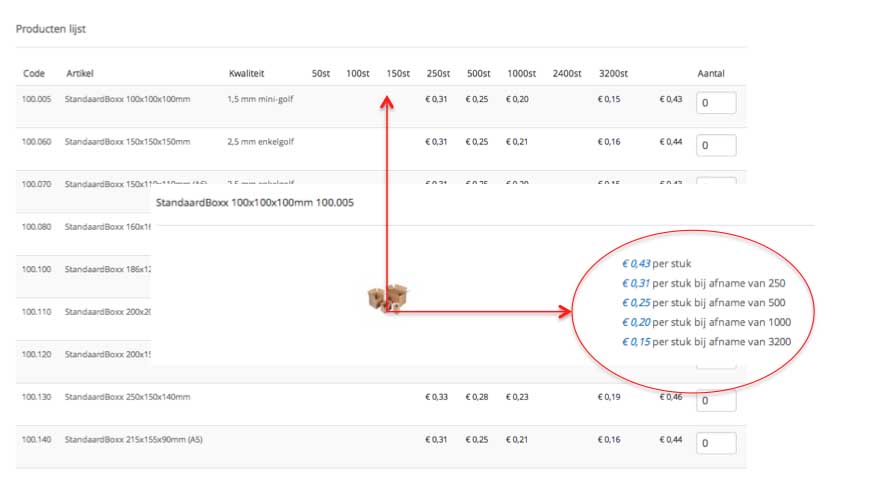
I tried your solution and it (partly) worked. (See enclosed pict 001) The problem is that a number of products have different bulk amounts.
example:
product a : 1, 250, 500, 1000, 3200
product a1: 1, 100, 250, 500,1000, 2400
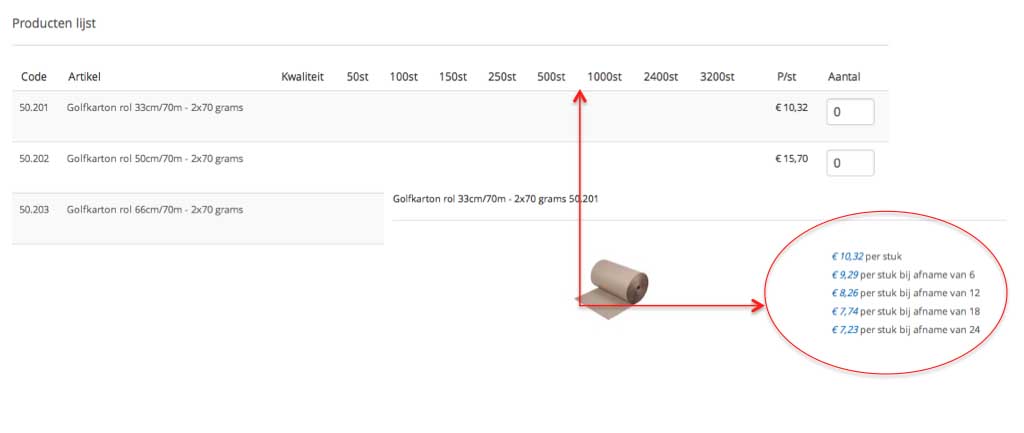
product b: 1, 6, 12, 18, 24
product c: 1, 36, 72, 180, 288
In other words, I can only place a max of 9 (th) header/bulk amounts in the view and therefore i can't show all bulk prices! See enclosed pict 002.
I therefore have the following question:
a) Is it possible to make different headers in the table list view, based upon for instance a product-range? Like Code 100.005 to 100.130 (bulk-range) header001, 100.140 to 100.235 (bulk-range) header002 etc. In this case, working with 1 table list view will give a lot of possibilities.
Thanks in advanced
Richard
I tried your solution and it (partly) worked. (See enclosed pict 001) The problem is that a number of products have different bulk amounts.
example:
product a : 1, 250, 500, 1000, 3200
product a1: 1, 100, 250, 500,1000, 2400
product b: 1, 6, 12, 18, 24
product c: 1, 36, 72, 180, 288
In other words, I can only place a max of 9 (th) header/bulk amounts in the view and therefore i can't show all bulk prices! See enclosed pict 002.
I therefore have the following question:
a) Is it possible to make different headers in the table list view, based upon for instance a product-range? Like Code 100.005 to 100.130 (bulk-range) header001, 100.140 to 100.235 (bulk-range) header002 etc. In this case, working with 1 table list view will give a lot of possibilities.
Thanks in advanced
Richard
Please Log in or Create an account to join the conversation.

12 years 2 months ago #163818
by Jerome
Jerome - Obsidev.com
HikaMarket & HikaSerial developer / HikaShop core dev team.
Replied by Jerome on topic product display page (listing tabel view)
Hi,
So you should not use hard coded values but you have to list the keys in "row->prices" to get all values of all products in the current listing.
Regards,
So you should not use hard coded values but you have to list the keys in "row->prices" to get all values of all products in the current listing.
Regards,
Jerome - Obsidev.com
HikaMarket & HikaSerial developer / HikaShop core dev team.
Please Log in or Create an account to join the conversation.
12 years 2 months ago - 12 years 2 months ago #164097
by RWouters
Replied by RWouters on topic product display page (listing tabel view)
Hi Jerome,
Thanks for the reply.
I'm currently using the following code for the view:
Can you give me an example of what your solution would look like?
Thanks,
Thanks for the reply.
I'm currently using the following code for the view:
Code:
if(isset($this->row->prices[50]->price_value)){
echo $this->currencyHelper->format(@$this->row->prices[50]->price_value,1);
echo '</td><td>';
} else{
echo '</td><td>';
}
if(isset($this->row->prices[100]->price_value)){
echo $this->currencyHelper->format(@$this->row->prices[100]->price_value,1);
echo '</td><td>';
} else{
echo '</td><td>';
}
if(isset($this->row->prices[150]->price_value)){
echo $this->currencyHelper->format(@$this->row->prices[150]->price_value,1);
echo '</td><td>';
} else{
echo '</td><td>';
}
Thanks,
Last edit: 12 years 2 months ago by Jerome. Reason: [code] is nice !
Please Log in or Create an account to join the conversation.
12 years 2 months ago #164151
by Jerome
Jerome - Obsidev.com
HikaMarket & HikaSerial developer / HikaShop core dev team.
Replied by Jerome on topic product display page (listing tabel view)
Hi,
You can use a more dynamic algorithm. It requires some development/PHP skills.
It idea is to fill the array "$values" with all possible values.
You have to fill the array in the view you can access to all rows.
So you can extra all array keys from the $rows[...]->prices
Regards,
You can use a more dynamic algorithm. It requires some development/PHP skills.
Code:
$this->all_price_quantities = array(50,100,150,200);
foreach($this->all_price_quantities as $qty) {
if(isset($this->row->prices[$qty]->price_value)){
echo $this->currencyHelper->format(@$this->row->prices[$qty]->price_value,1);
}
echo '</td><td>';
}
You have to fill the array in the view you can access to all rows.
So you can extra all array keys from the $rows[...]->prices
Regards,
Jerome - Obsidev.com
HikaMarket & HikaSerial developer / HikaShop core dev team.
Please Log in or Create an account to join the conversation.
12 years 2 months ago - 12 years 2 months ago #164270
by RWouters
Replied by RWouters on topic product display page (listing tabel view)
Hi,
The dynamic algorithm is a better approach for this problem, but i'm still stuck with the table header (theader) where
The table header equals the price_min_quantity. For now I use a fixed header f.i. 1, 50, 100, 150, 250, 500, 1000, 2400, 3200 like
Example: A
price_product_id price_min_quantity Price_value
25 1 0,43
25 250 0,31
25 500 0,25
.. ........... ............etc.
Brings me to my problem. In case of example B, the table header is still 1, 50, 100, 150, 250, 500, 1000, 2400, 3200 but the values of price_min_quantity are:
Example: B
price_product_id price_min_quantity Price_value
64 1 1,43
64 6 1,31
64 12 1,25
.. ........... ............etc.
You can see my problem here. Perhaps there is a possibility to make the <th text variable or in relation to price_product_id?
Example:
Hope you can help me. Done excellent so far.
Regards,
The dynamic algorithm is a better approach for this problem, but i'm still stuck with the table header (theader) where
The table header equals the price_min_quantity. For now I use a fixed header f.i. 1, 50, 100, 150, 250, 500, 1000, 2400, 3200 like
Code:
<th class="hikashop_product_staffel_title" align="center">
<?php echo JText::_('50st');?>
</th>
<th class="hikashop_product_staffel_title" align="center">
<?php echo JText::_('100st'); ?>
</th>
<th class="hikashop_product_staffel_title" align="center">
<?php echo JText::_('150st'); ?>
price_product_id price_min_quantity Price_value
25 1 0,43
25 250 0,31
25 500 0,25
.. ........... ............etc.
Brings me to my problem. In case of example B, the table header is still 1, 50, 100, 150, 250, 500, 1000, 2400, 3200 but the values of price_min_quantity are:
Example: B
price_product_id price_min_quantity Price_value
64 1 1,43
64 6 1,31
64 12 1,25
.. ........... ............etc.
You can see my problem here. Perhaps there is a possibility to make the <th text variable or in relation to price_product_id?
Example:
Hope you can help me. Done excellent so far.
Regards,
Last edit: 12 years 2 months ago by RWouters. Reason: removed table
Please Log in or Create an account to join the conversation.
12 years 2 months ago #164274
by Xavier
Replied by Xavier on topic product display page (listing tabel view)
Hi,
For the header part, you can use:
For the header part, you can use:
Code:
$this->all_price_quantities = array(6,12,50,100,150,200);
foreach($this->all_price_quantities as $qty) {
if(isset($this->row->prices[$qty]->price_value)){
echo $qty;
}
echo '</th><th>';
}
Please Log in or Create an account to join the conversation.
12 years 2 months ago #164367
by RWouters
Replied by RWouters on topic product display page (listing tabel view)
Hi,
With your solution i'm getting on the right track, but I still encountered a problem in the view.
Source:
With result: LIST VIEW-A.jpg
In this case there are no headers! Only corresponding values.
Just to check, i used the following code:
That gave the following results: LIST VIEW-B.jpg
In this case i can see all headers from the array, even when there is no value.
I'm confused and on the other hand convinced to leave it to the pro's
So if you could give me the final push, i would be very obliged.
Regards,
With your solution i'm getting on the right track, but I still encountered a problem in the view.
Source:
Code:
<?php
/****************************************************************/
/******************** table view header *******************/
/****************************************************************/
$this->all_price_quantities = array(5,6,10,12,18,24,36,50,72,100,108,140,150,180,250,288,500,600,1000,1200,1600,2400,3200);
foreach($this->all_price_quantities as $qty) {
if(isset($this->row->prices[$qty]->price_value)){
echo $qty;
}
echo '</th><th>';
}
/****************************************************************/ ?>
In this case there are no headers! Only corresponding values.
Just to check, i used the following code:
Code:
<?php
/****************************************************************/
/******************** table view header *******************/
/****************************************************************/
$this->all_price_quantities = array(5,6,10,12,18,24,36,50,72,100,108,140,150,180,250,288,500,600,1000,1200,1600,2400,3200);
foreach($this->all_price_quantities as $qty) {
if(isset($this->row->prices[$qty]->price_value)){
echo $qty;
}
echo '</th><th>';
echo $qty;
}
/****************************************************************/ ?>
That gave the following results: LIST VIEW-B.jpg
In this case i can see all headers from the array, even when there is no value.
I'm confused and on the other hand convinced to leave it to the pro's
So if you could give me the final push, i would be very obliged.
Regards,
Please Log in or Create an account to join the conversation.
12 years 2 months ago - 12 years 2 months ago #164372
by Xavier
Replied by Xavier on topic product display page (listing tabel view)
Hi,
Sorry my code was not correct, the values were not loaded.
Thanks to add:
At the top of the file, just after if(!empty($this->rows)){
And use:
For the header part.
And:
For the "td" part.
Sorry my code was not correct, the values were not loaded.
Thanks to add:
Code:
$this->all_price_quantities = array(5,6,10,12,18,24,36,50,72,100,108,140,150,180,250,288,500,600,1000,1200,1600,2400,3200);
$toShowQties = array();
foreach($this->rows as $row){
foreach($this->all_price_quantities as $qty) {
if(isset($this->row->prices[$qty]->price_value)){
$toShowQties[$qty] = $qty;
}
}
}
And use:
Code:
foreach($toShowQties as $qty) {
if(isset($this->row->prices[$qty]->price_value)){
echo $qty;
}
echo '</th><th>';
}
For the header part.
And:
Code:
foreach($toShowQties as $qty) {
if(isset($this->row->prices[$qty]->price_value)){
echo $this->currencyHelper->format(@$this->row->prices[$qty]->price_value,1);
}
echo '</td><td>';
}
Last edit: 12 years 2 months ago by Xavier.
Please Log in or Create an account to join the conversation.
12 years 2 months ago #164384
by RWouters
Replied by RWouters on topic product display page (listing tabel view)
Hi,
I just tried the solution you gave, with the following results: See pict
Perhaps the complete code will give you an idea what i did?
Regards,
I just tried the solution you gave, with the following results: See pict
Perhaps the complete code will give you an idea what i did?
Code:
<?php
/**
* @package HikaShop for Joomla!
* @version 2.3.1
* @author hikashop.com
* @copyright (C) 2010-2014 HIKARI SOFTWARE. All rights reserved.
* @license GNU/GPLv3 http://www.gnu.org/licenses/gpl-3.0.html
*/
defined('_JEXEC') or die('Restricted access');
?><?php
if(!empty($this->rows)){
/*****************************************************/
$this->all_price_quantities = array(5,6,10,12,18,24,36,50,60,72,100,108,140,150,180,250,288,500,600,1000,1200,1600,2400,3200);
$toShowQties = array();
foreach($this->rows as $row){
foreach($this->all_price_quantities as $qty) {
if(isset($this->row->prices[$qty]->price_value)){
$toShowQties[$qty] = $qty;
}
}
}
/****************************************************/
$pagination = $this->config->get('pagination','bottom');
if(in_array($pagination,array('top','both')) && $this->params->get('show_limit') && $this->pageInfo->elements->total){ $this->pagination->form = '_top'; ?>
<form action="<?php echo hikashop_currentURL(); ?>" method="post" name="adminForm_<?php echo $this->params->get('main_div_name').$this->category_selected;?>_top">
<div class="hikashop_products_pagination hikashop_products_pagination_top">
<?php echo $this->pagination->getListFooter($this->params->get('limit')); ?>
<span class="hikashop_results_counter"><?php echo $this->pagination->getResultsCounter(); ?></span>
</div>
<input type="hidden" name="filter_order_<?php echo $this->params->get('main_div_name').$this->category_selected;?>" value="<?php echo $this->pageInfo->filter->order->value; ?>" />
<input type="hidden" name="filter_order_Dir_<?php echo $this->params->get('main_div_name').$this->category_selected;?>" value="<?php echo $this->pageInfo->filter->order->dir; ?>" />
<?php echo JHTML::_( 'form.token' ); ?>
</form>
<?php } ?>
<div class="hikashop_products">
<?php
if ($this->config->get('show_quantity_field')>=2) { ?>
<form action="<?php echo hikashop_completeLink('product&task=updatecart'); ?>" method="post" name="hikashop_product_form_<?php echo $this->params->get('main_div_name'); ?>" enctype="multipart/form-data">
<?php }
$columns = 1; ?>
<table class="hikashop_products_table adminlist table table-striped table-hover" cellpadding="1">
<thead>
<tr>
<?php if($this->config->get('thumbnail')){ $columns++; ?>
<th class="hikashop_product_image title" align="center">
<?php echo JText::_( 'HIKA_IMAGE' );?>
</th>
<?php } ?>
<?php if ($this->config->get('show_code')) { $columns++;?>
<th class="hikashop_product_code_title" align="center">
<?php echo JText::_( 'PRODUCT_CODE'); ?>
</th>
<?php } ?>
<th class="hikashop_product_name title" align="center">
<?php echo JText::_( 'PRODUCT' );?>
</th>
<th class="hikashop_product_quality title" align="center">
<?php echo JText::_( 'Kwaliteit' );?>
</th>
<?php if($this->params->get('show_vote_product')){ ?>
<th class="hikashop_product_vote title" align="center">
<?php echo JText::_('VOTE'); ?>
</th>
<?php } ?>
<?php
/****************************************************************/
/******************** table view header ************************/
/****************************************************************/
foreach($toShowQties as $qty) {
if(isset($this->row->prices[$qty]->price_value)){
echo $qty;
}
echo '</th><th>';
}
/******************************************************
$this->all_price_quantities = array(5,6,10,12,18,24,36,50,60,72,100,108,140,150,180,250,288,500,600,1000,1200,1600,2400,3200);
foreach($this->all_price_quantities as $qty) {
if(isset($this->row->prices[$qty]->price_value)){
echo ($qty);
}
echo '</th><th>';
}
echo '</th><th>'
/****************************************************************/ ?>
<?php
if($this->params->get('show_price','-1')=='-1'){
$config =& hikashop_config();
$this->params->set('show_price',$config->get('show_price'));
}
if($this->params->get('show_price')){ $columns++; ?>
<th class="hikashop_product_price title" align="center">
<?php echo JText::_('P/stuk'); ?>
</th>
<?php } ?>
<?php if($this->params->get('add_to_cart') || $this->params->get('add_to_wishlist')){ $columns++; ?>
<th class="hikashop_product_add_to_cart title" align="center">
<?php echo JText::_( 'Aantal'); ?>
</th>
<?php } ?>
<?php if(JRequest::getVar('hikashop_front_end_main',0) && JRequest::getVar('task')=='listing' && $this->params->get('show_compare')) { $columns++; ?>
<th class="hikashop_product_compare title" align="center">
</th>
<?php } ?>
</tr>
</thead>
<tfoot>
<tr>
<td colspan="<?php echo $columns; ?>">
</td>
</tr>
</tfoot>
<tbody>
<?php foreach($this->rows as $row){
$this->row =& $row;
$height = $this->params->get('image_height');
$width = $this->params->get('image_width');
if(empty($height)) $height=$this->config->get('thumbnail_y');
if(empty($width)) $width=$this->config->get('thumbnail_x');
$divWidth=$width;
$divHeight=$height;
$this->image->checkSize($divWidth,$divHeight,$row);
$link = hikashop_contentLink('product&task=show&cid='.$this->row->product_id.'&name='.$this->row->alias.$this->itemid.$this->category_pathway,$this->row); ?>
<tr>
<?php if($this->config->get('thumbnail')){ ?>
<td class="hikashop_product_image_row">
<div style="height:<?php echo $divHeight;?>px;text-align:center;clear:both;" class="hikashop_product_image">
<div style="position:relative;text-align:center;clear:both;width:<?php echo $divWidth;?>px;margin: auto;" class="hikashop_product_image_subdiv">
<?php if($this->params->get('link_to_product_page',1)){ ?>
<a href="<?php echo $link;?>" title="<?php echo $this->escape($this->row->product_name); ?>">
<?php }
$image_options = array('default' => true,'forcesize'=>$this->config->get('image_force_size',true),'scale'=>$this->config->get('image_scale_mode','inside'));
$img = $this->image->getThumbnail(@$this->row->file_path, array('width' => $this->image->main_thumbnail_x, 'height' => $this->image->main_thumbnail_y), $image_options);
if($img->success) {
echo '<img class="hikashop_product_listing_image" title="'.$this->escape(@$this->row->file_description).'" alt="'.$this->escape(@$this->row->file_name).'" src="'.$img->url.'"/>';
}
$main_thumb_x = $this->image->main_thumbnail_x;
$main_thumb_y = $this->image->main_thumbnail_y;
if($this->params->get('display_badges',1)){
$this->classbadge->placeBadges($this->image, $this->row->badges, -10, 0);
}
$this->image->main_thumbnail_x = $main_thumb_x;
$this->image->main_thumbnail_y = $main_thumb_y;
if($this->params->get('link_to_product_page',1)){ ?>
</a>
<?php } ?>
</div>
</div>
</td>
<?php if ($this->config->get('show_code')){ ?>
<td class="hikashop_product_code_row">
<?php if($this->params->get('link_to_product_page',1)){ ?>
<a href="<?php echo $link;?>">
<?php }
echo $this->row->product_code;
if($this->params->get('link_to_product_page',1)){ ?>
</a>
<?php } ?>
</td>
<?php } ?>
<?php } ?>
<td class="hikashop_product_name_row">
<span class="hikashop_product_name">
<?php if($this->params->get('link_to_product_page',1)){ ?>
<a href="<?php echo $link;?>">
<?php }
echo $this->row->product_name;
if($this->params->get('link_to_product_page',1)){ ?>
</a>
<?php } ?>
</span>
<?php if(!empty($this->row->extraData->afterProductName)) { echo implode("\r\n",$this->row->extraData->afterProductName); } ?>
</td>
<td class="hikashop_product_name_row">
<span class="hikashop_product_name">
<?php if($this->params->get('link_to_product_page',1)){ ?>
<a href="<?php echo $link;?>">
<?php }
echo $this->row->product_quality;
if($this->params->get('link_to_product_page',1)){ ?>
</a>
<?php } ?>
</span>
<?php if(!empty($this->row->extraData->afterProductName)) { echo implode("\r\n",$this->row->extraData->afterProductName); } ?>
</td>
<td class="hikashop_product_name_row">
<span class="hikashop_product_name">
<?php if($this->params->get('link_to_product_page',1)){ ?>
<a href="<?php echo $link;?>">
<?php }
/****************************************************************/
/*********************** table view option [prices]**************/
foreach($toShowQties as $qty) {
if(isset($this->row->prices[$qty]->price_value)){
echo $this->currencyHelper->format(@$this->row->prices[$qty]->price_value,1);
}
echo '</td><td>';
}
/****************************************************************
$this->all_price_quantities = array(5,6,10,12,18,24,36,50,60,72,100,108,140,150,180,250,288,500,600,1000,1200,1600,2400,3200);
foreach($this->all_price_quantities as $qty) {
;
/****************************************************************
if(isset($this->row->prices[$qty]->price_value)){
echo $this->currencyHelper->format(@$this->row->prices[$qty]->price_value,1);
} echo '</td><td>';
}
/****************************************************************/
/* if(isset($this->row->prices[$qty]->price_value)){
echo $this->currencyHelper->format(@$this->row->prices[50]->price_value,1);
echo '</td><td>';
} else{
echo '</td><td>';
}
if(isset($this->row->prices[150]->price_value)){
echo $this->currencyHelper->format(@$this->row->prices[150]->price_value,1);
echo '</td><td>';
} else{
echo '</td><td>';
}
if(isset($this->row->prices[250]->price_value)){
echo $this->currencyHelper->format(@$this->row->prices[250]->price_value,1);
echo '</td><td>';
} else{
echo '</td><td>';
}
if(isset($this->row->prices[500]->price_value)){
echo $this->currencyHelper->format(@$this->row->prices[500]->price_value,1);
echo '</td><td>';
} else{
echo '</td><td>';
}
if(isset($this->row->prices[1000]->price_value)){
echo $this->currencyHelper->format(@$this->row->prices[1000]->price_value,1);
echo '</td><td>';
} else{
echo '</td><td>';
}
if(isset($this->row->prices[1600]->price_value)){
echo $this->currencyHelper->format(@$this->row->prices[1600]->price_value,1);
echo '</td><td>';
} else{
echo '</td><td>';
}
if(isset($this->row->prices[2400]->price_value)){
echo $this->currencyHelper->format(@$this->row->prices[2400]->price_value,1);
echo '</td><td>';
} else{
echo '</td><td>';
}
if(isset($this->row->prices[3200]->price_value)){
echo $this->currencyHelper->format(@$this->row->prices[3200]->price_value,1);
echo '</td><td>';
} else{
echo '</td><td>';
}
/*******************************************************************/
if($this->params->get('link_to_product_page',1)){ ?>
</a>
<?php } ?>
</span>
<?php if(!empty($this->row->extraData->afterProductName)) { echo implode("\r\n",$this->row->extraData->afterProductName); } ?>
</td>
<?php if($this->params->get('show_vote_product')){ ?>
<td class="hikashop_product_vote_row">
<?php
$this->row =& $row;
$this->setLayout('listing_vote');
echo $this->loadTemplate();
?>
</td>
<?php } ?>
<?php
if($this->params->get('show_price','-1')=='-1'){
$config =& hikashop_config();
$this->params->set('show_price',$config->get('show_price'));
}
if($this->params->get('show_price')){ ?>
<td class="hikashop_product_price_row">
<?php
$prodClass = hikashop_get('class.product');
$prodClass->getProducts($this->row->product_id);
echo $this->currencyHelper->format(@$this->row->prices[0]->price_value,1);
echo ('');
echo $this->row->price_product_id;
?>
</td>
<?php } ?>
<?php if($this->params->get('add_to_cart')){ ?>
<td class="hikashop_product_add_to_cart_row">
<?php
$this->setLayout('add_to_cart_listing');
echo $this->loadTemplate();
?>
</td>
<?php } ?>
<?php
if(JRequest::getVar('hikashop_front_end_main',0) && JRequest::getVar('task')=='listing' && $this->params->get('show_compare')) {
if( $this->params->get('show_compare') == 1 ) {
?>
<td class="hikashop_product_compare_row">
<?php
$js = 'setToCompareList('.$this->row->product_id.',\''.$this->escape($this->row->product_name).'\',this); return false;';
echo $this->cart->displayButton(JText::_('ADD_TO_COMPARE_LIST'),'compare',$this->params,$link,$js,'',0,1,'hikashop_compare_button');
?>
</td>
<?php } else { ?>
<td class="hikashop_product_compare_row">
<input type="checkbox" class="hikashop_compare_checkbox" id="hikashop_listing_chk_<?php echo $this->row->product_id;?>" onchange="setToCompareList(<?php echo $this->row->product_id;?>,'<?php echo $this->escape($this->row->product_name); ?>',this);"><label for="hikashop_listing_chk_<?php echo $this->row->product_id;?>"><?php echo JText::_('ADD_TO_COMPARE_LIST'); ?></label>
</td>
<?php }
} ?>
</tr>
<?php } ?>
</tbody>
</table>
<?php if ($this->config->get('show_quantity_field')>=2) {
$this->ajax = 'if(hikashopCheckChangeForm(\'item\',\'hikashop_product_form_'.$this->params->get('main_div_name').'\')){ return hikashopModifyQuantity(\'\',field,1,\'hikashop_product_form_'.$this->params->get('main_div_name').'\'); } return false;';
$this->row = null;
$this->row->product_quantity = -1;
$this->row->product_min_per_order = 0;
$this->row->product_max_per_order = -1;
$this->row->product_sale_start = 0;
$this->row->product_sale_end = 0;
$this->row->prices = array('filler');
$this->setLayout('quantity');
echo $this->loadTemplate();
if(!empty($this->ajax) && $this->config->get('redirect_url_after_add_cart','stay_if_cart')=='ask_user'){ ?>
<input type="hidden" name="popup" value="1"/>
<?php } ?>
<input type="hidden" name="hikashop_cart_type_0" id="hikashop_cart_type_0" value="cart"/>
<input type="hidden" name="add" value="1"/>
<input type="hidden" name="ctrl" value="product"/>
<input type="hidden" name="task" value="updatecart"/>
<input type="hidden" name="return_url" value="<?php echo urlencode(base64_encode(urldecode($this->redirect_url)));?>"/>
</form>
<?php }
if(in_array($pagination,array('bottom','both')) && $this->params->get('show_limit') && $this->pageInfo->elements->total){ $this->pagination->form = '_bottom'; ?>
<form action="<?php echo hikashop_currentURL(); ?>" method="post" name="adminForm_<?php echo $this->params->get('main_div_name').$this->category_selected;?>_bottom">
<div class="hikashop_products_pagination hikashop_products_pagination_bottom">
<?php echo $this->pagination->getListFooter($this->params->get('limit')); ?>
<span class="hikashop_results_counter"><?php echo $this->pagination->getResultsCounter(); ?></span>
</div>
<input type="hidden" name="filter_order_<?php echo $this->params->get('main_div_name').$this->category_selected;?>" value="<?php echo $this->pageInfo->filter->order->value; ?>" />
<input type="hidden" name="filter_order_Dir_<?php echo $this->params->get('main_div_name').$this->category_selected;?>" value="<?php echo $this->pageInfo->filter->order->dir; ?>" />
<?php echo JHTML::_( 'form.token' ); ?>
</form>
<?php } ?>
</div>
<?php } ?>
Regards,
Please Log in or Create an account to join the conversation.
12 years 2 months ago #164389
by Xavier
Replied by Xavier on topic product display page (listing tabel view)
Hi,
Thanks to try that code:
If still not working thanks to give me backend access via pm in order to take more time about this.
thanks to give the url to that topic in the private message.
Thanks to try that code:
Code:
<?php
/**
* @package HikaShop for Joomla!
* @version 2.3.1
* @author hikashop.com
* @copyright (C) 2010-2014 HIKARI SOFTWARE. All rights reserved.
* @license GNU/GPLv3 http://www.gnu.org/licenses/gpl-3.0.html
*/
defined('_JEXEC') or die('Restricted access');
?><?php
if(!empty($this->rows)){
/*****************************************************/
$this->all_price_quantities = array(5,6,10,12,18,24,36,50,60,72,100,108,140,150,180,250,288,500,600,1000,1200,1600,2400,3200);
$toShowQties = array();
foreach($this->rows as $row){
foreach($this->all_price_quantities as $qty) {
if(isset($row->prices[$qty]->price_value)){
$toShowQties[$qty] = $qty;
}
}
}
/****************************************************/
$pagination = $this->config->get('pagination','bottom');
if(in_array($pagination,array('top','both')) && $this->params->get('show_limit') && $this->pageInfo->elements->total){ $this->pagination->form = '_top'; ?>
<form action="<?php echo hikashop_currentURL(); ?>" method="post" name="adminForm_<?php echo $this->params->get('main_div_name').$this->category_selected;?>_top">
<div class="hikashop_products_pagination hikashop_products_pagination_top">
<?php echo $this->pagination->getListFooter($this->params->get('limit')); ?>
<span class="hikashop_results_counter"><?php echo $this->pagination->getResultsCounter(); ?></span>
</div>
<input type="hidden" name="filter_order_<?php echo $this->params->get('main_div_name').$this->category_selected;?>" value="<?php echo $this->pageInfo->filter->order->value; ?>" />
<input type="hidden" name="filter_order_Dir_<?php echo $this->params->get('main_div_name').$this->category_selected;?>" value="<?php echo $this->pageInfo->filter->order->dir; ?>" />
<?php echo JHTML::_( 'form.token' ); ?>
</form>
<?php } ?>
<div class="hikashop_products">
<?php
if ($this->config->get('show_quantity_field')>=2) { ?>
<form action="<?php echo hikashop_completeLink('product&task=updatecart'); ?>" method="post" name="hikashop_product_form_<?php echo $this->params->get('main_div_name'); ?>" enctype="multipart/form-data">
<?php }
$columns = 1; ?>
<table class="hikashop_products_table adminlist table table-striped table-hover" cellpadding="1">
<thead>
<tr>
<?php if($this->config->get('thumbnail')){ $columns++; ?>
<th class="hikashop_product_image title" align="center">
<?php echo JText::_( 'HIKA_IMAGE' );?>
</th>
<?php } ?>
<?php if ($this->config->get('show_code')) { $columns++;?>
<th class="hikashop_product_code_title" align="center">
<?php echo JText::_( 'PRODUCT_CODE'); ?>
</th>
<?php } ?>
<th class="hikashop_product_name title" align="center">
<?php echo JText::_( 'PRODUCT' );?>
</th>
<th class="hikashop_product_quality title" align="center">
<?php echo JText::_( 'Kwaliteit' );?>
</th>
<?php if($this->params->get('show_vote_product')){ ?>
<th class="hikashop_product_vote title" align="center">
<?php echo JText::_('VOTE'); ?>
</th>
<?php } ?>
<?php
/****************************************************************/
/******************** table view header ************************/
/****************************************************************/
foreach($toShowQties as $qty) {
echo $qty;
echo '</th><th>';
}
/******************************************************
$this->all_price_quantities = array(5,6,10,12,18,24,36,50,60,72,100,108,140,150,180,250,288,500,600,1000,1200,1600,2400,3200);
foreach($this->all_price_quantities as $qty) {
if(isset($this->row->prices[$qty]->price_value)){
echo ($qty);
}
echo '</th><th>';
}
echo '</th><th>'
/****************************************************************/ ?>
<?php
if($this->params->get('show_price','-1')=='-1'){
$config =& hikashop_config();
$this->params->set('show_price',$config->get('show_price'));
}
if($this->params->get('show_price')){ $columns++; ?>
<th class="hikashop_product_price title" align="center">
<?php echo JText::_('P/stuk'); ?>
</th>
<?php } ?>
<?php if($this->params->get('add_to_cart') || $this->params->get('add_to_wishlist')){ $columns++; ?>
<th class="hikashop_product_add_to_cart title" align="center">
<?php echo JText::_( 'Aantal'); ?>
</th>
<?php } ?>
<?php if(JRequest::getVar('hikashop_front_end_main',0) && JRequest::getVar('task')=='listing' && $this->params->get('show_compare')) { $columns++; ?>
<th class="hikashop_product_compare title" align="center">
</th>
<?php } ?>
</tr>
</thead>
<tfoot>
<tr>
<td colspan="<?php echo $columns; ?>">
</td>
</tr>
</tfoot>
<tbody>
<?php foreach($this->rows as $row){
$this->row =& $row;
$height = $this->params->get('image_height');
$width = $this->params->get('image_width');
if(empty($height)) $height=$this->config->get('thumbnail_y');
if(empty($width)) $width=$this->config->get('thumbnail_x');
$divWidth=$width;
$divHeight=$height;
$this->image->checkSize($divWidth,$divHeight,$row);
$link = hikashop_contentLink('product&task=show&cid='.$this->row->product_id.'&name='.$this->row->alias.$this->itemid.$this->category_pathway,$this->row); ?>
<tr>
<?php if($this->config->get('thumbnail')){ ?>
<td class="hikashop_product_image_row">
<div style="height:<?php echo $divHeight;?>px;text-align:center;clear:both;" class="hikashop_product_image">
<div style="position:relative;text-align:center;clear:both;width:<?php echo $divWidth;?>px;margin: auto;" class="hikashop_product_image_subdiv">
<?php if($this->params->get('link_to_product_page',1)){ ?>
<a href="<?php echo $link;?>" title="<?php echo $this->escape($this->row->product_name); ?>">
<?php }
$image_options = array('default' => true,'forcesize'=>$this->config->get('image_force_size',true),'scale'=>$this->config->get('image_scale_mode','inside'));
$img = $this->image->getThumbnail(@$this->row->file_path, array('width' => $this->image->main_thumbnail_x, 'height' => $this->image->main_thumbnail_y), $image_options);
if($img->success) {
echo '<img class="hikashop_product_listing_image" title="'.$this->escape(@$this->row->file_description).'" alt="'.$this->escape(@$this->row->file_name).'" src="'.$img->url.'"/>';
}
$main_thumb_x = $this->image->main_thumbnail_x;
$main_thumb_y = $this->image->main_thumbnail_y;
if($this->params->get('display_badges',1)){
$this->classbadge->placeBadges($this->image, $this->row->badges, -10, 0);
}
$this->image->main_thumbnail_x = $main_thumb_x;
$this->image->main_thumbnail_y = $main_thumb_y;
if($this->params->get('link_to_product_page',1)){ ?>
</a>
<?php } ?>
</div>
</div>
</td>
<?php if ($this->config->get('show_code')){ ?>
<td class="hikashop_product_code_row">
<?php if($this->params->get('link_to_product_page',1)){ ?>
<a href="<?php echo $link;?>">
<?php }
echo $this->row->product_code;
if($this->params->get('link_to_product_page',1)){ ?>
</a>
<?php } ?>
</td>
<?php } ?>
<?php } ?>
<td class="hikashop_product_name_row">
<span class="hikashop_product_name">
<?php if($this->params->get('link_to_product_page',1)){ ?>
<a href="<?php echo $link;?>">
<?php }
echo $this->row->product_name;
if($this->params->get('link_to_product_page',1)){ ?>
</a>
<?php } ?>
</span>
<?php if(!empty($this->row->extraData->afterProductName)) { echo implode("\r\n",$this->row->extraData->afterProductName); } ?>
</td>
<td class="hikashop_product_name_row">
<span class="hikashop_product_name">
<?php if($this->params->get('link_to_product_page',1)){ ?>
<a href="<?php echo $link;?>">
<?php }
echo $this->row->product_quality;
if($this->params->get('link_to_product_page',1)){ ?>
</a>
<?php } ?>
</span>
<?php if(!empty($this->row->extraData->afterProductName)) { echo implode("\r\n",$this->row->extraData->afterProductName); } ?>
</td>
<td class="hikashop_product_name_row">
<span class="hikashop_product_name">
<?php if($this->params->get('link_to_product_page',1)){ ?>
<a href="<?php echo $link;?>">
<?php }
/****************************************************************/
/*********************** table view option [prices]**************/
foreach($toShowQties as $qty) {
if(isset($this->row->prices[$qty]->price_value)
echo $this->currencyHelper->format(@$this->row->prices[$qty]->price_value,1);
echo '</td><td>';
}
/****************************************************************
$this->all_price_quantities = array(5,6,10,12,18,24,36,50,60,72,100,108,140,150,180,250,288,500,600,1000,1200,1600,2400,3200);
foreach($this->all_price_quantities as $qty) {
;
/****************************************************************
if(isset($this->row->prices[$qty]->price_value)){
echo $this->currencyHelper->format(@$this->row->prices[$qty]->price_value,1);
} echo '</td><td>';
}
/****************************************************************/
/* if(isset($this->row->prices[$qty]->price_value)){
echo $this->currencyHelper->format(@$this->row->prices[50]->price_value,1);
echo '</td><td>';
} else{
echo '</td><td>';
}
if(isset($this->row->prices[150]->price_value)){
echo $this->currencyHelper->format(@$this->row->prices[150]->price_value,1);
echo '</td><td>';
} else{
echo '</td><td>';
}
if(isset($this->row->prices[250]->price_value)){
echo $this->currencyHelper->format(@$this->row->prices[250]->price_value,1);
echo '</td><td>';
} else{
echo '</td><td>';
}
if(isset($this->row->prices[500]->price_value)){
echo $this->currencyHelper->format(@$this->row->prices[500]->price_value,1);
echo '</td><td>';
} else{
echo '</td><td>';
}
if(isset($this->row->prices[1000]->price_value)){
echo $this->currencyHelper->format(@$this->row->prices[1000]->price_value,1);
echo '</td><td>';
} else{
echo '</td><td>';
}
if(isset($this->row->prices[1600]->price_value)){
echo $this->currencyHelper->format(@$this->row->prices[1600]->price_value,1);
echo '</td><td>';
} else{
echo '</td><td>';
}
if(isset($this->row->prices[2400]->price_value)){
echo $this->currencyHelper->format(@$this->row->prices[2400]->price_value,1);
echo '</td><td>';
} else{
echo '</td><td>';
}
if(isset($this->row->prices[3200]->price_value)){
echo $this->currencyHelper->format(@$this->row->prices[3200]->price_value,1);
echo '</td><td>';
} else{
echo '</td><td>';
}
/*******************************************************************/
if($this->params->get('link_to_product_page',1)){ ?>
</a>
<?php } ?>
</span>
<?php if(!empty($this->row->extraData->afterProductName)) { echo implode("\r\n",$this->row->extraData->afterProductName); } ?>
</td>
<?php if($this->params->get('show_vote_product')){ ?>
<td class="hikashop_product_vote_row">
<?php
$this->row =& $row;
$this->setLayout('listing_vote');
echo $this->loadTemplate();
?>
</td>
<?php } ?>
<?php
if($this->params->get('show_price','-1')=='-1'){
$config =& hikashop_config();
$this->params->set('show_price',$config->get('show_price'));
}
if($this->params->get('show_price')){ ?>
<td class="hikashop_product_price_row">
<?php
$prodClass = hikashop_get('class.product');
$prodClass->getProducts($this->row->product_id);
echo $this->currencyHelper->format(@$this->row->prices[0]->price_value,1);
echo ('');
echo $this->row->price_product_id;
?>
</td>
<?php } ?>
<?php if($this->params->get('add_to_cart')){ ?>
<td class="hikashop_product_add_to_cart_row">
<?php
$this->setLayout('add_to_cart_listing');
echo $this->loadTemplate();
?>
</td>
<?php } ?>
<?php
if(JRequest::getVar('hikashop_front_end_main',0) && JRequest::getVar('task')=='listing' && $this->params->get('show_compare')) {
if( $this->params->get('show_compare') == 1 ) {
?>
<td class="hikashop_product_compare_row">
<?php
$js = 'setToCompareList('.$this->row->product_id.',\''.$this->escape($this->row->product_name).'\',this); return false;';
echo $this->cart->displayButton(JText::_('ADD_TO_COMPARE_LIST'),'compare',$this->params,$link,$js,'',0,1,'hikashop_compare_button');
?>
</td>
<?php } else { ?>
<td class="hikashop_product_compare_row">
<input type="checkbox" class="hikashop_compare_checkbox" id="hikashop_listing_chk_<?php echo $this->row->product_id;?>" onchange="setToCompareList(<?php echo $this->row->product_id;?>,'<?php echo $this->escape($this->row->product_name); ?>',this);"><label for="hikashop_listing_chk_<?php echo $this->row->product_id;?>"><?php echo JText::_('ADD_TO_COMPARE_LIST'); ?></label>
</td>
<?php }
} ?>
</tr>
<?php } ?>
</tbody>
</table>
<?php if ($this->config->get('show_quantity_field')>=2) {
$this->ajax = 'if(hikashopCheckChangeForm(\'item\',\'hikashop_product_form_'.$this->params->get('main_div_name').'\')){ return hikashopModifyQuantity(\'\',field,1,\'hikashop_product_form_'.$this->params->get('main_div_name').'\'); } return false;';
$this->row = null;
$this->row->product_quantity = -1;
$this->row->product_min_per_order = 0;
$this->row->product_max_per_order = -1;
$this->row->product_sale_start = 0;
$this->row->product_sale_end = 0;
$this->row->prices = array('filler');
$this->setLayout('quantity');
echo $this->loadTemplate();
if(!empty($this->ajax) && $this->config->get('redirect_url_after_add_cart','stay_if_cart')=='ask_user'){ ?>
<input type="hidden" name="popup" value="1"/>
<?php } ?>
<input type="hidden" name="hikashop_cart_type_0" id="hikashop_cart_type_0" value="cart"/>
<input type="hidden" name="add" value="1"/>
<input type="hidden" name="ctrl" value="product"/>
<input type="hidden" name="task" value="updatecart"/>
<input type="hidden" name="return_url" value="<?php echo urlencode(base64_encode(urldecode($this->redirect_url)));?>"/>
</form>
<?php }
if(in_array($pagination,array('bottom','both')) && $this->params->get('show_limit') && $this->pageInfo->elements->total){ $this->pagination->form = '_bottom'; ?>
<form action="<?php echo hikashop_currentURL(); ?>" method="post" name="adminForm_<?php echo $this->params->get('main_div_name').$this->category_selected;?>_bottom">
<div class="hikashop_products_pagination hikashop_products_pagination_bottom">
<?php echo $this->pagination->getListFooter($this->params->get('limit')); ?>
<span class="hikashop_results_counter"><?php echo $this->pagination->getResultsCounter(); ?></span>
</div>
<input type="hidden" name="filter_order_<?php echo $this->params->get('main_div_name').$this->category_selected;?>" value="<?php echo $this->pageInfo->filter->order->value; ?>" />
<input type="hidden" name="filter_order_Dir_<?php echo $this->params->get('main_div_name').$this->category_selected;?>" value="<?php echo $this->pageInfo->filter->order->dir; ?>" />
<?php echo JHTML::_( 'form.token' ); ?>
</form>
<?php } ?>
</div>
<?php } ?>
If still not working thanks to give me backend access via pm in order to take more time about this.
thanks to give the url to that topic in the private message.
Please Log in or Create an account to join the conversation.
12 years 2 months ago - 12 years 2 months ago #164488
by RWouters
Replied by RWouters on topic product display page (listing tabel view)
Hi,
Thanks for the update. It 'almost' works perfectly.
I've enclosed a pict of the latest results.
As you can see, for some reason the header is 'mixed up'. The first header-value (e.g. 250) is not placed on the same row as the rest of the header. The corresponding value (0,31) is now underneath the header 500 instead of 250.
Too make sure i didn't make any typo's i enclosed the code.
I'm sorry to say that there is no back-end at this moment. Where still on a local development situation, so this is the only way to make any changes at the moment.
Last minute change: I've changed the source regarding to the header and that seems to work. Rest sorting the header/data.
As for the view, is it possible to sort the header / data on low header-value to high header-value. In that case the view would look better.
As always i'm very grateful for the good professional support.
Regards,
Thanks for the update. It 'almost' works perfectly.
I've enclosed a pict of the latest results.
As you can see, for some reason the header is 'mixed up'. The first header-value (e.g. 250) is not placed on the same row as the rest of the header. The corresponding value (0,31) is now underneath the header 500 instead of 250.
Too make sure i didn't make any typo's i enclosed the code.
Code:
<?php
/**
* @package HikaShop for Joomla!
* @version 2.3.1
* @author hikashop.com
* @copyright (C) 2010-2014 HIKARI SOFTWARE. All rights reserved.
* @license GNU/GPLv3 http://www.gnu.org/licenses/gpl-3.0.html
*/
defined('_JEXEC') or die('Restricted access');
?><?php
if(!empty($this->rows)){
/*****************************************************/
$this->all_price_quantities = array(5,6,10,12,18,24,36,50,60,72,100,108,140,150,180,250,288,500,600,1000,1200,1600,2400,3200);
$toShowQties = array();
foreach($this->rows as $row){
foreach($this->all_price_quantities as $qty) {
if(isset($row->prices[$qty]->price_value)){
$toShowQties[$qty] = $qty;
}
}
}
/****************************************************/
$pagination = $this->config->get('pagination','bottom');
if(in_array($pagination,array('top','both')) && $this->params->get('show_limit') && $this->pageInfo->elements->total){ $this->pagination->form = '_top'; ?>
<form action="<?php echo hikashop_currentURL(); ?>" method="post" name="adminForm_<?php echo $this->params->get('main_div_name').$this->category_selected;?>_top">
<div class="hikashop_products_pagination hikashop_products_pagination_top">
<?php echo $this->pagination->getListFooter($this->params->get('limit')); ?>
<span class="hikashop_results_counter"><?php echo $this->pagination->getResultsCounter(); ?></span>
</div>
<input type="hidden" name="filter_order_<?php echo $this->params->get('main_div_name').$this->category_selected;?>" value="<?php echo $this->pageInfo->filter->order->value; ?>" />
<input type="hidden" name="filter_order_Dir_<?php echo $this->params->get('main_div_name').$this->category_selected;?>" value="<?php echo $this->pageInfo->filter->order->dir; ?>" />
<?php echo JHTML::_( 'form.token' ); ?>
</form>
<?php } ?>
<div class="hikashop_products">
<?php
if ($this->config->get('show_quantity_field')>=2) { ?>
<form action="<?php echo hikashop_completeLink('product&task=updatecart'); ?>" method="post" name="hikashop_product_form_<?php echo $this->params->get('main_div_name'); ?>" enctype="multipart/form-data">
<?php }
$columns = 1; ?>
<table class="hikashop_products_table adminlist table table-striped table-hover" cellpadding="1">
<thead>
<tr>
<?php if($this->config->get('thumbnail')){ $columns++; ?>
<th class="hikashop_product_image title" align="center">
<?php echo JText::_( 'HIKA_IMAGE' );?>
</th>
<?php } ?>
<?php if ($this->config->get('show_code')) { $columns++;?>
<th class="hikashop_product_code_title" align="center">
<?php echo JText::_( 'PRODUCT_CODE'); ?>
</th>
<?php } ?>
<th class="hikashop_product_name title" align="center">
<?php echo JText::_( 'PRODUCT' );?>
</th>
<th class="hikashop_product_quality title" align="center">
<?php echo JText::_( 'Kwaliteit' );?>
</th>
<?php if($this->params->get('show_vote_product')){ ?>
<th class="hikashop_product_vote title" align="center">
<?php echo JText::_('VOTE'); ?>
</th>
<?php } ?>
<?php
/****************************************************************/
/******************** table view header ************************/
/****************************************************************/
foreach($toShowQties as $qty) {
echo $qty;
echo '</th><th>';
}
/******************************************************
$this->all_price_quantities = array(5,6,10,12,18,24,36,50,60,72,100,108,140,150,180,250,288,500,600,1000,1200,1600,2400,3200);
foreach($this->all_price_quantities as $qty) {
if(isset($this->row->prices[$qty]->price_value)){
echo ($qty);
}
echo '</th><th>';
}
echo '</th><th>'
/****************************************************************/ ?>
<?php
if($this->params->get('show_price','-1')=='-1'){
$config =& hikashop_config();
$this->params->set('show_price',$config->get('show_price'));
}
if($this->params->get('show_price')){ $columns++; ?>
<th class="hikashop_product_price title" align="center">
<?php echo '</th><th>'; ?>
<?php echo JText::_('P/stuk'); ?>
</th>
<?php } ?>
<?php if($this->params->get('add_to_cart') || $this->params->get('add_to_wishlist')){ $columns++; ?>
<th class="hikashop_product_add_to_cart title" align="center">
<?php echo JText::_( 'Aantal'); ?>
</th>
<?php } ?>
<?php if(JRequest::getVar('hikashop_front_end_main',0) && JRequest::getVar('task')=='listing' && $this->params->get('show_compare')) { $columns++; ?>
<th class="hikashop_product_compare title" align="center">
</th>
<?php } ?>
</tr>
</thead>
<tfoot>
<tr>
<td colspan="<?php echo $columns; ?>">
</td>
</tr>
</tfoot>
<tbody>
<?php foreach($this->rows as $row){
$this->row =& $row;
$height = $this->params->get('image_height');
$width = $this->params->get('image_width');
if(empty($height)) $height=$this->config->get('thumbnail_y');
if(empty($width)) $width=$this->config->get('thumbnail_x');
$divWidth=$width;
$divHeight=$height;
$this->image->checkSize($divWidth,$divHeight,$row);
$link = hikashop_contentLink('product&task=show&cid='.$this->row->product_id.'&name='.$this->row->alias.$this->itemid.$this->category_pathway,$this->row); ?>
<tr>
<?php if($this->config->get('thumbnail')){ ?>
<td class="hikashop_product_image_row">
<div style="height:<?php echo $divHeight;?>px;text-align:center;clear:both;" class="hikashop_product_image">
<div style="position:relative;text-align:center;clear:both;width:<?php echo $divWidth;?>px;margin: auto;" class="hikashop_product_image_subdiv">
<?php if($this->params->get('link_to_product_page',1)){ ?>
<a href="<?php echo $link;?>" title="<?php echo $this->escape($this->row->product_name); ?>">
<?php }
$image_options = array('default' => true,'forcesize'=>$this->config->get('image_force_size',true),'scale'=>$this->config->get('image_scale_mode','inside'));
$img = $this->image->getThumbnail(@$this->row->file_path, array('width' => $this->image->main_thumbnail_x, 'height' => $this->image->main_thumbnail_y), $image_options);
if($img->success) {
echo '<img class="hikashop_product_listing_image" title="'.$this->escape(@$this->row->file_description).'" alt="'.$this->escape(@$this->row->file_name).'" src="'.$img->url.'"/>';
}
$main_thumb_x = $this->image->main_thumbnail_x;
$main_thumb_y = $this->image->main_thumbnail_y;
if($this->params->get('display_badges',1)){
$this->classbadge->placeBadges($this->image, $this->row->badges, -10, 0);
}
$this->image->main_thumbnail_x = $main_thumb_x;
$this->image->main_thumbnail_y = $main_thumb_y;
if($this->params->get('link_to_product_page',1)){ ?>
</a>
<?php } ?>
</div>
</div>
</td>
<?php if ($this->config->get('show_code')){ ?>
<td class="hikashop_product_code_row">
<?php if($this->params->get('link_to_product_page',1)){ ?>
<a href="<?php echo $link;?>">
<?php }
echo $this->row->product_code;
if($this->params->get('link_to_product_page',1)){ ?>
</a>
<?php } ?>
</td>
<?php } ?>
<?php } ?>
<td class="hikashop_product_name_row">
<span class="hikashop_product_name">
<?php if($this->params->get('link_to_product_page',1)){ ?>
<a href="<?php echo $link;?>">
<?php }
echo $this->row->product_name;
if($this->params->get('link_to_product_page',1)){ ?>
</a>
<?php } ?>
</span>
<?php if(!empty($this->row->extraData->afterProductName)) { echo implode("\r\n",$this->row->extraData->afterProductName); } ?>
</td>
<td class="hikashop_product_name_row">
<span class="hikashop_product_name">
<?php if($this->params->get('link_to_product_page',1)){ ?>
<a href="<?php echo $link;?>">
<?php }
echo $this->row->product_quality;
if($this->params->get('link_to_product_page',1)){ ?>
</a>
<?php } ?>
</span>
<?php if(!empty($this->row->extraData->afterProductName)) { echo implode("\r\n",$this->row->extraData->afterProductName); } ?>
</td>
<td class="hikashop_product_name_row">
<span class="hikashop_product_name">
<?php if($this->params->get('link_to_product_page',1)){ ?>
<a href="<?php echo $link;?>">
<?php }
/****************************************************************/
/*********************** table view option [prices]**************/
foreach($toShowQties as $qty) {
if(isset($this->row->prices[$qty]->price_value))
echo $this->currencyHelper->format(@$this->row->prices[$qty]->price_value,1);
echo '</td><td>';
}
/****************************************************************
$this->all_price_quantities = array(5,6,10,12,18,24,36,50,60,72,100,108,140,150,180,250,288,500,600,1000,1200,1600,2400,3200);
foreach($this->all_price_quantities as $qty) {
;
if(isset($this->row->prices[$qty]->price_value)){
echo $this->currencyHelper->format(@$this->row->prices[$qty]->price_value,1);
} echo '</td><td>';
}
/****************************************************************/
/* if(isset($this->row->prices[$qty]->price_value)){
echo $this->currencyHelper->format(@$this->row->prices[50]->price_value,1);
echo '</td><td>';
} else{
echo '</td><td>';
}
if(isset($this->row->prices[150]->price_value)){
echo $this->currencyHelper->format(@$this->row->prices[150]->price_value,1);
echo '</td><td>';
} else{
echo '</td><td>';
}
if(isset($this->row->prices[250]->price_value)){
echo $this->currencyHelper->format(@$this->row->prices[250]->price_value,1);
echo '</td><td>';
} else{
echo '</td><td>';
}
if(isset($this->row->prices[500]->price_value)){
echo $this->currencyHelper->format(@$this->row->prices[500]->price_value,1);
echo '</td><td>';
} else{
echo '</td><td>';
}
if(isset($this->row->prices[1000]->price_value)){
echo $this->currencyHelper->format(@$this->row->prices[1000]->price_value,1);
echo '</td><td>';
} else{
echo '</td><td>';
}
if(isset($this->row->prices[1600]->price_value)){
echo $this->currencyHelper->format(@$this->row->prices[1600]->price_value,1);
echo '</td><td>';
} else{
echo '</td><td>';
}
if(isset($this->row->prices[2400]->price_value)){
echo $this->currencyHelper->format(@$this->row->prices[2400]->price_value,1);
echo '</td><td>';
} else{
echo '</td><td>';
}
if(isset($this->row->prices[3200]->price_value)){
echo $this->currencyHelper->format(@$this->row->prices[3200]->price_value,1);
echo '</td><td>';
} else{
echo '</td><td>';
}
/*******************************************************************/
if($this->params->get('link_to_product_page',1)){ ?>
</a>
<?php } ?>
</span>
<?php if(!empty($this->row->extraData->afterProductName)) { echo implode("\r\n",$this->row->extraData->afterProductName); } ?>
</td>
<?php if($this->params->get('show_vote_product')){ ?>
<td class="hikashop_product_vote_row">
<?php
$this->row =& $row;
$this->setLayout('listing_vote');
echo $this->loadTemplate();
?>
</td>
<?php } ?>
<?php
if($this->params->get('show_price','-1')=='-1'){
$config =& hikashop_config();
$this->params->set('show_price',$config->get('show_price'));
}
if($this->params->get('show_price')){ ?>
<td class="hikashop_product_price_row">
<?php
$prodClass = hikashop_get('class.product');
$prodClass->getProducts($this->row->product_id);
echo $this->currencyHelper->format(@$this->row->prices[0]->price_value,1);
echo ('');
echo $this->row->price_product_id;
?>
</td>
<?php } ?>
<?php if($this->params->get('add_to_cart')){ ?>
<td class="hikashop_product_add_to_cart_row">
<?php
$this->setLayout('add_to_cart_listing');
echo $this->loadTemplate();
?>
</td>
<?php } ?>
<?php
if(JRequest::getVar('hikashop_front_end_main',0) && JRequest::getVar('task')=='listing' && $this->params->get('show_compare')) {
if( $this->params->get('show_compare') == 1 ) {
?>
<td class="hikashop_product_compare_row">
<?php
$js = 'setToCompareList('.$this->row->product_id.',\''.$this->escape($this->row->product_name).'\',this); return false;';
echo $this->cart->displayButton(JText::_('ADD_TO_COMPARE_LIST'),'compare',$this->params,$link,$js,'',0,1,'hikashop_compare_button');
?>
</td>
<?php } else { ?>
<td class="hikashop_product_compare_row">
<input type="checkbox" class="hikashop_compare_checkbox" id="hikashop_listing_chk_<?php echo $this->row->product_id;?>" onchange="setToCompareList(<?php echo $this->row->product_id;?>,'<?php echo $this->escape($this->row->product_name); ?>',this);"><label for="hikashop_listing_chk_<?php echo $this->row->product_id;?>"><?php echo JText::_('ADD_TO_COMPARE_LIST'); ?></label>
</td>
<?php }
} ?>
</tr>
<?php } ?>
</tbody>
</table>
<?php if ($this->config->get('show_quantity_field')>=2) {
$this->ajax = 'if(hikashopCheckChangeForm(\'item\',\'hikashop_product_form_'.$this->params->get('main_div_name').'\')){ return hikashopModifyQuantity(\'\',field,1,\'hikashop_product_form_'.$this->params->get('main_div_name').'\'); } return false;';
$this->row = null;
$this->row->product_quantity = -1;
$this->row->product_min_per_order = 0;
$this->row->product_max_per_order = -1;
$this->row->product_sale_start = 0;
$this->row->product_sale_end = 0;
$this->row->prices = array('filler');
$this->setLayout('quantity');
echo $this->loadTemplate();
if(!empty($this->ajax) && $this->config->get('redirect_url_after_add_cart','stay_if_cart')=='ask_user'){ ?>
<input type="hidden" name="popup" value="1"/>
<?php } ?>
<input type="hidden" name="hikashop_cart_type_0" id="hikashop_cart_type_0" value="cart"/>
<input type="hidden" name="add" value="1"/>
<input type="hidden" name="ctrl" value="product"/>
<input type="hidden" name="task" value="updatecart"/>
<input type="hidden" name="return_url" value="<?php echo urlencode(base64_encode(urldecode($this->redirect_url)));?>"/>
</form>
<?php }
if(in_array($pagination,array('bottom','both')) && $this->params->get('show_limit') && $this->pageInfo->elements->total){ $this->pagination->form = '_bottom'; ?>
<form action="<?php echo hikashop_currentURL(); ?>" method="post" name="adminForm_<?php echo $this->params->get('main_div_name').$this->category_selected;?>_bottom">
<div class="hikashop_products_pagination hikashop_products_pagination_bottom">
<?php echo $this->pagination->getListFooter($this->params->get('limit')); ?>
<span class="hikashop_results_counter"><?php echo $this->pagination->getResultsCounter(); ?></span>
</div>
<input type="hidden" name="filter_order_<?php echo $this->params->get('main_div_name').$this->category_selected;?>" value="<?php echo $this->pageInfo->filter->order->value; ?>" />
<input type="hidden" name="filter_order_Dir_<?php echo $this->params->get('main_div_name').$this->category_selected;?>" value="<?php echo $this->pageInfo->filter->order->dir; ?>" />
<?php echo JHTML::_( 'form.token' ); ?>
</form>
<?php } ?>
</div>
<?php } ?>
I'm sorry to say that there is no back-end at this moment. Where still on a local development situation, so this is the only way to make any changes at the moment.
Last minute change: I've changed the source regarding to the header and that seems to work. Rest sorting the header/data.
Code:
/******************** table view header ************************/
/****************************************************************/
foreach($toShowQties as $qty) {
echo $qty;
echo '</th><th>';
}
/******************************************************
changed in: foreach($toShowQties as $qty) {
echo '</th><th>';
echo $qty;
}
As for the view, is it possible to sort the header / data on low header-value to high header-value. In that case the view would look better.
As always i'm very grateful for the good professional support.
Regards,
Last edit: 12 years 2 months ago by RWouters. Reason: added change
Please Log in or Create an account to join the conversation.
12 years 2 months ago #164610
by Xavier
Replied by Xavier on topic product display page (listing tabel view)
Hi,
Indeed the "<th>" tags were not at the correct place.
Thanks to add:
After:
In order to sort the values as you want.
Indeed the "<th>" tags were not at the correct place.
Thanks to add:
Code:
ksort($toShowQties);
Code:
$this->all_price_quantities = array(5,6,10,12,18,24,36,50,60,72,100,108,140,150,180,250,288,500,600,1000,1200,1600,2400,3200);
$toShowQties = array();
foreach($this->rows as $row){
foreach($this->all_price_quantities as $qty) {
if(isset($row->prices[$qty]->price_value)){
$toShowQties[$qty] = $qty;
}
}
}
The following user(s) said Thank You: RWouters
Please Log in or Create an account to join the conversation.
12 years 2 months ago #164624
by RWouters
Replied by RWouters on topic product display page (listing tabel view)
Hi Xavier,
All is working fine. Thanks for the support
Regards,
All is working fine. Thanks for the support
Regards,
Please Log in or Create an account to join the conversation.

12 years 5 days ago #173517
by b_sz
Replied by b_sz on topic product display page (listing tabel view)
I would like to ask you.
Table header:
photo of NO; product Name; Price / piece; price> 10 items; price> 50 items; price> 100
There where price 0, then "Call of price"
How can solve
Thank you!
Table header:
photo of NO; product Name; Price / piece; price> 10 items; price> 50 items; price> 100
There where price 0, then "Call of price"
How can solve
Thank you!
Please Log in or Create an account to join the conversation.
12 years 5 days ago #173541
by Xavier
Replied by Xavier on topic product display page (listing tabel view)
Hi,
Sort but I don't really understand your issue, could you please give us more details ?
Through screenshots, or something else ?
Sort but I don't really understand your issue, could you please give us more details ?
Through screenshots, or something else ?
Please Log in or Create an account to join the conversation.
12 years 5 days ago #173559
by b_sz
Replied by b_sz on topic product display page (listing tabel view)
Now it is.
I would like to:
column headings: Column 1: Product name; Column 2: Price 1; Column 3: Price 2; Column 4: Price 3; Column 5: Price 4; Column 6: Cart button
no photo
I would like to:
column headings: Column 1: Product name; Column 2: Price 1; Column 3: Price 2; Column 4: Price 3; Column 5: Price 4; Column 6: Cart button
no photo
Please Log in or Create an account to join the conversation.
12 years 4 days ago #173569
by Xavier
Replied by Xavier on topic product display page (listing tabel view)
Hi,
So you have to edit the view "product / listing_table" and do the same editions than RWouters.
With these modifications columns had been added with the desired values.
then you just have to reorder the fields as you want, it's some HTML.
So you have to edit the view "product / listing_table" and do the same editions than RWouters.
With these modifications columns had been added with the desired values.
then you just have to reorder the fields as you want, it's some HTML.
Please Log in or Create an account to join the conversation.
Time to create page: 0.371 seconds