

- Posts: 12
- Thank you received: 1
Totally messed up category menu module
12 years 2 months ago #164452
by tinadevi
Totally messed up category menu module was created by tinadevi
-- HikaShop version -- : 2.3.1 (business)
-- Joomla version -- : 3.3.1 (protostar template)
-- PHP version -- : 5.4.26
-- Browser -- : Chrome
Hello,
I just can't figure out how to make it work.
I'm looking for a left column menu that lists my product categories and then expands when I click on it if there are sub-categories.
Right now it disappears as you drill down into the sub-categories. And the styling is weird too.
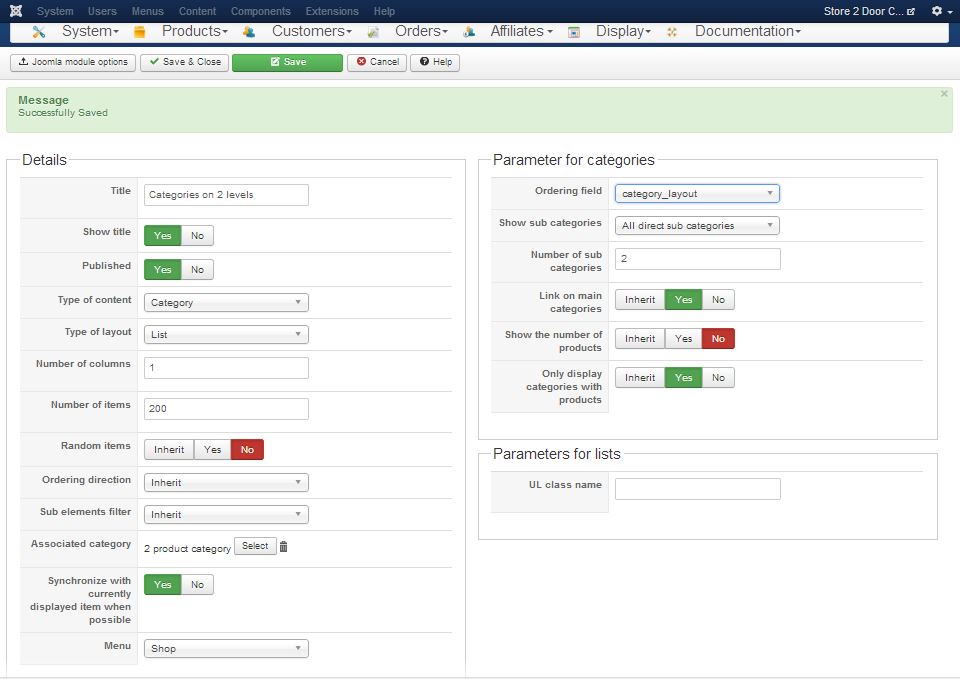
Here is a screenshot of my current settings:
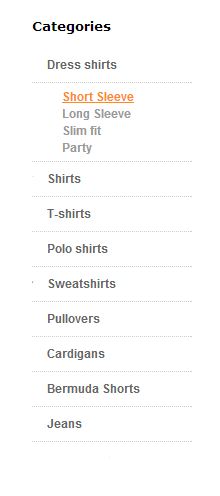
This is what I want it to do and look like:
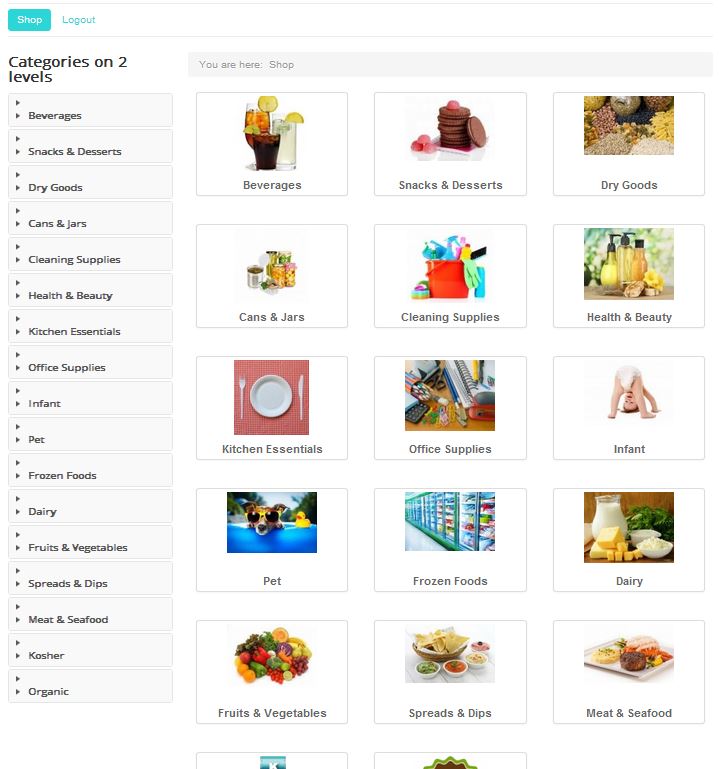
This is what it looks like. This is the customer landing page after login. You can't see this until you log in.
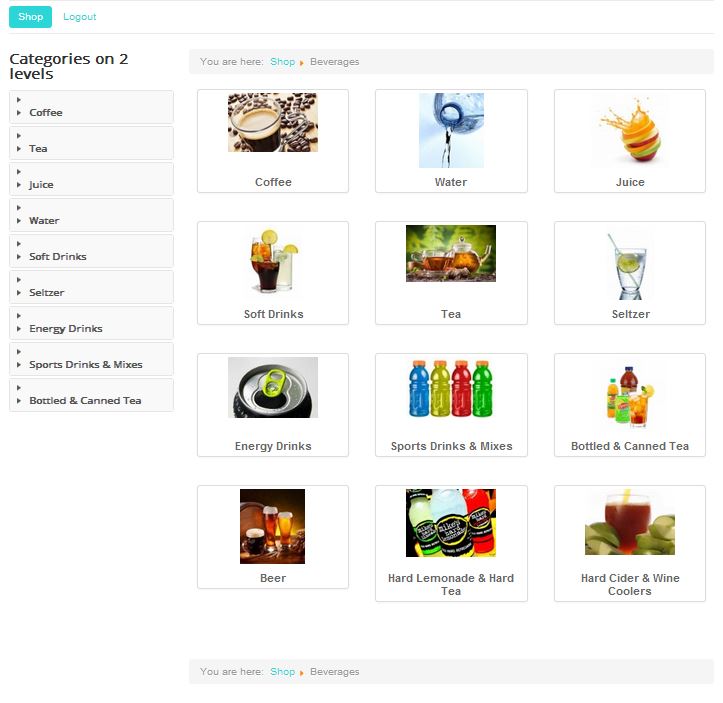
When I click a category, the top level categories disappear. For example the next image shows what happens when I click the beverages category
What should my settings be to get the desired functionality.
Thank you so much for your help!
-- Joomla version -- : 3.3.1 (protostar template)
-- PHP version -- : 5.4.26
-- Browser -- : Chrome
Hello,
I just can't figure out how to make it work.
I'm looking for a left column menu that lists my product categories and then expands when I click on it if there are sub-categories.
Right now it disappears as you drill down into the sub-categories. And the styling is weird too.
Here is a screenshot of my current settings:
This is what I want it to do and look like:
This is what it looks like. This is the customer landing page after login. You can't see this until you log in.
When I click a category, the top level categories disappear. For example the next image shows what happens when I click the beverages category
What should my settings be to get the desired functionality.
Thank you so much for your help!
Please Log in or Create an account to join the conversation.

Less
More
- Posts: 12953
- Thank you received: 1778
12 years 2 months ago #164453
by Mohamed Thelji
Replied by Mohamed Thelji on topic Totally messed up category menu module
Hello,
I think that you correctly configured your category listing content module, but that your issue is coming from some CSS issue, checking that documentation will probably help you : www.hikashop.com/support/documentation/1...the-display.html#css
Also can you give us a link to your website so that we can directly test it ?
Thanks.
I think that you correctly configured your category listing content module, but that your issue is coming from some CSS issue, checking that documentation will probably help you : www.hikashop.com/support/documentation/1...the-display.html#css
Also can you give us a link to your website so that we can directly test it ?
Thanks.
Please Log in or Create an account to join the conversation.
12 years 2 months ago #165040
by tinadevi
Replied by tinadevi on topic Totally messed up category menu module
Hi Mohammed,
I think I agree that this is a CSS issue. In the source code there are nested A tags. Here is the source for the last two categories in my category list.
Thanks for your help with this!
Tina
I think I agree that this is a CSS issue. In the source code there are nested A tags. Here is the source for the last two categories in my category list.
Code:
<div class="accordion-group">
<div class="accordion-heading has-child">
<h4>
<a class="accordion-toggle" data-toggle="collapse" data-parent="#category_panel_99" href="#category_pane_15">
<a href="/categories/category/kosher">Kosher</a>
</a>
</h4>
</div>
<div id="category_pane_15" class="accordion-body collapse ">
<div class="accordion-inner">
<ul class="hikashop_category_list">
<li class="hikashop_category_list_item"><a class="hikashop_category_list_item_link" href="/categories/category/meat-and-deli">Meat and Deli</a></li>
<li class="hikashop_category_list_item"><a class="hikashop_category_list_item_link" href="/categories/category/kosher-dairy">Kosher Dairy</a></li>
<li class="hikashop_category_list_item"><a class="hikashop_category_list_item_link" href="/categories/category/other">Other</a></li>
</ul>
</div>
</div>
</div>
<div class="accordion-group">
<div class="accordion-heading ">
<h4>
<a class="accordion-toggle" data-toggle="collapse" data-parent="#category_panel_99" href="#category_pane_16">
<a href="/categories/category/organic">Organic</a>
</a>
</h4>
</div>
<div id="category_pane_16" class="accordion-body collapse ">
<div class="accordion-inner">No subcategories</div>
</div>
</div>
Thanks for your help with this!
Tina
Please Log in or Create an account to join the conversation.

12 years 2 months ago #165062
by nicolas
Replied by nicolas on topic Totally messed up category menu module
Hi,
You need to turn off the "Synchronize with currently displayed item when possible" option of your module and increase the "number of sub categories" option. That should have it display always the same categories.
Then, for the style, it mainly depends on the CSS on your template which apparently doesn't have any CSS to customize it so it means that you'll have to add custom CSS for it to looks like you want.
You need to turn off the "Synchronize with currently displayed item when possible" option of your module and increase the "number of sub categories" option. That should have it display always the same categories.
Then, for the style, it mainly depends on the CSS on your template which apparently doesn't have any CSS to customize it so it means that you'll have to add custom CSS for it to looks like you want.
The following user(s) said Thank You: tinadevi
Please Log in or Create an account to join the conversation.
12 years 2 months ago - 12 years 2 months ago #165165
by tinadevi
Replied by tinadevi on topic Totally messed up category menu module
Thank you Nicolas. This fixed all the disappearing issues. 
Is there a switch to turn off the accordion when there are no sub-categories?
And will this category module display deeper levels of sub-categories? Like this:
Level 1
--- Level 2
Level 3
Is there a switch to turn off the accordion when there are no sub-categories?
And will this category module display deeper levels of sub-categories? Like this:
Level 1
--- Level 2
Level 3
Last edit: 12 years 2 months ago by tinadevi. Reason: correct spacing
Please Log in or Create an account to join the conversation.
12 years 2 months ago #165174
by nicolas
Replied by nicolas on topic Totally messed up category menu module
Hi,
There is no option to not display the accordion when there are no sub categories and the module only supports two levels of categories.
If you want more levels, you would have to use another module like this one:
extensions.joomla.org/extensions/extensi...hop-extensions/21225
There is no option to not display the accordion when there are no sub categories and the module only supports two levels of categories.
If you want more levels, you would have to use another module like this one:
extensions.joomla.org/extensions/extensi...hop-extensions/21225
Please Log in or Create an account to join the conversation.
Time to create page: 0.205 seconds