

- Posts: 178
- Thank you received: 5
+ and - instead Refresh button in Chekout and Cart
12 years 1 month ago #167907
by alikon1
+ and - instead Refresh button in Chekout and Cart was created by alikon1
-- HikaShop version -- : HikaShop Business 2.3.2
-- Joomla version -- : Joomla! 3.3.3 Stable
-- PHP version -- : 5.3.28
-- Browser(s) name and version -- : Any
I can change quantity by pressing + and - in product or category listing.
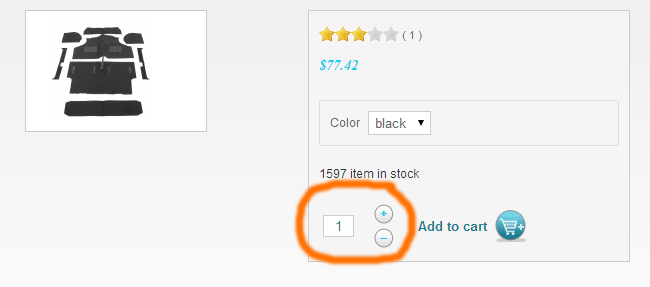
But in Checkout I have only Refresh button.
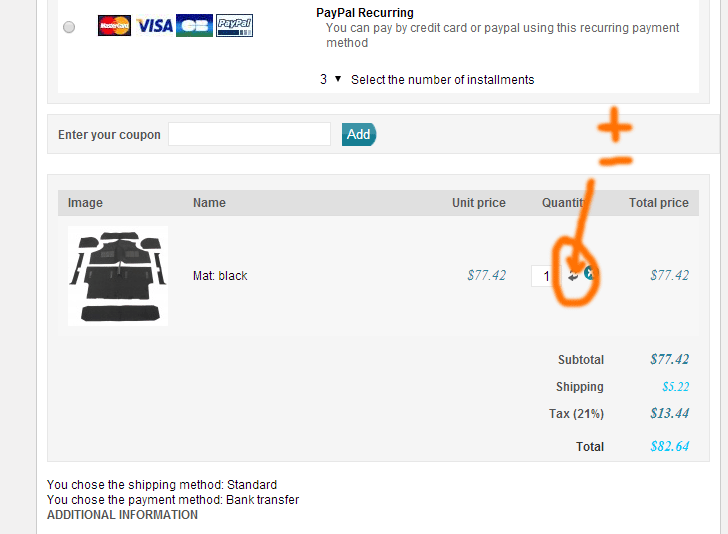
And in the CartI havent any button at all.
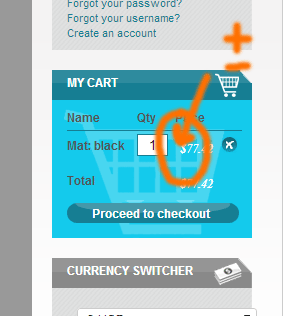
Can I change quantity in the Cart and Checkout by pressing + and - too? Many users don't understand, that they can press Refresh. They are search + and - buttons.
-- Joomla version -- : Joomla! 3.3.3 Stable
-- PHP version -- : 5.3.28
-- Browser(s) name and version -- : Any
I can change quantity by pressing + and - in product or category listing.
But in Checkout I have only Refresh button.
And in the CartI havent any button at all.
Can I change quantity in the Cart and Checkout by pressing + and - too? Many users don't understand, that they can press Refresh. They are search + and - buttons.
Please Log in or Create an account to join the conversation.

12 years 1 month ago #167950
by nicolas
Replied by nicolas on topic + and - instead Refresh button in Chekout and Cart
Hi,
There is no option to activate such capability, but you can always modify the cart view files via the menu Display>Views in order to add them.
It's not really complex if you know a bit of programming. For example, for the + of the checkout/cart view file, you could have that code:
You can add it before the refresh button:
<div class="hikashop_cart_product_quantity_refresh">
There is no option to activate such capability, but you can always modify the cart view files via the menu Display>Views in order to add them.
It's not really complex if you know a bit of programming. For example, for the + of the checkout/cart view file, you could have that code:
Code:
<a href="#" onclick="var qty_field = document.getElementById('hikashop_checkout_quantity_<?php echo $row->cart_product_id;?>'); qty_field.value=qty_field.value.parseInt()+1;qty_field.form.submit();">+</a>
<div class="hikashop_cart_product_quantity_refresh">
The following user(s) said Thank You: alikon1
Please Log in or Create an account to join the conversation.
12 years 1 month ago #168535
by alikon1
Replied by alikon1 on topic + and - instead Refresh button in Chekout and Cart
Add and when press + button, get error:
Code:
Uncaught TypeError: undefined is not a function step-1.html:791
onclick
Please Log in or Create an account to join the conversation.
12 years 1 month ago #168536
by alikon1
Replied by alikon1 on topic + and - instead Refresh button in Chekout and Cart
Rewrite as:
Now it works I think.
Code:
<a href="#" onclick="var qty_field = document.getElementById('hikashop_checkout_quantity_<?php echo $row->cart_product_id;?>'); qty_field.value=parseInt(qty_field.value)+1;qty_field.form.submit();">+</a>
Now it works I think.
The following user(s) said Thank You: Jerome
Please Log in or Create an account to join the conversation.
9 years 6 months ago #266115
by alikon1
Replied by alikon1 on topic + and - instead Refresh button in Chekout and Cart
What about Hikashop 3.0.1?
How I can now add +/- to cart module and checkout page?
Doesn't work too.
How I can now add +/- to cart module and checkout page?
Doesn't work too.
Code:
<table class="cartplusminus"><tbody><tr><td>
<div class="cartplus" onclick="var qty_field = document.getElementById('hikashop_cart_quantity_<?php echo $row->cart_product_id;?>'); if(qty_field){qty_field.value=parseInt(qty_field.value)+1;<?php echo $input; ?> document.hikashop_cart_form.submit(); return false;}else{ return true;}" title="Добавить порцию">+</div></td></tr><tr>
<td><div class="cartminus" onclick="var qty_field = document.getElementById('hikashop_cart_quantity_<?php echo $row->cart_product_id;?>'); if(qty_field){qty_field.value=parseInt(qty_field.value)-1;<?php echo $input; ?> document.hikashop_cart_form.submit(); return false;}else{ return true;}" title="Убрать порцию">-</div>
</td></tr></tbody></table>
Please Log in or Create an account to join the conversation.
9 years 6 months ago #266119
by alikon1
Replied by alikon1 on topic + and - instead Refresh button in Chekout and Cart
Try to replace getElementById with getElementsByName. And $row->cart_product_id; with $product->cart_product_id;
It change quantity in cart, but reload page, no ajax reload.
It change quantity in cart, but reload page, no ajax reload.
Code:
<table class="cartplusminus"><tbody><tr><td>
<div class="cartplus" onclick="var qty_field = document.getElementsByName('item[<?php echo $product->cart_product_id;?>][cart_product_quantity]')[0]; if(qty_field){qty_field.value=parseInt(qty_field.value)+1;return false;}else{ return true;}" title="Добавить порцию">+</div></td></tr><tr>
<td><div class="cartminus" onclick="var qty_field = document.getElementsByName('item[<?php echo $product->cart_product_id;?>][cart_product_quantity]')[0]; if(qty_field){qty_field.value=parseInt(qty_field.value)-1;<?php echo $input; ?> document.hikashop_cart_form.submit(); return false;}else{ return true;}" title="Убрать порцию">-</div>
</td></tr></tbody></table>
Please Log in or Create an account to join the conversation.

9 years 6 months ago #266121
by Jerome
Jerome - Obsidev.com
HikaMarket & HikaSerial developer / HikaShop core dev team.
Replied by Jerome on topic + and - instead Refresh button in Chekout and Cart
Hello,
Please be sure that you do not have view overrides for your content.
The code you mentioned is related to the "legacy" add to cart system and it received some minor modifications in order to be compatible with the new way that the cart is handled in HikaShop.
You have to keep using the getElementById but you need to use the right code to get the HTML input element.
Without knowing what you have modified but seeing that you do not have the original content ; I'm afraid that our support won't be able to give you any useful help.
Regards,
Please be sure that you do not have view overrides for your content.
The code you mentioned is related to the "legacy" add to cart system and it received some minor modifications in order to be compatible with the new way that the cart is handled in HikaShop.
You have to keep using the getElementById but you need to use the right code to get the HTML input element.
Without knowing what you have modified but seeing that you do not have the original content ; I'm afraid that our support won't be able to give you any useful help.
Regards,
Jerome - Obsidev.com
HikaMarket & HikaSerial developer / HikaShop core dev team.
Please Log in or Create an account to join the conversation.
9 years 5 months ago #266258
by alikon1
Replied by alikon1 on topic + and - instead Refresh button in Chekout and Cart
I use original files. I just tried to add modofication, that I had used in 2.6.3 but it doesn't work now.
There is still no default function to show +/- in the cart or checkout page in Hikashop 3?
There is still no default function to show +/- in the cart or checkout page in Hikashop 3?
Please Log in or Create an account to join the conversation.
9 years 5 months ago #266261
by Jerome
Jerome - Obsidev.com
HikaMarket & HikaSerial developer / HikaShop core dev team.
Replied by Jerome on topic + and - instead Refresh button in Chekout and Cart
Hello,
There is no mention of
in HikaShop 3.
So I don't know what you're trying to do but that's not the official HikaShop 3 code.
If you're using HikaShop 3 ; you have to use code of HikaShop 3, not older code.
And yes, there is features in HikaShop 3 to display a quantity selector in the checkout cart.
Regards,
There is no mention of
Code:
<table class="cartplusminus">
So I don't know what you're trying to do but that's not the official HikaShop 3 code.
If you're using HikaShop 3 ; you have to use code of HikaShop 3, not older code.
And yes, there is features in HikaShop 3 to display a quantity selector in the checkout cart.
Regards,
Jerome - Obsidev.com
HikaMarket & HikaSerial developer / HikaShop core dev team.
Please Log in or Create an account to join the conversation.
9 years 5 months ago #266378
by alikon1
Replied by alikon1 on topic + and - instead Refresh button in Chekout and Cart
You didn't read my last message.
I can write again. Modification <table class="cartplusminus"> was in 2.6.3. When I try the same hack in 3.0.1 it doesn't work.
How can I add +/- to the cart module without page reload in 3.0.1?
I can write again. Modification <table class="cartplusminus"> was in 2.6.3. When I try the same hack in 3.0.1 it doesn't work.
How can I add +/- to the cart module without page reload in 3.0.1?
Please Log in or Create an account to join the conversation.
9 years 5 months ago #266383
by Jerome
Jerome - Obsidev.com
HikaMarket & HikaSerial developer / HikaShop core dev team.
Replied by Jerome on topic + and - instead Refresh button in Chekout and Cart
Hello,
And I wrote:
Regards,
And I wrote:
So I don't know what I can tell you.If you're using HikaShop 3 ; you have to use code of HikaShop 3, not older code.
Regards,
Jerome - Obsidev.com
HikaMarket & HikaSerial developer / HikaShop core dev team.
Please Log in or Create an account to join the conversation.
9 years 5 months ago #266497
by alikon1
3 years ago Nicolas wrote how to add +/- buttons to Hikashop 2.
In the new Hikashop 3 it does not work anymore. And I ask for 5 days how to add these buttons.
How can I use the code of Hikashop 3, if I do not know what it should be now. If I knew, obviously I would not write on the forum.
I can not understand the meaning of your answers.
Replied by alikon1 on topic + and - instead Refresh button in Chekout and Cart
Jerome wrote: You have to keep using the getElementById but you need to use the right code to get the HTML input element.
Jerome wrote: If you're using HikaShop 3 ; you have to use code of HikaShop 3, not older code.
3 years ago Nicolas wrote how to add +/- buttons to Hikashop 2.
nicolas wrote:
Code:<a href="#" onclick="var qty_field = document.getElementById('hikashop_checkout_quantity_<?php echo $row->cart_product_id;?>'); qty_field.value=qty_field.value.parseInt()+1;qty_field.form.submit();">+</a>
In the new Hikashop 3 it does not work anymore. And I ask for 5 days how to add these buttons.
How can I use the code of Hikashop 3, if I do not know what it should be now. If I knew, obviously I would not write on the forum.
I can not understand the meaning of your answers.
Please Log in or Create an account to join the conversation.
9 years 5 months ago - 9 years 5 months ago #266562
by nicolas
Replied by nicolas on topic + and - instead Refresh button in Chekout and Cart
Hi,
You can still use the same code with the new checkout cart view.
If you look at either the "cart" view file of the "legacy" checkout, or at the show_block_cart view file of the new checkout, both have a quantity input field with the same id :
So the code I wrote three years ago should still work there:
(obviously, you need to update the $row variable to $product, but the logic is still the same and you still need to use a getElementById as Jerome was saying.)
Please understand that this is custom coding.
We provide user support in this forum. We try to help when you have coding questions regarding HikaShop, but that's already outside the support we're supposed to give, and that doesn't mean that we will work on your customizations for you. If you're a developer, these basic modifications shouldn't be a problem, and if you aren't, then you should ask a developer for help on such customization.
You can still use the same code with the new checkout cart view.
If you look at either the "cart" view file of the "legacy" checkout, or at the show_block_cart view file of the new checkout, both have a quantity input field with the same id :
Code:
<input id="hikashop_checkout_quantity_<?php echo $product->cart_product_id;?>" type="text" name="checkout[cart][item][<?php echo $product->cart_product_id;?>]" class="hikashop_product_quantity_field" value="<?php echo $product->cart_product_quantity; ?>"/>
Code:
<input id="hikashop_checkout_quantity_<?php echo $row->cart_product_id;?>" type="text" name="item[<?php echo $row->cart_product_id;?>]" class="hikashop_product_quantity_field" value="<?php echo $row->cart_product_quantity; ?>" onchange="var qty_field = document.getElementById('hikashop_checkout_quantity_<?php echo $row->cart_product_id;?>'); if (qty_field){<?php echo $input; ?>}; return true;" />
So the code I wrote three years ago should still work there:
Code:
<a href="#" onclick="var qty_field = document.getElementById('hikashop_checkout_quantity_<?php echo $row->cart_product_id;?>'); qty_field.value=qty_field.value.parseInt()+1;qty_field.form.submit();">+</a>
Code:
<a href="#" onclick="var qty_field = document.getElementById('hikashop_checkout_quantity_<?php echo $product->cart_product_id;?>'); qty_field.value=qty_field.value.parseInt()+1;qty_field.form.submit();">+</a>
Please understand that this is custom coding.
We provide user support in this forum. We try to help when you have coding questions regarding HikaShop, but that's already outside the support we're supposed to give, and that doesn't mean that we will work on your customizations for you. If you're a developer, these basic modifications shouldn't be a problem, and if you aren't, then you should ask a developer for help on such customization.
Last edit: 9 years 5 months ago by nicolas.
Please Log in or Create an account to join the conversation.
9 years 5 months ago #266625
by alikon1
Replied by alikon1 on topic + and - instead Refresh button in Chekout and Cart
Yes, I can use
in checkout page. But it reload all page, not new system (ajax) update.
Try to use getElementsByName instead getElementById, but when change quantity - all page content reloads. So the advantage of the new "Add to cart" system is lost in that case.
It's normal to change the amount through the input field via keyboard on the desktop PC, but on the mobile phone it's easier to press the plus and minus buttons. Reloading the page on the phone is annoying. Today, more than half of all visitors use mobile phones.
Code:
<a href="#" onclick="var qty_field = document.getElementById('hikashop_checkout_quantity_<?php echo $product->cart_product_id;?>'); qty_field.value=parseInt(qty_field.value)+1;qty_field.form.submit();">+</a>
<a href="#" onclick="var qty_field = document.getElementById('hikashop_checkout_quantity_<?php echo $product->cart_product_id;?>'); qty_field.value=parseInt(qty_field.value)-1;qty_field.form.submit();">-</a>
In the cart module as I see, id do not contain product id. I don't know what this number (_39) is meaning. Product id is in name atribute.nicolas wrote: (obviously, you need to update the $row variable to $product, but the logic is still the same and you still need to use a getElementById as Jerome was saying.)
Code:
<input id="hikashop_product_quantity_field_39" type="text" value="16" class="hikashop_product_quantity_field" name="item[182409][cart_product_quantity]" data-hk-qty-min="1" data-hk-qty-max="0" onchange="window.hikashop.checkQuantity(this); if(this.value == 16){ return; } if(this.form.onsubmit && !this.form.onsubmit()) return; this.form.submit();">
Try to use getElementsByName instead getElementById, but when change quantity - all page content reloads. So the advantage of the new "Add to cart" system is lost in that case.
It's normal to change the amount through the input field via keyboard on the desktop PC, but on the mobile phone it's easier to press the plus and minus buttons. Reloading the page on the phone is annoying. Today, more than half of all visitors use mobile phones.
Please Log in or Create an account to join the conversation.
9 years 5 months ago #266629
by alikon1
Replied by alikon1 on topic + and - instead Refresh button in Chekout and Cart
Found else that I can edit /components/com_hikashop/views/layouts/tmpl/quantity.php near line 118, to get buttons with correct id.
 but this variant refresh all page too
Code:
<a href="#" onclick="var qty_field = document.getElementById('<?php echo $id;?>'); qty_field.value=parseInt(qty_field.value)+1;qty_field.form.submit();">+</a>
but this variant refresh all page too Please Log in or Create an account to join the conversation.

9 years 5 months ago #266630
by kyratn
Replied by kyratn on topic + and - instead Refresh button in Chekout and Cart
Hi,
You are right about mobile. I have asked same question about 2 months ago here; www.hikashop.com/forum/4-how-to/888560-h...uestions.html#260825
Still waiting for the improvement
Thanks
You are right about mobile. I have asked same question about 2 months ago here; www.hikashop.com/forum/4-how-to/888560-h...uestions.html#260825
Still waiting for the improvement
Thanks
Please Log in or Create an account to join the conversation.
9 years 5 months ago #266632
by nicolas
Replied by nicolas on topic + and - instead Refresh button in Chekout and Cart
Hi,
If you want to submit the block (ajax refresh), instead of a whole step refresh, it's quite easy. Just take example on the delete button.
If you look in the cart.php for the delete button code, you can see that the submission of the data is done with qty_field.form.submit();
while in the show_block_cart.php that piece is replaced by:
return window.checkout.submitCart(<?php echo $this->step; ?>,<?php echo $this->module_position; ?>);
So in your code in show_block_cart, do the same change and the + and - buttons will also use AJAX refresh.
If you want to submit the block (ajax refresh), instead of a whole step refresh, it's quite easy. Just take example on the delete button.
If you look in the cart.php for the delete button code, you can see that the submission of the data is done with qty_field.form.submit();
while in the show_block_cart.php that piece is replaced by:
return window.checkout.submitCart(<?php echo $this->step; ?>,<?php echo $this->module_position; ?>);
So in your code in show_block_cart, do the same change and the + and - buttons will also use AJAX refresh.
Please Log in or Create an account to join the conversation.
9 years 5 months ago #266734
by alikon1
In cart module another code for Delete button and I didn't find solution
Replied by alikon1 on topic + and - instead Refresh button in Chekout and Cart
Thank you. In Checkout page it works.nicolas wrote: So in your code in show_block_cart, do the same change and the + and - buttons will also use AJAX refresh.
In cart module another code for Delete button and I didn't find solution
Please Log in or Create an account to join the conversation.
9 years 5 months ago #266770
by alikon1
That file already contains some +/- code:
But when I try to add this, it's only increase quantity in input box and don't recalculate total sum, no entire or ajax page reload.
Replied by alikon1 on topic + and - instead Refresh button in Chekout and Cart
alikon1 wrote: Found else that I can edit /components/com_hikashop/views/layouts/tmpl/quantity.php near line 118, to get buttons with correct id.
Code:<a href="#" onclick="var qty_field = document.getElementById('<?php echo $id;?>'); qty_field.value=parseInt(qty_field.value)+1;qty_field.form.submit();">+</a>
That file already contains some +/- code:
Code:
<a class="hikashop_product_quantity_field_change_plus hikashop_product_quantity_field_change" href="#" data-hk-qty-mod="1" onclick="return window.hikashop.<updateQuantity>(this, '<?php echo $id; ?>');">+</a>
<a class="hikashop_product_quantity_field_change_minus hikashop_product_quantity_field_change" href="#" data-hk-qty-mod="-1" onclick="return window.hikashop.<updateQuantity>(this, '<?php echo $id; ?>');">–</a>
But when I try to add this, it's only increase quantity in input box and don't recalculate total sum, no entire or ajax page reload.
Please Log in or Create an account to join the conversation.
9 years 5 months ago - 9 years 5 months ago #266777
by alikon1
Replied by alikon1 on topic + and - instead Refresh button in Chekout and Cart
In /components/com_hikashop/views/layouts/tmpl/quantity.php add:
It seems it works :woohoo:
Code:
<button type="submit" onclick="var qty_field = document.getElementById('<?php echo $id; ?>'); qty_field.value=parseInt(qty_field.value)+1;">+</button>
<button <?php if ($current_quantity==1) echo 'disabled'; ?> type="submit" onclick="var qty_field = document.getElementById('<?php echo $id; ?>'); qty_field.value=parseInt(qty_field.value)-1;">-</button>
Last edit: 9 years 5 months ago by alikon1.
The following user(s) said Thank You: OA
Please Log in or Create an account to join the conversation.
Time to create page: 0.353 seconds