
Change VAT name on invoice

7 years 3 weeks ago #310388
by Rixters
Change VAT name on invoice was created by Rixters
-- HikaShop version -- : 4.2.1
-- Joomla version -- : 3.9.11
-- PHP version -- : 7.3
-- Browser(s) name and version -- : Chrome
I use the EU VAT
On the invoice and emails I get a country extension net to the VAT. Can this be removed only on the invoices and emails.
In the image VAT (BE) Should be VAT.
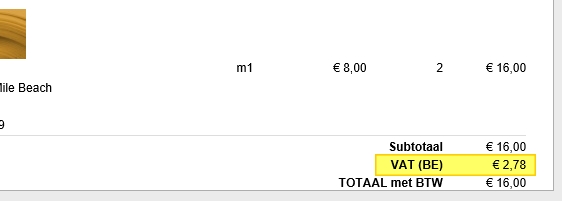
Do you have a tip or trick to change this?
-- Joomla version -- : 3.9.11
-- PHP version -- : 7.3
-- Browser(s) name and version -- : Chrome
I use the EU VAT
On the invoice and emails I get a country extension net to the VAT. Can this be removed only on the invoices and emails.
In the image VAT (BE) Should be VAT.
Do you have a tip or trick to change this?
Please Log in or Create an account to join the conversation.
7 years 3 weeks ago #310392
by Rixters
Replied by Rixters on topic Change VAT name on invoice
Extra question... How can I display the tax rate FI 21% after the tax name?
Please Log in or Create an account to join the conversation.

7 years 3 weeks ago #310429
by nicolas
Replied by nicolas on topic Change VAT name on invoice
Hi,
It's possible to change it by changing the name of the tax rate (via the "manage tax rates" button of the System>Taxes menu), or using a translation override on the name, but in that case, it will affect all the areas (the emails, the order details in the backend, in the frontend, the invoices, the checkout, etc).
If you only want to do the change in the email, it will require modifying the code of the email.
In the preload, you'll find the line:
That you could change to :
or to:
It's possible to change it by changing the name of the tax rate (via the "manage tax rates" button of the System>Taxes menu), or using a translation override on the name, but in that case, it will affect all the areas (the emails, the order details in the backend, in the frontend, the invoices, the checkout, etc).
If you only want to do the change in the email, it will require modifying the code of the email.
In the preload, you'll find the line:
Code:
'NAME' => hikashop_translate($tax->tax_namekey),
Code:
'NAME' => 'VAT',
Code:
'NAME' => 'VAT '.($tax->tax_rate*100).'%',
Please Log in or Create an account to join the conversation.
Time to create page: 0.170 seconds