

- Posts: 72
- Thank you received: 5
Layout + and - sign
6 years 7 months ago #315509
by mlehr
Layout + and - sign was created by mlehr
-- url of the page with the problem -- :
nieuw.megiq.com/shop/vector-network-analyzers/vna-0440
URL: nieuw.megiq.com/shop/vector-network-analyzers/vna-0440
See also image with the red frame.
The plus sign and the minus sign are too far apart and both have to go up slightly.
How can I do that?
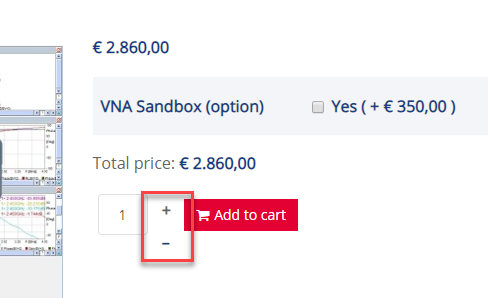
URL: nieuw.megiq.com/shop/vector-network-analyzers/vna-0440
See also image with the red frame.
The plus sign and the minus sign are too far apart and both have to go up slightly.
How can I do that?
Please Log in or Create an account to join the conversation.

6 years 7 months ago #315523
by nicolas
Replied by nicolas on topic Layout + and - sign
Hi,
The issue comes from the CSS of your template.
Add such CSS on your website and it will display properly:
monosnap.com/file/fl40u9jF0p5ik4q2OgwTwDJGfQaDFI
www.hikashop.com/support/documentation/1...ize-the-display.html
The issue comes from the CSS of your template.
Add such CSS on your website and it will display properly:
Code:
.hikashop_product_quantity_change_div_plus_default {
line-height: 1;
}
www.hikashop.com/support/documentation/1...ize-the-display.html
Please Log in or Create an account to join the conversation.
6 years 7 months ago #315537
by mlehr
Replied by mlehr on topic Layout + and - sign
Thanx.
Would it be possible to style the + and - sign like on the printscreen here below?
So the minus sign to the left and the plus sign to the right.
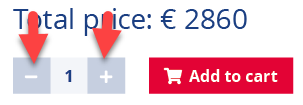
Would it be possible to style the + and - sign like on the printscreen here below?
So the minus sign to the left and the plus sign to the right.
Please Log in or Create an account to join the conversation.
6 years 7 months ago #315547
by nicolas
Replied by nicolas on topic Layout + and - sign
Hi,
In the HikaShop configuration, you'll find the setting "quantity input method". If you select "show left and right", you'll actually get such display automatically.
In the HikaShop configuration, you'll find the setting "quantity input method". If you select "show left and right", you'll actually get such display automatically.
Please Log in or Create an account to join the conversation.
6 years 7 months ago #315549
by mlehr
Replied by mlehr on topic Layout + and - sign
OK Thanx!
The following user(s) said Thank You: Philip
Please Log in or Create an account to join the conversation.
3 years 3 days ago #355392
by mlehr
Replied by mlehr on topic Layout + and - sign
URL with the problem:
www.test.megiq.com/shop/vector-network-analyzers/vna-0460
In Joomla 3 this worked fine this setting:
Now in Joomla 4 it does not anymore, see screenshot:
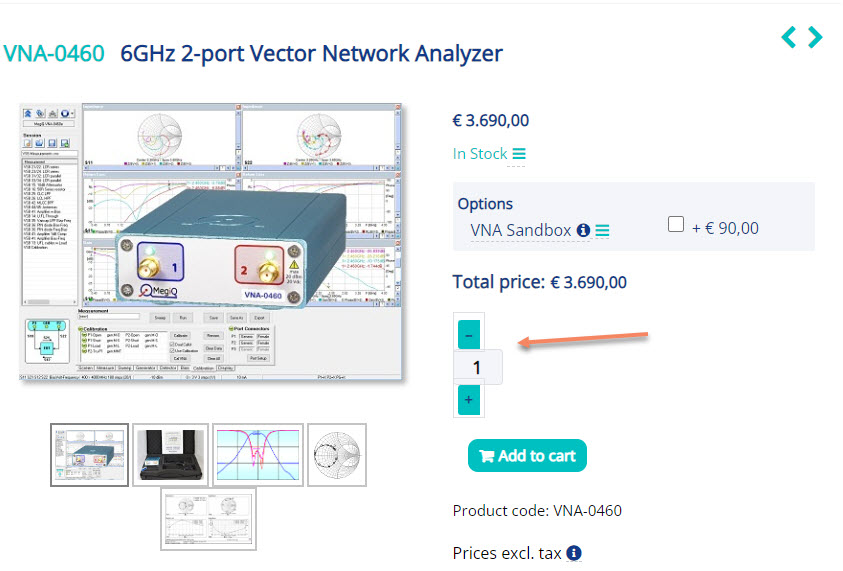
In Joomla 3 it looked like this:
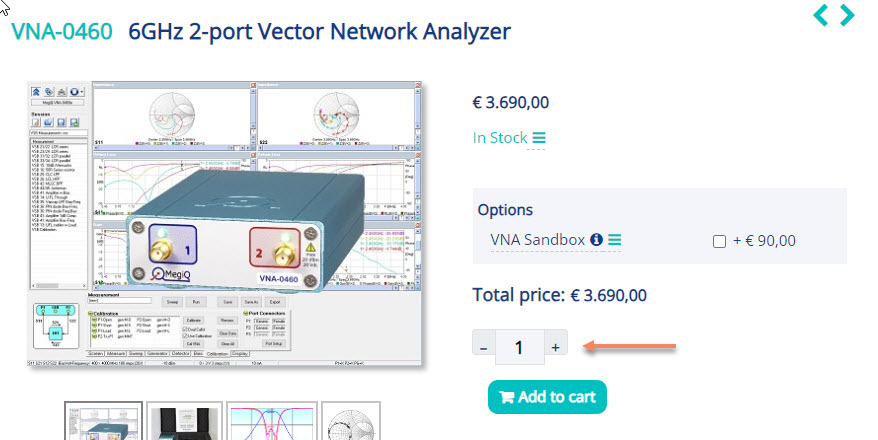
How can I get the plus en minus sign again on one line?
In Joomla 3 this worked fine this setting:
In the HikaShop configuration, you'll find the setting "quantity input method". If you select "show left and right", you'll actually get such display automatically.
Now in Joomla 4 it does not anymore, see screenshot:
In Joomla 3 it looked like this:
How can I get the plus en minus sign again on one line?
Please Log in or Create an account to join the conversation.

3 years 2 days ago - 3 years 3 days ago #355395
by Philip
Replied by Philip on topic Layout + and - sign
Hello,
Thanks for your return, it seems indeed that there are some display issue.
On our side we have to add this css command :

In our default css frontend file, around line 563, you will find :
And it seems that you have some custom css to remove or adjust from what we can see
Regards
Thanks for your return, it seems indeed that there are some display issue.
On our side we have to add this css command :
In our default css frontend file, around line 563, you will find :
Code:
main .hikashop_product_quantity_div input.form-control,
main .form-control.hikashop_product_quantity_field {
max-width: 50px;
padding: 3px 10px;
display: inline-block;
}
And it seems that you have some custom css to remove or adjust from what we can see
Regards
Last edit: 3 years 3 days ago by Philip.
The following user(s) said Thank You: mlehr
Please Log in or Create an account to join the conversation.
2 years 8 months ago #358343
by mlehr
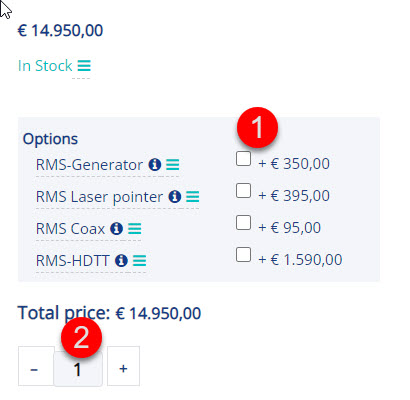
I still have 2 problems.
1. The prices do not align well with the checkboxes. How can I solve this?
2. The quantity (number) is not nicely in the middle between the minus sign and the plus sign. How can I solve that?
Replied by mlehr on topic Layout + and - sign
I still have 2 problems.
1. The prices do not align well with the checkboxes. How can I solve this?
2. The quantity (number) is not nicely in the middle between the minus sign and the plus sign. How can I solve that?
Please Log in or Create an account to join the conversation.
2 years 8 months ago #358366
by Philip
Replied by Philip on topic Layout + and - sign
Hello,
We will work on this subject more in depth on this subject and will keep you informed of the progress because indeed some things are not as they should be.
Regards
We will work on this subject more in depth on this subject and will keep you informed of the progress because indeed some things are not as they should be.
Regards
Please Log in or Create an account to join the conversation.
2 years 8 months ago - 2 years 8 months ago #358391
by Philip
Replied by Philip on topic Layout + and - sign
Hello,
We have proceed a new release, the 5.0.3, and with it, you will have some css adjustments which should correct the display problems, you only need to update AND use the default frontend file Css.
Let's see now, if this will be sufficient in your case (with your different template elements, and various custom ones).
See my screenshot on my side, in my localhost :

Regards
We have proceed a new release, the 5.0.3, and with it, you will have some css adjustments which should correct the display problems, you only need to update AND use the default frontend file Css.
Let's see now, if this will be sufficient in your case (with your different template elements, and various custom ones).
See my screenshot on my side, in my localhost :
Regards
Last edit: 2 years 8 months ago by Philip.
Please Log in or Create an account to join the conversation.
2 years 8 months ago #358406
by mlehr
Replied by mlehr on topic Layout + and - sign
hi,
I did the update AND use the default frontend file Css, but the 2 problens are not solved yet. Please help.
I did the update AND use the default frontend file Css, but the 2 problens are not solved yet. Please help.
Please Log in or Create an account to join the conversation.
2 years 8 months ago - 2 years 8 months ago #358428
by Philip
Replied by Philip on topic Layout + and - sign
Hello,
Please process some test WITHOUT any custom css file AND with a default template, in my screenshot you can see that you have many css file added to your frontend :

Regards
Please process some test WITHOUT any custom css file AND with a default template, in my screenshot you can see that you have many css file added to your frontend :
Regards
Last edit: 2 years 8 months ago by Philip.
Please Log in or Create an account to join the conversation.
2 years 8 months ago #358533
by mlehr
Replied by mlehr on topic Layout + and - sign
WITHOUT any custom css file AND with a default template works better but is still not good enough. Moreover, I can't just change the template.
I have now made some adjustments, but I am still left with 2 small issues. See screenshot.
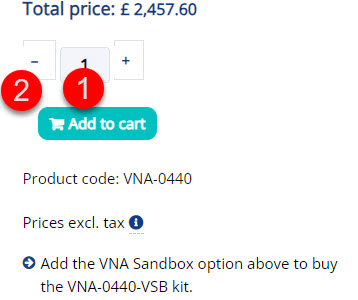
1. If I want to adjust the quantity with the css below, I get an error message:
Could not load content for www.test.megiq.com/(stdin) (HTTP error: status code 404, net::ERR_HTTP_RESPONSE_CODE_FAILURE)
STDIN overruled the styling in my custom.scss file:
div.hikashop_product_quantity_change_div_leftright input.hikashop_product_quantity_field {
background: #f3f5f9;
margin-left: 0px !important;
margin-right: -5px !important;
width: 50px;
display: inline block;
}
I only get that error message when adjusting the quantity sign. How do I solve this?
2. With the – sign and the + sign, the left border is barely visible. How do I solve that?
I have now made some adjustments, but I am still left with 2 small issues. See screenshot.
1. If I want to adjust the quantity with the css below, I get an error message:
Could not load content for www.test.megiq.com/(stdin) (HTTP error: status code 404, net::ERR_HTTP_RESPONSE_CODE_FAILURE)
STDIN overruled the styling in my custom.scss file:
div.hikashop_product_quantity_change_div_leftright input.hikashop_product_quantity_field {
background: #f3f5f9;
margin-left: 0px !important;
margin-right: -5px !important;
width: 50px;
display: inline block;
}
I only get that error message when adjusting the quantity sign. How do I solve this?
2. With the – sign and the + sign, the left border is barely visible. How do I solve that?
Please Log in or Create an account to join the conversation.
2 years 8 months ago #358536
by Philip
Replied by Philip on topic Layout + and - sign
Hello,
Like previous case, we will need these elements to process some tests directly on your website :
- An Url link to your backend (administrator)
- Backend user references (with maximum Acl)
Note : Use our Contact us form to provide these elements, and add to your message an Url link to this topic.
Regards
Like previous case, we will need these elements to process some tests directly on your website :
- An Url link to your backend (administrator)
- Backend user references (with maximum Acl)
Note : Use our Contact us form to provide these elements, and add to your message an Url link to this topic.
Regards
Please Log in or Create an account to join the conversation.
2 years 8 months ago #358554
by mlehr
Replied by mlehr on topic Layout + and - sign
I did send it.
Cheers!
Cheers!
Please Log in or Create an account to join the conversation.
2 years 8 months ago - 2 years 8 months ago #358558
by Philip
Replied by Philip on topic Layout + and - sign
Hello,
This a screenshot of your left/right button without your current Template, AND without the style default (that we don't support anymore, too old).

As you can see, the display is as expected, and as the main root issue is your current template, your only solution is to contact the template creator.
Now for the style_default we can guide you to adjust it, if you want ton continue with it, but note that the style could continue to cause you small display problems with Joomla & HikaShop updates.
Basically here, for your button issue, you can simply "turn off" these css commands, by commenting them out.
Example :
// Your css command that impact your button display in your style default :
.html_example_selector {
command: value;
}
=> Comment your unwanted css command:
/* Your css command that impact your button display in your style default : */
.html_example_selector {
/* command: value;
}
Regards
This a screenshot of your left/right button without your current Template, AND without the style default (that we don't support anymore, too old).
As you can see, the display is as expected, and as the main root issue is your current template, your only solution is to contact the template creator.
Now for the style_default we can guide you to adjust it, if you want ton continue with it, but note that the style could continue to cause you small display problems with Joomla & HikaShop updates.
Basically here, for your button issue, you can simply "turn off" these css commands, by commenting them out.
Example :
// Your css command that impact your button display in your style default :
.html_example_selector {
command: value;
}
=> Comment your unwanted css command:
/* Your css command that impact your button display in your style default : */
.html_example_selector {
/* command: value;
}
Regards
Last edit: 2 years 8 months ago by Philip.
Please Log in or Create an account to join the conversation.
2 years 8 months ago #358643
by mlehr
Replied by mlehr on topic Layout + and - sign
Okay, thnks!
Another question:\, you write:
And if so, wich one should I use then? And what are the consequences?
Another question:\, you write:
You mean the default css style?style default (that we don't support anymore, too old).
And if so, wich one should I use then? And what are the consequences?
Please Log in or Create an account to join the conversation.
2 years 7 months ago #358647
by Philip
Replied by Philip on topic Layout + and - sign
Hello,
Yes, I mean the default css style, and so you have to select "none", BUT process some tests because without this file certain things could move!
Perhaps it will be faster for you to keep it BUT to turn off the commands one by one which causes display problems?
Regards
Yes, I mean the default css style, and so you have to select "none", BUT process some tests because without this file certain things could move!
Perhaps it will be faster for you to keep it BUT to turn off the commands one by one which causes display problems?
Regards
Please Log in or Create an account to join the conversation.
2 years 7 months ago #358697
by mlehr
Replied by mlehr on topic Layout + and - sign
Okay thanks Philip. I will go do some testing 
The following user(s) said Thank You: Philip
Please Log in or Create an account to join the conversation.
Time to create page: 0.361 seconds