
- Posts: 64
- Thank you received: 1
I don't see words - It is message from hikashop cart
- danieledanibel
-
 Topic Author
- Offline
Less
More
5 years 7 months ago #330168
by danieledanibel
-- HikaShop version -- : 4.4.1
-- Joomla version -- : last
-- PHP version -- : last
-- Browser(s) name and version -- : firefox chrome
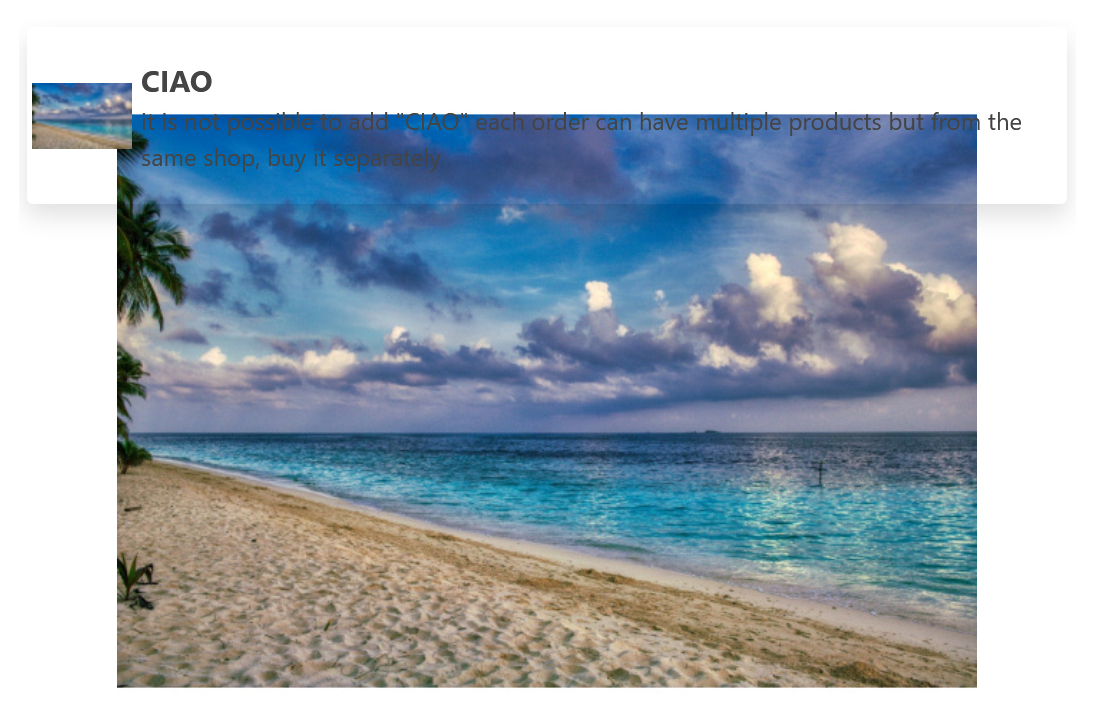
I don't see words - It is message from hikashop cart
What should I change for remove the transparent and put other backgroud color
This is the variable with the transparent popup problem
VENDOR_CART_PRODUCT_REFUSED
-- Joomla version -- : last
-- PHP version -- : last
-- Browser(s) name and version -- : firefox chrome
I don't see words - It is message from hikashop cart
What should I change for remove the transparent and put other backgroud color
This is the variable with the transparent popup problem
VENDOR_CART_PRODUCT_REFUSED
Please Log in or Create an account to join the conversation.

5 years 7 months ago #330172
by nicolas
Replied by nicolas on topic I don't see words - It is message from hikashop cart
Hi,
This looks like a customization issue since by default these messages have a colored background.
I tried to look at the issue on your website but I don't see your shop when I use the URL you provided.
Could you provide the necessary information to access that page and reproduce the issue ?
This looks like a customization issue since by default these messages have a colored background.
I tried to look at the issue on your website but I don't see your shop when I use the URL you provided.
Could you provide the necessary information to access that page and reproduce the issue ?
Please Log in or Create an account to join the conversation.
- danieledanibel
-
Topic Author
- Offline
Less
More
- Posts: 64
- Thank you received: 1
5 years 7 months ago #330203
by danieledanibel
Replied by danieledanibel on topic I don't see words - It is message from hikashop cart
I sent you a private message
please check
please check
Please Log in or Create an account to join the conversation.
5 years 7 months ago #330205
by nicolas
Replied by nicolas on topic I don't see words - It is message from hikashop cart
It's indeed a problem with the customization of the notice popup box from your template.
In the file /shop/templates/r_glamour/scss/hydrogen/_hikashopstyles.scss
You have this code:
which customizes the notification boxes for error messages and success messages, but not notice messages.
The line:
&.notifyjs-metro-warn, &.notifyjs-metro-warning {
should be changed to:
&.notifyjs-metro-warn, &.notifyjs-metro-warning, &.notifyjs-metro-notice {
and then it should display fine.
I would recommend you to report the issue to your template provider so that they can include the modification on their end.
That way, you won't get the issue again next time you update your template and the scss file is overwritten by the update process.
In the file /shop/templates/r_glamour/scss/hydrogen/_hikashopstyles.scss
You have this code:
Code:
.notifyjs-metro-base {
@include box-shadow(0 6px 12px rgba(0, 0, 0, 0.12), 0 6px 24px rgba(0, 0, 0, 0.25) !important);
padding: 5px;
border-radius: 3px;
.image {
padding-left: 5px;
}
&.notifyjs-metro-info {
background-color: $base-color-1 !important;
border-color: $base-color-1 !important;
color: $white !important;
}
&.notifyjs-metro-error {
background-color: #DB2828 !important;
border-color: #DB2828 !important;
color: $white !important;
}
&.notifyjs-metro-success {
background-color: #21BA45 !important;
border-color: #21BA45 !important;
color: $white !important;
}
&.notifyjs-metro-warn, &.notifyjs-metro-warning {
background-color: #FBBD08 !important;
border-color: #FBBD08 !important;
color: $black !important;
}
}
The line:
&.notifyjs-metro-warn, &.notifyjs-metro-warning {
should be changed to:
&.notifyjs-metro-warn, &.notifyjs-metro-warning, &.notifyjs-metro-notice {
and then it should display fine.
I would recommend you to report the issue to your template provider so that they can include the modification on their end.
That way, you won't get the issue again next time you update your template and the scss file is overwritten by the update process.
Please Log in or Create an account to join the conversation.
- danieledanibel
-
Topic Author
- Offline
Less
More
- Posts: 64
- Thank you received: 1
5 years 7 months ago #330217
by danieledanibel
Replied by danieledanibel on topic I don't see words - It is message from hikashop cart
Everything works!
Thanks for your great support
Dan
Thanks for your great support
Dan
Please Log in or Create an account to join the conversation.
Time to create page: 0.170 seconds