

- Posts: 221
- Thank you received: 8
hikashop cart module can not select tmplate layout
3 years 9 months ago #347430
by sadaf3d
hikashop cart module can not select tmplate layout was created by sadaf3d
hello.
In the hikashop cart module i can not select any layout. how to do that? i want create multi layout and set some different layout for each module.
i see it has tmpl folder.
thank you
In the hikashop cart module i can not select any layout. how to do that? i want create multi layout and set some different layout for each module.
i see it has tmpl folder.
thank you
Please Log in or Create an account to join the conversation.

3 years 9 months ago #347433
by nicolas
Replied by nicolas on topic hikashop cart module can not select tmplate layout
Hi,
The layout is in HikaShop. That way, you can customize it via the menu Display>Views, like other views in HikaShop. The one you want to edit is product / cart.php
The layout is in HikaShop. That way, you can customize it via the menu Display>Views, like other views in HikaShop. The one you want to edit is product / cart.php
Please Log in or Create an account to join the conversation.
3 years 9 months ago #347439
by sadaf3d
Replied by sadaf3d on topic hikashop cart module can not select tmplate layout
Thank you but if i want have two cart module first with his own layout for show menu item 1 and second need in the menu item 2. What need to do to implement that?
(This case occured with Mighty Site extension for me and i have some slave site)
(This case occured with Mighty Site extension for me and i have some slave site)
Please Log in or Create an account to join the conversation.
3 years 9 months ago #347449
by nicolas
Replied by nicolas on topic hikashop cart module can not select tmplate layout
Hi,
I'm sorry but I don't know how Mighty Site works.
What is a "template layout" for you ? Do you have some extra setting in modules which aren't by default in Joomla to select that ?
I'm sorry but I don't know how Mighty Site works.
What is a "template layout" for you ? Do you have some extra setting in modules which aren't by default in Joomla to select that ?
Please Log in or Create an account to join the conversation.
3 years 9 months ago #347451
by sadaf3d
Replied by sadaf3d on topic hikashop cart module can not select tmplate layout
hello
please forget mighty site and see this image: (it is from default joomla latest article module.)
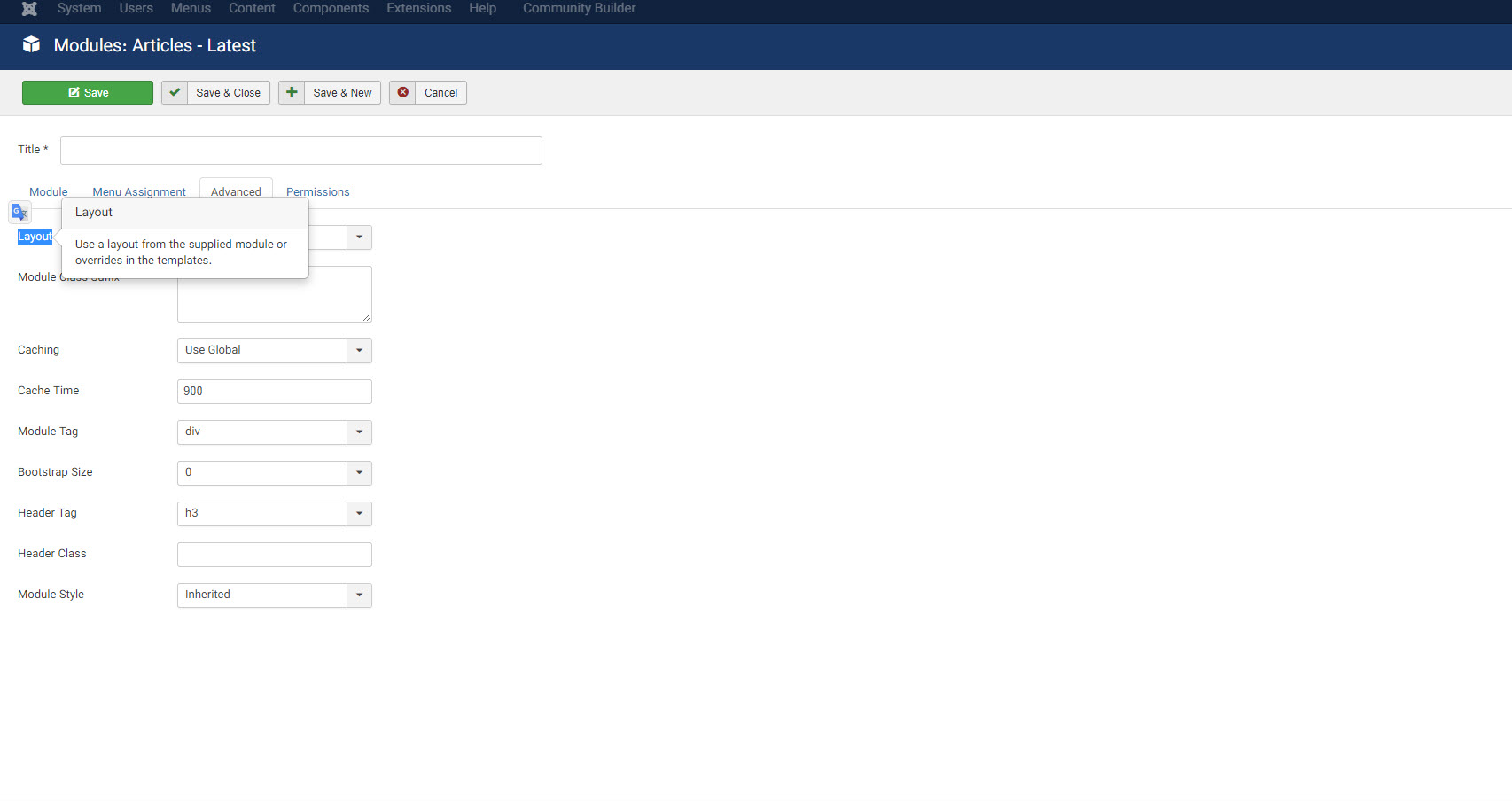
with this field i can select any existing layout for each module to show different view for each module that show latest article. i want something similar this default field for each cart module in my different menu item.
please forget mighty site and see this image: (it is from default joomla latest article module.)
with this field i can select any existing layout for each module to show different view for each module that show latest article. i want something similar this default field for each cart module in my different menu item.
Please Log in or Create an account to join the conversation.
3 years 9 months ago #347453
by nicolas
Replied by nicolas on topic hikashop cart module can not select tmplate layout
But that's a setting specific to the latest article module.
That's not a setting all modules have and it's not in the cart module.
If you want to have a different display for different instances of the cart module, you can do it with custom coding in the override of the product / cart view file.
For example, you can add such code at the top:
where XX is the id of the module instance you want to display differently from the others.
That's not a setting all modules have and it's not in the cart module.
If you want to have a different display for different instances of the cart module, you can do it with custom coding in the override of the product / cart view file.
For example, you can add such code at the top:
Code:
<?php if((int)$this->params->get('id', 0) == XX) {
echo "module instance with the id XX";
} else {
echo "other module instances of the cart module";
}
?>
Please Log in or Create an account to join the conversation.
3 years 9 months ago - 3 years 9 months ago #347465
by sadaf3d
Replied by sadaf3d on topic hikashop cart module can not select tmplate layout
thank you nicolas
docs.joomla.org/J3.x:Layout_Overrides_in..._Alternative_Layouts
joomla has some official document.
While thanking Hikashop, is it possible to include this topic in your plan for development for next release of hikacart or this field is not compatible with hikacart architecture?
thank you again.
many module have this field and in this link:nicolas wrote: But that's a setting specific to the latest article module.
That's not a setting all modules have and it's not in the cart module.
docs.joomla.org/J3.x:Layout_Overrides_in..._Alternative_Layouts
joomla has some official document.
While thanking Hikashop, is it possible to include this topic in your plan for development for next release of hikacart or this field is not compatible with hikacart architecture?
nicolas wrote: If you want to have a different display for different instances of the cart module, you can do it with custom coding in the override of the product / cart view file.
For example, you can add such code at the top:Code:<?php if((int)$this->params->get('id', 0) == XX) { echo "module instance with the id XX"; } else { echo "other module instances of the cart module"; } ?>
i guess maybe you give me this solution. but this is not robust solution for my joomla situation.nicolas wrote: where XX is the id of the module instance you want to display differently from the others.
thank you again.
Last edit: 3 years 9 months ago by sadaf3d.
The following user(s) said Thank You: infinityb
Please Log in or Create an account to join the conversation.
3 years 9 months ago #347471
by nicolas
Replied by nicolas on topic hikashop cart module can not select tmplate layout
Hi,
While that's true that the Joomla project added that setting to many modules included by default in Joomla, most modules not included in Joomla do not have that setting.
Also, that documentation explains how it can be used but not how it works in the background or how third party developers can implement it.
And we wouldn't be able to implement it the same way as the Joomla modules. That's because the code of the cart module is in product / cart. The cart module layout only has 3 lines of code to load the product / cart view file. Being able to override it with a layout like you can do with Joomla default modules wouldn't help you do what you want since you couldn't do any customization with these 3 lines of code.
What you want is something similar to the "layout on product page" setting of products / the HikaShop configuration which allows you to select among different view overrides across your templates.
While this could be implemented, I feel it's a lot of work for something almost no one would use while the alternative solution I proposed in my previous message is only a few lines of code.
While that's true that the Joomla project added that setting to many modules included by default in Joomla, most modules not included in Joomla do not have that setting.
Also, that documentation explains how it can be used but not how it works in the background or how third party developers can implement it.
And we wouldn't be able to implement it the same way as the Joomla modules. That's because the code of the cart module is in product / cart. The cart module layout only has 3 lines of code to load the product / cart view file. Being able to override it with a layout like you can do with Joomla default modules wouldn't help you do what you want since you couldn't do any customization with these 3 lines of code.
What you want is something similar to the "layout on product page" setting of products / the HikaShop configuration which allows you to select among different view overrides across your templates.
While this could be implemented, I feel it's a lot of work for something almost no one would use while the alternative solution I proposed in my previous message is only a few lines of code.
The following user(s) said Thank You: sadaf3d
Please Log in or Create an account to join the conversation.
3 years 8 months ago #348949
by infinityb
Replied by infinityb on topic hikashop cart module can not select tmplate layout
The ability to select different cart layouts in the module settings is also something I would be interested in.
Adding 2 or 3 different layouts in the same product/cart override will result in a huge messy file that is difficult to keep up to date.
Adding 2 or 3 different layouts in the same product/cart override will result in a huge messy file that is difficult to keep up to date.
Please Log in or Create an account to join the conversation.
3 years 8 months ago #348953
by nicolas
Replied by nicolas on topic hikashop cart module can not select tmplate layout
Hi,
This is a non issue. It just depends on how you organize yourself.
The override of cart / product will be in templates/YOUR_TEMPLATE/html/com_hikashop/product/cart.php
What you could do is create copies of that file, like for example templates/YOUR_TEMPLATE/html/com_hikashop/product/cart_layout_XX.php and templates/YOUR_TEMPLATE/html/com_hikashop/product/cart_default_layout.php
Then, in your product / cart view file, you could have just this code:
Then, you can just modify the files cart_layout_XX.php and cart_default_layout.php separately.
Now, there are even smarter ways to do overrides to make it easier for you in the future.
For example, from the product / cart.php view file, you could modify the variables available in $this before calling the original view file. That way, you could have different changes, while still using the default view file of HikaShop. You would get all the modifications to the view automatically and that's the less likely to require modifications in the future.
This is a non issue. It just depends on how you organize yourself.
The override of cart / product will be in templates/YOUR_TEMPLATE/html/com_hikashop/product/cart.php
What you could do is create copies of that file, like for example templates/YOUR_TEMPLATE/html/com_hikashop/product/cart_layout_XX.php and templates/YOUR_TEMPLATE/html/com_hikashop/product/cart_default_layout.php
Then, in your product / cart view file, you could have just this code:
Code:
<?php if((int)$this->params->get('id', 0) == XX) {
include_once('cart_layout_XX.php');
} else {
include_once('cart_default_layout.php');
}
?>
Now, there are even smarter ways to do overrides to make it easier for you in the future.
For example, from the product / cart.php view file, you could modify the variables available in $this before calling the original view file. That way, you could have different changes, while still using the default view file of HikaShop. You would get all the modifications to the view automatically and that's the less likely to require modifications in the future.
Please Log in or Create an account to join the conversation.
3 years 7 months ago #349081
by infinityb
Replied by infinityb on topic hikashop cart module can not select tmplate layout
Ah I see, thanks!
The following user(s) said Thank You: Philip
Please Log in or Create an account to join the conversation.
Time to create page: 0.302 seconds