
- Posts: 79
- Thank you received: 3
How to change the text of the variant option
- studiocurci
-
 Topic Author
- Offline
Less
More
3 years 1 month ago #354747
by studiocurci
How to change the text of the variant option was created by studiocurci
-- HikaShop version -- : 4.7.5 [2308101603]
-- Joomla version -- : 4.2.9
-- PHP version -- : 8.1.17
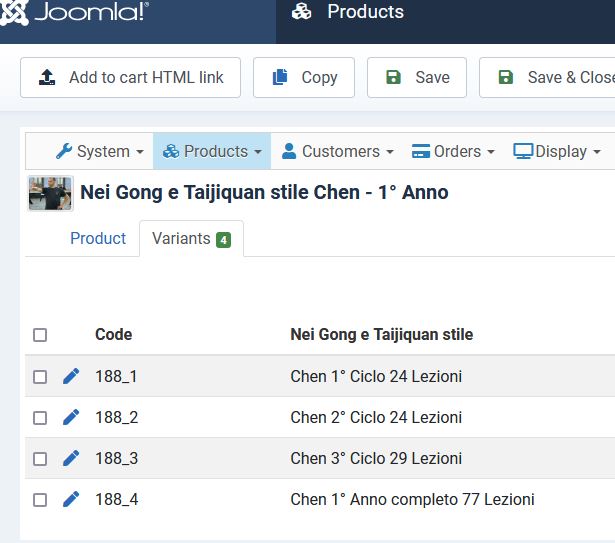
-- Joomla version -- : 4.2.9
-- PHP version -- : 8.1.17
Please Log in or Create an account to join the conversation.

3 years 1 month ago #354755
by nicolas
Replied by nicolas on topic How to change the text of the variant option
Hi,
I'm sorry but I don't understand what you want.
If you want to change the text, can't you just edit the variant with the edit pencil icon on your screenshot, enter the text you want in the "name" field, and then save the variant ?
I'm sorry but I don't understand what you want.
If you want to change the text, can't you just edit the variant with the edit pencil icon on your screenshot, enter the text you want in the "name" field, and then save the variant ?
Please Log in or Create an account to join the conversation.
- studiocurci
-
Topic Author
- Offline
Less
More
- Posts: 79
- Thank you received: 3
3 years 1 month ago #354765
by studiocurci
Replied by studiocurci on topic How to change the text of the variant option
Hi, the drop down list is not editable and if I change the name of the variant using the field "name" in the drop down list the name remains the same.
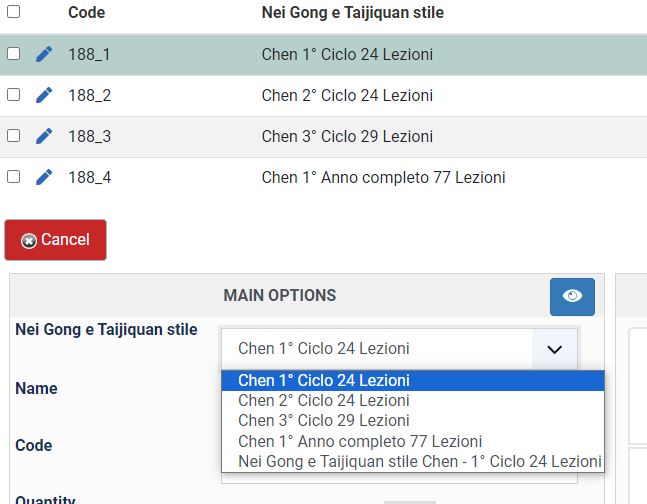
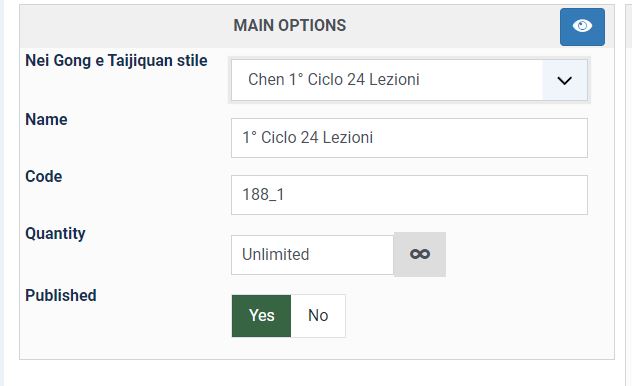
Should I do it directly in the database using php myadmin?
Thank you
Francesco
Should I do it directly in the database using php myadmin?
Thank you
Francesco
Please Log in or Create an account to join the conversation.
3 years 4 weeks ago #354768
by nicolas
Replied by nicolas on topic How to change the text of the variant option
Hi,
The name in the dropdown there is the text of the value you entered in the characteristic. If you want to change it, you can edit the characteristic via the menu Products>Characteristics.
Note that it will change for all the products using that characteristic.
The name in the dropdown there is the text of the value you entered in the characteristic. If you want to change it, you can edit the characteristic via the menu Products>Characteristics.
Note that it will change for all the products using that characteristic.
Please Log in or Create an account to join the conversation.
- studiocurci
-
Topic Author
- Offline
Less
More
- Posts: 79
- Thank you received: 3
3 years 4 weeks ago #354774
by studiocurci
Replied by studiocurci on topic How to change the text of the variant option
Hi, now everything is clear.
I'm sorry, my developer created the characteristics and I miss this step.
Thank you
Regards
Francesco
I'm sorry, my developer created the characteristics and I miss this step.
Thank you
Regards
Francesco
The following user(s) said Thank You: Philip
Please Log in or Create an account to join the conversation.
Time to create page: 0.215 seconds