
- Posts: 70
- Thank you received: 3
Appearance of legacy dashboard
- Thierry H.
-
 Topic Author
- Offline
Less
More
6 years 11 months ago #312274
by Thierry H.
Appearance of legacy dashboard was created by Thierry H.
-- HikaShop version -- : 4.2.2
-- Joomla version -- : 3.9.12
-- PHP version -- : 7.3
-- Browser(s) name and version -- : Safari 13.0.1
-- Error-message(debug-mod must be tuned on) -- : none
Hello,
we use the legacy dashboard. It suits better our needs.
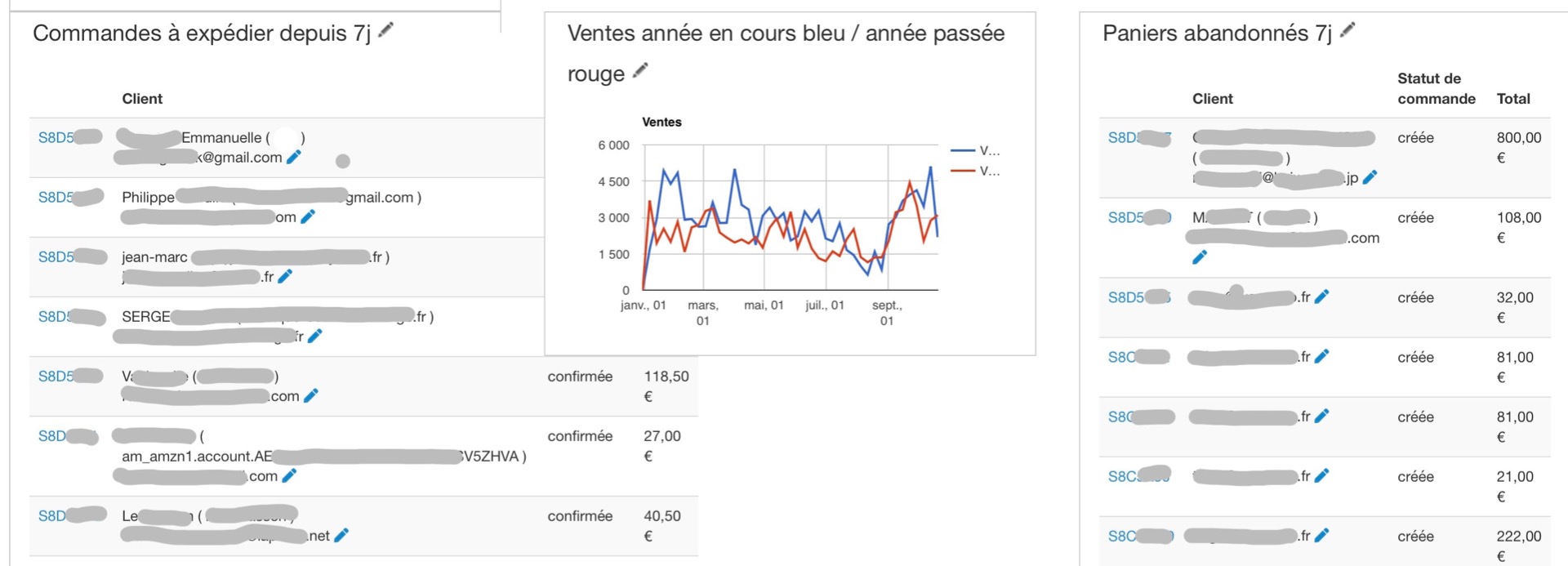
the apparence of some reports seems to be altered by the length of username of some clients. Some very long usernames stretch or enlarge the listing reports. such "enlarged" listing report is partially covered by the other report. it happens unless you use a large screen. the attached screenshot is taken on an Apple laptop. The display is ok on an big (20 or 27") screen.
How to fix it ?
Thank you
-- Joomla version -- : 3.9.12
-- PHP version -- : 7.3
-- Browser(s) name and version -- : Safari 13.0.1
-- Error-message(debug-mod must be tuned on) -- : none
Hello,
we use the legacy dashboard. It suits better our needs.
the apparence of some reports seems to be altered by the length of username of some clients. Some very long usernames stretch or enlarge the listing reports. such "enlarged" listing report is partially covered by the other report. it happens unless you use a large screen. the attached screenshot is taken on an Apple laptop. The display is ok on an big (20 or 27") screen.
How to fix it ?
Thank you
Please Log in or Create an account to join the conversation.

6 years 11 months ago #312294
by nicolas
Replied by nicolas on topic Appearance of legacy dashboard
Hi,
I think you want to edit the file "order" of the view "dashboard" via the menu Display>Views and change the code:
to:
So you'll get only the first 30 letters of the username.
I think you want to edit the file "order" of the view "dashboard" via the menu Display>Views and change the code:
Code:
echo $customer->name.' ( '.$customer->username.' )</a><br/>';
Code:
echo $customer->name.' ( '.substr($customer->username, 0, 30).' )</a><br/>';
The following user(s) said Thank You: Thierry H.
Please Log in or Create an account to join the conversation.
- Thierry H.
-
Topic Author
- Offline
Less
More
- Posts: 70
- Thank you received: 3
6 years 11 months ago #312302
by Thierry H.
Replied by Thierry H. on topic Appearance of legacy dashboard
Perfect Nicolas !
I changed 30 to 20 to get the 20 first letters of the usernames. with 30, it was still too large.
By the way, those extra long usernames come from Amazon login I've enabled of the site.
Merci / Thanks.
I changed 30 to 20 to get the 20 first letters of the usernames. with 30, it was still too large.
By the way, those extra long usernames come from Amazon login I've enabled of the site.
Merci / Thanks.
The following user(s) said Thank You: nicolas
Please Log in or Create an account to join the conversation.
Time to create page: 0.192 seconds