

- Posts: 74
- Thank you received: 2
UPS shipping method not recognized
5 years 8 months ago #328442
by jdean
UPS shipping method not recognized was created by jdean
-- HikaShop version -- : 4.4.0
-- Joomla version -- : 3.9.24
-- PHP version -- : 7.3.23
-- Browser(s) name and version -- : Firefox 84.0.2
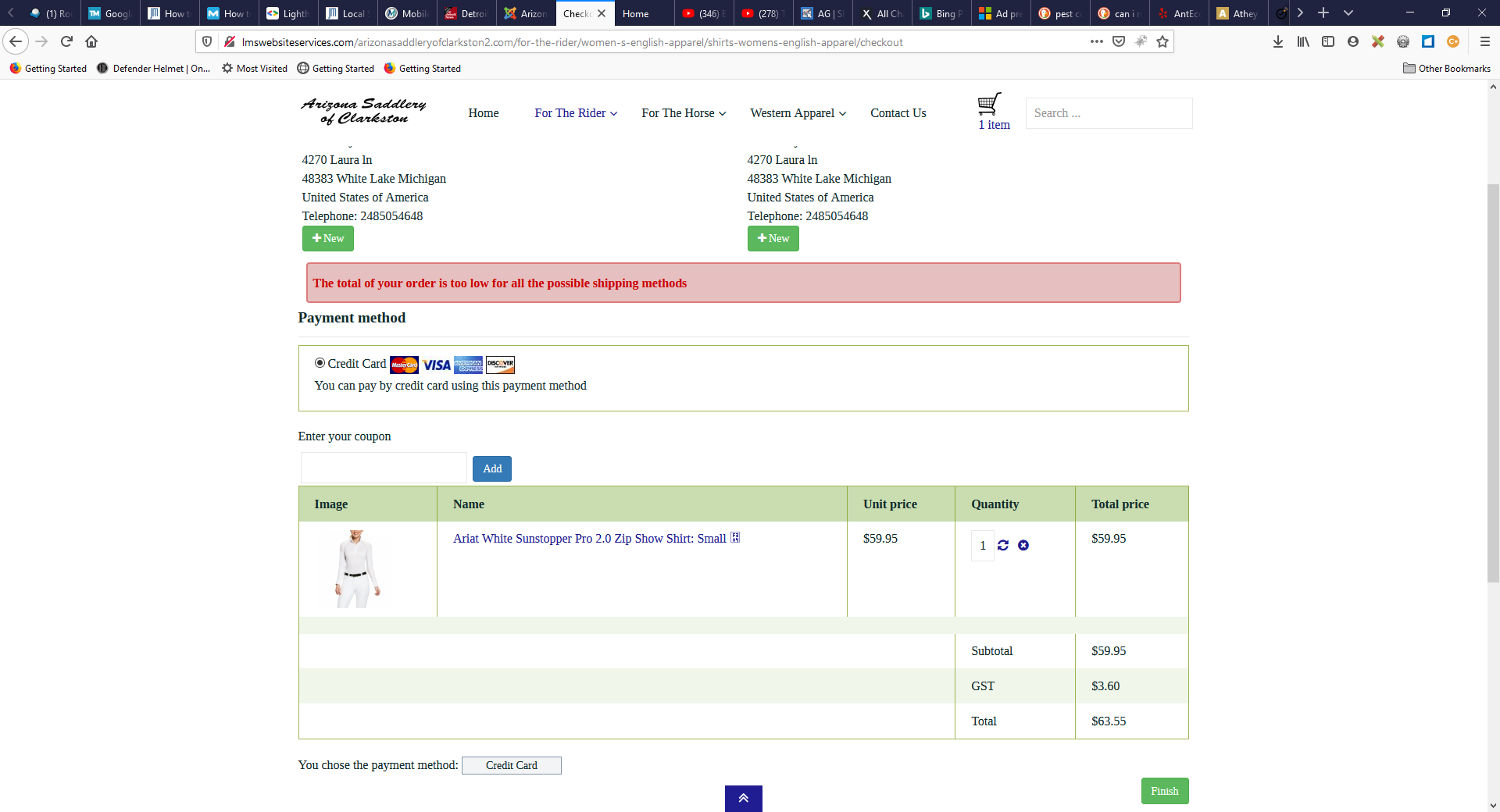
-- Error-message(debug-mod must be tuned on) -- : The total of your order is too low for all the possible shipping methods
I have two shipping methods. A UPS shipping method for all orders less than $100 and a manual shipping method for any order over $100.01. The manual shipping method seems to work but I get error "The total of your order is too low for all the possible shipping methods" when I try to check out with an order for less than $100.
I've linked a web page of one of my product pages that sells for less than $100. I've tried for hours to figure this out and I'm sure it's something small that I should have figured out but hopefully you can help.
Thanks.
-- Joomla version -- : 3.9.24
-- PHP version -- : 7.3.23
-- Browser(s) name and version -- : Firefox 84.0.2
-- Error-message(debug-mod must be tuned on) -- : The total of your order is too low for all the possible shipping methods
I have two shipping methods. A UPS shipping method for all orders less than $100 and a manual shipping method for any order over $100.01. The manual shipping method seems to work but I get error "The total of your order is too low for all the possible shipping methods" when I try to check out with an order for less than $100.
I've linked a web page of one of my product pages that sells for less than $100. I've tried for hours to figure this out and I'm sure it's something small that I should have figured out but hopefully you can help.
Thanks.
Please Log in or Create an account to join the conversation.

Less
More
- Posts: 12953
- Thank you received: 1778
5 years 8 months ago #328467
by Mohamed Thelji
Replied by Mohamed Thelji on topic UPS shipping method not recognized
Hello,
That error message is displayed because :
- The UPS platform didn't returned any rate for your order
- The manual shipping method should be available for your order if you increase its price.
So your issue is mainly linked to the fact that the UPS platform didn't returned any rate. You should check your UPS plugin configuration page and also check that your product have a weight / dimensions configured.
Kind regards,
Mohamed.
That error message is displayed because :
- The UPS platform didn't returned any rate for your order
- The manual shipping method should be available for your order if you increase its price.
So your issue is mainly linked to the fact that the UPS platform didn't returned any rate. You should check your UPS plugin configuration page and also check that your product have a weight / dimensions configured.
Kind regards,
Mohamed.
Please Log in or Create an account to join the conversation.
5 years 8 months ago #328496
by jdean
Replied by jdean on topic UPS shipping method not recognized
Ok, so the UPS plugin is not returning a rate (that's good to know). I have another website with the UPS plugin configured exactly the same so the configuration should be right. I do have weights and sizes on the product I'm testing. Could it possibly be that the UPS account is new and never been used before? Could the problem be with UPS?
Please Log in or Create an account to join the conversation.
Less
More
- Posts: 12953
- Thank you received: 1778
5 years 8 months ago #328531
by Mohamed Thelji
Replied by Mohamed Thelji on topic UPS shipping method not recognized
Hello,
We can't really tell you without more information if it's coming from the UPS platform, can you show us some screenshots of how you configured your :
- shipping method
- products dimension / weight that were on your cart during your test
- shipping address used during your test.
Also, following the shipping method section of our FAQ can be a good start :
www.hikashop.com/support/faq#ship
Kind regards,
Mohamed.
We can't really tell you without more information if it's coming from the UPS platform, can you show us some screenshots of how you configured your :
- shipping method
- products dimension / weight that were on your cart during your test
- shipping address used during your test.
Also, following the shipping method section of our FAQ can be a good start :
www.hikashop.com/support/faq#ship
Kind regards,
Mohamed.
Please Log in or Create an account to join the conversation.
5 years 8 months ago #328598
by jdean
Replied by jdean on topic UPS shipping method not recognized
Okay. Something you said sparked a memory in me. The last website I put Hikashop on had the same problem. It ended up being in the workflow. The log in screen, shipping methods, payment methods and cart all came up on the same page. Since I hadn't logged in/registered yet the UPS plugin didn't have the information it needed to bring back a rate. So I changed the workflow to have log in/registration page on step one, then shipping method, payment method and cart on step two.
I thought this would take care of the problem but nope...
I thought this would take care of the problem but nope...
Please Log in or Create an account to join the conversation.
Less
More
- Posts: 12953
- Thank you received: 1778
5 years 8 months ago #328673
by Mohamed Thelji
Replied by Mohamed Thelji on topic UPS shipping method not recognized
Hello,
I think your issue is coming from the way you have configured the "State / province code" option through your UPS configuration page.
You should replace Michigan by MI and test it again.
Kind regards,
Mohamed.
I think your issue is coming from the way you have configured the "State / province code" option through your UPS configuration page.
You should replace Michigan by MI and test it again.
Kind regards,
Mohamed.
Please Log in or Create an account to join the conversation.
5 years 8 months ago #328682
by jdean
Replied by jdean on topic UPS shipping method not recognized
Ok. That didn't work. Look at this image, what about the fact that the zip code is showing up before the city and state? I went into display > custom fields and changed the order and it doesn't seem to affect the front end at checkout. Could that be the problem?
I changed the address_title to unpublished and it does disappear but the order doesn't change....
I changed the address_title to unpublished and it does disappear but the order doesn't change....
Please Log in or Create an account to join the conversation.
5 years 8 months ago - 5 years 8 months ago #328685
by jdean
Replied by jdean on topic UPS shipping method not recognized
Ok, I found the address format area and changed to to show City State Zip Code in that order and it still shows "The total of your order is too low for all the possible shipping methods". So now I'm not sure what else to try.....
I am trying to talk to the UPS Rep for my customer next week in case there is a problem there but every thing looks okay from what I've checked (access key is correct, account is live and not in test mode, etc)...
I don't mind giving you temporary access to take a look around if you think you need to do that...
I am trying to talk to the UPS Rep for my customer next week in case there is a problem there but every thing looks okay from what I've checked (access key is correct, account is live and not in test mode, etc)...
I don't mind giving you temporary access to take a look around if you think you need to do that...
Last edit: 5 years 8 months ago by jdean.
Please Log in or Create an account to join the conversation.
5 years 8 months ago #328686
by jdean
Replied by jdean on topic UPS shipping method not recognized
Okay, I found the issue. Finally. I didn't realize there was a United States Minor Outlying Islands and a United States of America. I just realized I had set the warehouse as United States Minor Outlying Islands instead of United States of America. So that was throwing off the UPS API probably. Anyway, it seems to be working now so thanks for all of your help. Your suggestion that Michigan should be MI sent me on the path to double check all of my warehouse settings. Thanks again....
Please Log in or Create an account to join the conversation.
Time to create page: 0.272 seconds