
- Posts: 22
- Thank you received: 0
VAT within EU without valid VAT number
- dutchaudio
-
 Topic Author
- Offline
Less
More
6 years 8 months ago #314325
by dutchaudio
VAT within EU without valid VAT number was created by dutchaudio
-- url of the page with the problem -- :
dutch.audio/nl/dutch-audio-webshop/product/listing
-- HikaShop version -- : 4.2.2
My first post here, so thanks in advance.
My webdesigner installed Hikashop on my site ( dutch.audio ) which is great, but there is one thing that I can not get to work properly.
When I have a EU customer from outside of the netherlands (NL), from let's say belgium (BE), and he doesn't fill in a valid VAT it still removes the 21% VAT. It should ONLY remove the VAT when a valid VAT number is filled, otherwise the customer needs to pay the 21% VAT.
When I have a client from NL, it adds the 21% VAT as it should be.
I added the VAT rules ( www.hikashop.com/support/2-uncategorised...urope-vat-rules.html ) and things like that, but I just can not get it work the way it should.
Any idea what could be wrong here and how do I fix this?
Is there some kind of tutorial or something like that? Or step by step thing.
Thanks!
Jeffrey de Gans
-- HikaShop version -- : 4.2.2
My first post here, so thanks in advance.
My webdesigner installed Hikashop on my site ( dutch.audio ) which is great, but there is one thing that I can not get to work properly.
When I have a EU customer from outside of the netherlands (NL), from let's say belgium (BE), and he doesn't fill in a valid VAT it still removes the 21% VAT. It should ONLY remove the VAT when a valid VAT number is filled, otherwise the customer needs to pay the 21% VAT.
When I have a client from NL, it adds the 21% VAT as it should be.
I added the VAT rules ( www.hikashop.com/support/2-uncategorised...urope-vat-rules.html ) and things like that, but I just can not get it work the way it should.
Any idea what could be wrong here and how do I fix this?
Is there some kind of tutorial or something like that? Or step by step thing.
Thanks!
Jeffrey de Gans
Please Log in or Create an account to join the conversation.

6 years 8 months ago - 6 years 8 months ago #314335
by Philip
Replied by Philip on topic VAT within EU without valid VAT number
Hello,
Can you provide all your relative setting screenshot in order to better understand the context and be more precise in our help.
Awaiting news from you.
Can you provide all your relative setting screenshot in order to better understand the context and be more precise in our help.
Awaiting news from you.
Last edit: 6 years 8 months ago by Philip.
Please Log in or Create an account to join the conversation.
- dutchaudio
-
Topic Author
- Offline
Less
More
- Posts: 22
- Thank you received: 0
6 years 8 months ago #314374
by dutchaudio
Replied by dutchaudio on topic VAT within EU without valid VAT number
Hi Philip,
Thanks for the quick reply.
I have been playing around again but still can not get it to work the way I want.
I tried playing around with the rules, but i'm clueless/

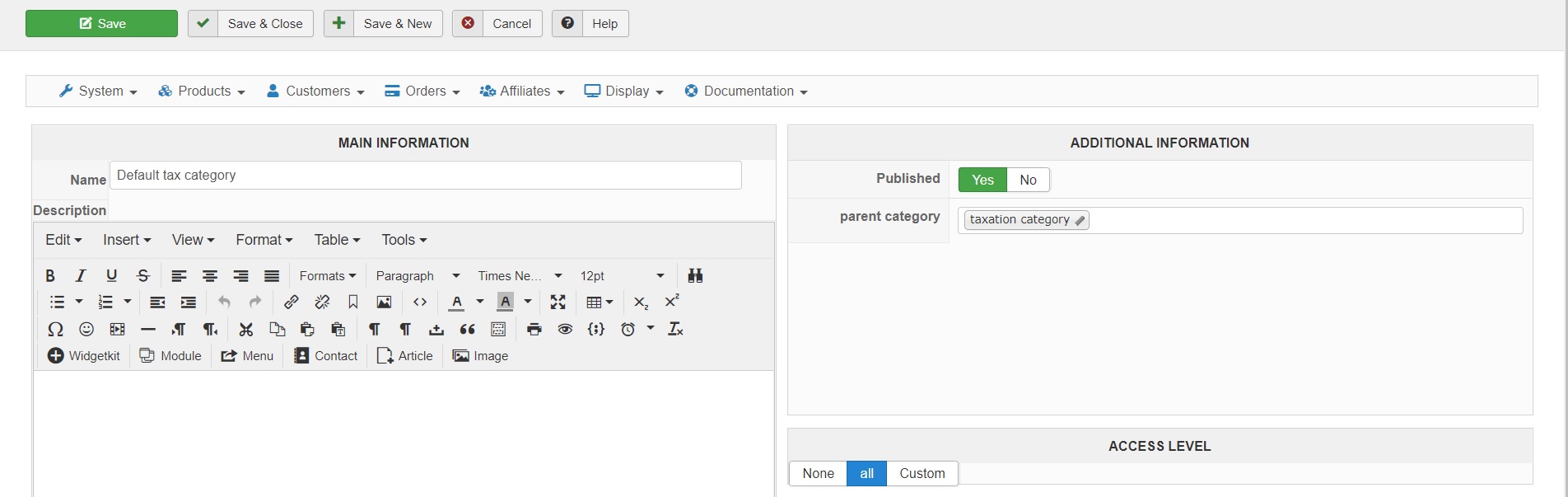
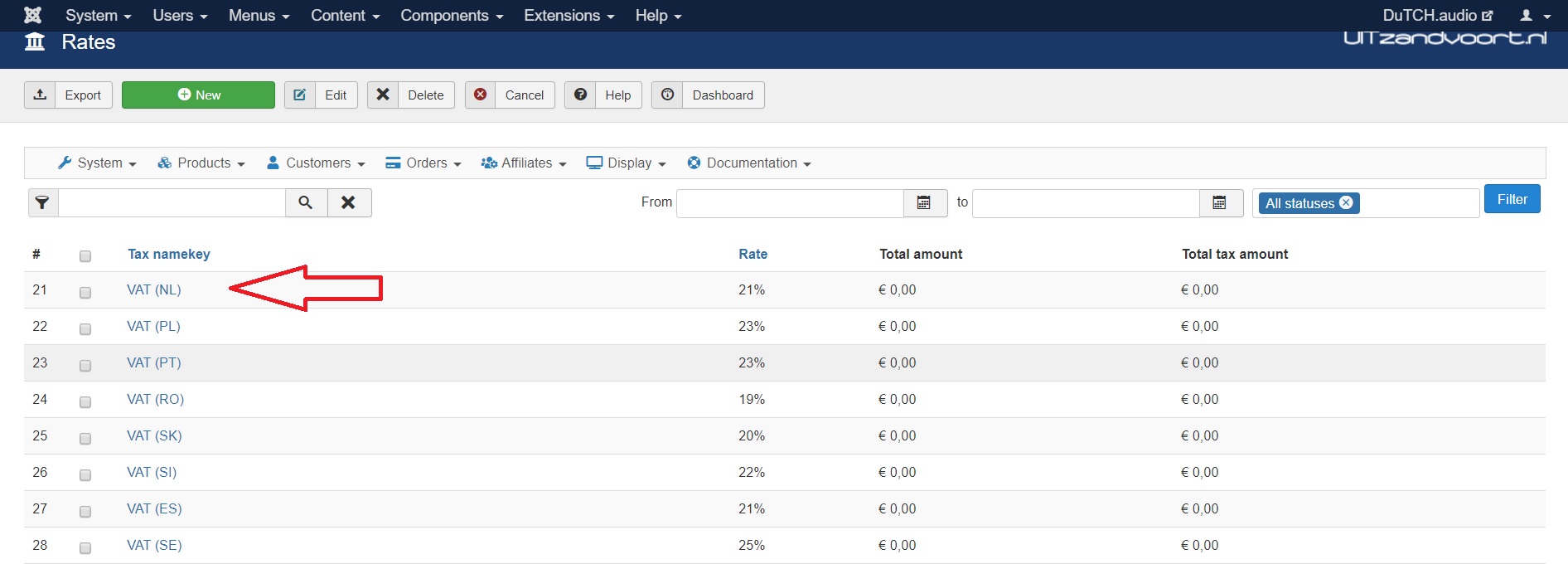
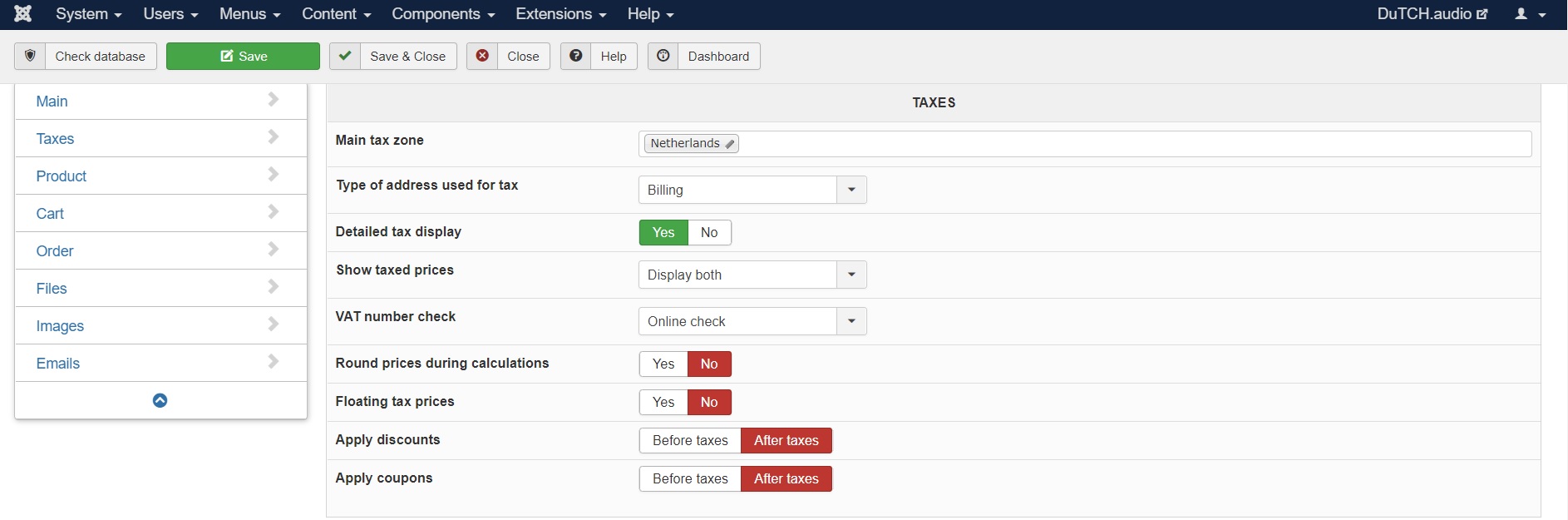
What still happens is that when you are from NL, the taxes are added like it should be. But as soon you are from let's say belgium, taxes are removed no matter if you fill in a VAT number or not. It should just remove the VAT when a valid VAT number is added.
The VAT number check works, when I fill in a random number it gives an error, when I fill in a good number it's fine, so that works.
I attached some screenshots of all tax settings the way I have them right now, hope that helps.
Thanks for the quick reply.
I have been playing around again but still can not get it to work the way I want.
I tried playing around with the rules, but i'm clueless/
What still happens is that when you are from NL, the taxes are added like it should be. But as soon you are from let's say belgium, taxes are removed no matter if you fill in a VAT number or not. It should just remove the VAT when a valid VAT number is added.
The VAT number check works, when I fill in a random number it gives an error, when I fill in a good number it's fine, so that works.
I attached some screenshots of all tax settings the way I have them right now, hope that helps.
Please Log in or Create an account to join the conversation.
- dutchaudio
-
Topic Author
- Offline
Less
More
- Posts: 22
- Thank you received: 0
6 years 8 months ago #314375
by dutchaudio
Replied by dutchaudio on topic VAT within EU without valid VAT number
also this doesn't work, forgot to add it.

Please Log in or Create an account to join the conversation.
6 years 8 months ago #314376
by GW
Replied by GW on topic VAT within EU without valid VAT number
Hi,
your taxes are not set up correctly.
Right now you have your taxes only specified for customers in the Netherlands, which is why a customer for any other country will always see your prices without tax. If I understand correctly, what you want, is to:
- set the 21% tax rate for all customers in the Netherlands
- set the 21% tax rate for any individual customers within Europe
- set 0% tax rate for any company with VAT number in Europe but outside of the Netherlands
You can achieve this with the settings as shown below:

As you can see, you do in fact not have to do anything for the third point, because if you don't set the tax rate for a particular country/zone, Hikashop will automatically assume 0% tax.
Hope that helps.
your taxes are not set up correctly.
Right now you have your taxes only specified for customers in the Netherlands, which is why a customer for any other country will always see your prices without tax. If I understand correctly, what you want, is to:
- set the 21% tax rate for all customers in the Netherlands
- set the 21% tax rate for any individual customers within Europe
- set 0% tax rate for any company with VAT number in Europe but outside of the Netherlands
You can achieve this with the settings as shown below:
As you can see, you do in fact not have to do anything for the third point, because if you don't set the tax rate for a particular country/zone, Hikashop will automatically assume 0% tax.
Hope that helps.
Please Log in or Create an account to join the conversation.
- dutchaudio
-
Topic Author
- Offline
Less
More
- Posts: 22
- Thank you received: 0
6 years 8 months ago #314379
by dutchaudio
Replied by dutchaudio on topic VAT within EU without valid VAT number
That was brilliant and fast
I finally got it to work the way it should.
One small thing, but not really an issue. I see that in you case you have set europe as the zone. I might be doing something wrong since I don't have
europe in the list, so I added all EU counties by hand which also works ofcourse but takes a bit more time.
Thank you for your help!
I finally got it to work the way it should.
One small thing, but not really an issue. I see that in you case you have set europe as the zone. I might be doing something wrong since I don't have
europe in the list, so I added all EU counties by hand which also works ofcourse but takes a bit more time.
Thank you for your help!
Please Log in or Create an account to join the conversation.

6 years 8 months ago #314389
by nicolas
Replied by nicolas on topic VAT within EU without valid VAT number
Hi,
There is a "tax zone" by default called "Europe" which contains all the SEPA countries from the EU.
But if you don't have it, it's not a problem, you can either:
- as you said, select the country zones one by one in your tax rule
- create a "Europe" tax zone yourself via the System>Zones menu, with the countries you want in its "sub zones" listing, and then use that zone in your tax rule.
There is a "tax zone" by default called "Europe" which contains all the SEPA countries from the EU.
But if you don't have it, it's not a problem, you can either:
- as you said, select the country zones one by one in your tax rule
- create a "Europe" tax zone yourself via the System>Zones menu, with the countries you want in its "sub zones" listing, and then use that zone in your tax rule.
Please Log in or Create an account to join the conversation.
- dutchaudio
-
Topic Author
- Offline
Less
More
- Posts: 22
- Thank you received: 0
6 years 8 months ago #314401
by dutchaudio
Replied by dutchaudio on topic VAT within EU without valid VAT number
Thanks! The zone setup worked. I think that I might have deleted the EU zone by accident.nicolas wrote: Hi,
There is a "tax zone" by default called "Europe" which contains all the SEPA countries from the EU.
But if you don't have it, it's not a problem, you can either:
- as you said, select the country zones one by one in your tax rule
- create a "Europe" tax zone yourself via the System>Zones menu, with the countries you want in its "sub zones" listing, and then use that zone in your tax rule.
Please Log in or Create an account to join the conversation.
Time to create page: 0.232 seconds