

- Posts: 966
- Thank you received: 11
Wishlist Has Two Different Views
6 years 4 months ago #319202
by MyWorld
Wishlist Has Two Different Views was created by MyWorld
-- HikaShop version -- : 4.3.0
The wishlist from HikaShop » User control panel uses the URL below and it looks like the wishlist-1.jpg image attached.
www.pungles.com/my-account/cart/listing/cart_type-wishlist.html
The wishlist from the dropdown menu uses the URL below and it looks like the wishlist-2.jpg image.
www.pungles.com/my-account/wishlist.html
I prefer how the 2nd one looks. How do I get the first one to look like the 2nd one. I don't know why there are 2 different views and I do not like the first one because you have to click on "No Name" in order to see the product in the wish list.
Thanks!
The wishlist from HikaShop » User control panel uses the URL below and it looks like the wishlist-1.jpg image attached.
www.pungles.com/my-account/cart/listing/cart_type-wishlist.html
The wishlist from the dropdown menu uses the URL below and it looks like the wishlist-2.jpg image.
www.pungles.com/my-account/wishlist.html
I prefer how the 2nd one looks. How do I get the first one to look like the 2nd one. I don't know why there are 2 different views and I do not like the first one because you have to click on "No Name" in order to see the product in the wish list.
Thanks!
Please Log in or Create an account to join the conversation.

6 years 4 months ago #319208
by nicolas
Replied by nicolas on topic Wishlist Has Two Different Views
Hi,
It's not two different look for the wishlist display.
One is the listing of wishlists of the customer. And the other one is the page of a wishlist.
It seems that what you want is to not have a listing of wishlists. So in that case, you should turn off the "enable multi wishlist" setting in the HikaShop configuration.
That way, you won't have the listing anymore and it will direct you directly to the current wishlist.
It's not two different look for the wishlist display.
One is the listing of wishlists of the customer. And the other one is the page of a wishlist.
It seems that what you want is to not have a listing of wishlists. So in that case, you should turn off the "enable multi wishlist" setting in the HikaShop configuration.
That way, you won't have the listing anymore and it will direct you directly to the current wishlist.
Please Log in or Create an account to join the conversation.
6 years 4 months ago #319353
by MyWorld
Replied by MyWorld on topic Wishlist Has Two Different Views
OK thanks!!
1) How do I remove "Carts" from the menu? I was going to use CSS but all the menu items have the same CSS.
2) Also how/where do I change the date format from "2018-09-08 21:10" to "September 8, 2018 21:10"
Please see attached pic.
Thanks!
1) How do I remove "Carts" from the menu? I was going to use CSS but all the menu items have the same CSS.
2) Also how/where do I change the date format from "2018-09-08 21:10" to "September 8, 2018 21:10"
Please see attached pic.
Thanks!
Please Log in or Create an account to join the conversation.
6 years 4 months ago #319378
by nicolas
Replied by nicolas on topic Wishlist Has Two Different Views
Hi,
1. Edit the file user / cpanel.php via the menu Display>Views and add such code at the beginning:
2. You need to use translation overrides for the translation keys HIKASHOP_DATE_FORMAT and HIKASHOP_EXTENDED_DATE_FORMAT
www.hikashop.com/download/languages.html#modify
www.php.net/manual/en/function.date.php
1. Edit the file user / cpanel.php via the menu Display>Views and add such code at the beginning:
Code:
<?php unset($this->buttons['cart']); ?>
2. You need to use translation overrides for the translation keys HIKASHOP_DATE_FORMAT and HIKASHOP_EXTENDED_DATE_FORMAT
www.hikashop.com/download/languages.html#modify
www.php.net/manual/en/function.date.php
Please Log in or Create an account to join the conversation.
6 years 3 months ago #320151
by MyWorld
Replied by MyWorld on topic Wishlist Has Two Different Views
Hi,
Sorry but I'm missing something. When I change the date in the language override file like this:
I see this on the order details page:
Date: %September %8 2018
And it does not change on the Order Listings page as per the attached. What did I miss please?
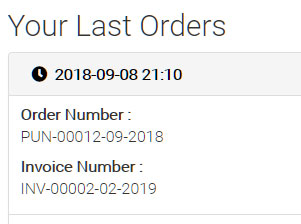
Thanks!
Sorry but I'm missing something. When I change the date in the language override file like this:
Code:
HIKASHOP_DATE_FORMAT="%F %j %Y"
HIKASHOP_EXTENDED_DATE_FORMAT="%F %j %Y %H:%M"
I see this on the order details page:
Date: %September %8 2018
And it does not change on the Order Listings page as per the attached. What did I miss please?
Thanks!
Please Log in or Create an account to join the conversation.
6 years 3 months ago #320169
by nicolas
Replied by nicolas on topic Wishlist Has Two Different Views
Hi,
Ah, that's a good point. The date there doesn't support the translation override yet.
We'll change that.
In the mean time, you need to edit the file order / listing.php via the menu Display>Views and directly change the code:
with your format.
And regarding the extra % you see in the format, that's because some letters you use don't support the % mode of Joomla's date format.
So you just have to change your format to :
HIKASHOP_DATE_FORMAT="F j %Y"
and it will display properly.
Ah, that's a good point. The date there doesn't support the translation override yet.
We'll change that.
In the mean time, you need to edit the file order / listing.php via the menu Display>Views and directly change the code:
Code:
%Y-%m-%d %H:%M
And regarding the extra % you see in the format, that's because some letters you use don't support the % mode of Joomla's date format.
So you just have to change your format to :
HIKASHOP_DATE_FORMAT="F j %Y"
and it will display properly.
Please Log in or Create an account to join the conversation.
Time to create page: 0.170 seconds