[Skip to main content](#vessel-content)
☰ Documentation
# Language to Currency plugin
Details Written by: jobsigen Category: [Payment plugins](/support/documentation/hikashop/payment-plugins) Published: 23 October 2026 Hits: 3682

- [Installation](#installation)
- [Description](#description)
- [Plugins options](#options)
### Description
This plugin aim is to able you to **automatically** define your currency from the current language.
### Installation
Download the install package of the Language to Currency plugin from your [Customer Account](https://www.hikashop.com/my-account.html).
Then, install it via the Joomla installer on your website. Then, go in the menu **Extensions** dropdown => **Plugins**, use the input filter to find your Language to Currency plugin.
Click on it, to edit your plugin options.
### Plugins options
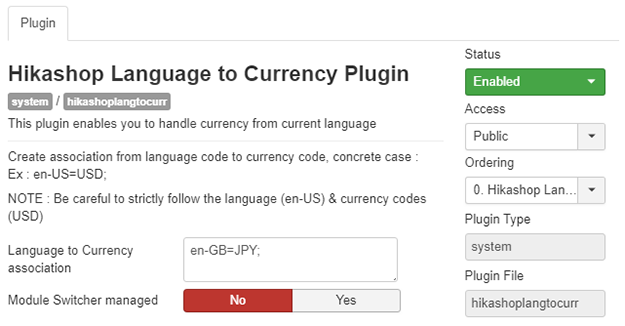
**In this part, we will see the primordial options of the Language to Currency plugin.**
- **Language to Currency association**: This text input allow you to enter your elements association, by following this structure and this example : **Language-code** = **Currency Code** (**3 letter code**) and finish your entry with an "**;**" **=> en-US=USD;** For have several associations, simply repeat the same structure like this structure and this example : **=> en-US=USD;en-GB=GBP;fr-FR=EUR;**
- **Module Switcher managed** : Define if you want to have an interaction between your Currency Switcher module and your plugin. **Yes** : The plugin will work with the Currency module Switcher, means that if your user have selected a language, then the associated won't be processn and your user keep his selected language. **No** : The plugin will mute your current currency without be influenced by Currency Switcher module.
**IMPORTANTE NOTE:** This previous option, is unable to work **without** an 4.03 HikaShop version or superior.
[](#top)