
image css in module

13 years 8 months ago #90799
by luppe
image css in module was created by luppe
hi
the image on top in the module is not showing
How can I fix it
www.sanitair-installatie.be/index.php/kranen/keuken-kraan
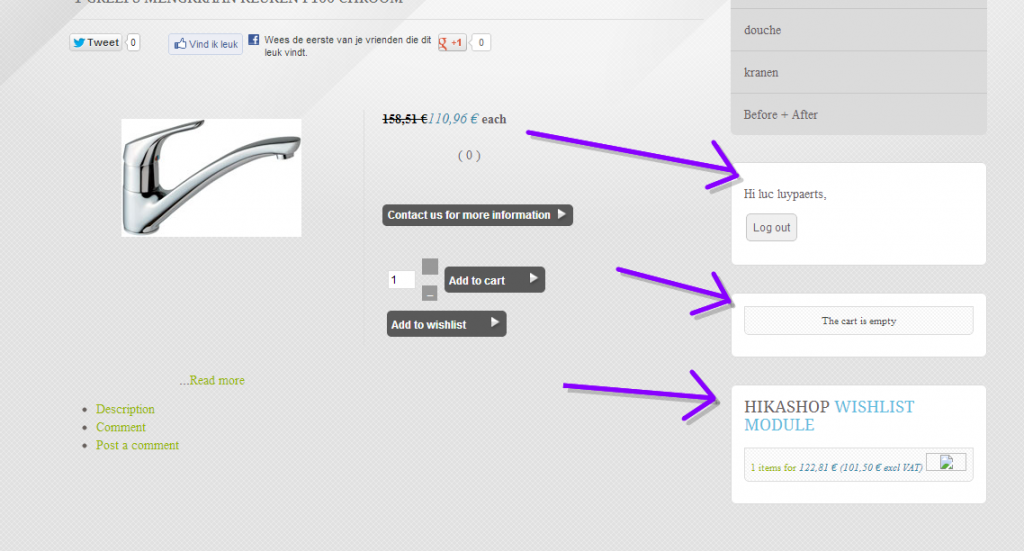
thanks for your time
the image on top in the module is not showing
How can I fix it
www.sanitair-installatie.be/index.php/kranen/keuken-kraan
thanks for your time
Please Log in or Create an account to join the conversation.

13 years 8 months ago #90896
by Jerome
Jerome - Obsidev.com
HikaMarket & HikaSerial developer / HikaShop core dev team.
Replied by Jerome on topic image css in module
Hi,
The style you use have some background images.
There is one grey background image under "The cart is empty".
But, if you want to put a head image for your modules, you have to use some rules which are commented in your css file.
Regards,
The style you use have some background images.
There is one grey background image under "The cart is empty".
But, if you want to put a head image for your modules, you have to use some rules which are commented in your css file.
Code:
/*************************/
/*****My cart module*******/
/*************************/
/*
.moduletable-cart h3{
background: url("../images/style_pictureblue/cart_bg.png") no-repeat scroll right center;
color: #FFFFFF;
padding:10px 0px 8px 10px;
text-align: left;
border-bottom:2px solid #236780;
margin:0px;
}
*/
#hikashop_cart{
border:1px solid #ddd;
background-color:#ffffff;
background:url(../images/style_pictureblue/bgstrip.png) repeat right;
padding:5px;
text-align:center;
border-bottom-left-radius:5px;
border-bottom-right-radius:5px;
margin-bottom:10px;
color:#444;}
Regards,
Jerome - Obsidev.com
HikaMarket & HikaSerial developer / HikaShop core dev team.
The following user(s) said Thank You: luppe
Please Log in or Create an account to join the conversation.
13 years 8 months ago #91042
by luppe
Replied by luppe on topic image css in module
Hi
I try to remove the /* */
then the code gets color in dreamwever
So I think the code will work
but it is not showing?
thanks for your help and time
regards
I try to remove the /* */
then the code gets color in dreamwever
So I think the code will work
but it is not showing?
thanks for your help and time
regards
Please Log in or Create an account to join the conversation.

13 years 8 months ago #91097
by Eliot
Replied by Eliot on topic image css in module
Hi there,
Are you sure there are not another section dedicated to the same class of id which is overriding these rules?
Try to move it at the end of your css file.
Are you sure there are not another section dedicated to the same class of id which is overriding these rules?
Try to move it at the end of your css file.
The following user(s) said Thank You: luppe
Please Log in or Create an account to join the conversation.
Time to create page: 0.165 seconds