
HikaShop 6.8.3 tells your customers how much is missing for free shipping and shows a cart sent from several warehouses or vendors shipment by shipment. The HikaShop app now gets its alerts while it is closed, WordPress shops get more from their page builder and their SEO plugin, the Purchase order payment method suits shops selling on account, and a new mass action adds sizes or colours to many products at once.
Here is a look at what changed in this release.
- Free shipping progress, and a cart shown shipment by shipment
- The HikaShop app: alerts while it is closed
- WordPress improvements
- Selling on account with the Purchase order method
- New sizes or colours on many products at once
- Bug fixes and other improvements
- Before you update
The cart module and the cart of the checkout can now say "6,40 € more for free shipping" with a progress bar, then "You get free shipping" once the amount is reached. There is nothing to set up besides turning it on: HikaShop reads your own shipping methods, so as soon as a method priced 0 with a minimum price exists for the cart, the bar appears, and it always agrees with what the checkout offers, zones and vendors included. Turn it on with the new Free shipping progress setting of the cart module and of the cart block of the checkout workflow.
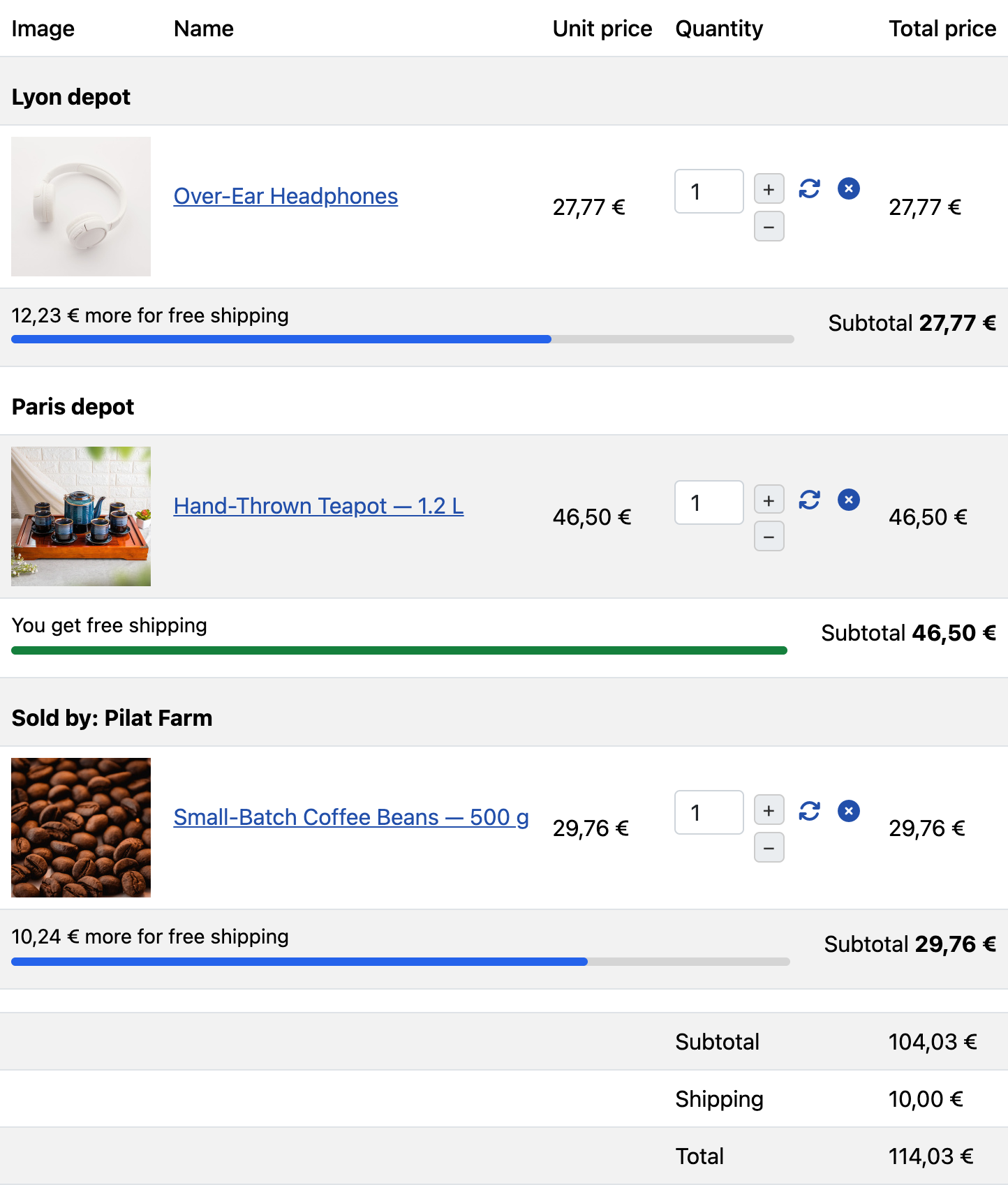
When the products of a cart ship separately, from several warehouses or, with HikaMarket, from several vendors, the checkout, the cart module and the cart page now show the cart shipment by shipment: each shipment with its name, its products and, in the checkout and the cart page, its subtotal, as the shipping methods of the checkout already were. Each shipment gets its own free shipping bar, since each one has its own shipping methods. A cart with a single shipment looks exactly as before, and the new Group the cart by vendor / warehouse setting turns the grouping off. Templates can restyle the bar through a few CSS variables, and the rows of a shipment are layouts a template can override.
The HikaShop app installed from the web, including on an iPhone or iPad added to the Home Screen, now receives its new order and low stock alerts while it is closed. Your site sends them itself through the browser's push service, with keys created on your site, so no HikaShop server is involved. It needs PHP 7.3 or later with OpenSSL and cURL; without them the app keeps checking for alerts only while it is open.
Page builder add-ons such as HikaShop for Elementor can now display the product pages with their own template and show the listings and product parts of the shop in their editor, and the HikaShop widgets placed with SiteOrigin Page Builder each keep their own settings. With Yoast SEO or Rank Math, product and category pages give them their own title, description, address and image, for search results, social network previews and structured data, and the sitemaps list the products and categories. With Polylang or WPML, the sitemaps, the alternate language links and the language switcher lead to the same product or category in each language. The cart, checkout and account pages ask search engines not to index them.
The Purchase order payment method now fits shops selling to businesses on account. Its purchase order number can be required, optional or hidden, its field has a label you choose and translate, and its Submit button can be hidden, the number being saved with the order. The thank you page says the order is paid on invoice instead of asking the customer to complete the payment, and a number typed in the checkout is saved with a single click on the finish button.
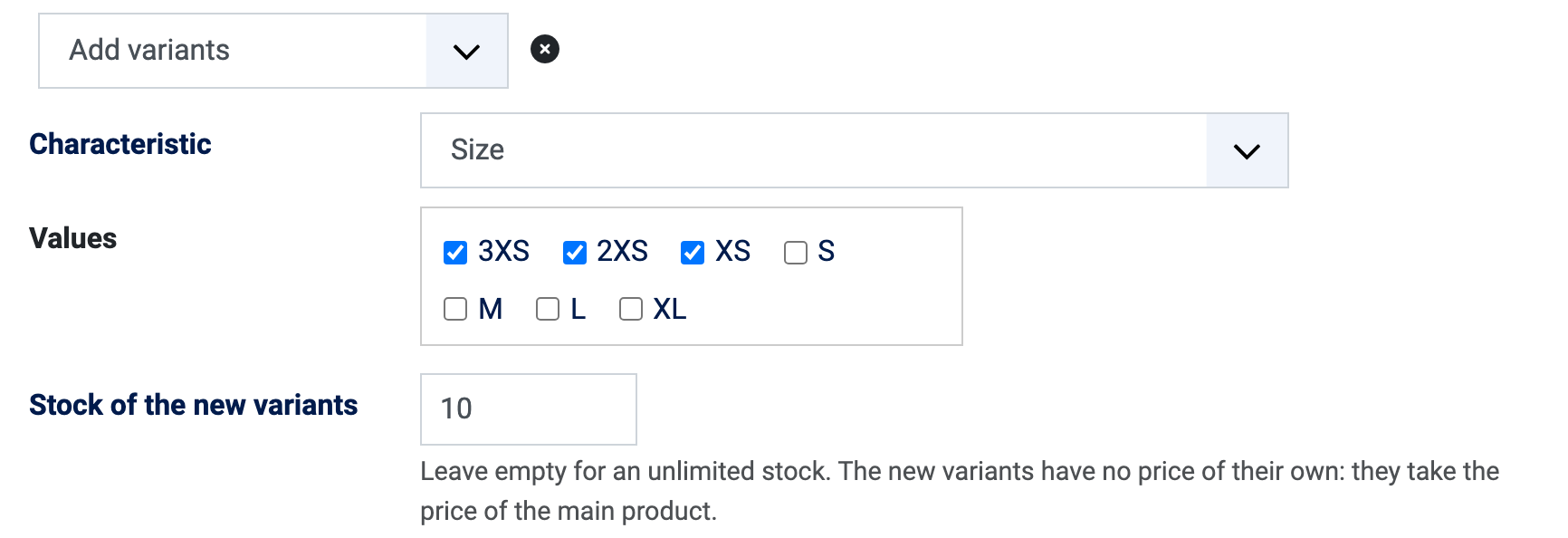
Your supplier now makes the range in XS and 2XS as well? The new Add variants action of the product mass actions adds them to every product concerned in one go. Choose the characteristic, tick the new values and, if you want, the stock of the new variants, then run it on the products you filtered, such as a category. Each product gets the variants it does not have yet, the existing ones stay as they are, and a product sold in several colours gets the new sizes in each of its colours. The new variants take the price of their main product until you give them their own.
The CSV import can do it too, with the stock and the price of each variant in the file: a line per new variant is now enough, with the code of its main product in the product_parent_id column, without the line of the main product. A variant whose main product cannot be found is no longer imported as a product attached to nothing: the import names it, so you can correct the file.
HikaShop 6.8.3 ships with 3 new features, 17 improvements and 54 bug fixes. Here is a selection.
- The cart page: changing a quantity or removing a product saves the cart again. HikaShop 6.8.2 answered Access forbidden and left the cart unchanged.
- Coupons: with "Show coupon price" turned off, the total of the cart always leaves the coupon out, whatever the amount of the cart.
- Downloads: each order line of a product with a generated file, such as a HikaSerial gift card, gets its own download.
- Logout: the logout button of the customer account goes to the page chosen in the HikaShop user logout plugin, or to the logout redirection set in Joomla.
- Speed: product listings need half the database queries, and Check database rebuilds the customer totals in seconds on shops with thousands of customers.
- Google: the tabular and reversed product page layouts add the product's structured data again, as the other layouts do.
- Falang: the translated settings of payment and shipping methods, such as the information of the Bank transfer method, are shown in the customer's language.
- WordPress: the customer account page displays again, product and category pages have their own page title, meta description and canonical URL, and the HikaShop JavaScript loads once per page.
- For developers: plugins and template overrides can add whole rows around a product in the carts, and content under the add to cart button, the description and the name of a product.
- Back up your site first, as for any update. The update is done from the Joomla or WordPress updater, or with the one-click update button of your HikaShop configuration page.
- A cart of several shipments is grouped by default: if your products ship from several warehouses or vendors, the carts show them shipment by shipment after the update. The Group the cart by vendor / warehouse setting brings back the previous display. A template that overrides the cart views keeps its own display.
- The free shipping bar is off by default: turn on Free shipping progress in the cart module and in the cart block of the checkout workflow.
You can download the update from your member area or use the one-click update button in your HikaShop configuration page.
For the complete list of changes, see the full changelog.