

- Posts: 59
- Thank you received: 1
Translation not working
6 years 2 days ago #324156
by Borburgh
Translation not working was created by Borburgh
-- url of the page with the problem -- : devshop.hopto.org
Not sure if I'm posting in the correct forum, so sorry if wrong.
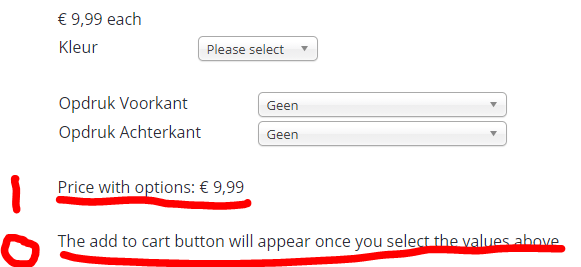
There are some items not being translated to Dutch (see attachment).
For the first, there is a translation line in the Dutch file: PRICE_WITH_OPTIONS="Prijs met opties", but it's not being used, not even an override.
For the second, I can't find anything to translate myself.
Please advice!
Not sure if I'm posting in the correct forum, so sorry if wrong.
There are some items not being translated to Dutch (see attachment).
For the first, there is a translation line in the Dutch file: PRICE_WITH_OPTIONS="Prijs met opties", but it's not being used, not even an override.
For the second, I can't find anything to translate myself.
Please advice!
Please Log in or Create an account to join the conversation.

6 years 2 days ago #324174
by nicolas
Replied by nicolas on topic Translation not working
Hi,
It's this translation line you need to change:
ADD_TO_CART_AVAILABLE_AFTER_CHARACTERISTIC_SELECTION="The add to cart button will appear once you select the values above"
It's been added in the 4.2.3.
If you're using a dutch language file from an older version of Hikashop, then that's normal you don't find it in there.
Also, if you get the translation key PRICE_WITH_OPTIONS with the english text, it's potentially that there is an error in your translation file and Joomla can't read the file properly anymore.
Turn on the "debug language" setting of the Joomla configuration and look at that product page again. You'll see at its bottom the language debug area where it will say which files were loaded and which ones contained an error and on which line of the file the error was.
It's this translation line you need to change:
ADD_TO_CART_AVAILABLE_AFTER_CHARACTERISTIC_SELECTION="The add to cart button will appear once you select the values above"
It's been added in the 4.2.3.
If you're using a dutch language file from an older version of Hikashop, then that's normal you don't find it in there.
Also, if you get the translation key PRICE_WITH_OPTIONS with the english text, it's potentially that there is an error in your translation file and Joomla can't read the file properly anymore.
Turn on the "debug language" setting of the Joomla configuration and look at that product page again. You'll see at its bottom the language debug area where it will say which files were loaded and which ones contained an error and on which line of the file the error was.
Please Log in or Create an account to join the conversation.
5 years 11 months ago - 5 years 11 months ago #324244
by Borburgh
Replied by Borburgh on topic Translation not working
Some are not loaded?
How can I correct this? Reinstall the language file?
Latest version of NL here is 4.2.2. which is loaded in my system aswell.
How can I correct this? Reinstall the language file?
Latest version of NL here is 4.2.2. which is loaded in my system aswell.
Last edit: 5 years 11 months ago by Borburgh.
Please Log in or Create an account to join the conversation.
5 years 11 months ago #324250
by nicolas
Replied by nicolas on topic Translation not working
Hi,
The translation files not being loaded just means that Joomla didn't find the translation file. But it can be totally normal. It's just that the extension don't have a translation file for itself. For example, for the datepickerfield plugin listed as not loaded on your screenshot. But that's just because the translations used by that plugin are in the translation file of HikaShop.
The latest version of the translation file is not 4.2.2 but 4.3.0. But yes, the NL translations were not updated since the 4.2.2, only the new translations were added, with their english text.
Now you didn't give a link to your website so I can't check the situation there.
It's possible that your website is actually not in Dutch but in English on the frontend. And thus, only the English translation files are loaded there. That would explain why you see the text by default in HikaShop in Engilsh, while the content you've added yourself is in Dutch.
In that case, the problem is not the translation files but how the languages are configured in Joomla.
The translation files not being loaded just means that Joomla didn't find the translation file. But it can be totally normal. It's just that the extension don't have a translation file for itself. For example, for the datepickerfield plugin listed as not loaded on your screenshot. But that's just because the translations used by that plugin are in the translation file of HikaShop.
The latest version of the translation file is not 4.2.2 but 4.3.0. But yes, the NL translations were not updated since the 4.2.2, only the new translations were added, with their english text.
Now you didn't give a link to your website so I can't check the situation there.
It's possible that your website is actually not in Dutch but in English on the frontend. And thus, only the English translation files are loaded there. That would explain why you see the text by default in HikaShop in Engilsh, while the content you've added yourself is in Dutch.
In that case, the problem is not the translation files but how the languages are configured in Joomla.
Please Log in or Create an account to join the conversation.
5 years 11 months ago #324329
by Borburgh
Replied by Borburgh on topic Translation not working
devshop.hopto.org/
Everything is in Dutch, just a few lines are not, even though a translation line exist
Everything is in Dutch, just a few lines are not, even though a translation line exist
Please Log in or Create an account to join the conversation.
5 years 11 months ago #324330
by Borburgh
Replied by Borburgh on topic Translation not working
Oke 
Nevermind, aparently a restore of the live site on the devserver doesn't restore the default language correctly.
Time to post on someone elses forum
Nevermind, aparently a restore of the live site on the devserver doesn't restore the default language correctly.
Time to post on someone elses forum
Please Log in or Create an account to join the conversation.
Time to create page: 0.262 seconds