

- Posts: 11
- Thank you received: 0
How to show vendor address on product page
12 years 4 months ago - 12 years 4 months ago #155168
by apatiu
[Solved]How to show vendor address on product page was created by apatiu
I'm see "Sold by ......"
and i'm need to show vendor address and phone number.
What's view I'm need to edit.
Thanks
and i'm need to show vendor address and phone number.
What's view I'm need to edit.
Thanks
Last edit: 12 years 4 months ago by apatiu.
Please Log in or Create an account to join the conversation.

12 years 4 months ago #155173
by Jerome
Jerome - Obsidev.com
HikaMarket & HikaSerial developer / HikaShop core dev team.
Replied by Jerome on topic How to show vendor address on product page
Hi,
First, you will have to edit the HikaMarket class product file ( administrator/components/com_hikamarket/classes/product.php ) and replace :
By:
It will allow you to access to the vendor object in the HikaShop product listing view.
(This patch will be included in HikaMarket 1.4.1).
HikaMarket uses the "extraData" to add his HTML content which will be displayed in the view afterwards.
If you are looking at the content of the "hikashop | front-end | your_template | product | listing_img_title" view, you will see
HikaMarket put the "Sold by..." in this specific "slot" of the extraData.
With the patch, you will also have access to the "$this->row->vendor" and all of his content.
So you will be able to put this code below:
To display the vendor phone number.
Regards,
First, you will have to edit the HikaMarket class product file ( administrator/components/com_hikamarket/classes/product.php ) and replace :
Code:
if(isset($row->product_vendor_id) && !$hide_sold_by) {
$id = (int)$row->product_vendor_id;
if($id <= 1)
$id = 1;
if(!empty($vendors[$id]->vendor_name)) {
if(!isset($row->extraData))
$row->extraData = new stdClass();
Code:
if(isset($row->product_vendor_id)) {
$id = (int)$row->product_vendor_id;
if($id <= 1)
$id = 1;
$row->vendor = null;
if(isset($vendors[$id]))
$row->vendor =& $vendors[$id];
if(!$hide_sold_by && !empty($vendors[$id]->vendor_name)) {
if(!isset($row->extraData))
$row->extraData = new stdClass();
(This patch will be included in HikaMarket 1.4.1).
HikaMarket uses the "extraData" to add his HTML content which will be displayed in the view afterwards.
If you are looking at the content of the "hikashop | front-end | your_template | product | listing_img_title" view, you will see
Code:
<?php if(!empty($this->row->extraData->afterProductName)) { echo implode("\r\n",$this->row->extraData->afterProductName); } ?>
With the patch, you will also have access to the "$this->row->vendor" and all of his content.
So you will be able to put this code below:
Code:
if(!empty($this->row->vendor)) {
echo '<p>'.$this->row->vendor->vendor_address_telephone.'</p>';
}
Regards,
Jerome - Obsidev.com
HikaMarket & HikaSerial developer / HikaShop core dev team.
The following user(s) said Thank You: praes
Please Log in or Create an account to join the conversation.
12 years 4 months ago #155241
by apatiu
Replied by apatiu on topic How to show vendor address on product page
hi. thanks for your help.
it'working on list_img_title now, But not with show_default .
i'm put this under
is not show any thing. What I missing?
it'working on list_img_title now, But not with show_default .
i'm put this under
Code:
<?php if(!empty($this->element->extraData->topEnd)) { echo implode("\r\n",$this->element->extraData->topEnd); } ?>
is not show any thing. What I missing?
Please Log in or Create an account to join the conversation.
12 years 4 months ago #155242
by apatiu
Replied by apatiu on topic How to show vendor address on product page
I'm try to
is not have vendor class like $this->row on list_img_title page
Why? I'm thing it's should be use from the same product class ( administrator/components/com_hikamarket/classes/product.php ) right?
Code:
echo var_dump($this->row);
is not have vendor class like $this->row on list_img_title page
Why? I'm thing it's should be use from the same product class ( administrator/components/com_hikamarket/classes/product.php ) right?
Please Log in or Create an account to join the conversation.
12 years 4 months ago - 12 years 4 months ago #155247
by apatiu
Replied by apatiu on topic How to show vendor address on product page
Hi. I'm sloved.
replace this
by this
it's have $this->element->vendor in show_default
Thanks you
replace this
Code:
$slot = 0;
if($show_sold_by && ($vendor->vendor_id > 1 || $show_sold_by_me)) {
$vendorLink = '<a href="'.hikamarket::completeLink('vendor&task=show&cid=' . $vendor->vendor_id . '&name=' . $vendor->alias . $url_itemid).'">' . $vendor->vendor_name . '</a>';
$view->element->extraData->topEnd[$slot] = '<span class="hikamarket_vendor">'.JText::sprintf('SOLD_BY_VENDOR', $vendorLink).'</span>';
}
by this
Code:
$slot = 0;
if($show_sold_by && ($vendor->vendor_id > 1 || $show_sold_by_me)) {
$vendorLink = '<a href="'.hikamarket::completeLink('vendor&task=show&cid=' . $vendor->vendor_id . '&name=' . $vendor->alias . $url_itemid).'">' . $vendor->vendor_name . '</a>';
$view->element->extraData->topEnd[$slot] = '<span class="hikamarket_vendor">'.JText::sprintf('SOLD_BY_VENDOR', $vendorLink).'</span>';
$view->element->vendor = $vendor;
}
it's have $this->element->vendor in show_default
Thanks you
Last edit: 12 years 4 months ago by apatiu.
Please Log in or Create an account to join the conversation.
12 years 4 months ago #155268
by Jerome
Jerome - Obsidev.com
HikaMarket & HikaSerial developer / HikaShop core dev team.
Replied by Jerome on topic How to show vendor address on product page
Hi,
You patch is a possibility but I won't put it in the same place because you are in a condition with the "show sold by".
In the product page, it is quite much easy to load the vendor manually.
Regards,
You patch is a possibility but I won't put it in the same place because you are in a condition with the "show sold by".
In the product page, it is quite much easy to load the vendor manually.
Code:
if($this->element->product_vendor_id > 1) {
$vendorClass = hikamarket::get('class.vendor');
$vendor = $vendorClass->get($this->element->product_vendor_id);
}
Jerome - Obsidev.com
HikaMarket & HikaSerial developer / HikaShop core dev team.
The following user(s) said Thank You: apatiu
Please Log in or Create an account to join the conversation.
Less
More
- Posts: 424
- Thank you received: 11
5 years 3 months ago #333610
by BluepointWebdesign
Replied by BluepointWebdesign on topic How to show vendor address on product page
Hi,
I know this is an old topic.
But here the only thing is that the vendor name adress telephone number is on the product_listing_table or product_listing_img.
But what i would like is to have a button next to the filter see screenshot to open the information as adress phonenumber name etc. to be shown in a pop up. So it is directly after pushing the button visible publicly in a pop up screen. How can i accomplish that??
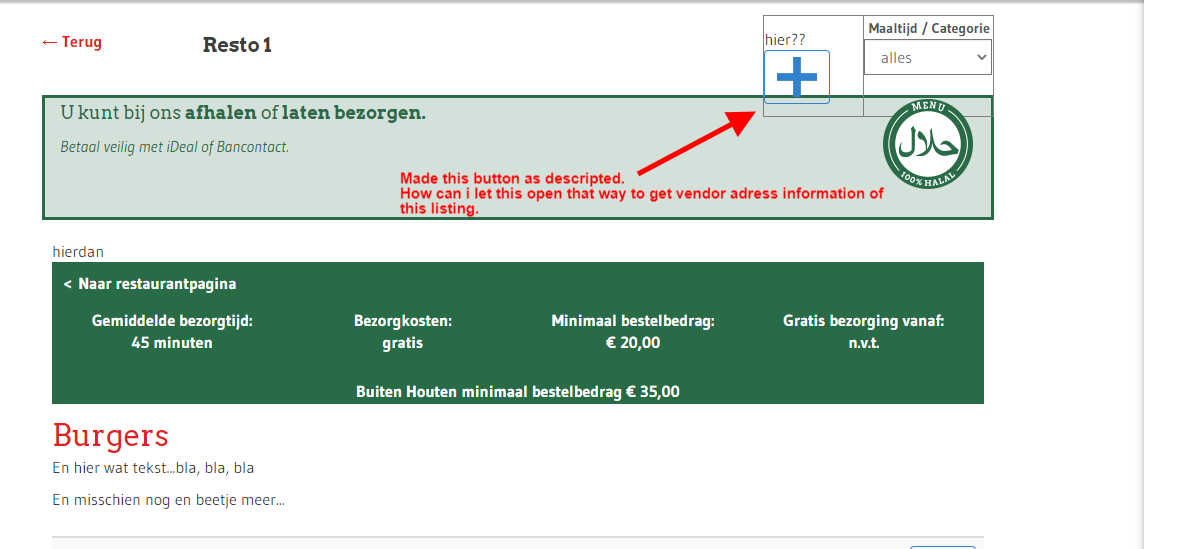
I would like this button which allready opens up in pop up with hika pop helper. To open the name, adress, telephone number of the vendor of this listing. How can i trigger this??
<?php
$popupHelper = hikashop_get('helper.popup');
echo ' '.$popupHelper->display(
'<i class="hikabtn" style="background: transparent; border-color: #3182CE;" ><img src="/images//Plusje.png"/></i>',
'HIKASHOP_EDIT_CART_PRODUCT',
$link = hikamarket::completeLink('vendor&task=show&cid'.$this->row->vendor_id.'&name='.$this->row->alias . $this->menu_id),
'edit_cart_product',
600, 600, 'title="'.JText::_('CHOOSE_OPTIONS').'"', '', 'link'
);
?>
I now have this but then it states vendor does not exists.
Hope you can help, that would be gratefull!
I know this is an old topic.
But here the only thing is that the vendor name adress telephone number is on the product_listing_table or product_listing_img.
But what i would like is to have a button next to the filter see screenshot to open the information as adress phonenumber name etc. to be shown in a pop up. So it is directly after pushing the button visible publicly in a pop up screen. How can i accomplish that??
I would like this button which allready opens up in pop up with hika pop helper. To open the name, adress, telephone number of the vendor of this listing. How can i trigger this??
<?php
$popupHelper = hikashop_get('helper.popup');
echo ' '.$popupHelper->display(
'<i class="hikabtn" style="background: transparent; border-color: #3182CE;" ><img src="/images//Plusje.png"/></i>',
'HIKASHOP_EDIT_CART_PRODUCT',
$link = hikamarket::completeLink('vendor&task=show&cid'.$this->row->vendor_id.'&name='.$this->row->alias . $this->menu_id),
'edit_cart_product',
600, 600, 'title="'.JText::_('CHOOSE_OPTIONS').'"', '', 'link'
);
?>
I now have this but then it states vendor does not exists.
Hope you can help, that would be gratefull!
Please Log in or Create an account to join the conversation.
5 years 3 months ago #333612
by Jerome
Jerome - Obsidev.com
HikaMarket & HikaSerial developer / HikaShop core dev team.
Replied by Jerome on topic How to show vendor address on product page
Please open a new thread.
Jerome - Obsidev.com
HikaMarket & HikaSerial developer / HikaShop core dev team.
Please Log in or Create an account to join the conversation.
Moderators: Obsidev
Time to create page: 0.214 seconds