

- Posts: 6
- Thank you received: 0
United States Postal Service (USPS) Module
13 years 4 months ago #109655
by Techgro
Replied by Techgro on topic United States Postal Service (USPS) Module
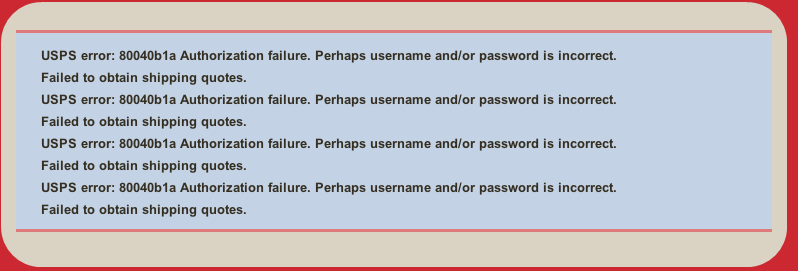
I am getting the same USPS error below multiple times upon checkout. I have verified that my USPS user is on the production server. It is calculating the prices correctly, yet still displaying the error.
USPS error: 80040b1a Authorization failure. Perhaps username and/or password is incorrect.
Failed to obtain shipping quotes.
Thank you for you help.
USPS error: 80040b1a Authorization failure. Perhaps username and/or password is incorrect.
Failed to obtain shipping quotes.
Thank you for you help.
Please Log in or Create an account to join the conversation.

Less
More
- Posts: 12953
- Thank you received: 1778
13 years 4 months ago #109666
by Mohamed Thelji
Replied by Mohamed Thelji on topic United States Postal Service (USPS) Module
Hi,
I think that the problem is coming from the way you configured your USPS shipping plugin or your USPS account itself, can you check :
- if your USPS WebTools User ID is the good one
- if you have the right to use the USPS shipping plugin with this USPS WebTools User ID
Thanks.
I think that the problem is coming from the way you configured your USPS shipping plugin or your USPS account itself, can you check :
- if your USPS WebTools User ID is the good one
- if you have the right to use the USPS shipping plugin with this USPS WebTools User ID
Thanks.
Please Log in or Create an account to join the conversation.
13 years 4 months ago #109713
by Techgro
Replied by Techgro on topic United States Postal Service (USPS) Module
The USPS is valid and they are aware I am using a third party plugin. Please see the response below. I am able to pull in the shipping rates.
www.wiredformischief.com/index.php/products/women-s-apparel
Your profile has been updated to allow you access to the Production Server.
1. The Production Server URL is: production.shippingapis.com . For APIs calling the secure server, the URL is secure.shippingapis.com .
2. There is a line of code that refers to "shippingapitest.dll". You'll need to remove the word "test".
If you need assistance, please contact Hikashop of the software. They should be able to assist you in obtaining live information using our APIs.
If you plan to print labels or verify addresses as well, please let me know so I can update your account to include the necessary label permissions, or send you the request form for Address API permissions.
We hope that you have a great day.
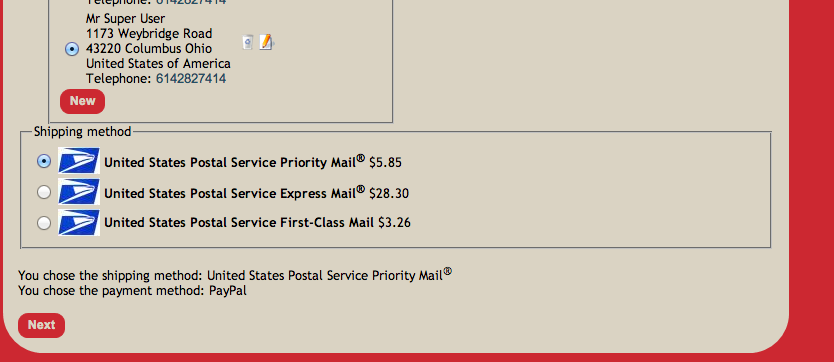
www.wiredformischief.com/index.php/products/women-s-apparel
Your profile has been updated to allow you access to the Production Server.
1. The Production Server URL is: production.shippingapis.com . For APIs calling the secure server, the URL is secure.shippingapis.com .
2. There is a line of code that refers to "shippingapitest.dll". You'll need to remove the word "test".
If you need assistance, please contact Hikashop of the software. They should be able to assist you in obtaining live information using our APIs.
If you plan to print labels or verify addresses as well, please let me know so I can update your account to include the necessary label permissions, or send you the request form for Address API permissions.
We hope that you have a great day.
Please Log in or Create an account to join the conversation.
Less
More
- Posts: 12953
- Thank you received: 1778
13 years 4 months ago #109722
by Mohamed Thelji
Replied by Mohamed Thelji on topic United States Postal Service (USPS) Module
Ok, so can you give me a back-end access through a private message ?
Please Log in or Create an account to join the conversation.
Less
More
- Posts: 12953
- Thank you received: 1778
13 years 4 months ago - 13 years 4 months ago #109750
by Mohamed Thelji
Replied by Mohamed Thelji on topic United States Postal Service (USPS) Module
Can you test it with this last version of the USPS shipping method ?
Last edit: 13 years 4 months ago by Mohamed Thelji.
Please Log in or Create an account to join the conversation.
13 years 4 months ago #109755
by Techgro
Replied by Techgro on topic United States Postal Service (USPS) Module
I have installed the most recent version. If there is a newer version can you send me a link?
Please Log in or Create an account to join the conversation.
13 years 4 months ago #109759
by Techgro
Replied by Techgro on topic United States Postal Service (USPS) Module
I installed the most recent version 2013_6_18 and still show the same errors.
Please Log in or Create an account to join the conversation.
Less
More
- Posts: 12953
- Thank you received: 1778
13 years 4 months ago - 13 years 4 months ago #109863
by Mohamed Thelji
Replied by Mohamed Thelji on topic United States Postal Service (USPS) Module
I can't reproduce this issue on my end, and it's working fine even with your USPS IDs, so I've done some research regarding your USPS error and found
this
:
This error occurs when the web store in which the error occurs has not been authorized to connect to USPS' production server. To resolve this error, contact USPS customer service and request that they allow your account to access the production server. Once this is done, the error should disappear.
Last edit: 13 years 4 months ago by Mohamed Thelji.
Please Log in or Create an account to join the conversation.
13 years 4 months ago #110761
by Techgro
Replied by Techgro on topic United States Postal Service (USPS) Module
I have verification from USPS that we are on the production server. Please check the last message I sent you with the details. Are you not seeing these error codes when you go to checkout? I am seeing the same 80040b1a code multiple times when I checkout. However the correct shipping amounts are being received from the USPS api
Please Log in or Create an account to join the conversation.
Less
More
- Posts: 12953
- Thank you received: 1778
13 years 4 months ago #110780
by Mohamed Thelji
Replied by Mohamed Thelji on topic United States Postal Service (USPS) Module
No, When I test it with your USPS ID it's working fine and I can't reproduce this issue on my end.
Please Log in or Create an account to join the conversation.
13 years 4 months ago #110899
by Techgro
Replied by Techgro on topic United States Postal Service (USPS) Module
It happens everytime you proceed through checkout using a USA address. Please let me know if you have any other suggestions. At this point we will have to stop using Hikashop
Please Log in or Create an account to join the conversation.
13 years 4 months ago #111416
by asajay
Replied by asajay on topic United States Postal Service (USPS) Module
Is there a way to set the USPS plugin for testing against the test server before requesting access to the production server?
Or must we request production server access before we figure out if everything is working?
Or must we request production server access before we figure out if everything is working?
Please Log in or Create an account to join the conversation.

13 years 4 months ago #111511
by nicolas
Replied by nicolas on topic United States Postal Service (USPS) Module
You can directly request access to the production server.
The USPS plugin is simply receiving the rates from USPS. Production or test doesn't change anything to that. There is no point in using a test server for that.
It's useful for other APIs of USPS I guess but not with this one.
The USPS plugin is simply receiving the rates from USPS. Production or test doesn't change anything to that. There is no point in using a test server for that.
It's useful for other APIs of USPS I guess but not with this one.
Please Log in or Create an account to join the conversation.
13 years 4 months ago #111556
by asajay
When I asked to be moved to the production server, they noted there were no "test" accesses from my site and denied the switch until I provided additional information. After letting them know I was using HikaShop with this USPS plugin, they transferred the account, but it was kind of a hassle going through the transfer request twice.
Some years ago I set up a different web shopping cart and the USPS plugin had the capability of either pointing to the test server or the production server. This was handy to test things out beforehand.
Once pointing to the production server, it appears to be working nicely. This is a great plugin and I'm glad it's part of HikaShop.
Thank you for the response.
Replied by asajay on topic United States Postal Service (USPS) Module
nicolas wrote: You can directly request access to the production server.
The USPS plugin is simply receiving the rates from USPS. Production or test doesn't change anything to that. There is no point in using a test server for that.
It's useful for other APIs of USPS I guess but not with this one.
When I asked to be moved to the production server, they noted there were no "test" accesses from my site and denied the switch until I provided additional information. After letting them know I was using HikaShop with this USPS plugin, they transferred the account, but it was kind of a hassle going through the transfer request twice.
Some years ago I set up a different web shopping cart and the USPS plugin had the capability of either pointing to the test server or the production server. This was handy to test things out beforehand.
Once pointing to the production server, it appears to be working nicely. This is a great plugin and I'm glad it's part of HikaShop.
Thank you for the response.
Please Log in or Create an account to join the conversation.
13 years 3 months ago #113655
by shinehaid
Replied by shinehaid on topic United States Postal Service (USPS) Module
Hi,
I swear I've looked the documentation and searched the forums but couldn't find an answer. It seems like it should be simple but...
I get this error - THE_CART_ITEMS_COMBINED_QUANTITY_IS_TOO_HIGH_FOR_ALL_THE_POSSIBLE_SHIPPING_METHODS - no matter how much I play around with quantity. In the Product screen I've set it from 0 to Unlimited, left them blank.
I've turned on and off price per product (and played with various combinations of settings, as well).
I've copied the United States of America zone and the new one is a shipping zone.
There's nowhere in the Shipping method to set quantity.
I've tried no zone in the method, the included zone for US above, and my shipping zone copy.
I've created a manual method that should cover shipping in the US. The per product plug-in is enabled (in fact I had some manual methods working but they weren't precise enough.
Any help would be appreciated, I just can't see where to change the quantities except in the product page.
Mark
I swear I've looked the documentation and searched the forums but couldn't find an answer. It seems like it should be simple but...
I get this error - THE_CART_ITEMS_COMBINED_QUANTITY_IS_TOO_HIGH_FOR_ALL_THE_POSSIBLE_SHIPPING_METHODS - no matter how much I play around with quantity. In the Product screen I've set it from 0 to Unlimited, left them blank.
I've turned on and off price per product (and played with various combinations of settings, as well).
I've copied the United States of America zone and the new one is a shipping zone.
There's nowhere in the Shipping method to set quantity.
I've tried no zone in the method, the included zone for US above, and my shipping zone copy.
I've created a manual method that should cover shipping in the US. The per product plug-in is enabled (in fact I had some manual methods working but they weren't precise enough.
Any help would be appreciated, I just can't see where to change the quantities except in the product page.
Mark
Please Log in or Create an account to join the conversation.
Less
More
- Posts: 12953
- Thank you received: 1778
13 years 3 months ago #113916
by Mohamed Thelji
Replied by Mohamed Thelji on topic United States Postal Service (USPS) Module
Hi,
1. Can you show me screenshots of how did you configured :
- Your product
- Your shipping method
2. Can you give me a link to your website then I'll be able to see what shipping methods your exactly using and to reproduce your problem.
Thanks.
1. Can you show me screenshots of how did you configured :
- Your product
- Your shipping method
2. Can you give me a link to your website then I'll be able to see what shipping methods your exactly using and to reproduce your problem.
Thanks.
Please Log in or Create an account to join the conversation.
13 years 3 months ago #113948
by shinehaid
Replied by shinehaid on topic United States Postal Service (USPS) Module
Mohammed,
Thanks for the reply.
See the attached.
Mark
Thanks for the reply.
See the attached.
Mark
Please Log in or Create an account to join the conversation.
Less
More
- Posts: 12953
- Thank you received: 1778
13 years 3 months ago #114073
by Mohamed Thelji
Replied by Mohamed Thelji on topic United States Postal Service (USPS) Module
Ok,
Can you download and install the last Hikashop version and tell me if you are facing the same problem ?
Can you download and install the last Hikashop version and tell me if you are facing the same problem ?
The following user(s) said Thank You: shinehaid
Please Log in or Create an account to join the conversation.
13 years 3 months ago #114154
by shinehaid
Replied by shinehaid on topic United States Postal Service (USPS) Module
Mohammed,
The new version seems to have fixed the paypal problem. There's still a limit on the number of items per order but I don't see any error message anymore, the shipping method simply isn't available. The paypal problem was the biggest obstacle, but I'd like to see quantity working as well.
The new version seems to have fixed the paypal problem. There's still a limit on the number of items per order but I don't see any error message anymore, the shipping method simply isn't available. The paypal problem was the biggest obstacle, but I'd like to see quantity working as well.
Please Log in or Create an account to join the conversation.
Less
More
- Posts: 12953
- Thank you received: 1778
13 years 3 months ago #114287
by Mohamed Thelji
Replied by Mohamed Thelji on topic United States Postal Service (USPS) Module
Hi,
I've done some tests, and it seems like your shipping methods are actually available, and are displaying through the checkout. Did you solved the problem ?
I've done some tests, and it seems like your shipping methods are actually available, and are displaying through the checkout. Did you solved the problem ?
Please Log in or Create an account to join the conversation.
Time to create page: 0.199 seconds