

- Posts: 392
- Thank you received: 0
Images not showing
14 years 6 months ago #48733
by Bugger101
Images not showing was created by Bugger101
Hi Nicolas,
I see that the images are there in media/com_hikasop/upload in cpanel, but they are not showing in the shop frontend or backend.
When I try to add them via the backend it doesn't let me - it never uploads.
Weird thing is, that with the images are showing fine (even ones that are not published) in the module "Lof Hika Shop SlidingCaption Module" so it must be pulling them from somewhere.
Do I need to delete the thumnails image folder like I read in another post?
Cheers
I see that the images are there in media/com_hikasop/upload in cpanel, but they are not showing in the shop frontend or backend.
When I try to add them via the backend it doesn't let me - it never uploads.
Weird thing is, that with the images are showing fine (even ones that are not published) in the module "Lof Hika Shop SlidingCaption Module" so it must be pulling them from somewhere.
Do I need to delete the thumnails image folder like I read in another post?
Cheers
Please Log in or Create an account to join the conversation.

14 years 6 months ago #48774
by nicolas
Replied by nicolas on topic Re: Images not showing
Can you give a link to the product so that we can see that ?
Please Log in or Create an account to join the conversation.
14 years 6 months ago - 12 years 9 months ago #48854
by Bugger101
Replied by Bugger101 on topic Re: Images not showing
Yup, here is the category page
Cheers
Cheers
Last edit: 12 years 9 months ago by Bugger101.
Please Log in or Create an account to join the conversation.
14 years 6 months ago #48874
by nicolas
Replied by nicolas on topic Re: Images not showing
Can you do a screenshot of the images area of that product ?
Please Log in or Create an account to join the conversation.
14 years 5 months ago - 14 years 5 months ago #48943
by Bugger101
Replied by Bugger101 on topic Re: Images not showing
Sure
Last edit: 14 years 5 months ago by Bugger101.
Please Log in or Create an account to join the conversation.
14 years 5 months ago #48993
by nicolas
Replied by nicolas on topic Re: Images not showing
No , that I was able to see on your website. I was actually talking about the "images" area when you edit the product in the back end.
Please Log in or Create an account to join the conversation.
14 years 5 months ago #49061
by Bugger101
Replied by Bugger101 on topic Re: Images not showing
Der! haha
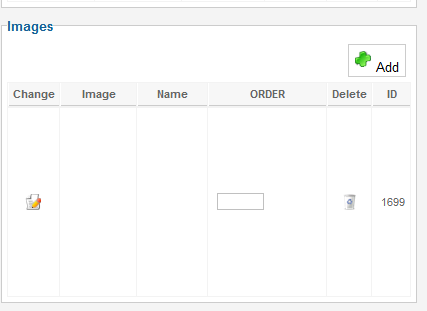
Please Log in or Create an account to join the conversation.
14 years 5 months ago #49133
by nicolas
Replied by nicolas on topic Re: Images not showing
So there is an entry for the image, but the image is not found.
Could you edit that image and do a screenshot of the edition popup ?
It's most likely that the image access is not possible because of access rights.
Could you provide a back end access so that we can look at the problem directly ?
Could you edit that image and do a screenshot of the edition popup ?
It's most likely that the image access is not possible because of access rights.
Could you provide a back end access so that we can look at the problem directly ?
Please Log in or Create an account to join the conversation.
14 years 5 months ago #49173
by Bugger101
Replied by Bugger101 on topic Re: Images not showing
Hi Nicolas,
Thanks for your help. I have attached the popup for you, and have sent you an email with access details.
Cheers
Thanks for your help. I have attached the popup for you, and have sent you an email with access details.
Cheers
Please Log in or Create an account to join the conversation.
14 years 5 months ago - 12 years 1 month ago #49270
by nicolas
Replied by nicolas on topic Re: Images not showing
I checked the product from your previous link. You can edit it here once logged on your back end :
https://YOUR_WEBSITE/third/administrator/index.php?option=com_hikashop&ctrl=product&task=edit&cid=1707
There is no image attached to it.
Are you looking at the correct product ?
https://YOUR_WEBSITE/third/lets-shop/product/1707-alluring-orange-golden-lip-gloss/category_pathway-20
https://YOUR_WEBSITE/third/administrator/index.php?option=com_hikashop&ctrl=product&task=edit&cid=1707
There is no image attached to it.
Are you looking at the correct product ?
https://YOUR_WEBSITE/third/lets-shop/product/1707-alluring-orange-golden-lip-gloss/category_pathway-20
Last edit: 12 years 1 month ago by Jerome. Reason: link removed
Please Log in or Create an account to join the conversation.
14 years 5 months ago - 12 years 9 months ago #49306
by Bugger101
Replied by Bugger101 on topic Re: Images not showing
Yes, that's the right one - every time I attach an image and save it, it disappears...
I fixed permissions in admin tools, and that didnt do anything, so I did a fresh Hikashop install, and that half fixed the problem.
Some of the images are there, and other aren't. I did notice in media/com_hikashop/upload that there are images with names that I never named them.
Also, in some of the categories, the images are bunched over the top of themselves.
Thanks for your help
I fixed permissions in admin tools, and that didnt do anything, so I did a fresh Hikashop install, and that half fixed the problem.
Some of the images are there, and other aren't. I did notice in media/com_hikashop/upload that there are images with names that I never named them.
Also, in some of the categories, the images are bunched over the top of themselves.
Thanks for your help
Last edit: 12 years 9 months ago by Bugger101.
Please Log in or Create an account to join the conversation.
14 years 5 months ago #49361
by nicolas
Replied by nicolas on topic Re: Images not showing
Great !
Regarding the name of images, that's because once you upload an image, if you upload it again with the same name, HikaShop will add a random number at the end of the name so that it can save it separately in the folder. So that's normal.
Regarding the image being displayed on top of the text, that's because of the size of the images which is too small to cover the text. You can add that CSS code in order to avoid that:
.hikashop_fade_effect{
background-color: black !important;
}
Regarding the name of images, that's because once you upload an image, if you upload it again with the same name, HikaShop will add a random number at the end of the name so that it can save it separately in the folder. So that's normal.
Regarding the image being displayed on top of the text, that's because of the size of the images which is too small to cover the text. You can add that CSS code in order to avoid that:
.hikashop_fade_effect{
background-color: black !important;
}
The following user(s) said Thank You: Bugger101
Please Log in or Create an account to join the conversation.
14 years 5 months ago #49411
by Bugger101
Replied by Bugger101 on topic Re: Images not showing
As always, THANKS Nicolas!
Please Log in or Create an account to join the conversation.
12 years 1 month ago #171224
by Bugger101
Replied by Bugger101 on topic Re: Images not showing
Hi Nicolas, could you please remove these links?
Please Log in or Create an account to join the conversation.
Time to create page: 0.148 seconds