

- Posts: 4
- Thank you received: 1
Remove Login or create a new account Registration
13 years 11 months ago #69244
by murtaaz
Remove Login or create a new account Registration was created by murtaaz
Hello
i want to remove or edit "Login or create a new account" and "Registration" in hikashop please guide
i want to remove or edit "Login or create a new account" and "Registration" in hikashop please guide
Please Log in or Create an account to join the conversation.

13 years 11 months ago #69276
by Xavier
Replied by Xavier on topic Re: Remove Login or create a new account Registration
Hi murtaaz,
In HikaShop > Configuration > Checkout, you can remove the step "login" in the checkout workflow.
In HikaShop > Configuration > Checkout, you can remove the step "login" in the checkout workflow.
Please Log in or Create an account to join the conversation.
13 years 11 months ago #70311
by sapo12
Replied by sapo12 on topic Re: Remove Login or create a new account Registration
I ordered the HikaShop Essential just to remove this Login, but is not working, Login is still needed. See checkout setting on attachement
and result on checkout:
see attachement
What i did wrong?
Same on Firefox and Chrome.
Thanks for helping
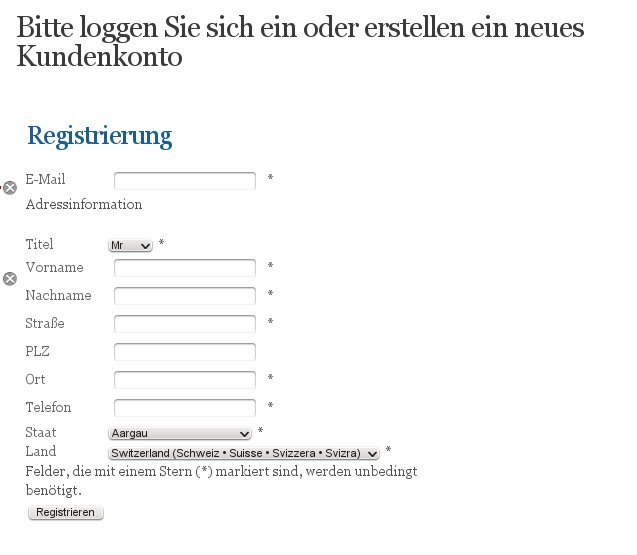
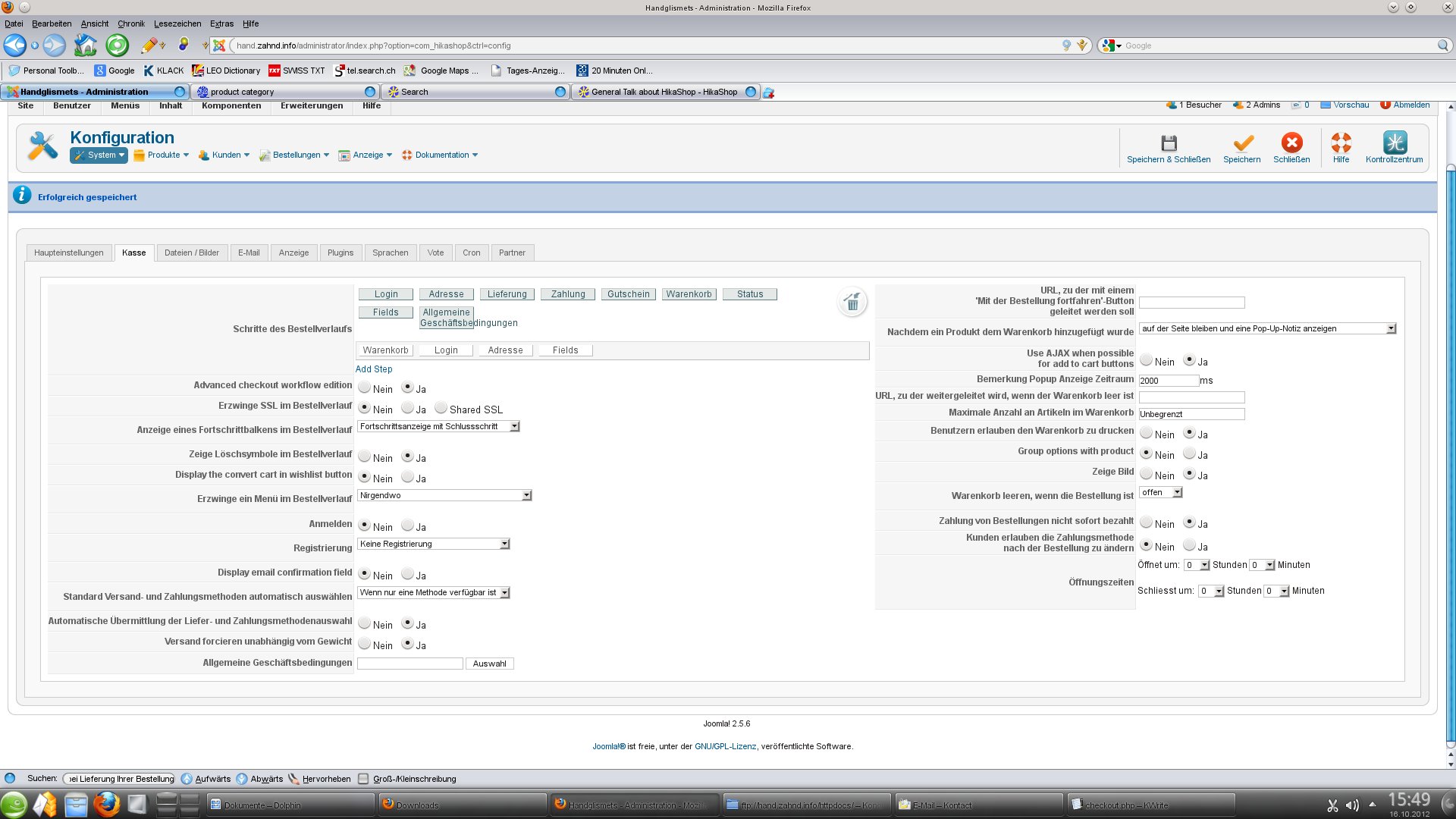
and result on checkout:
see attachement
What i did wrong?
Same on Firefox and Chrome.
Thanks for helping
Please Log in or Create an account to join the conversation.
13 years 11 months ago #70333
by Xavier
Replied by Xavier on topic Re: Remove Login or create a new account Registration
Hi,
You checkout is well configured, actually there is no registration.
Now you just have to do language override, in HikaShop > Configuration > Language, edit you language file and replace the values for the two following text by what you want, for example:
You checkout is well configured, actually there is no registration.
Now you just have to do language override, in HikaShop > Configuration > Language, edit you language file and replace the values for the two following text by what you want, for example:
Code:
LOGIN_OR_REGISTER_ACCOUNT=""
HIKA_REGISTRATION=""
HIKA_REGISTER="Validate address"
Please Log in or Create an account to join the conversation.
13 years 11 months ago #70358
by sapo12
Replied by sapo12 on topic Re: Remove Login or create a new account Registration
Thanks for helping.
I did this change, but now, the card stay empty, I'm not able to put anything in the shopping card.
here are the checkout settings See add files
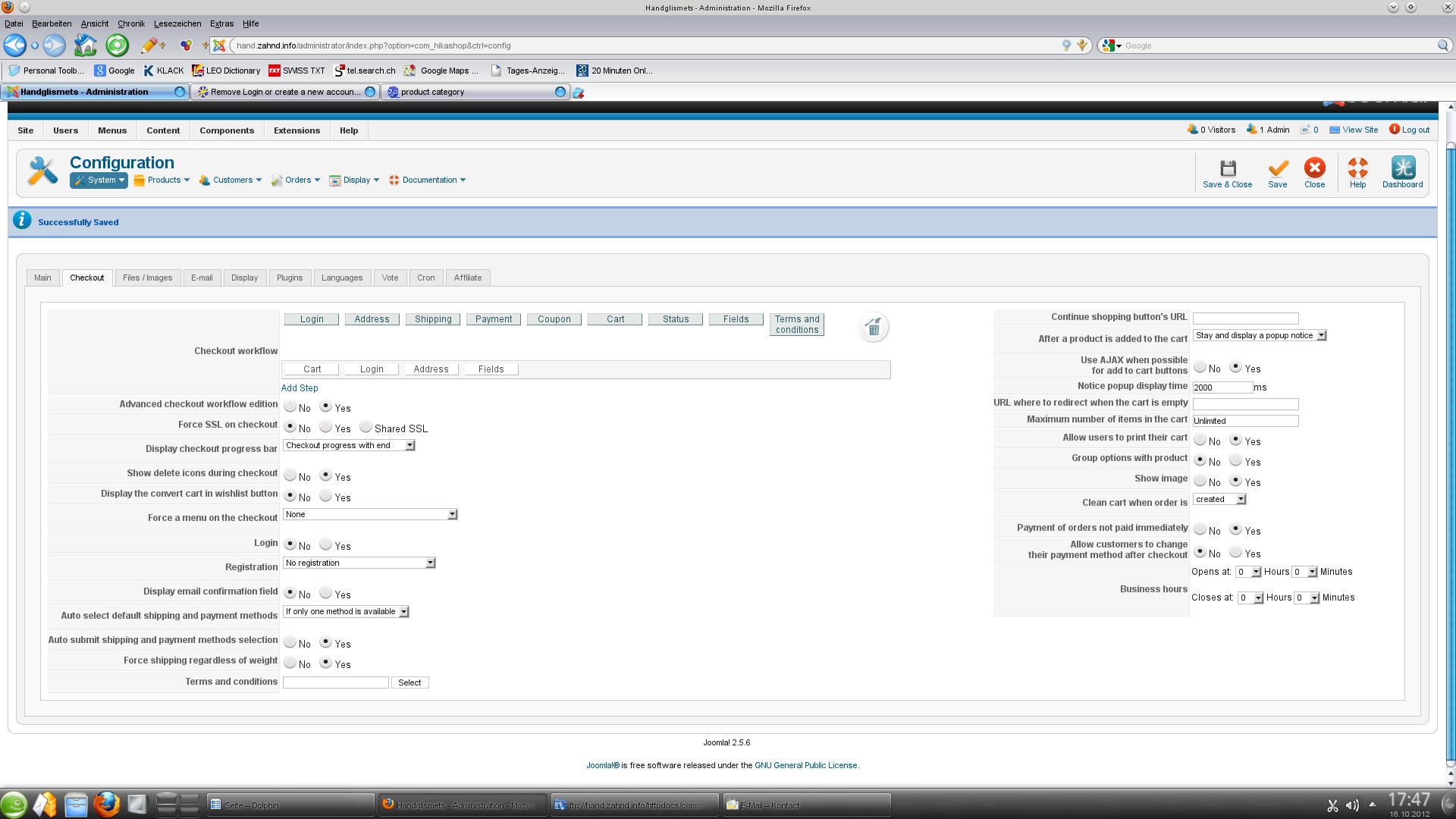
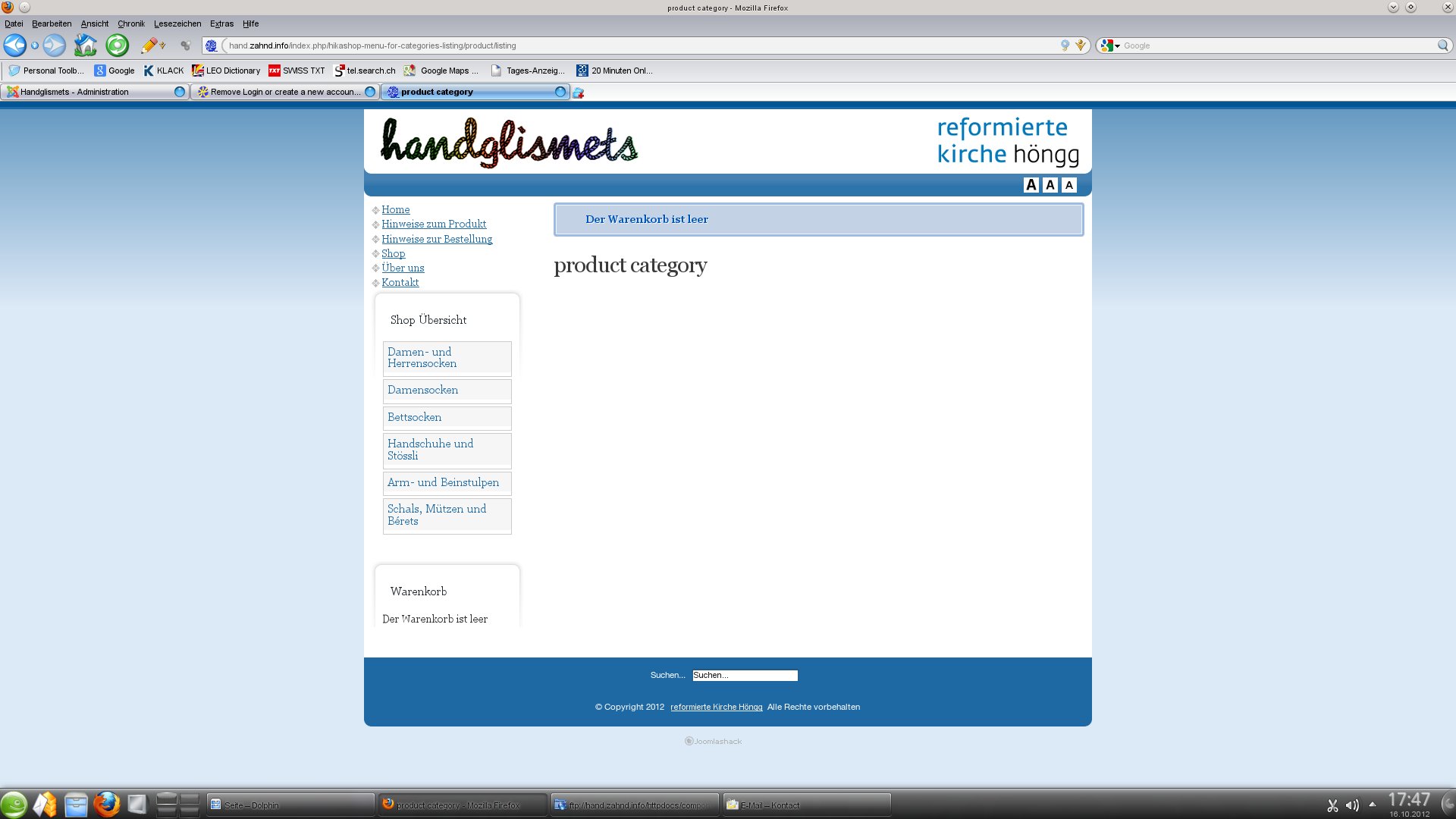
Any idea?
Thanks a lot
I did this change, but now, the card stay empty, I'm not able to put anything in the shopping card.
here are the checkout settings See add files
Any idea?
Thanks a lot
Please Log in or Create an account to join the conversation.
13 years 11 months ago #70436
by sapo12
Replied by sapo12 on topic Re: Remove Login or create a new account Registration
sorry, there was some cache problem on server.
Shopping card is working, but still a lot of fields for register needed. Some fields i?d like to use.
there for how I can remove required fields on the register Card?
Thanks for helping
Shopping card is working, but still a lot of fields for register needed. Some fields i?d like to use.
there for how I can remove required fields on the register Card?
Thanks for helping
Please Log in or Create an account to join the conversation.
13 years 11 months ago #70471
by Xavier
Replied by Xavier on topic Re: Remove Login or create a new account Registration
Hi,
To remove required fields you can go in HikaShop > Display > Custom fields, and in the custom fields listing disable the "required" property.
To remove required fields you can go in HikaShop > Display > Custom fields, and in the custom fields listing disable the "required" property.
Please Log in or Create an account to join the conversation.
13 years 11 months ago #70487
by sapo12
Replied by sapo12 on topic Re: Remove Login or create a new account Registration
Hi thanks a lot.
Email address is still required, thats ok. Is there some way to change the position
from the email field to end of the formulare?
Thanks a lot
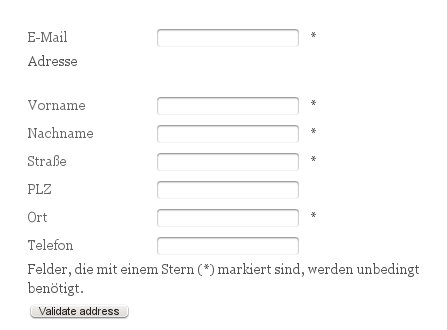
Email address is still required, thats ok. Is there some way to change the position
from the email field to end of the formulare?
Thanks a lot
Please Log in or Create an account to join the conversation.

13 years 11 months ago #70607
by nicolas
Replied by nicolas on topic Re: Remove Login or create a new account Registration
You would have to edit the file "registration" of the view "user" via the menu Display->Views and move the email field
before the line
Code:
<tr class="hikashop_registration_email_line">
<td class="key">
<label id="emailmsg" for="register_email">
<?php echo JText::_( 'HIKA_EMAIL' ); ?>
</label>
</td>
<td>
<input type="text" id="register_email" name="data[register][email]" value="<?php echo $this->escape($this->mainUser->get( 'email' ));?>" class="inputbox required validate-email" maxlength="100" /> *
</td>
</tr>
Code:
<tr class="hikashop_registration_required_info_line">
Please Log in or Create an account to join the conversation.
13 years 11 months ago #70641
by sapo12
Replied by sapo12 on topic Re: Remove Login or create a new account Registration
Thanks a lot, works perfectly
Please Log in or Create an account to join the conversation.
13 years 11 months ago #70655
by lululom
Replied by lululom on topic Re: Remove Login or create a new account Registration
Just a question about this topic: if I want to not allow the registration but let the login?
I explained: my customers have still an account and I don't want to allow new registration. Is it possible to ask the login for "my customers" but don't propose the form registration to other people?
Thank you very much!
I explained: my customers have still an account and I don't want to allow new registration. Is it possible to ask the login for "my customers" but don't propose the form registration to other people?
Thank you very much!
Please Log in or Create an account to join the conversation.
13 years 11 months ago #70679
by Xavier
Replied by Xavier on topic Re: Remove Login or create a new account Registration
Hi,
To allow only the login, in HikaShop > Configuration > Checkout, set the option "Login" to "Yes", "Registration" to "Simplified registration", and in Joomla > Users > User manager > Options set "Allow User Registration" to "No"
To allow only the login, in HikaShop > Configuration > Checkout, set the option "Login" to "Yes", "Registration" to "Simplified registration", and in Joomla > Users > User manager > Options set "Allow User Registration" to "No"
Please Log in or Create an account to join the conversation.
13 years 11 months ago #70685
by lululom
Replied by lululom on topic Re: Remove Login or create a new account Registration
I have the HikaShop Starter so it is not possible to use the option "Registration" in the Checkout configuration. Is it right?
Please Log in or Create an account to join the conversation.
13 years 11 months ago #70749
by Xavier
Replied by Xavier on topic Re: Remove Login or create a new account Registration
The option "Registration" is only available in the commercial versions of HikaShop.
Please Log in or Create an account to join the conversation.
13 years 11 months ago #70834
by lululom
Replied by lululom on topic Re: Remove Login or create a new account Registration
Thanks anyway!
Please Log in or Create an account to join the conversation.
Less
More
- Posts: 18
- Thank you received: 0
13 years 11 months ago #71499
by pattychocs
Replied by pattychocs on topic Re: Remove Login or create a new account Registration
Please forgive me if I'm repeating previous posts, but I've read a few posts regarding this issue, but haven't quite found or understood the answers as I'm not a developer.
Joomla 1.5.22
Hika Shop 1.5.6 - Business
Here's my issue:
I have tried to bypass the "Create or login to account" form on the checkout page so that when the customer wants to check out, they just go straight to the billing and shipping address forms instead. I have "no registration" and "no login" selected in the Configuration > Checkout page. Yet it's still forcing me to create an account and register before I can fill in the billing and shipping info. Is there something I'm missing? Most of my customers will not need or want to setup an account or want to register, so I want to avoid this step if possible. I've changed the language above the form to "billing information" as suggested earlier, but it's still there and says register. Please advise.
Thanks!
Joomla 1.5.22
Hika Shop 1.5.6 - Business
Here's my issue:
I have tried to bypass the "Create or login to account" form on the checkout page so that when the customer wants to check out, they just go straight to the billing and shipping address forms instead. I have "no registration" and "no login" selected in the Configuration > Checkout page. Yet it's still forcing me to create an account and register before I can fill in the billing and shipping info. Is there something I'm missing? Most of my customers will not need or want to setup an account or want to register, so I want to avoid this step if possible. I've changed the language above the form to "billing information" as suggested earlier, but it's still there and says register. Please advise.
Thanks!
Please Log in or Create an account to join the conversation.
13 years 11 months ago #71595
by Xavier
Replied by Xavier on topic Re: Remove Login or create a new account Registration
Hi,
If you have set the options to no login and no registration, then you just have to override the text, like explained in this post:
www.hikashop.com/en/forum/2-general-talk...istration.html#70333
Can you give me a screenshot of your checkout configuration ?
If you have set the options to no login and no registration, then you just have to override the text, like explained in this post:
www.hikashop.com/en/forum/2-general-talk...istration.html#70333
Can you give me a screenshot of your checkout configuration ?
Please Log in or Create an account to join the conversation.
Less
More
- Posts: 18
- Thank you received: 0
13 years 11 months ago #71747
by pattychocs
Replied by pattychocs on topic Re: Remove Login or create a new account Registration
Thanks! here's the screen shot of my checkout config.
I've changed the text. Will it still capture and store the information in the "Customer" section of Configuration>Customers?
I've changed the text. Will it still capture and store the information in the "Customer" section of Configuration>Customers?
Please Log in or Create an account to join the conversation.
13 years 11 months ago #71772
by Xavier
Replied by Xavier on topic Re: Remove Login or create a new account Registration
Hi,
Yes it will still capture and store the information, because these informations are needed for the shipping method and payment method.
Yes it will still capture and store the information, because these informations are needed for the shipping method and payment method.
Please Log in or Create an account to join the conversation.

12 years 9 months ago #135274
by PubSite
Replied by PubSite on topic Remove Login or create a new account Registration
How can I only remove USERNAME from the Registration page? I just want to have : Name, Email and Password (and approval of password)
thanks
thanks
Please Log in or Create an account to join the conversation.
Time to create page: 0.377 seconds