
- Posts: 92
- Thank you received: 0
Google: New Index coverage issue detected for site
- target4fun
-
 Topic Author
- Offline
Less
More
8 years 2 months ago #296743
by target4fun
Google: New Index coverage issue detected for site was created by target4fun
-- HikaShop version -- : 3.8.8
The example they list is : arma15.com/component/hikashop/checkout?Itemid=101
Search Console has identified that your site is affected by 1 new Index coverage related issue. This means that Index coverage may be negatively affected in Google Search results. We encourage you to fix this issue.
New issue found:
Server error (5xx)
So far I checked on my home page and found this item "101" with a value of "hidden" for some reason google is negatively effecting my search results which costs me customers/money. I searched my products under hikashop backend and there is no product with an ID number of 101. Can you give me some insight as to how I can resolve this google error.
Chris
The example they list is : arma15.com/component/hikashop/checkout?Itemid=101
Search Console has identified that your site is affected by 1 new Index coverage related issue. This means that Index coverage may be negatively affected in Google Search results. We encourage you to fix this issue.
New issue found:
Server error (5xx)
So far I checked on my home page and found this item "101" with a value of "hidden" for some reason google is negatively effecting my search results which costs me customers/money. I searched my products under hikashop backend and there is no product with an ID number of 101. Can you give me some insight as to how I can resolve this google error.
Chris
Please Log in or Create an account to join the conversation.

8 years 2 months ago #296744
by Jerome
Jerome - Obsidev.com
HikaMarket & HikaSerial developer / HikaShop core dev team.
Replied by Jerome on topic Google: New Index coverage issue detected for site
Hello,
I'm afraid that HikaShop 3.8.8 does not exist, yet.
Regarding the error :
Please check your HikaShop settings ; specially the one regarding the force menu for the checkout.
www.hikashop.com/support/documentation/5...ml#checkout_checkout
Regards;
I'm afraid that HikaShop 3.8.8 does not exist, yet.
Regarding the error :
There is no such view in HikaShop and regarding the nature of the URL ; it comes from a misconfiguration somewhere. But that Joomla menu is not an HikaShop one and all it can do, it generate unwanted side effects.500 - Layout listing_blog not found.
Please check your HikaShop settings ; specially the one regarding the force menu for the checkout.
www.hikashop.com/support/documentation/5...ml#checkout_checkout
Regards;
Jerome - Obsidev.com
HikaMarket & HikaSerial developer / HikaShop core dev team.
Please Log in or Create an account to join the conversation.

Less
More
- Posts: 55
- Thank you received: 0
3 years 4 months ago #352947
by webmasterab
Replied by webmasterab on topic Google: New Index coverage issue detected for site
I also keep getting a listing_blog notification.
This message comes when a search bot comes along and the product is no longer in the shop.
Or so it seems.
I have no idea what I've set up wrong.
I have already made the above option for a menu with the checkout link, but I still get the message.
This message comes when a search bot comes along and the product is no longer in the shop.
Or so it seems.
I have no idea what I've set up wrong.
I have already made the above option for a menu with the checkout link, but I still get the message.
Please Log in or Create an account to join the conversation.

3 years 4 months ago #352948
by nicolas
Replied by nicolas on topic Google: New Index coverage issue detected for site
Hi,
Which version of Joomla and HikaShop do you have ?
Do you know the URL which generates that error ?
If so, access it after activating the "debug" setting of the Joomla configuration and it should display more information about the error. Please provide a screenshot of all the information.
Which version of Joomla and HikaShop do you have ?
Do you know the URL which generates that error ?
If so, access it after activating the "debug" setting of the Joomla configuration and it should display more information about the error. Please provide a screenshot of all the information.
Please Log in or Create an account to join the conversation.
Less
More
- Posts: 55
- Thank you received: 0
3 years 3 months ago #353173
by webmasterab
Replied by webmasterab on topic Google: New Index coverage issue detected for site
Hikashop 4.7.4
Joomla 4.3.2
everybody-lingerie.nl/component/hikashop/categorie/beenmode
everybody-lingerie.nl/component/hikashop/categorie/dames-badjas
With this link I get a 500 message that the display cache does not exist.
And so on with more links.
These are found by the search engine bots
It also looks like links to me that are on noindex nofollow because this is set by default in the global settings.
But still looking for it.
Aren't these URLs to the backend component?
Joomla 4.3.2
everybody-lingerie.nl/component/hikashop/categorie/beenmode
everybody-lingerie.nl/component/hikashop/categorie/dames-badjas
With this link I get a 500 message that the display cache does not exist.
And so on with more links.
These are found by the search engine bots
It also looks like links to me that are on noindex nofollow because this is set by default in the global settings.
But still looking for it.
Aren't these URLs to the backend component?
Please Log in or Create an account to join the conversation.
3 years 3 months ago #353189
by nicolas
Replied by nicolas on topic Google: New Index coverage issue detected for site
Hi,
Thanks.
Are you using Google Analytics ? Normally in there, you can look for these faulty URLs and it should tell you the URL of the page where it found them:
stackoverflow.com/questions/70722211/how...ogle-analytics-4-ga4
Thanks.
Are you using Google Analytics ? Normally in there, you can look for these faulty URLs and it should tell you the URL of the page where it found them:
stackoverflow.com/questions/70722211/how...ogle-analytics-4-ga4
These are frontend URLs. They are generated either by a third party extension which doesn't take into account the menu items, or by a search plugin or module of HikaShop not configured properly, which leads to the URL being invalid.Aren't these URLs to the backend component?
Please Log in or Create an account to join the conversation.
Less
More
- Posts: 55
- Thank you received: 0
3 years 3 months ago #353195
by webmasterab
Replied by webmasterab on topic Google: New Index coverage issue detected for site
I am very curious which third component would do this.
Don't have anything in it that makes links.
The links also do not appear in Joomla's referrer component.
Have the following components on it:
Admin Tools
Akeeba Backup
Gantry Template
JCE Editor
What else is installed is core Joomla
Don't have anything in it that makes links.
The links also do not appear in Joomla's referrer component.
Have the following components on it:
Admin Tools
Akeeba Backup
Gantry Template
JCE Editor
What else is installed is core Joomla
Please Log in or Create an account to join the conversation.
3 years 3 months ago #353198
by nicolas
Replied by nicolas on topic Google: New Index coverage issue detected for site
Please reread my previous message. I'm not saying it is necessarily a third party extension generating these URLs.
For example, you have many HikaShop modules I suppose.
And each HikaShop content module has a "menu" setting, under its "hikashop options" tab where you need to select a menu item you want to be used for the URLs being generated.
If you leave that setting empty, it's possible to end up with URLs without a menu item for the HTML generated by that module, like the ones you provided.
In order to point at the module / plugin / extension which generates these faulty URLs, we need to look at the page where these faulty URLs can be found on your website. Google tools should be able to provide that information.
For example, you have many HikaShop modules I suppose.
And each HikaShop content module has a "menu" setting, under its "hikashop options" tab where you need to select a menu item you want to be used for the URLs being generated.
If you leave that setting empty, it's possible to end up with URLs without a menu item for the HTML generated by that module, like the ones you provided.
In order to point at the module / plugin / extension which generates these faulty URLs, we need to look at the page where these faulty URLs can be found on your website. Google tools should be able to provide that information.
Please Log in or Create an account to join the conversation.
Less
More
- Posts: 55
- Thank you received: 0
3 years 3 months ago #353900
by webmasterab
Replied by webmasterab on topic Google: New Index coverage issue detected for site
I only use the matching products module and that gives the links of the products, so it can't be that.
The strange thing is that I recently converted another website to Joomla 4 and it now has the same.
In Google or search engine I find all kinds of links with /component in it.
And this if the product exists then refers to the homepage and then at the top you see the relevant product.
If the product is no more than you get a 404 message, and as an administrator I get a message from akeeba admin tools that the display listing is not there with a php message.
So links were made with component in it, but how.
Both websites have been under Joomla 3 with a global setting that allowed the entire site to be searched.
In Joomla 4 this has been changed to noindex nofollow and index, follow has been set on the menus.
Could this be related?
The strange thing is that I recently converted another website to Joomla 4 and it now has the same.
In Google or search engine I find all kinds of links with /component in it.
And this if the product exists then refers to the homepage and then at the top you see the relevant product.
If the product is no more than you get a 404 message, and as an administrator I get a message from akeeba admin tools that the display listing is not there with a php message.
So links were made with component in it, but how.
Both websites have been under Joomla 3 with a global setting that allowed the entire site to be searched.
In Joomla 4 this has been changed to noindex nofollow and index, follow has been set on the menus.
Could this be related?
Please Log in or Create an account to join the conversation.
3 years 3 months ago #353909
by nicolas
Replied by nicolas on topic Google: New Index coverage issue detected for site
Hi,
No, it's not.
I spent some time on your website looking at different places and none of the URLs listed had /component in them.
AS I said before, I would really recommend you use the tools Google provide to find the referer of these 404 URLs:
webmasters.stackexchange.com/questions/1...glebots-crawling-url
With the information from there, we should be able to tell you what to do.
No, it's not.
I spent some time on your website looking at different places and none of the URLs listed had /component in them.
AS I said before, I would really recommend you use the tools Google provide to find the referer of these 404 URLs:
webmasters.stackexchange.com/questions/1...glebots-crawling-url
With the information from there, we should be able to tell you what to do.
Please Log in or Create an account to join the conversation.
Less
More
- Posts: 55
- Thank you received: 0
3 years 3 months ago #353921
by webmasterab
Replied by webmasterab on topic Google: New Index coverage issue detected for site
As I have also indicated, these are URLs that are already in Google.
When these are checked again, I get these messages.
Or if someone finds that link in Google or another search engine.
So it has been possible for search engines to index these links.
When these are checked again, I get these messages.
Or if someone finds that link in Google or another search engine.
So it has been possible for search engines to index these links.
Please Log in or Create an account to join the conversation.
3 years 3 months ago #353952
by nicolas
Replied by nicolas on topic Google: New Index coverage issue detected for site
Hi,
Go to the Google Search Console :
search.google.com/search-console/about
There, go to the menu Crawl > Crawl Errors > Desktop | Smartphone
Select the "Not found" sub tab.
The URLs that generate 404s should be listed at the bottom of the page.
Click on any one of these URLs to get a popup of more details of the error.
Provide the information from there for a 404 URL and we'll be able to understand why that URL appears in the search results even though we can't find it on your website.
Go to the Google Search Console :
search.google.com/search-console/about
There, go to the menu Crawl > Crawl Errors > Desktop | Smartphone
Select the "Not found" sub tab.
The URLs that generate 404s should be listed at the bottom of the page.
Click on any one of these URLs to get a popup of more details of the error.
Provide the information from there for a 404 URL and we'll be able to understand why that URL appears in the search results even though we can't find it on your website.
Please Log in or Create an account to join the conversation.
Less
More
- Posts: 55
- Thank you received: 0
3 years 3 months ago - 3 years 3 months ago #353985
by webmasterab
Replied by webmasterab on topic Google: New Index coverage issue detected for site
This is a url that can be found listed in Google
everybody-lingerie.nl/component/hikashop...etch-bikinislip-2643
When I deactivate the product I get a neat 404 and no notification.
Do not understand any of it
This is also a found url
everybody-lingerie.nl/index.php?option=c...limitstart=0&limit=4
But it is from the search, why does Google find it?
When I deactivate the product I get a neat 404 and no notification.
Do not understand any of it
This is also a found url
everybody-lingerie.nl/index.php?option=c...limitstart=0&limit=4
But it is from the search, why does Google find it?
Last edit: 3 years 3 months ago by webmasterab.
Please Log in or Create an account to join the conversation.
3 years 3 months ago #354000
by nicolas
Replied by nicolas on topic Google: New Index coverage issue detected for site
Hi,
I cannot answer this question. The only way to answer this question is to follow the instructions I gave in my previous message, and only you, as the owner of the website, can use the search console of Google to follow the instructions.
I cannot answer this question. The only way to answer this question is to follow the instructions I gave in my previous message, and only you, as the owner of the website, can use the search console of Google to follow the instructions.
Please Log in or Create an account to join the conversation.
Less
More
- Posts: 55
- Thank you received: 0
3 years 2 months ago #354443
by webmasterab
Replied by webmasterab on topic Google: New Index coverage issue detected for site
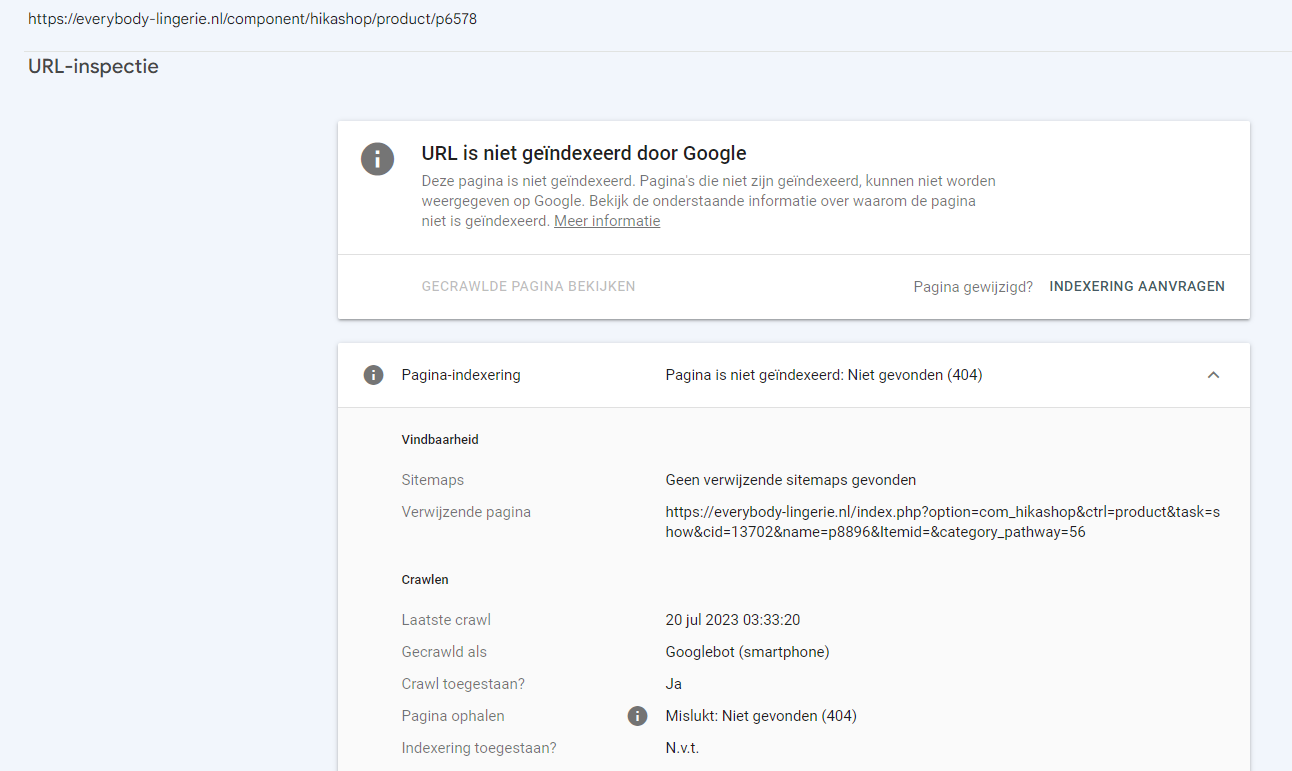
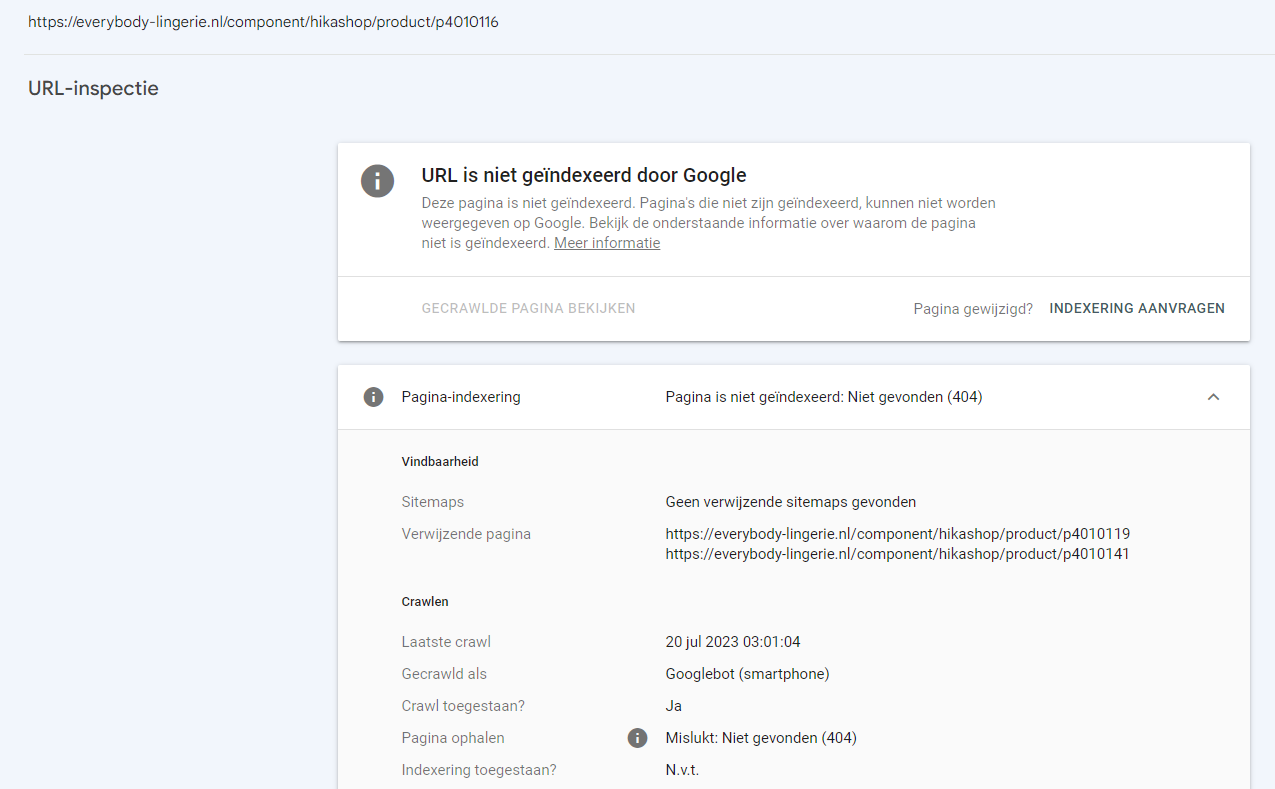
Have now looked at two links and found this in google search
Please Log in or Create an account to join the conversation.
3 years 2 months ago #354445
by nicolas
Replied by nicolas on topic Google: New Index coverage issue detected for site
Hi,
I don't read Dutch, so I'm not sure what it is saying. However, based on what I know, it seems that the "verwijzende pagina" is the referrer URL.
If I access these pages on your website, I don't see the faulty URL present on the page.
What that means is that these are old URLs that were present there in the past but are not there anymore.
However, I think there is a way to improve things.
I can see on the page everybody-lingerie.nl/index.php?option=c...&category_pathway=56 that you have a canonical URL set: i.imgur.com/eEeBkW8.png
However, it is set with just the current URL used to access the page.
This should normally be set with the main URL you want to be used to access the product page.
I think the problem is that you've activated the system - SEF plugin via the Joomla plugins manager. But you should not do that.
This plugin adds wrong canonical tags to the pages: github.com/joomla/joomla-cms/discussions/31806
So disable it. I think that's why Google indexes wrong URLs on your website.
Then, I would recommend you set the "canonical URL" setting in your products with the main URL you want to be indexed. That way, it will clean the search results on your website when Google reindexes your URLs.
I don't read Dutch, so I'm not sure what it is saying. However, based on what I know, it seems that the "verwijzende pagina" is the referrer URL.
If I access these pages on your website, I don't see the faulty URL present on the page.
What that means is that these are old URLs that were present there in the past but are not there anymore.
However, I think there is a way to improve things.
I can see on the page everybody-lingerie.nl/index.php?option=c...&category_pathway=56 that you have a canonical URL set: i.imgur.com/eEeBkW8.png
However, it is set with just the current URL used to access the page.
This should normally be set with the main URL you want to be used to access the product page.
I think the problem is that you've activated the system - SEF plugin via the Joomla plugins manager. But you should not do that.
This plugin adds wrong canonical tags to the pages: github.com/joomla/joomla-cms/discussions/31806
So disable it. I think that's why Google indexes wrong URLs on your website.
Then, I would recommend you set the "canonical URL" setting in your products with the main URL you want to be indexed. That way, it will clean the search results on your website when Google reindexes your URLs.
Please Log in or Create an account to join the conversation.
Time to create page: 0.119 seconds