
- Posts: 145
- Thank you received: 0
Payments to our vendors
- southga1974
-
 Topic Author
- Offline
Less
More
12 years 11 months ago - 12 years 11 months ago #129689
by southga1974
Payments to our vendors was created by southga1974
-- url of the page with the problem -- :
the-authors-club.com
-- HikaShop version -- : latest
-- Joomla version -- : 3.1.5
-- PHP version -- : 5.3.27
-- Browser(s) name and version -- : Internet Explorer 9
-- Error-message(debug-mod must be tuned on) -- : none
Hi Jerome,
I noticed that when a customer purchased a book on my website, I received the full amount of the price ($1.99) in my PayPal account.
I have it set up so that my vendors should receive 70% of the sale from their products, but it's not working. My store should have only got $0.60 and the vendor who sold the product should have got $1.39 from that sale.
I have the configuration set up so that the Vendor commission is 30%. I don't understand why it's not splitting the payments like it should.
Should "Split Payment fees" be set to Yes?
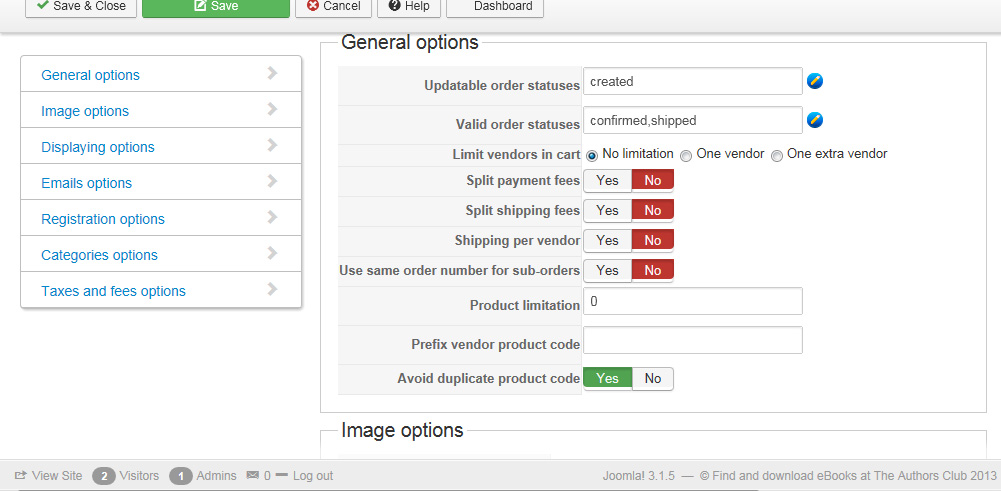
-- HikaShop version -- : latest
-- Joomla version -- : 3.1.5
-- PHP version -- : 5.3.27
-- Browser(s) name and version -- : Internet Explorer 9
-- Error-message(debug-mod must be tuned on) -- : none
Hi Jerome,
I noticed that when a customer purchased a book on my website, I received the full amount of the price ($1.99) in my PayPal account.
I have it set up so that my vendors should receive 70% of the sale from their products, but it's not working. My store should have only got $0.60 and the vendor who sold the product should have got $1.39 from that sale.
I have the configuration set up so that the Vendor commission is 30%. I don't understand why it's not splitting the payments like it should.
Should "Split Payment fees" be set to Yes?
Last edit: 12 years 11 months ago by southga1974.
Please Log in or Create an account to join the conversation.

12 years 11 months ago #129695
by Jerome
Jerome - Obsidev.com
HikaMarket & HikaSerial developer / HikaShop core dev team.
Replied by Jerome on topic Payments to our vendors
Hi,
1) For your HikaMarket questions, please post in the HikaMarket questions.
The HikaShop support team won't be able to answer to them.
2) The split fees is not related to the payment.
In your case I suppose that you are using the classical "HikaShop paypal" plugin.
Please read the section "How payment works" in the HikaMarket documentation :
www.hikashop.com/support/documentation/1...t-is-hikamarket.html
Regards,
1) For your HikaMarket questions, please post in the HikaMarket questions.
The HikaShop support team won't be able to answer to them.
2) The split fees is not related to the payment.
In your case I suppose that you are using the classical "HikaShop paypal" plugin.
Please read the section "How payment works" in the HikaMarket documentation :
www.hikashop.com/support/documentation/1...t-is-hikamarket.html
Regards,
Jerome - Obsidev.com
HikaMarket & HikaSerial developer / HikaShop core dev team.
Please Log in or Create an account to join the conversation.
- southga1974
-
Topic Author
- Offline
Less
More
- Posts: 145
- Thank you received: 0
12 years 11 months ago #129703
by southga1974
Replied by southga1974 on topic Payments to our vendors
Sorry for posting in the wrong topic. I'll repost in HikaMarket.
Please Log in or Create an account to join the conversation.
12 years 11 months ago #129707
by Jerome
Jerome - Obsidev.com
HikaMarket & HikaSerial developer / HikaShop core dev team.
Replied by Jerome on topic Payments to our vendors
I already moved the thread.
Jerome - Obsidev.com
HikaMarket & HikaSerial developer / HikaShop core dev team.
Please Log in or Create an account to join the conversation.
- southga1974
-
Topic Author
- Offline
Less
More
- Posts: 145
- Thank you received: 0
12 years 11 months ago #129720
by southga1974
Replied by southga1974 on topic Payments to our vendors
When I click on the PayPal adaptive plugin for my website, I don't see any of the settings shown on your tutorial:
www.hikashop.com/support/2013-08-08-00-1...aladaptive-form.html
. All I see is what's shown for the PayPal plugin.
How can I configure it without the settings?
How can I configure it without the settings?
Please Log in or Create an account to join the conversation.
12 years 11 months ago #129728
by Jerome
Jerome - Obsidev.com
HikaMarket & HikaSerial developer / HikaShop core dev team.
Replied by Jerome on topic Payments to our vendors
Hi,
I do not understand.
There is one configuration interface possible for the "paypal adaptive" plugin, with the username etc.
You can't configure it without the settings because it means that you are not configuring the right plugin.
Like it is explained in the presentation (and tutorial) if you don't want to use the paypal adaptive plugin, you can but you will have to pay your vendors afterwards.
Regards,
I do not understand.
There is one configuration interface possible for the "paypal adaptive" plugin, with the username etc.
You can't configure it without the settings because it means that you are not configuring the right plugin.
Like it is explained in the presentation (and tutorial) if you don't want to use the paypal adaptive plugin, you can but you will have to pay your vendors afterwards.
Regards,
Jerome - Obsidev.com
HikaMarket & HikaSerial developer / HikaShop core dev team.
Please Log in or Create an account to join the conversation.
- southga1974
-
Topic Author
- Offline
Less
More
- Posts: 145
- Thank you received: 0
12 years 11 months ago #129740
by southga1974
Replied by southga1974 on topic Payments to our vendors
When I click on the HikaShop (market) PayPal Adaptive Payment Plugin, I see this:
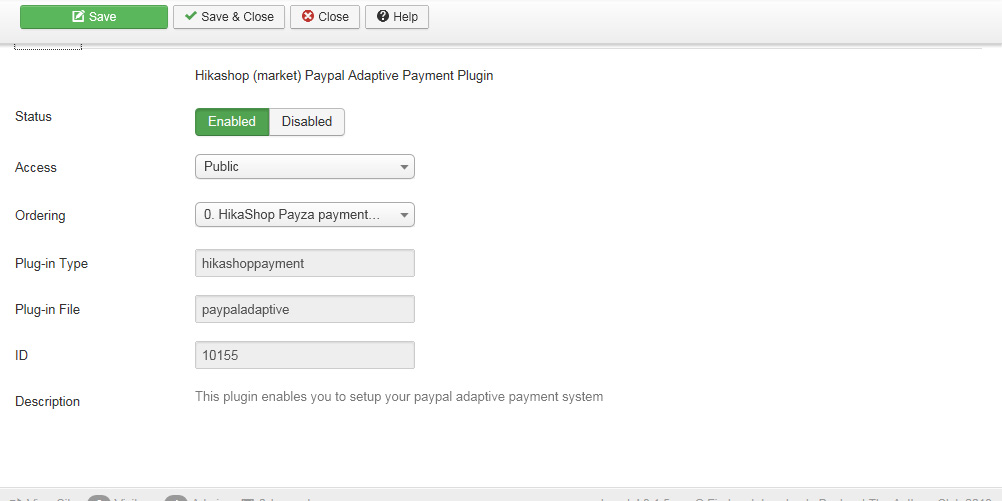
The other tab says Basic Options, and I see this:
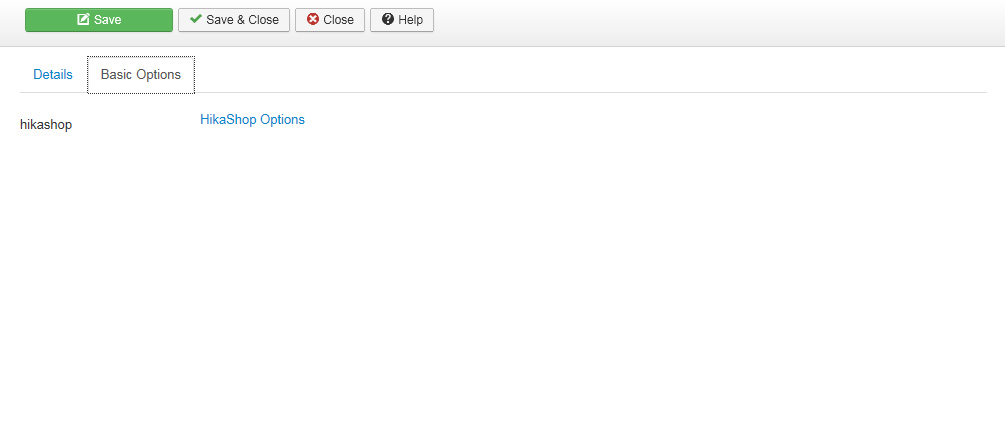
I can click on that link that says HikaShop Options, then it says PayPal. When I click on PayPal, it takes me to the HikaShop options for PayPal. I don't see anything else.
If you need to see for yourself, I can create an admin account for you.
The other tab says Basic Options, and I see this:
I can click on that link that says HikaShop Options, then it says PayPal. When I click on PayPal, it takes me to the HikaShop options for PayPal. I don't see anything else.
If you need to see for yourself, I can create an admin account for you.
Please Log in or Create an account to join the conversation.
12 years 11 months ago #129744
by Jerome
Jerome - Obsidev.com
HikaMarket & HikaSerial developer / HikaShop core dev team.
Replied by Jerome on topic Payments to our vendors
Hi,
To access to the payment methods, you have to use the payment method menu.
HikaShop > System > Payment methods.
You can create a new payment method configuration by clicking on the "new" button and then, select the payment plugin that you want to create a configuration for.
Regards,
To access to the payment methods, you have to use the payment method menu.
HikaShop > System > Payment methods.
You can create a new payment method configuration by clicking on the "new" button and then, select the payment plugin that you want to create a configuration for.
Regards,
Jerome - Obsidev.com
HikaMarket & HikaSerial developer / HikaShop core dev team.
Please Log in or Create an account to join the conversation.
- southga1974
-
Topic Author
- Offline
Less
More
- Posts: 145
- Thank you received: 0
12 years 11 months ago #129752
by southga1974
Replied by southga1974 on topic Payments to our vendors
I see the configuaration now. Thank you.
I have a few more questions:
Is this where I fill in details for my main vendor account?
I'm sorry to ask so many questions, but I need to get my website set up right. Thank you again.
I have a few more questions:
Is this where I fill in details for my main vendor account?
- Do I need to use both an email address and username if they are the same?
- What is Application ID?
- Once I fill all of this information in, will it split the payments automatically? Is there something else I need to do?
I'm sorry to ask so many questions, but I need to get my website set up right. Thank you again.
Please Log in or Create an account to join the conversation.
12 years 11 months ago #129772
by Jerome
Jerome - Obsidev.com
HikaMarket & HikaSerial developer / HikaShop core dev team.
Replied by Jerome on topic Payments to our vendors
Hi,
If you don't have an Application ID it means that you don't have a Paypal Adaptive account.
Paypal Adaptive is a special API in paypal which requires a specific account in order to have the possibility to create what they call "an application" and so, have payment to multiple accounts using the adaptive API.
And yes, with paypal adaptive, it will split the payments automatically, like explained in the documentation.
We have several threads in the HikaMarket forum which talk about it.
But the best to create a Paypal adaptive account, is to contact paypal.
Regards,
If you don't have an Application ID it means that you don't have a Paypal Adaptive account.
Paypal Adaptive is a special API in paypal which requires a specific account in order to have the possibility to create what they call "an application" and so, have payment to multiple accounts using the adaptive API.
And yes, with paypal adaptive, it will split the payments automatically, like explained in the documentation.
We have several threads in the HikaMarket forum which talk about it.
But the best to create a Paypal adaptive account, is to contact paypal.
Regards,
Jerome - Obsidev.com
HikaMarket & HikaSerial developer / HikaShop core dev team.
Please Log in or Create an account to join the conversation.
- southga1974
-
Topic Author
- Offline
Less
More
- Posts: 145
- Thank you received: 0
12 years 11 months ago #129774
by southga1974
Replied by southga1974 on topic Payments to our vendors
Okay, so once I get the PayPal adaptive set up, I need to publish the new PayPal Adaptive plugin instead of the regular PayPal plugin, correct?
Please Log in or Create an account to join the conversation.
12 years 11 months ago #129775
by Jerome
Jerome - Obsidev.com
HikaMarket & HikaSerial developer / HikaShop core dev team.
Replied by Jerome on topic Payments to our vendors
Right 
Jerome - Obsidev.com
HikaMarket & HikaSerial developer / HikaShop core dev team.
Please Log in or Create an account to join the conversation.
- southga1974
-
Topic Author
- Offline
Less
More
- Posts: 145
- Thank you received: 0
12 years 11 months ago #129814
by southga1974
Replied by southga1974 on topic Payments to our vendors
Thanks, Jerome. I'm going to keep this thread open in case I have some more questions later.
Please Log in or Create an account to join the conversation.
- southga1974
-
Topic Author
- Offline
Less
More
- Posts: 145
- Thank you received: 0
12 years 11 months ago #129910
by southga1974
Replied by southga1974 on topic Payments to our vendors
Hi,
I have some test accounts (2 business and 2 customer) set up for PayPal adaptive on my PayPal account. What do I need to do next? Can I go ahead and start testing the PayPal Adaptive Plugin or is there something I need to do first?
I have some test accounts (2 business and 2 customer) set up for PayPal adaptive on my PayPal account. What do I need to do next? Can I go ahead and start testing the PayPal Adaptive Plugin or is there something I need to do first?
Please Log in or Create an account to join the conversation.
12 years 11 months ago #129944
by Jerome
Jerome - Obsidev.com
HikaMarket & HikaSerial developer / HikaShop core dev team.
Replied by Jerome on topic Payments to our vendors
Hi,
The payment configuration require the application id, etc.
The customers accounts can be set for your vendors' paypal email (in the vendor parameters).
Regards,
The payment configuration require the application id, etc.
The customers accounts can be set for your vendors' paypal email (in the vendor parameters).
Regards,
Jerome - Obsidev.com
HikaMarket & HikaSerial developer / HikaShop core dev team.
Please Log in or Create an account to join the conversation.
- southga1974
-
Topic Author
- Offline
Less
More
- Posts: 145
- Thank you received: 0
12 years 11 months ago #130093
by southga1974
Replied by southga1974 on topic Payments to our vendors
Hi Jerome,
According to PayPal's documentation, I should make an API call before I start testing in Sandbox. Is this necessary or can I go ahead and test the Adaptive plugin on my website? If I need to do the APU call, how do I do that?
How should I test in Sandbox? I understand that I need to apply my test accounts' information to some vendors on my website and to the plugin configuration. I also understand that I test in Debug mode so that no real transactions are made.
According to PayPal's documentation, I should make an API call before I start testing in Sandbox. Is this necessary or can I go ahead and test the Adaptive plugin on my website? If I need to do the APU call, how do I do that?
How should I test in Sandbox? I understand that I need to apply my test accounts' information to some vendors on my website and to the plugin configuration. I also understand that I test in Debug mode so that no real transactions are made.
Please Log in or Create an account to join the conversation.
12 years 11 months ago #130103
by Jerome
Jerome - Obsidev.com
HikaMarket & HikaSerial developer / HikaShop core dev team.
Replied by Jerome on topic Payments to our vendors
Hi,
Just put your paypal adaptive configure in "debug" mode. It will use the paypal sandbox.
Testing the sandbox is making an API call.
Regards,
Just put your paypal adaptive configure in "debug" mode. It will use the paypal sandbox.
Testing the sandbox is making an API call.
Regards,
Jerome - Obsidev.com
HikaMarket & HikaSerial developer / HikaShop core dev team.
Please Log in or Create an account to join the conversation.
- southga1974
-
Topic Author
- Offline
Less
More
- Posts: 145
- Thank you received: 0
12 years 11 months ago #130117
by southga1974
Replied by southga1974 on topic Payments to our vendors
Great! Thank you!!
Please Log in or Create an account to join the conversation.
- southga1974
-
Topic Author
- Offline
Less
More
- Posts: 145
- Thank you received: 0
12 years 11 months ago #130376
by southga1974
Replied by southga1974 on topic Payments to our vendors
Hi,
Testing for the Adaptive Payments was successful yesterday. However, I noticed in PayPal's documentation that when using chained payments, there can be at most 1 primary receiver (my store) and 1-5 secondary receivers (vendors):
"You can have at most one primary receiver and 1-5 secondary receivers. Chained payments are useful in cases when the primary receiver acts as an agent for other receivers. The sender deals only with the primary receiver and does not know about the secondary receivers, including how a payment is split among receivers."
Is there a way to specify how many vendors a customer can have in his cart in the Adaptive Payment plugin? Or where would I look to specify the number of secondary receivers (vendors)?
Thanks!
Testing for the Adaptive Payments was successful yesterday. However, I noticed in PayPal's documentation that when using chained payments, there can be at most 1 primary receiver (my store) and 1-5 secondary receivers (vendors):
"You can have at most one primary receiver and 1-5 secondary receivers. Chained payments are useful in cases when the primary receiver acts as an agent for other receivers. The sender deals only with the primary receiver and does not know about the secondary receivers, including how a payment is split among receivers."
Is there a way to specify how many vendors a customer can have in his cart in the Adaptive Payment plugin? Or where would I look to specify the number of secondary receivers (vendors)?
Thanks!
Please Log in or Create an account to join the conversation.
12 years 11 months ago #130396
by Jerome
Jerome - Obsidev.com
HikaMarket & HikaSerial developer / HikaShop core dev team.
Replied by Jerome on topic Payments to our vendors
Hi,
There is an option in HikaMarket 1.7.3 but the option does not allow you (yet) to specify a precise number of vendors for the limitation.
It will see to include it in the next build.
Regards,
There is an option in HikaMarket 1.7.3 but the option does not allow you (yet) to specify a precise number of vendors for the limitation.
It will see to include it in the next build.
Regards,
Jerome - Obsidev.com
HikaMarket & HikaSerial developer / HikaShop core dev team.
Please Log in or Create an account to join the conversation.
Moderators: Obsidev
Time to create page: 0.283 seconds