

- Posts: 108
- Thank you received: 6
product template problem
12 years 1 month ago #167911
by christofu
product template problem was created by christofu
-- HikaShop version -- : 2.3.2
-- HikaMarket version -- : 1.4.3
-- Joomla version -- : 3.3.3
Hi,
I have used the product template to force some values for certain fields. when I dont use the template my product code is automatically generated from the title, and it seems the product URL is generated from the Alias?
when I do use the product template the URL appears to come from the name of the Template (rather than the product name) and the code is equal to the code that is automatically generated for the Template e.g. @template-53c5bb2e6c4b8 - which it tries to duplicate every time you add a product.
Is this expected behaviour for the Template?
-- HikaMarket version -- : 1.4.3
-- Joomla version -- : 3.3.3
Hi,
I have used the product template to force some values for certain fields. when I dont use the template my product code is automatically generated from the title, and it seems the product URL is generated from the Alias?
when I do use the product template the URL appears to come from the name of the Template (rather than the product name) and the code is equal to the code that is automatically generated for the Template e.g. @template-53c5bb2e6c4b8 - which it tries to duplicate every time you add a product.
Is this expected behaviour for the Template?
Please Log in or Create an account to join the conversation.

12 years 1 month ago - 12 years 1 month ago #167917
by Jerome
Jerome - Obsidev.com
HikaMarket & HikaSerial developer / HikaShop core dev team.
Also helping the HikaShop support team when having some time or couldn't sleep.
By the way, do not send me private message, use the "contact us" form instead.
Replied by Jerome on topic product template problem
Hi,
Thanks for the report.
You're right, it's an unexpected behaviour of the product template system.
I will fix and update the HikaMarket package as soon as possible.
You can edit the file "administrator/components/com_hikamarket/classes/product.php" and replace
By
It will exclude the "product_code" from the product template while creating a new product.
Regards,
Thanks for the report.
You're right, it's an unexpected behaviour of the product template system.
I will fix and update the HikaMarket package as soon as possible.
You can edit the file "administrator/components/com_hikamarket/classes/product.php" and replace
Code:
$template = $this->getRaw($template_id, true);
foreach($template as $k => $v) {
if(!isset($product->$k))
$product->$k = $v;
}
Code:
$template = $this->getRaw($template_id, true);
foreach($template as $k => $v) {
if(!in_array($k, array('product_code')) && !isset($product->$k))
$product->$k = $v;
}
Regards,
Jerome - Obsidev.com
HikaMarket & HikaSerial developer / HikaShop core dev team.
Also helping the HikaShop support team when having some time or couldn't sleep.
By the way, do not send me private message, use the "contact us" form instead.
Last edit: 12 years 1 month ago by Jerome. Reason: code fix
Please Log in or Create an account to join the conversation.
12 years 1 month ago #167934
by christofu
Replied by christofu on topic product template problem
thanks, I replaced that and received this error when I tried to add a new template:
Parse error: syntax error, unexpected '$product' (T_VARIABLE) in /home/siftmrkt/public_html/administrator/components/com_hikamarket/classes/product.php on line 320
Parse error: syntax error, unexpected '$product' (T_VARIABLE) in /home/siftmrkt/public_html/administrator/components/com_hikamarket/classes/product.php on line 320
Please Log in or Create an account to join the conversation.
12 years 1 month ago #167935
by christofu
Replied by christofu on topic product template problem
in fact the error occurs on every page - so I rolled it back to the original code for now
Please Log in or Create an account to join the conversation.
12 years 1 month ago #167960
by Jerome
Jerome - Obsidev.com
HikaMarket & HikaSerial developer / HikaShop core dev team.
Also helping the HikaShop support team when having some time or couldn't sleep.
By the way, do not send me private message, use the "contact us" form instead.
Replied by Jerome on topic product template problem
Hi,
I fixed the code in my previous post.
Regards,
I fixed the code in my previous post.
Regards,
Jerome - Obsidev.com
HikaMarket & HikaSerial developer / HikaShop core dev team.
Also helping the HikaShop support team when having some time or couldn't sleep.
By the way, do not send me private message, use the "contact us" form instead.
Please Log in or Create an account to join the conversation.
12 years 1 month ago #168299
by christofu
Replied by christofu on topic product template problem
Hi Jerome,
yes that worked for the code - brilliant:)
I noticed the Alias also automatically defaults to a variation of the template name - is that able to dynamically change to a variation of the new product name instead? (which will automatically change based on duplicate product names so it doesnt have to be exact)
yes that worked for the code - brilliant:)
I noticed the Alias also automatically defaults to a variation of the template name - is that able to dynamically change to a variation of the new product name instead? (which will automatically change based on duplicate product names so it doesnt have to be exact)
Please Log in or Create an account to join the conversation.
12 years 1 month ago #168304
by Jerome
Jerome - Obsidev.com
HikaMarket & HikaSerial developer / HikaShop core dev team.
Also helping the HikaShop support team when having some time or couldn't sleep.
By the way, do not send me private message, use the "contact us" form instead.
Replied by Jerome on topic product template problem
Hi,
Well, we can also include the product_alias in the list of exclusion.
Regards,
Well, we can also include the product_alias in the list of exclusion.
Code:
if(!in_array($k, array('product_code', 'product_alias')) && !isset($product->$k))
Regards,
Jerome - Obsidev.com
HikaMarket & HikaSerial developer / HikaShop core dev team.
Also helping the HikaShop support team when having some time or couldn't sleep.
By the way, do not send me private message, use the "contact us" form instead.
Please Log in or Create an account to join the conversation.
12 years 1 month ago #168371
by christofu
Replied by christofu on topic product template problem
hmm just recieved a general error after adding that one:
"An error occured while saving the product"
tried adding a new Template with the same error
"An error occured while saving the product"
tried adding a new Template with the same error
Please Log in or Create an account to join the conversation.
12 years 1 month ago #168383
by Jerome
Jerome - Obsidev.com
HikaMarket & HikaSerial developer / HikaShop core dev team.
Also helping the HikaShop support team when having some time or couldn't sleep.
By the way, do not send me private message, use the "contact us" form instead.
Replied by Jerome on topic product template problem
Hi,
It means that I should make some tests in order to understand what happened (because like that, I can't say).
The best will be to revert the latest modification in order to keep the "product_alias", so you will be able to save items correctly.
Regards,
It means that I should make some tests in order to understand what happened (because like that, I can't say).
The best will be to revert the latest modification in order to keep the "product_alias", so you will be able to save items correctly.
Regards,
Jerome - Obsidev.com
HikaMarket & HikaSerial developer / HikaShop core dev team.
Also helping the HikaShop support team when having some time or couldn't sleep.
By the way, do not send me private message, use the "contact us" form instead.
Please Log in or Create an account to join the conversation.
12 years 2 weeks ago #170203
by christofu
Replied by christofu on topic product template problem
Hi Jerome I added the code you suggested (for alias) underneath:
else
$vendor->alias = JFilterOutput::stringURLSafe(strip_tags($vendor->alias));
I am not sure if this is correct?
result is there is no error but there is no change in the alias behaviour. Every product assumes the alias (and hence page URL) of the product template, resulting in every created product pointing towards only 1 product. I have the program set to automatically generate the alias from product name, so it seems with a template it automatically generates the alias from the template name instead!
When I dont have a Template it generates the alias correctly
I am just using the template to set certain values when somebody adds a product
thanks
else
$vendor->alias = JFilterOutput::stringURLSafe(strip_tags($vendor->alias));
I am not sure if this is correct?
result is there is no error but there is no change in the alias behaviour. Every product assumes the alias (and hence page URL) of the product template, resulting in every created product pointing towards only 1 product. I have the program set to automatically generate the alias from product name, so it seems with a template it automatically generates the alias from the template name instead!
When I dont have a Template it generates the alias correctly
I am just using the template to set certain values when somebody adds a product
thanks
Please Log in or Create an account to join the conversation.
12 years 2 weeks ago #170253
by Jerome
Jerome - Obsidev.com
HikaMarket & HikaSerial developer / HikaShop core dev team.
Also helping the HikaShop support team when having some time or couldn't sleep.
By the way, do not send me private message, use the "contact us" form instead.
Replied by Jerome on topic product template problem
Hi,
Can you tell me more about the "program" which automatically generate the alias ?
Because the patch I gave you in this thread should work ; I don't understand your problem and as you know, I can't reproduce it.
Regards,
Can you tell me more about the "program" which automatically generate the alias ?
Because the patch I gave you in this thread should work ; I don't understand your problem and as you know, I can't reproduce it.
Regards,
Jerome - Obsidev.com
HikaMarket & HikaSerial developer / HikaShop core dev team.
Also helping the HikaShop support team when having some time or couldn't sleep.
By the way, do not send me private message, use the "contact us" form instead.
Please Log in or Create an account to join the conversation.
12 years 2 weeks ago #170352
by christofu
Replied by christofu on topic product template problem
in Hikashop / Config / features / SEF url options you can set Alias to be filled automatically.
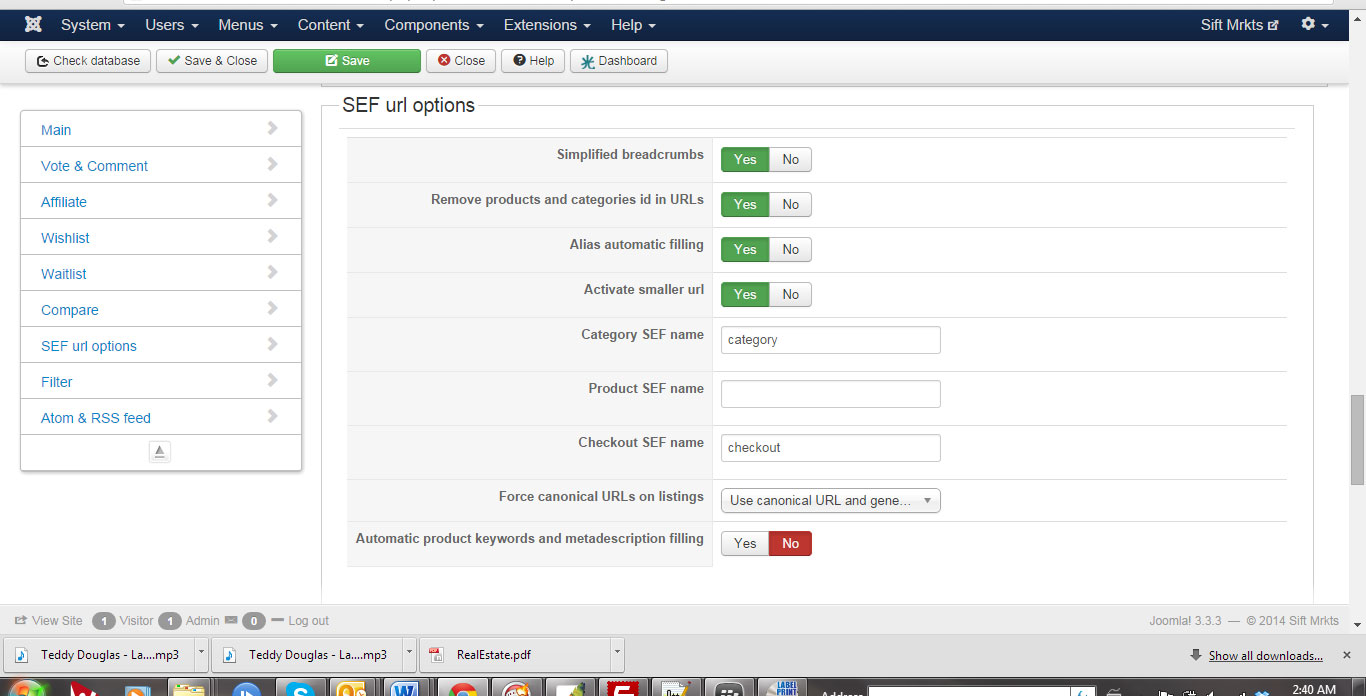 This is working fine.
Its just when I use the Product Template any product I create takes on the alias of the product Template name
The code you gave me above might fix it, I was just unsure where to place it (that is certainly not my strong point) - if you could help me regarding the placement that would be great:)
thanks
Its just when I use the Product Template any product I create takes on the alias of the product Template name
The code you gave me above might fix it, I was just unsure where to place it (that is certainly not my strong point) - if you could help me regarding the placement that would be great:)
thanks
Please Log in or Create an account to join the conversation.
12 years 2 weeks ago #170362
by Jerome
Jerome - Obsidev.com
HikaMarket & HikaSerial developer / HikaShop core dev team.
Also helping the HikaShop support team when having some time or couldn't sleep.
By the way, do not send me private message, use the "contact us" form instead.
Replied by Jerome on topic product template problem
Hi,
The code I gave you will fix it.
But I though you already used it...
In my first reply in this thread, I gave you 4 lines to replace ; and in the next reply, I gave you one line to change in the previous 4 lines.
I did not specified the replacement because it was from the previous message (like I wrote in that message).
So please, use the modification.
Regards,
The code I gave you will fix it.
But I though you already used it...
In my first reply in this thread, I gave you 4 lines to replace ; and in the next reply, I gave you one line to change in the previous 4 lines.
I did not specified the replacement because it was from the previous message (like I wrote in that message).
So please, use the modification.
Regards,
Jerome - Obsidev.com
HikaMarket & HikaSerial developer / HikaShop core dev team.
Also helping the HikaShop support team when having some time or couldn't sleep.
By the way, do not send me private message, use the "contact us" form instead.
The following user(s) said Thank You: christofu
Please Log in or Create an account to join the conversation.
12 years 2 weeks ago #170512
by christofu
Replied by christofu on topic product template problem
Thanks Jerome,
not my strong point so your last comment cleared up what do with the code & it works! I presume you will update in the next version so I dont need to create an override file?
thanks again for your help :lol:
not my strong point so your last comment cleared up what do with the code & it works! I presume you will update in the next version so I dont need to create an override file?
thanks again for your help :lol:
Please Log in or Create an account to join the conversation.
12 years 2 weeks ago #170513
by Jerome
Jerome - Obsidev.com
HikaMarket & HikaSerial developer / HikaShop core dev team.
Also helping the HikaShop support team when having some time or couldn't sleep.
By the way, do not send me private message, use the "contact us" form instead.
Replied by Jerome on topic product template problem
Hi,
Yes, the code is already committed for the next release.
Regards,
Yes, the code is already committed for the next release.
Regards,
Jerome - Obsidev.com
HikaMarket & HikaSerial developer / HikaShop core dev team.
Also helping the HikaShop support team when having some time or couldn't sleep.
By the way, do not send me private message, use the "contact us" form instead.
The following user(s) said Thank You: christofu
Please Log in or Create an account to join the conversation.
12 years 2 days ago #172724
by christofu
Replied by christofu on topic product template problem
Hi,
I had to upgrade to the newest version of Hikamarket to resolve some other problems - in doing so I have had some issues pop up with my product template file resulting in either:
1. the product assumes the name of the product template (instead of its own name)
or
2. the product assumes the correct name but there is a 404 error
I have removed the product template to test adding a product without and it has the same results
I have checked the code above is in the updated edition and it is (though I had to add the product alias addition)
is this a familiar error?
I had to upgrade to the newest version of Hikamarket to resolve some other problems - in doing so I have had some issues pop up with my product template file resulting in either:
1. the product assumes the name of the product template (instead of its own name)
or
2. the product assumes the correct name but there is a 404 error
I have removed the product template to test adding a product without and it has the same results
I have checked the code above is in the updated edition and it is (though I had to add the product alias addition)
is this a familiar error?
Please Log in or Create an account to join the conversation.
12 years 2 days ago #172725
by Jerome
Jerome - Obsidev.com
HikaMarket & HikaSerial developer / HikaShop core dev team.
Also helping the HikaShop support team when having some time or couldn't sleep.
By the way, do not send me private message, use the "contact us" form instead.
Replied by Jerome on topic product template problem
Hi,
We are building a new version which should be release tomorrow.
Regards,
We are building a new version which should be release tomorrow.
Regards,
Jerome - Obsidev.com
HikaMarket & HikaSerial developer / HikaShop core dev team.
Also helping the HikaShop support team when having some time or couldn't sleep.
By the way, do not send me private message, use the "contact us" form instead.
Please Log in or Create an account to join the conversation.
12 years 20 hours ago #173043
by christofu
Replied by christofu on topic product template problem
Hi Jerome,
is the 1.4.4 that is available now the latest version?
I have tried updating and I am still getting some familiar errors...
thanks
is the 1.4.4 that is available now the latest version?
I have tried updating and I am still getting some familiar errors...
thanks
Please Log in or Create an account to join the conversation.
12 years 18 hours ago #173065
by Jerome
Jerome - Obsidev.com
HikaMarket & HikaSerial developer / HikaShop core dev team.
Also helping the HikaShop support team when having some time or couldn't sleep.
By the way, do not send me private message, use the "contact us" form instead.
Replied by Jerome on topic product template problem
Hi,
The exact same problems than in your previous post ?
I tried to reproduce it but I couldn't. I think I don't have the same "product template" configuration than yours.
Regards,
The exact same problems than in your previous post ?
I tried to reproduce it but I couldn't. I think I don't have the same "product template" configuration than yours.
Regards,
Jerome - Obsidev.com
HikaMarket & HikaSerial developer / HikaShop core dev team.
Also helping the HikaShop support team when having some time or couldn't sleep.
By the way, do not send me private message, use the "contact us" form instead.
Please Log in or Create an account to join the conversation.
12 years 15 hours ago #173104
by christofu
Replied by christofu on topic product template problem
Hi,
yes its the same problem - i.e. the same error at the top of page when you add a new product "Warning: Creating default object from empty value in /home/siftmrkt/public_html/components/com_hikamarket/views/productmarket/view.html.php on line 487"
I had removed the product template altogether to test first, and I have these problems:
so perhaps the product template is ok, but it is something else?
the error started when I updated to the latest 1.4.3, and still exists when I updated to 1.4.4 today
yes its the same problem - i.e. the same error at the top of page when you add a new product "Warning: Creating default object from empty value in /home/siftmrkt/public_html/components/com_hikamarket/views/productmarket/view.html.php on line 487"
I had removed the product template altogether to test first, and I have these problems:
- add product form has error at the top (as per my above images) but it saves the product
- when you access the product it brings up a 404 error
so perhaps the product template is ok, but it is something else?
the error started when I updated to the latest 1.4.3, and still exists when I updated to 1.4.4 today
Please Log in or Create an account to join the conversation.
Moderators: Obsidev
Time to create page: 0.363 seconds