

- Posts: 159
- Thank you received: 2
Edit listing at front end
12 years 2 weeks ago #170330
by Rokell
Edit listing at front end was created by Rokell
Hi,
where can I edit the vendor front end order list table?
I'd like to have the customer name in the client column instead of the mail address. It would also be a great feature, if I could list the orders by invoice numbers.
Thanks
Roger
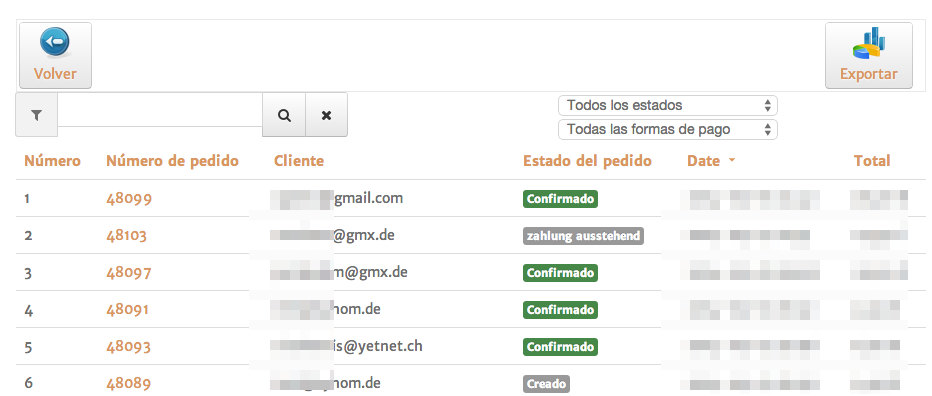
where can I edit the vendor front end order list table?
I'd like to have the customer name in the client column instead of the mail address. It would also be a great feature, if I could list the orders by invoice numbers.
Thanks
Roger
Please Log in or Create an account to join the conversation.

12 years 2 weeks ago #170331
by Jerome
Jerome - Obsidev.com
HikaMarket & HikaSerial developer / HikaShop core dev team.
Also helping the HikaShop support team when having some time or couldn't sleep.
By the way, do not send me private message, use the "contact us" form instead.
Replied by Jerome on topic Edit listing at front end
Hi,
If you want to change the sorting, you can click on the column title.
The view is "front-end (hikamarket) | your_frontend_template | ordermarket | listing", you can edit it in the backend "HikaShop > Display > Views" (or "HikaMarket > Views", which will open the same link but with the filter on HikaMarket views).
Regards,
If you want to change the sorting, you can click on the column title.
The view is "front-end (hikamarket) | your_frontend_template | ordermarket | listing", you can edit it in the backend "HikaShop > Display > Views" (or "HikaMarket > Views", which will open the same link but with the filter on HikaMarket views).
Regards,
Jerome - Obsidev.com
HikaMarket & HikaSerial developer / HikaShop core dev team.
Also helping the HikaShop support team when having some time or couldn't sleep.
By the way, do not send me private message, use the "contact us" form instead.
Please Log in or Create an account to join the conversation.
12 years 2 weeks ago #170414
by Rokell
Replied by Rokell on topic Edit listing at front end
Hi Jerome,
I found this file: HikaMarket - ordermarket / listing.php
and this code (line 93):
What do I have to change to see the users name instead of his email?
Can I add a line to the table that shows me the invoice number?
Thanks
Roger
I found this file: HikaMarket - ordermarket / listing.php
and this code (line 93):
Code:
<th class="hikamarket_order_customer_title title"><?php
echo JHTML::_('grid.sort', JText::_('CUSTOMER'), 'hkuser.user_email', $this->pageInfo->filter->order->dir, $this->pageInfo->filter->order->value);
?></th>
What do I have to change to see the users name instead of his email?
Can I add a line to the table that shows me the invoice number?
Thanks
Roger
Please Log in or Create an account to join the conversation.
12 years 2 weeks ago #170421
by Jerome
Jerome - Obsidev.com
HikaMarket & HikaSerial developer / HikaShop core dev team.
Also helping the HikaShop support team when having some time or couldn't sleep.
By the way, do not send me private message, use the "contact us" form instead.
Replied by Jerome on topic Edit listing at front end
Hi,
The line you paste is the line for the header of the table.
You can change the "user_email" into another element of the table HikaShop user.
If you want to display an element of the Joomla user table ; it will require extra modification because the SQL request does not include this table.
Except the header which only provide the link for the sorting, the important line is the content line
I will have to see how I could propose such link with the joomla user table but basically, I don't want to.
HikaShop have a "guest" account system where the customer does not have any Joomla account, creating a link with the joomla user table will work on several cases but not in all cases ; so if you use the guest checkout, you won't be able to display the username (or the user name).
So the most important is to know which data you want to display exactly (and from which table).
Regards,
The line you paste is the line for the header of the table.
You can change the "user_email" into another element of the table HikaShop user.
If you want to display an element of the Joomla user table ; it will require extra modification because the SQL request does not include this table.
Except the header which only provide the link for the sorting, the important line is the content line
Code:
<td class="hikamarket_order_customer_value"><?php echo $order->user_email; ?></td>
I will have to see how I could propose such link with the joomla user table but basically, I don't want to.
HikaShop have a "guest" account system where the customer does not have any Joomla account, creating a link with the joomla user table will work on several cases but not in all cases ; so if you use the guest checkout, you won't be able to display the username (or the user name).
So the most important is to know which data you want to display exactly (and from which table).
Regards,
Jerome - Obsidev.com
HikaMarket & HikaSerial developer / HikaShop core dev team.
Also helping the HikaShop support team when having some time or couldn't sleep.
By the way, do not send me private message, use the "contact us" form instead.
Please Log in or Create an account to join the conversation.
Moderators: Obsidev
Time to create page: 0.191 seconds