
- Posts: 640
- Thank you received: 16
Improve category assignation
- PeterChain
-
 Topic Author
- Offline
Less
More
11 years 3 weeks ago - 11 years 3 weeks ago #212897
by PeterChain
Improve category assignation was created by PeterChain
-- HikaShop version -- : 2.6.5
-- HikaMarket version -- : 1.6.5
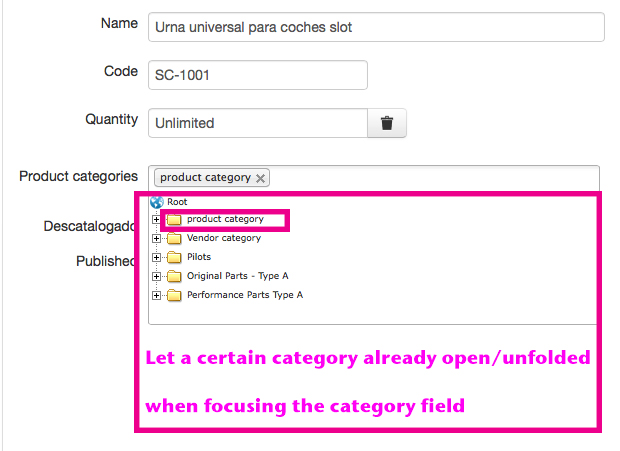
In the frontend product edition I would like to make the category tree chooser larger and with some category already unfolded so for massive maintenance it makes life easier for the data entry user.
This post is with double purpose:
First, could you advise on how could change the tree window size? I tried with several CSS editing but wasn't successful.
Second. is it possible to assign some (or all) category to be already unfolded once I open the category tree?
Second purpose, if not possible with simple file editing then I would like to suggest this as product improvements for future editions.
Indeed would be great if I could assign in the category itself if I want it to be shown already unfolded when showing in frontend or backend.
Thank you.
-- HikaMarket version -- : 1.6.5
In the frontend product edition I would like to make the category tree chooser larger and with some category already unfolded so for massive maintenance it makes life easier for the data entry user.
This post is with double purpose:
First, could you advise on how could change the tree window size? I tried with several CSS editing but wasn't successful.
Second. is it possible to assign some (or all) category to be already unfolded once I open the category tree?
Second purpose, if not possible with simple file editing then I would like to suggest this as product improvements for future editions.
Indeed would be great if I could assign in the category itself if I want it to be shown already unfolded when showing in frontend or backend.
Thank you.
Last edit: 11 years 3 weeks ago by PeterChain. Reason: Added missing image
Please Log in or Create an account to join the conversation.

11 years 3 weeks ago #212908
by Jerome
Jerome - Obsidev.com
HikaMarket & HikaSerial developer / HikaShop core dev team.
Also helping the HikaShop support team when having some time or couldn't sleep.
By the way, do not send me private message, use the "contact us" form instead.
Replied by Jerome on topic Improve category assignation
Hi,
The category selector is using the namebox system.
The width of the "popup" is 100% of the container and the height is by default 130px.
You can change it using the CSS selector
For the loading of the content ; you can use an override in order to change the depth number (which is 1 by default).
The categories of the "product category" will be automatically loaded and the "product category" will be in open state.
Regards,
The category selector is using the namebox system.
The width of the "popup" is 100% of the container and the height is by default 130px.
You can change it using the CSS selector
Code:
div.namebox-popup div.namebox-popup-content { }
For the loading of the content ; you can use an override in order to change the depth number (which is 1 by default).
Code:
echo $this->nameboxType->display(
'data[product][categories]',
$categories,
hikamarketNameboxType::NAMEBOX_MULTIPLE,
'category',
array(
'delete' => true,
'sort' => true,
'depth' => 2,
'root' => $this->vendorCategories,
'default_text' => '<em>'.JText::_('HIKA_NONE').'</em>',
)
);
Regards,
Jerome - Obsidev.com
HikaMarket & HikaSerial developer / HikaShop core dev team.
Also helping the HikaShop support team when having some time or couldn't sleep.
By the way, do not send me private message, use the "contact us" form instead.
Please Log in or Create an account to join the conversation.
- PeterChain
-
Topic Author
- Offline
Less
More
- Posts: 640
- Thank you received: 16
11 years 3 weeks ago #212919
by PeterChain
Replied by PeterChain on topic Improve category assignation
Thank you very much, I will dig in your suggestions and report when I am successful.
Please Log in or Create an account to join the conversation.
- PeterChain
-
Topic Author
- Offline
Less
More
- Posts: 640
- Thank you received: 16
10 years 9 months ago - 10 years 9 months ago #224158
by PeterChain
Replied by PeterChain on topic Improve category assignation
The "unfolding by default' worked perfectly for product categories tree but now I want to do the same with product tree for Options and for Related products fields and I am not successful using the depth parameter:
I tried with depth value from 2 to 4 and no error is displaying but also no unfolding by default.
Am I wrong expecting depth parameter to work for product selection trees?
Code:
echo $this->nameboxType->display(
'data[product][options]',
@$this->product->options,
hikamarketNameboxType::NAMEBOX_MULTIPLE,
'product',
array(
'delete' => true,
'sort' => true,
'depth' => 4, /* ADDED DEPTH OPENING TREE CATEGORIES */
'root' => 2,
'allvendors' => (int)$this->config->get('options_all_vendors', 0),
'default_text' => '<em>'.JText::_('HIKA_NONE').'</em>',
)
);
I tried with depth value from 2 to 4 and no error is displaying but also no unfolding by default.
Am I wrong expecting depth parameter to work for product selection trees?
Last edit: 10 years 9 months ago by PeterChain. Reason: Arranged code to be better readable
Please Log in or Create an account to join the conversation.
10 years 9 months ago #224160
by Jerome
Jerome - Obsidev.com
HikaMarket & HikaSerial developer / HikaShop core dev team.
Also helping the HikaShop support team when having some time or couldn't sleep.
By the way, do not send me private message, use the "contact us" form instead.
Replied by Jerome on topic Improve category assignation
Hi,
The "depth" setting in "product" just allow to load the data but does not unfold the categories by default.
In order to manage the "depth" for the "product" ; it requires some code in the getNameboxData of the HikaMarket product class.
The automatic unfold was not added for the products because it could display a big tree. The usage of the depth is more to pre-load data than display them directly to the user.
But we can see to add a setting for that unfolding.
In the file, you can replace
By
And then
By
So, you can now use the setting "unfold" with the other parameters (depth, root, ...)
Regards,
The "depth" setting in "product" just allow to load the data but does not unfold the categories by default.
In order to manage the "depth" for the "product" ; it requires some code in the getNameboxData of the HikaMarket product class.
The automatic unfold was not added for the products because it could display a big tree. The usage of the depth is more to pre-load data than display them directly to the user.
But we can see to add a setting for that unfolding.
In the file, you can replace
Code:
$limit = (int)@$options['limit'];
Code:
$limit = (int)@$options['limit'];
$unfold = (int)@$options['unfold'];
And then
Code:
if($depth > 1 && $v->category_depth < $base_depth) {
$lookup_categories[$k] = $k;
$o->status = 1;
}
Code:
if($depth > 1 && $v->category_depth < $base_depth) {
$lookup_categories[$k] = $k;
$o->status = $unfold ? 2: 1;
}
Regards,
Jerome - Obsidev.com
HikaMarket & HikaSerial developer / HikaShop core dev team.
Also helping the HikaShop support team when having some time or couldn't sleep.
By the way, do not send me private message, use the "contact us" form instead.
The following user(s) said Thank You: PeterChain
Please Log in or Create an account to join the conversation.
- PeterChain
-
Topic Author
- Offline
Less
More
- Posts: 640
- Thank you received: 16
10 years 9 months ago #224190
by PeterChain
Replied by PeterChain on topic Improve category assignation
Applied successfully!
BIG THANK YOU!
BIG THANK YOU!
Please Log in or Create an account to join the conversation.
Moderators: Obsidev
Time to create page: 0.177 seconds