

- Posts: 490
- Thank you received: 2
how to disable fields on the front end
10 years 4 months ago #240990
by ronron
how to disable fields on the front end was created by ronron
-- HikaShop version -- : 2.6.3
-- HikaMarket version -- : 1.7.0
-- Joomla version -- : 3.4.3
-- PHP version -- : 5.5
-- Error-message(debug-mod must be tuned on) -- : none
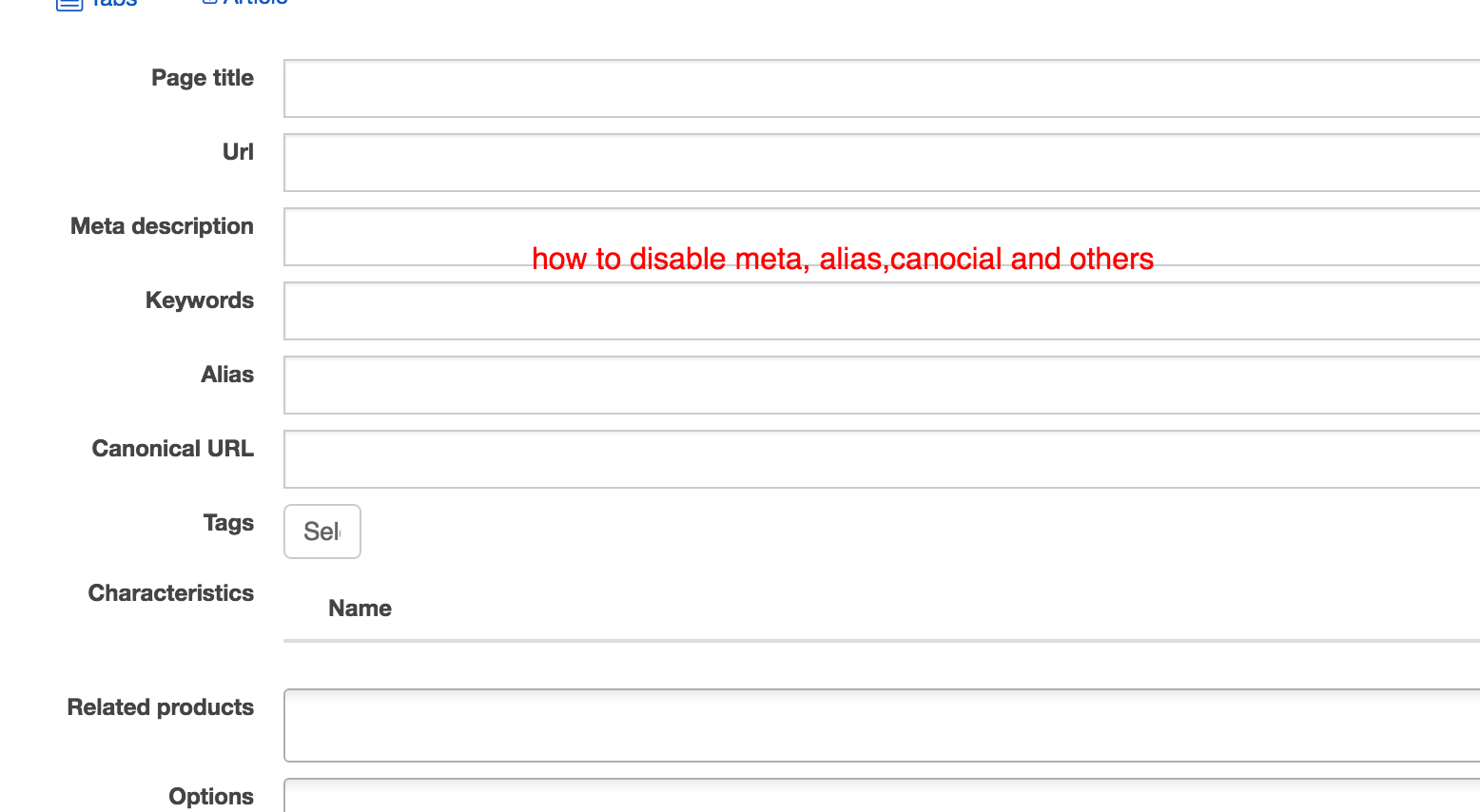
i already tried to disable some fields on the front end for vendors such as alias, meta and others using hikamarket > access > vendor access but i can still see it on the front end
thanks
-- HikaMarket version -- : 1.7.0
-- Joomla version -- : 3.4.3
-- PHP version -- : 5.5
-- Error-message(debug-mod must be tuned on) -- : none
i already tried to disable some fields on the front end for vendors such as alias, meta and others using hikamarket > access > vendor access but i can still see it on the front end
thanks
Please Log in or Create an account to join the conversation.

10 years 4 months ago #240992
by Jerome
Jerome - Obsidev.com
HikaMarket & HikaSerial developer / HikaShop core dev team.
Also helping the HikaShop support team when having some time or couldn't sleep.
By the way, do not send me private message, use the "contact us" form instead.
Replied by Jerome on topic how to disable fields on the front end
Hi,
The menu "Access > Vendor Access" is to define access depending the vendor group.
It means that the vendor accounts must have groups to get these ACL.
The easier is to set the global Access Level in the HikaMarket configuration ; under the tab "Access Level" you will find the "default store" (for every vendors) and the "main vendor" (for your vendor account).
More about Access Level :
www.hikashop.com/support/documentation/1...l#tuto_configure_acl
Regards,
The menu "Access > Vendor Access" is to define access depending the vendor group.
It means that the vendor accounts must have groups to get these ACL.
The easier is to set the global Access Level in the HikaMarket configuration ; under the tab "Access Level" you will find the "default store" (for every vendors) and the "main vendor" (for your vendor account).
More about Access Level :
www.hikashop.com/support/documentation/1...l#tuto_configure_acl
Regards,
Jerome - Obsidev.com
HikaMarket & HikaSerial developer / HikaShop core dev team.
Also helping the HikaShop support team when having some time or couldn't sleep.
By the way, do not send me private message, use the "contact us" form instead.
Please Log in or Create an account to join the conversation.
10 years 4 months ago #241075
by ronron
Replied by ronron on topic how to disable fields on the front end
thank you.
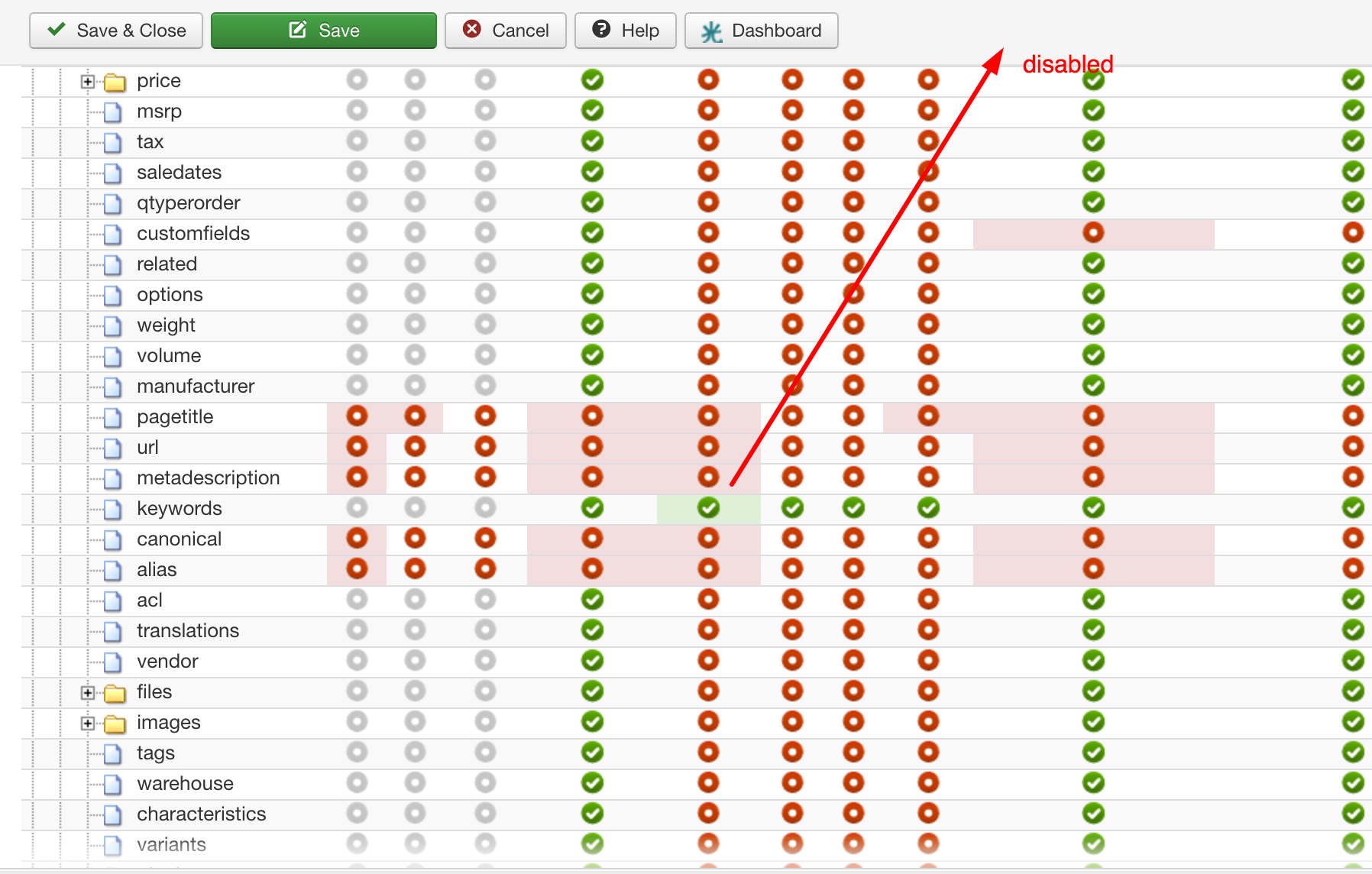
i created groups and added the user,i even added the user to simple registered group and tested it. it doesnt work. What could i have missed? i also disabled the access for registered and certain groups. to test.
BTW. i am using the joomla user manager to verify the groups
thanks
i created groups and added the user,i even added the user to simple registered group and tested it. it doesnt work. What could i have missed? i also disabled the access for registered and certain groups. to test.
BTW. i am using the joomla user manager to verify the groups
thanks
Please Log in or Create an account to join the conversation.
10 years 4 months ago #241081
by Jerome
Jerome - Obsidev.com
HikaMarket & HikaSerial developer / HikaShop core dev team.
Also helping the HikaShop support team when having some time or couldn't sleep.
By the way, do not send me private message, use the "contact us" form instead.
Replied by Jerome on topic how to disable fields on the front end
Hi,
With your screenshot I'm not able to understand what is that ACL panel and for who it is.
Please understand that vendors and users are different and they all have their own ACL.
So if you put ACL for your vendors ; it will use the "vendor group" for the processing ; not the "user group" (from the Joomla account).
On the other hand, if you set ACL on your users ; it will use the Joomla account and his user groups for the ACL processing.
Regards,
With your screenshot I'm not able to understand what is that ACL panel and for who it is.
Please understand that vendors and users are different and they all have their own ACL.
So if you put ACL for your vendors ; it will use the "vendor group" for the processing ; not the "user group" (from the Joomla account).
On the other hand, if you set ACL on your users ; it will use the Joomla account and his user groups for the ACL processing.
Regards,
Jerome - Obsidev.com
HikaMarket & HikaSerial developer / HikaShop core dev team.
Also helping the HikaShop support team when having some time or couldn't sleep.
By the way, do not send me private message, use the "contact us" form instead.
Please Log in or Create an account to join the conversation.
10 years 4 months ago #241130
by ronron
Replied by ronron on topic how to disable fields on the front end
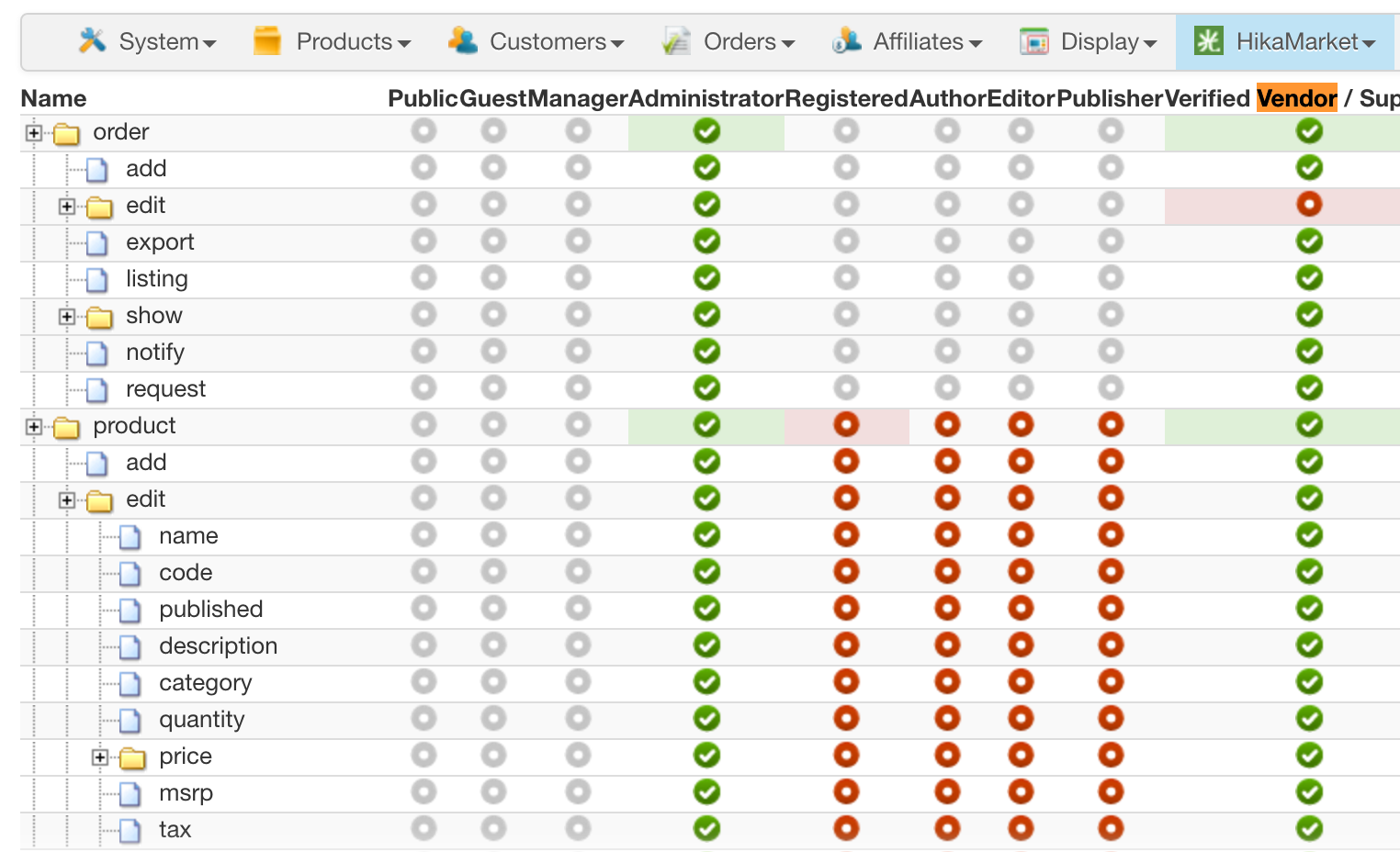
sorry where can i find the vendor group?
do i need to create this group?
im using seller group...
here is the acl
do i need to create this group?
im using seller group...
here is the acl
Please Log in or Create an account to join the conversation.
10 years 4 months ago #241132
by Jerome
Jerome - Obsidev.com
HikaMarket & HikaSerial developer / HikaShop core dev team.
Also helping the HikaShop support team when having some time or couldn't sleep.
By the way, do not send me private message, use the "contact us" form instead.
Replied by Jerome on topic how to disable fields on the front end
Jerome - Obsidev.com
HikaMarket & HikaSerial developer / HikaShop core dev team.
Also helping the HikaShop support team when having some time or couldn't sleep.
By the way, do not send me private message, use the "contact us" form instead.
Please Log in or Create an account to join the conversation.
10 years 3 months ago - 10 years 3 months ago #241201
by ronron
Replied by ronron on topic how to disable fields on the front end
great!
1. how can i control custom fields on the front end? example vendor 1 can view but not edit the field bank address while vendor premium can view and edit the custom field in the front.
i tried the ACL function but its for viewing only. if i uncheck vendor 1 he can view and edit.
2. also you have an option on the product listing menu for Custom item fields. it say Inherit, Yes, No. but even if a click on No it still appears.
what to do?
thanks as always
1. how can i control custom fields on the front end? example vendor 1 can view but not edit the field bank address while vendor premium can view and edit the custom field in the front.
i tried the ACL function but its for viewing only. if i uncheck vendor 1 he can view and edit.
2. also you have an option on the product listing menu for Custom item fields. it say Inherit, Yes, No. but even if a click on No it still appears.
what to do?
thanks as always
Last edit: 10 years 3 months ago by ronron.
Please Log in or Create an account to join the conversation.
10 years 3 months ago #241206
by Jerome
Jerome - Obsidev.com
HikaMarket & HikaSerial developer / HikaShop core dev team.
Also helping the HikaShop support team when having some time or couldn't sleep.
By the way, do not send me private message, use the "contact us" form instead.
Replied by Jerome on topic how to disable fields on the front end
Hi,
The ACL is provided by HikaShop business and is related to the Joomla account user group.
We cannot list the different fields in the HikaMarket ACL configuration (and the list is already big enough).
But we will see with HikaShop 3 if it's easier to implement such new feature in HikaMarket (because it requires some entry points for the interface and store the data in the database).
For the moment, the best solution I see is to use some view override in order to filter the display of the fields.
For product fields, in the view "productmarket | form" you will find these lines
And you can add some PHP code just below the "foreach" to keep or skip the display of the field for the vendor (depending his vendor group and the $fieldName which contain the field namekey).
For vendor fields, in the view "vendormarket | registration" you will find these lines
And that's the same idea than for the product fields.
Regards,
The ACL is provided by HikaShop business and is related to the Joomla account user group.
We cannot list the different fields in the HikaMarket ACL configuration (and the list is already big enough).
But we will see with HikaShop 3 if it's easier to implement such new feature in HikaMarket (because it requires some entry points for the interface and store the data in the database).
For the moment, the best solution I see is to use some view override in order to filter the display of the fields.
For product fields, in the view "productmarket | form" you will find these lines
Code:
foreach($this->fields as $fieldName => $oneExtraField) {
?>
<dl id="hikashop_product_<?php echo $fieldName; ?>" class="hikam_options">
For vendor fields, in the view "vendormarket | registration" you will find these lines
Code:
foreach($this->extraFields['vendor'] as $fieldName => $oneExtraField) {
?>
<dl id="hikamarket_<?php echo $this->form_type.'_'.$oneExtraField->field_namekey; ?>" class="hikam_options hikamarket_<?php echo $this->form_type; ?>_<?php echo $fieldName;?>_line">
Regards,
Jerome - Obsidev.com
HikaMarket & HikaSerial developer / HikaShop core dev team.
Also helping the HikaShop support team when having some time or couldn't sleep.
By the way, do not send me private message, use the "contact us" form instead.
Please Log in or Create an account to join the conversation.
10 years 3 months ago #241295
by ronron
Replied by ronron on topic how to disable fields on the front end
thank you for answering no 1 question.
what about no 2. i can not get it to work.
example on menu 1 i want custom fields to display but not on menu 2. So i configure the menu for custom fields to NO but the custom fields still appear.
thanks
what about no 2. i can not get it to work.
2. also you have an option on the product listing menu for Custom item fields. it say Inherit, Yes, No. but even if a click on No it still appears.
what to do?
example on menu 1 i want custom fields to display but not on menu 2. So i configure the menu for custom fields to NO but the custom fields still appear.
thanks
Please Log in or Create an account to join the conversation.
10 years 3 months ago #241298
by Jerome
Jerome - Obsidev.com
HikaMarket & HikaSerial developer / HikaShop core dev team.
Also helping the HikaShop support team when having some time or couldn't sleep.
By the way, do not send me private message, use the "contact us" form instead.
Replied by Jerome on topic how to disable fields on the front end
Hi,
A "product listing menu" is related to HikaShop and not to HikaMarket.
Regards,
A "product listing menu" is related to HikaShop and not to HikaMarket.
Regards,
Jerome - Obsidev.com
HikaMarket & HikaSerial developer / HikaShop core dev team.
Also helping the HikaShop support team when having some time or couldn't sleep.
By the way, do not send me private message, use the "contact us" form instead.
Please Log in or Create an account to join the conversation.
Moderators: Obsidev
Time to create page: 0.262 seconds