

- Posts: 490
- Thank you received: 2
how to customize image upload
9 years 10 months ago #254974
by ronron
how to customize image upload was created by ronron
-- HikaShop version -- : 2.6.3
-- Joomla version -- : 3.4.5
-- PHP version -- : 5.5
-- Error-message(debug-mod must be tuned on) -- : none
hi
1. how can i change the icon for the image upload
2. how can i change the folder for the image upload. if you click on it the folder hikashop image will appear
3. how can i remove the image folder icon
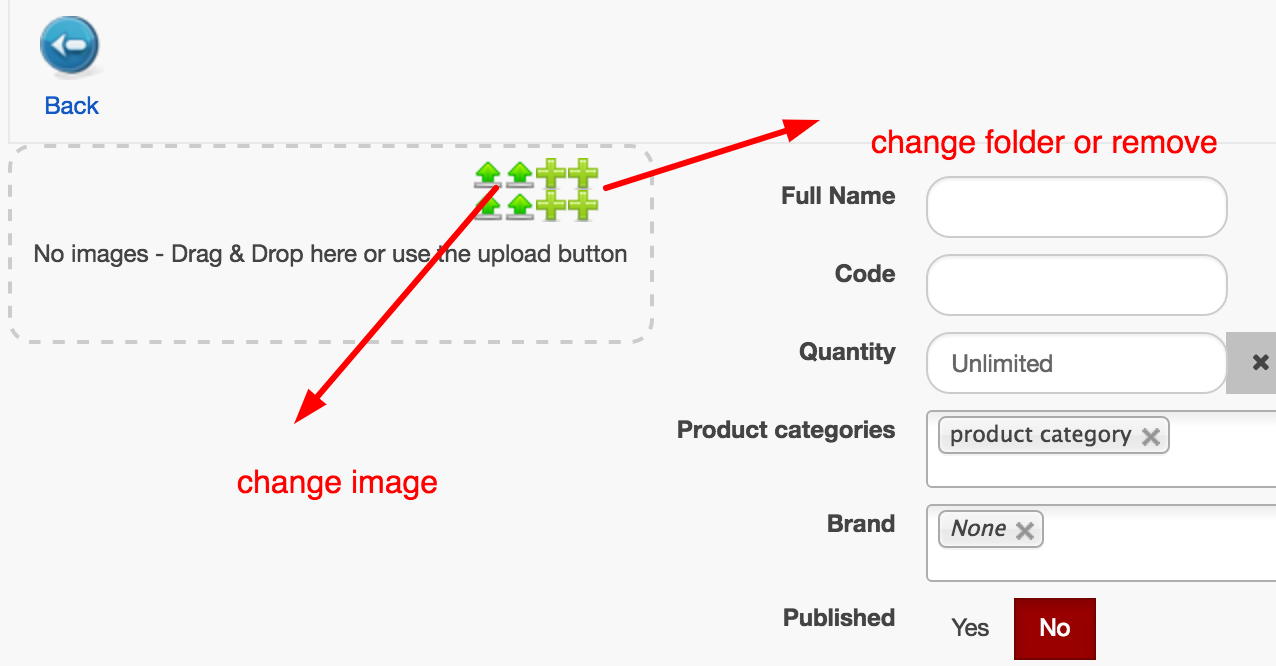
thanks
-- Joomla version -- : 3.4.5
-- PHP version -- : 5.5
-- Error-message(debug-mod must be tuned on) -- : none
hi
1. how can i change the icon for the image upload
2. how can i change the folder for the image upload. if you click on it the folder hikashop image will appear
3. how can i remove the image folder icon
thanks
Please Log in or Create an account to join the conversation.

9 years 10 months ago #255009
by Jerome
Jerome - Obsidev.com
HikaMarket & HikaSerial developer / HikaShop core dev team.
Also helping the HikaShop support team when having some time or couldn't sleep.
By the way, do not send me private message, use the "contact us" form instead.
Replied by Jerome on topic how to customize image upload
Hi,
1 - The same way than the icons has been made larger, you can change the background-image.
www.hikashop.com/support/documentation/1...the-display.html#css
2 - The folder is where your images will be sent.
If you're the main vendor you will access to all images ; if you're a vendor, you will just access to the vendor image (a sub-folder of the hikashop image).
3 - Thanks to a view override you can change the uploader settings.
www.hikashop.com/support/documentation/1...-display.html#layout
In the view "productmarket / form_image", you will find the code which display the image uploader.
Just replace
By
To remove the gallery image section.
Regards,
1 - The same way than the icons has been made larger, you can change the background-image.
www.hikashop.com/support/documentation/1...the-display.html#css
2 - The folder is where your images will be sent.
If you're the main vendor you will access to all images ; if you're a vendor, you will just access to the vendor image (a sub-folder of the hikashop image).
3 - Thanks to a view override you can change the uploader settings.
www.hikashop.com/support/documentation/1...-display.html#layout
In the view "productmarket / form_image", you will find the code which display the image uploader.
Just replace
Code:
'gallery' => $upload,
Code:
'gallery' => false,
Regards,
Jerome - Obsidev.com
HikaMarket & HikaSerial developer / HikaShop core dev team.
Also helping the HikaShop support team when having some time or couldn't sleep.
By the way, do not send me private message, use the "contact us" form instead.
The following user(s) said Thank You: ronron
Please Log in or Create an account to join the conversation.
9 years 10 months ago #255059
by ronron
Replied by ronron on topic how to customize image upload
can we customize the folder name to example my folder or just folders. At the moment you can see HikaShop Images folder.
thanks
thanks
Please Log in or Create an account to join the conversation.
9 years 10 months ago #255065
by Jerome
Jerome - Obsidev.com
HikaMarket & HikaSerial developer / HikaShop core dev team.
Also helping the HikaShop support team when having some time or couldn't sleep.
By the way, do not send me private message, use the "contact us" form instead.
Replied by Jerome on topic how to customize image upload
Hi,
You can rename the name of the "root dir" thanks to a translation
Regards,
You can rename the name of the "root dir" thanks to a translation
Code:
HIKASHOP_IMAGE_ROOTDIR="HikaShop Images"
Jerome - Obsidev.com
HikaMarket & HikaSerial developer / HikaShop core dev team.
Also helping the HikaShop support team when having some time or couldn't sleep.
By the way, do not send me private message, use the "contact us" form instead.
The following user(s) said Thank You: ronron
Please Log in or Create an account to join the conversation.
Moderators: Obsidev
Time to create page: 0.186 seconds