

- Posts: 306
- Thank you received: 42
Vendor admin showing old style vendor filter
7 years 8 months ago - 7 years 8 months ago #303039
by trevsmiff
Vendor admin showing old style vendor filter was created by trevsmiff
-- HikaShop version -- : 4.0.2
-- HikaMarket version -- : 3.0.0
-- Joomla version -- : 3.9.2
-- PHP version -- : 7.1.24
Hi
When we log in to the vendor control panel and go to Products, Characteristics or Discounts the vendor filter is displayed in the old style and no longer works.
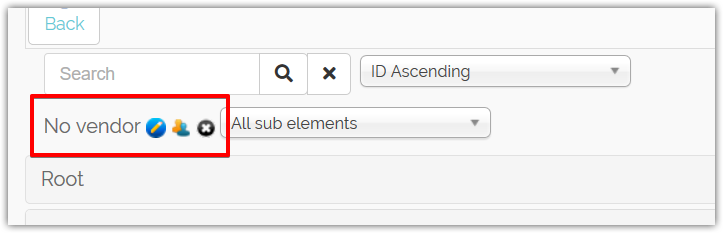
I have tried switching to the Beez template to rule out any overrides that might be causing it but without succes.
Any suggestions where to look?
Which file generates this area?
Regards
Trevor
-- HikaMarket version -- : 3.0.0
-- Joomla version -- : 3.9.2
-- PHP version -- : 7.1.24
Hi
When we log in to the vendor control panel and go to Products, Characteristics or Discounts the vendor filter is displayed in the old style and no longer works.
I have tried switching to the Beez template to rule out any overrides that might be causing it but without succes.
Any suggestions where to look?
Which file generates this area?
Regards
Trevor
Last edit: 7 years 8 months ago by trevsmiff.
Please Log in or Create an account to join the conversation.

7 years 8 months ago #303045
by Jerome
Jerome - Obsidev.com
HikaMarket & HikaSerial developer / HikaShop core dev team.
Also helping the HikaShop support team when having some time or couldn't sleep.
By the way, do not send me private message, use the "contact us" form instead.
Replied by Jerome on topic Vendor admin showing old style vendor filter
Hello,
The content is generated by the HikaMarket "filter_vendor" type.
When you have few vendors, it displays a dropdown but when you have more than 10 vendors it changes for a different layout...
You can find the code within the "display" function, the idea is to replace all the code in the "else" by
And it should improve the usability.
Please give us your feedback about it
The content is generated by the HikaMarket "filter_vendor" type.
When you have few vendors, it displays a dropdown but when you have more than 10 vendors it changes for a different layout...
You can find the code within the "display" function, the idea is to replace all the code in the "else" by
Code:
$nameboxType = hikamarket::get('type.namebox');
$ret = '<div style="display:inline-block;min-width:240px;vertical-align:top;">'.
$nameboxType->display(
$map,
(int)$value,
hikamarketNameboxType::NAMEBOX_SINGLE,
'vendor',
array(
'delete' => true,
'default_text' => '<em>'.JText::_('HIKA_NONE').'</em>'
)
) .
'</div>';
Please give us your feedback about it
Jerome - Obsidev.com
HikaMarket & HikaSerial developer / HikaShop core dev team.
Also helping the HikaShop support team when having some time or couldn't sleep.
By the way, do not send me private message, use the "contact us" form instead.
Please Log in or Create an account to join the conversation.
7 years 8 months ago - 7 years 8 months ago #303060
by trevsmiff
Replied by trevsmiff on topic Vendor admin showing old style vendor filter
Hi Jerome
I changed the code as suggested and it looks good and works OK the first time I select a vendor but if I then try and change the vendor the product list does not update. If I click on the magnifying glass or the 'X' the page is refreshed with the correct products are listed. It's close to working OK.
btw. The unmodified page doesn't work properly. When I click on the blue button a pop-up is displayed with a list of vendors and if I select a vendor and click OK the list of vendors disappears and I am left with a blank pop-up. When I close the pop-up the product list is not updated and the box says 'No vendor'
In the meantime I have increased the number of vendors to 50 before the layout changes and that seems to be working fine. (we currently have about 30 vendors)
Best regards
Trevor
I changed the code as suggested and it looks good and works OK the first time I select a vendor but if I then try and change the vendor the product list does not update. If I click on the magnifying glass or the 'X' the page is refreshed with the correct products are listed. It's close to working OK.
btw. The unmodified page doesn't work properly. When I click on the blue button a pop-up is displayed with a list of vendors and if I select a vendor and click OK the list of vendors disappears and I am left with a blank pop-up. When I close the pop-up the product list is not updated and the box says 'No vendor'
In the meantime I have increased the number of vendors to 50 before the layout changes and that seems to be working fine. (we currently have about 30 vendors)
Best regards
Trevor
Last edit: 7 years 8 months ago by trevsmiff.
Please Log in or Create an account to join the conversation.
7 years 7 months ago #303062
by Jerome
Jerome - Obsidev.com
HikaMarket & HikaSerial developer / HikaShop core dev team.
Also helping the HikaShop support team when having some time or couldn't sleep.
By the way, do not send me private message, use the "contact us" form instead.
Replied by Jerome on topic Vendor admin showing old style vendor filter
Hello,
Thanks for your feedback.
Instead of using the popup or the namebox ; you can see to modify the hard coded limit of 10, so even if you got 30 vendors, you will use a regular dropdown for the vendor selection.
In the mean time, I will continue tests for the integration of the namebox as replacement (yes, the auto-submit on selection need to be activate).
Regards,
Thanks for your feedback.
Instead of using the popup or the namebox ; you can see to modify the hard coded limit of 10, so even if you got 30 vendors, you will use a regular dropdown for the vendor selection.
In the mean time, I will continue tests for the integration of the namebox as replacement (yes, the auto-submit on selection need to be activate).
Regards,
Jerome - Obsidev.com
HikaMarket & HikaSerial developer / HikaShop core dev team.
Also helping the HikaShop support team when having some time or couldn't sleep.
By the way, do not send me private message, use the "contact us" form instead.
The following user(s) said Thank You: trevsmiff
Please Log in or Create an account to join the conversation.
Moderators: Obsidev
Time to create page: 0.181 seconds