

- Posts: 48
- Thank you received: 1
add image button
15 years 9 months ago #3745
by SLLLC
add image button was created by SLLLC
when I click on the add image button on product right panel receive "done but with errors on page"
i.e. does not show dropdown to install an image.
also, cannot remove default image from system-config
question 2:
how do I remove the "Product listing for category listing menu 88" text showing on product pages
i.e. does not show dropdown to install an image.
also, cannot remove default image from system-config
question 2:
how do I remove the "Product listing for category listing menu 88" text showing on product pages
Please Log in or Create an account to join the conversation.

15 years 9 months ago #3747
by nicolas
Replied by nicolas on topic Re: add image button
Q1: Could you do a screenshot of the problem ?
Q2: Go in the menu Display->Content modules. Edit the module with that name. There, you will be able to cusotmize the look of the product listing as well as turning off the module title.
Q2: Go in the menu Display->Content modules. Edit the module with that name. There, you will be able to cusotmize the look of the product listing as well as turning off the module title.
Please Log in or Create an account to join the conversation.
15 years 9 months ago #3752
by SLLLC
Replied by SLLLC on topic Re: add image button
Question 2 resolved
seems when I Upgraded the upgrade did not maintain prior setting(s)
Q1
image attached
the only "add" tab a right that works is the "prices"
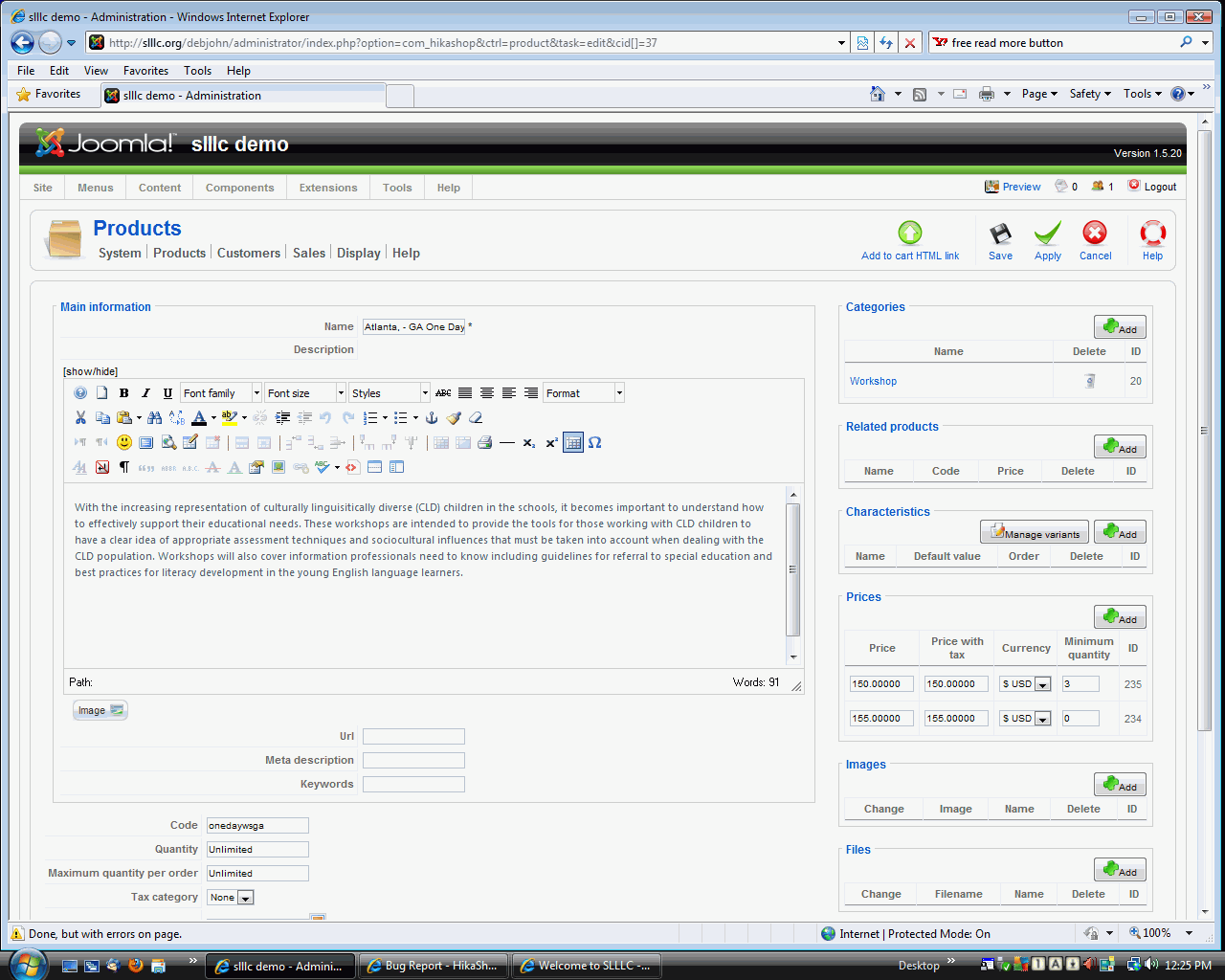
seems when I Upgraded the upgrade did not maintain prior setting(s)
Q1
image attached
the only "add" tab a right that works is the "prices"
Please Log in or Create an account to join the conversation.
15 years 9 months ago #3753
by nicolas
Replied by nicolas on topic Re: add image button
That was a bug in an old version of HikaShop. Do you use the latest version ? If not please update. That was a bug with Internet explorer not supporting some of the JS we were using. Since then, we changed the way we do it to avoid the problem.
Please Log in or Create an account to join the conversation.
15 years 9 months ago #3756
by SLLLC
Replied by SLLLC on topic Re: add image button
interesting
I am using IE-8, did not have prob until upgraded to version 1.40 of HikaShop
While I was waiting for your reply, I tried with Firefox and the pop-up screens appeared when clicking on the "add" button(s) what I wanted to perform worked using Firfox
Whent back to IE, tried changes to pop-up settings in IE, did not resolve the pop-up window not showing when clicking on the "add" button(s)
I am using IE-8, did not have prob until upgraded to version 1.40 of HikaShop
While I was waiting for your reply, I tried with Firefox and the pop-up screens appeared when clicking on the "add" button(s) what I wanted to perform worked using Firfox
Whent back to IE, tried changes to pop-up settings in IE, did not resolve the pop-up window not showing when clicking on the "add" button(s)
Please Log in or Create an account to join the conversation.
15 years 9 months ago #3757
by nicolas
Replied by nicolas on topic Re: add image button
If you try the same operation on our demo website, do you get the same behavior ?
It works for us on our demo website with IE8 so it should work for you as well. If it don't, that means that it's a problem of settings in your IE. If it does work on the demo website, it means that the problem is on the backend of your website. Maybe you have a special plugin/module which breaks something. Like for example if you get a warning on your backend because of an error in another plugin, it can mess up the headers in IE.
It works for us on our demo website with IE8 so it should work for you as well. If it don't, that means that it's a problem of settings in your IE. If it does work on the demo website, it means that the problem is on the backend of your website. Maybe you have a special plugin/module which breaks something. Like for example if you get a warning on your backend because of an error in another plugin, it can mess up the headers in IE.
Please Log in or Create an account to join the conversation.
15 years 9 months ago #3809
by SLLLC
Replied by SLLLC on topic Re: add image button
tried the same operation on your demo website, and I do get the same behavior
will have to research IE for which setting(s) may be the prob
p.s. did find a post about Post about IE and JS corruption posibility, they recommend reinstall if IE
For now will workaround by using firefox, as I have a deadline, will get back with my findings later
thank you for providing good direction
will have to research IE for which setting(s) may be the prob
p.s. did find a post about Post about IE and JS corruption posibility, they recommend reinstall if IE
For now will workaround by using firefox, as I have a deadline, will get back with my findings later
thank you for providing good direction
Please Log in or Create an account to join the conversation.
15 years 9 months ago #3810
by nicolas
Replied by nicolas on topic Re: add image button
OK, that's strange. I'm curious to know what IE8 setting could cause such problems.
Please Log in or Create an account to join the conversation.
Time to create page: 0.198 seconds